

QUOTE(leongtat @ Jul 6 2011, 04:06 PM)
LOL... it took sometime for me to figure out the port forwarding....

how??? 
Unifi Official TM UniFi High Speed Broadbrand Thread V11, FREE Installation & 1-month subscription
|
|
 Jul 6 2011, 08:06 PM Jul 6 2011, 08:06 PM
|
 
VIP
4,032 posts Joined: Jan 2003 From: MSR Headquaters 
|
QUOTE(leongtat @ Jul 6 2011, 04:06 PM) LOL... it took sometime for me to figure out the port forwarding.... how??? |
|
|
|
|
|
Jul 6 2011, 08:30 PM
|
 
Senior Member
961 posts Joined: Jan 2011 From: Msia 
|
1080p utube videos i can, 1080p download from mediafire shows me 1 year....
|
|
|
Jul 6 2011, 08:42 PM
|

Junior Member
4 posts Joined: Jun 2011
|
don't worry 1 year fly by very fast de...
|
|
|
Jul 6 2011, 08:47 PM
|

Newbie
17 posts Joined: Mar 2009 
|
QUOTE(leongtat @ Jul 6 2011, 04:06 PM) LOL... it took sometime for me to figure out the port forwarding.... how lar, i've been trying to port block and forward with tm's router but can't figure it out. tell me!  |
|
|
Jul 6 2011, 09:25 PM
|

Senior Member
545 posts Joined: Mar 2006 From: The Weirdo River O_o
|
QUOTE(leongtat @ Jul 6 2011, 04:06 PM) LOL... it took sometime for me to figure out the port forwarding.... How you did it .... teach me .... |
|
|
Jul 6 2011, 09:33 PM
|

Junior Member
289 posts Joined: Jan 2003 From: Shah Alam
|
anyone facing browsing issues? like intermittent to certain site?
|
|
|
|
|
|
Jul 6 2011, 09:41 PM
|

Junior Member
426 posts Joined: Jan 2003 From: somewhere over the rainbow
|
I'm facing extremely slow speeds when browsing overseas sites. Speedtest.net shows the same thing. Anybody else facing the same problems?
|
|
|
Jul 6 2011, 09:46 PM
|

Senior Member
950 posts Joined: Aug 2006
|
OK this is how i did...
Borrowing someone screen cap.  Click on port forwarding, you will see 2 drop down. one is DHCP another is PPOE. Select PPOE. Im configuring UCPlay aka dota platform. Below is my settings. Enable tick Description: Anyname Remote Host: Leave it Blank ( Unless You want certain IP connect to your portforward) Remote Mask: Leave it Blank. (Same as above) Protocol: TCP/UDP External Port: 6113-6113 Internal Port: 6113 Internal CLient: Your port forwarding PC IP (Must be Static in this case 192.168.0.50) go to your network sharing--> LAN Connection--> Properties--> IPv4 Put in below. 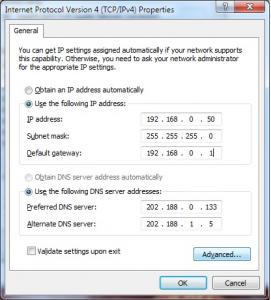
Done! Go to here. http://www.canyouseeme.org/ Put the port there... if success means your portforward is completed. This post has been edited by leongtat: Jul 6 2011, 09:54 PM |
|
|
Jul 6 2011, 09:57 PM
|
|
Junior Member
289 posts Joined: Jan 2003 From: Shah Alam
|
QUOTE(panafone @ Jul 6 2011, 09:41 PM) I'm facing extremely slow speeds when browsing overseas sites. Speedtest.net shows the same thing. Anybody else facing the same problems? i'm not the only one i guess |
|
|
Jul 6 2011, 10:02 PM
|
|
Junior Member
426 posts Joined: Jan 2003 From: somewhere over the rainbow
|
QUOTE(dimenxion @ Jul 6 2011, 09:57 PM) i'm not the only one i guess Crappy TM!  Just called their CS and logged a report. Wanted to make a report with SKMM but their complaints site won't load. Typical.  Try again tomorrow. Sigh. |
|
|
Jul 6 2011, 10:10 PM
|
|
Newbie
17 posts Joined: Mar 2009
|
QUOTE(leongtat @ Jul 6 2011, 09:46 PM) OK this is how i did... » Click to show Spoiler - click again to hide... « I did it! Thx bro  |
|
|
Jul 6 2011, 10:21 PM
|
|
Senior Member
950 posts Joined: Aug 2006
|
QUOTE(heavendevil @ Jul 6 2011, 10:10 PM) [/spoiler] Good to hear that? What u forwarding?I did it! Thx bro |
|
|
Jul 6 2011, 10:22 PM
|

Senior Member
4,093 posts Joined: Jan 2003 From: USJ
|
QUOTE(antonio @ Jul 6 2011, 12:37 PM) Juz in case...I'm probably getting 841ND later evening, but before my 841 suddenly pops at Garage Sale for some reason, I was wondering... my DIR-615 can port forward worIf by all means the 841 'cant', like the DIR-615, do port forward....Am I screwed or what?  Added on July 6, 2011, 10:23 pm QUOTE(leongtat @ Jul 6 2011, 09:46 PM) OK this is how i did... and remember to change you p2p software to the new ports Borrowing someone screen cap. Click on port forwarding, you will see 2 drop down. one is DHCP another is PPOE. Select PPOE. Im configuring UCPlay aka dota platform. Below is my settings. Enable tick Description: Anyname Remote Host: Leave it Blank ( Unless You want certain IP connect to your portforward) Remote Mask: Leave it Blank. (Same as above) Protocol: TCP/UDP External Port: 6113-6113 Internal Port: 6113 Internal CLient: Your port forwarding PC IP (Must be Static in this case 192.168.0.50) go to your network sharing--> LAN Connection--> Properties--> IPv4 Put in below.
Done! Go to here. http://www.canyouseeme.org/ Put the port there... if success means your portforward is completed.  This post has been edited by alexwsk: Jul 6 2011, 10:23 PM |
|
|
|
|
|
Jul 6 2011, 10:35 PM
|
|
Newbie
17 posts Joined: Mar 2009
|
QUOTE(leongtat @ Jul 6 2011, 10:21 PM) Good to hear that? What u forwarding? Forwarding is only half the work, now I need to figure out how to block ports.This post has been edited by heavendevil: Jul 6 2011, 10:51 PM |
|
|
Jul 6 2011, 10:58 PM
|
|
VIP
4,032 posts Joined: Jan 2003 From: MSR Headquaters
|
QUOTE(alexwsk @ Jul 6 2011, 10:22 PM) my DIR-615 can port forward wor mine cant   


This post has been edited by antonio: Jul 6 2011, 10:59 PM |
|
|
Jul 6 2011, 11:08 PM
|
|
Senior Member
950 posts Joined: Aug 2006
|
QUOTE(antonio @ Jul 6 2011, 10:58 PM) mine cant Disable Ur dhcp n dns server in Ur LAN adapter ipv4 to 202.188.1.5 and 202.188.0.133
|
|
|
Jul 6 2011, 11:28 PM
|
|
VIP
4,032 posts Joined: Jan 2003 From: MSR Headquaters
|
QUOTE(leongtat @ Jul 6 2011, 11:08 PM) Disable Ur dhcp n dns server in Ur LAN adapter ipv4 to 202.188.1.5 and 202.188.0.133 Already did it...both the ip u gave and the 8.8.8.8 ones....still no go  |
|
|
Jul 6 2011, 11:37 PM
|
|
Senior Member
950 posts Joined: Aug 2006
|
QUOTE(antonio @ Jul 6 2011, 11:28 PM) Already did it...both the ip u gave and the 8.8.8.8 ones....still no go Did you own pc firewall block it? Can you off your firewall for a while and test? |
|
|
Jul 6 2011, 11:58 PM
|
|
VIP
4,032 posts Joined: Jan 2003 From: MSR Headquaters
|
QUOTE(leongtat @ Jul 6 2011, 11:37 PM) Did you own pc firewall block it? Can you off your firewall for a while and test? K...let me list down:Pc freshly installed win7, Modem n btu both restarted and reset to factory settings... Manually set ip n dns for my pc... Already set port forwarding on dir-615 Windows firewall is off No antivirus Btu lan 1 to dir-615 wan 615 lan 1 to my pc lan 4 to iptv But no...i cant get canyouseeme.org to see me DIR-615 G2 Firmware: v7.09 This post has been edited by antonio: Jul 7 2011, 01:03 AM |
|
|
Jul 7 2011, 12:29 AM
|
|
Senior Member
950 posts Joined: Aug 2006
|
QUOTE(antonio @ Jul 6 2011, 11:58 PM) K...let me list down: i just google n found out that dir-615 does not support loop back...Pc freshly installed win7, Modem n btu both restarted and reset to factory settings... Manually set ip n dns for my pc... Already set port forwarding on dir-615 Windows firewall is off No antivirus Btu lan 1 to dir-615 wan 615 lan 1 to my pc lan 4 to iptv But no...i cant get canyouseeme.org to see me meaning canyouseeme.org is actually providing u the false information because your ip does not loop back... i guess you have done all the right thing... the port should be open now... no need to go canyouseeme.org to verify. Yes... i just verified this... my fren able to portforward with those setting even failed the canyouseeme.org beccause of the sucky modem that does not provide loop back.... This post has been edited by leongtat: Jul 7 2011, 12:32 AM |
|
Topic ClosedOptions
|
| Change to: |  0.0608sec 0.0608sec
 0.22 0.22
 7 queries 7 queries
 GZIP Disabled GZIP Disabled
Time is now: 3rd December 2025 - 06:00 AM |
 Quote
Quote