Welcome Guest ( Log In | Register )

21 Pages « < 16 17 18 19 20 > » Bottom

Outline · [ Standard ] · Linear+

 iOS 5 Discussion, what do you think?

views
     
cRazYee
post Oct 14 2011, 09:25 AM

Look at all my stars!!
*******
Senior Member
2,642 posts

Joined: Jan 2005
From: Penang
QUOTE(ks1234 @ Oct 14 2011, 12:56 AM)
but i cant add/edit my contact! cant send the message =(
*
That's to do with your address book app


Added on October 14, 2011, 9:27 amI'm f***ing love iOS 5
Internet browsing is snapping
Separate keyboard is so fun
iCloud's setup works flawlessly for me
Notification centre looks great but missing weather forecast for me

More reason to own iPad2


Added on October 14, 2011, 9:34 am
QUOTE(LightningChan @ Oct 14 2011, 06:26 AM)
I'm a tiny bit disappointed with iOS 5..

Love the new notification bar...

Happy with Safari browser improvements...

Althought Newsstand is a waste of time but I'm still okay with that coz it looks cool...

Happy with iCloud...

Happy with iMessages(an official solution to whatsapp or LINE and clone of the famous BBM)

However, I'm unhappy with Apple for not enabling Multi Touch Gesture for iPad 1!
I can enable and use it with no problem with a jailbroken 4.3.3..

Oh ya.. The new music player looks kinda retro to me.. Not my taste.. I like the old player better.. Still no way of accessing equalizer in app..
*
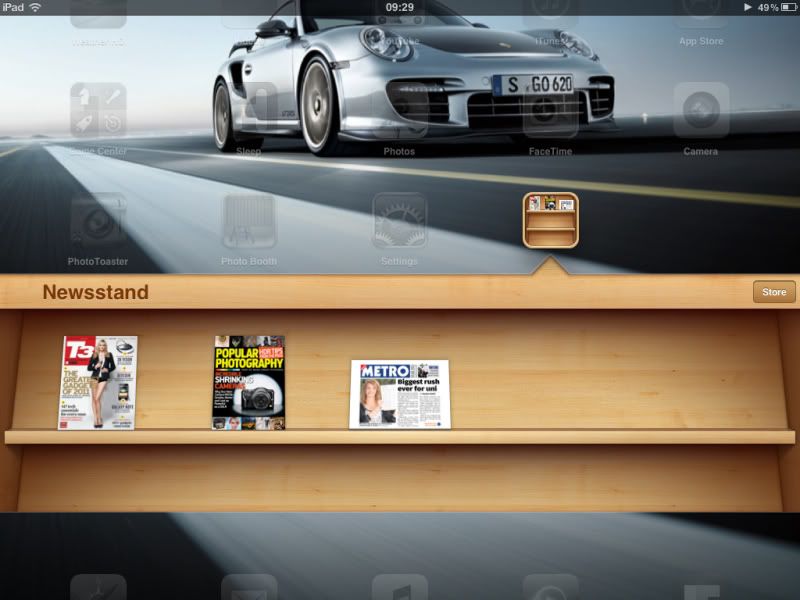
Newsstand isn't so great
But it's alright
I got popular photogrhy and t3 magazine
Both of them looks great in newsstand
user posted image

This post has been edited by cRazYee: Oct 14 2011, 09:34 AM
jay
post Oct 14 2011, 10:47 AM

Legendary
*****
Senior Member
904 posts

Joined: Jan 2003
From: Central Region Status: Safe Trader
How to get the @me email?????
RAMChYLD
post Oct 14 2011, 10:59 AM

Regular
******
Senior Member
1,715 posts

Joined: May 2005
From: Klang


one thing I discovered that I really like about iOS5.

Safari now allows you to scroll textboxes. This is perhaps what I think is the only nice feature in iOS5. I regularly edit TVTropes, and on iOS4 scrolling can only be done with a bluetooth keyboard arrow keys (page up and page down doesn't work!) or holding and dragging the cursor, and believe me when I say it's damn slow doing that. The ability to quickly move in a textbox by scrolling it is a relief.
icemessenger
post Oct 14 2011, 12:26 PM

Regular
******
Senior Member
1,036 posts

Joined: Mar 2005
I tried the iMessage on both my iPad and iPhone but didn't work. Dunno what's wrong. Sob

What's wrong? Any idea?

user posted image

This post has been edited by icemessenger: Oct 14 2011, 12:31 PM
cRazYee
post Oct 14 2011, 01:06 PM

Look at all my stars!!
*******
Senior Member
2,642 posts

Joined: Jan 2005
From: Penang
QUOTE(jay @ Oct 14 2011, 10:47 AM)
How to get the @me email?????
*
Sign up iCloud account
LightningChan
post Oct 14 2011, 02:25 PM

Casual
***
Junior Member
420 posts

Joined: May 2011


Split keyboard for iPad is awesome! Now I can hold my iPad and type with both hands comfortably..
user posted image
hadzGBN
post Oct 14 2011, 03:28 PM

Casual
***
Junior Member
345 posts

Joined: Jun 2009
From: johor bahru


QUOTE(cRazYee @ Oct 14 2011, 09:25 AM)
That's to do with your address book app


Added on October 14, 2011, 9:27 amI'm f***ing love iOS 5
Internet browsing is snapping
Separate keyboard is so fun
iCloud's setup works flawlessly for me
Notification centre looks great but missing weather forecast for me

More reason to own iPad2


Added on October 14, 2011, 9:34 am
Newsstand isn't so great
But it's alright
I got popular photogrhy and t3 magazine
Both of them looks great in newsstand
user posted image
*
bro is the metro paper u got there free to read past news?
pocketcctv
post Oct 14 2011, 06:12 PM

Getting Started
**
Junior Member
129 posts

Joined: Jul 2006
From: 3-001G, Plaza Low Yat,Off Jln Bt. Bintang


which firmware of successfully upgraded iOS 5? 8C148?
RAMChYLD
post Oct 14 2011, 07:08 PM

Regular
******
Senior Member
1,715 posts

Joined: May 2005
From: Klang


QUOTE(pocketcctv @ Oct 14 2011, 06:12 PM)
which firmware of successfully upgraded iOS 5? 8C148?
*
iPad 1 is 9A334.
BRY7
post Oct 14 2011, 07:13 PM

Siri: I'm your humble personal assistant
*******
Senior Member
7,924 posts

Joined: Jul 2009


QUOTE(pocketcctv @ Oct 14 2011, 06:12 PM)
which firmware of successfully upgraded iOS 5? 8C148?
*
isn't 8C148 iOS 4? doh.gif
KVReninem
post Oct 14 2011, 09:41 PM

IX
*******
Senior Member
5,369 posts

Joined: Jan 2003
QUOTE(RAMChYLD @ Oct 13 2011, 01:37 PM)
So far so good.

Except that there's an onslaught of app updates, and Digi's being a PITA >.<
*
did u have wifi issue; cos I`m having wifi issue here :/ unsure.gif
yankiat
post Oct 14 2011, 09:58 PM

Cameraman Wannabe
******
Senior Member
1,281 posts

Joined: Oct 2010


QUOTE(alvinool @ Oct 14 2011, 12:22 AM)
ur internet line putts...

u download the firmware directly and press shift and click restore
*
I just downloaded onto my deskstop.. so i plug phone to pc.. itunes launches.. hold shift and click restore will do? it'll auto locate where i saved the firmware?? sorry noob here..
KVReninem
post Oct 14 2011, 10:59 PM

IX
*******
Senior Member
5,369 posts

Joined: Jan 2003
QUOTE(yankiat @ Oct 15 2011, 12:58 AM)
I just downloaded onto my deskstop.. so i plug phone to pc.. itunes launches.. hold shift and click restore will do? it'll auto locate where i saved the firmware?? sorry noob here..
*
yeah..find whr did u saved it. then u install from there. smile.gif
Vince1991
post Oct 15 2011, 12:49 AM

Getting Started
**
Junior Member
262 posts

Joined: Jul 2008
From: KL


Hey dudes.. I just found out one thing lol..

iMessages for iPad contact picture will follow your Mac OS X user picture..

I tried searching the whole settings to let me change profile pict but cant find..

Then I change my Mac OS X user picture and sync my iPad with ITunes then the contact picture on iMessages changed lol..
llsphinxll
post Oct 15 2011, 01:38 AM

debt that all men pay..
*******
Senior Member
2,197 posts

Joined: Nov 2008


loving the notification center. but the option to customize it would be even better.
dwin95
post Oct 15 2011, 02:06 AM

wow i finally get to type here since 2009
******
Senior Member
1,257 posts

Joined: Apr 2009


Hey , I just updated my ipod touch 3g to ios5 but im stuck at the find my ipod touch intro setup , its really frustrating . After ticking Use Find My Ipod Touch , no matter how many times i tap on next it just wont move . I tried re starting the whole setup but failed . damn .
narien
post Oct 15 2011, 02:28 AM

Getting Started
**
Junior Member
115 posts

Joined: Sep 2008
From: KL


Attached Image

i can't update from iTunes coz always get error network time-out. then when i download the update directly this error pop-out.
any idea how to fix?

neo_sharky
post Oct 15 2011, 08:30 AM

Regular
******
Senior Member
1,725 posts

Joined: Aug 2007
QUOTE(narien @ Oct 15 2011, 02:28 AM)
Attached Image

i can't update from iTunes coz always get error network time-out. then when i download the update directly this error pop-out.
any idea how to fix?
*
u should download the .ipsw not using itunes, using direct links IPSW
digilife
post Oct 15 2011, 09:08 AM

The MNP guy, its me yeah.
*******
Senior Member
8,025 posts

Joined: Feb 2005
From: Planet Boleland


for those of you who wan to taste iOS5


iOS 5 Software Update

This update contains over 200 new features, including the following:

• Notifications
◦ Swipe from the top of any screen to view notifications in one place with Notification Center
◦ New notifications appear briefly at the top of the screen
◦ View notifications from lock screen
◦ Slide the notification app icon to the right on the lock screen to go directly to the app
• iMessage
◦ Send and receive unlimited text, photo, and video messages with other iOS 5 users
◦ Track messages with delivery and read receipts
◦ Group messaging and secure encryption
◦ Works over cellular network and Wi-Fi*
• Newsstand
◦ Automatically organizes magazine and newspaper subscriptions on Home Screen
◦ Displays the cover of the latest issue
◦ Background downloads of new issues 
• Reminders for managing to do lists
◦ Syncs with iCloud, iCal and Outlook
◦ Location-based reminders when you leave or arrive at a location for iPhone 4S and iPhone 4
• Built-in support for Twitter
◦ Sign-in once in Settings and tweet directly from Camera, Photos, Maps, Safari and YouTube
◦ Add location to any tweet
◦ View twitter profile pictures and usernames in Contacts
• Camera improvements for devices with cameras
◦ Double click the home button when device is asleep to bring up a camera shortcut on iPhone 4S, iPhone 4, iPhone 3GS and iPod touch (4th generation)
◦ Volume Up button to take a picture
◦ Optional grid lines to line up shots
◦ Pinch to zoom in the preview screen
◦ Swipe to camera roll from preview screen
◦ Tap and hold to lock focus and exposure, iPad 2 and iPod touch (4th generation) only support exposure lock
• Photo improvements for devices with cameras
◦ Crop and rotate
◦ Red eye removal
◦ One tap enhance
◦ Organize photos into albums
• Mail improvements
◦ Format text using bold, italic, or underlined fonts
◦ Indentation control
◦ Drag to rearrange names in address fields
◦ Flag messages
◦ Mass mark messages as flagged, read or unread
◦ Customize mail alert sounds
◦ S/MIME
• Calendar improvements
◦ Year view on iPad and new Week view for iPhone and iPod touch
◦ Tap to create an event
◦ View and add event attachments
• Game Center improvements
◦ Use personal photos for your Game Center account
◦ Compare your overall achievement scores with your friends
◦ Find new Game Center friends with friend recommendations and friends of friends
◦ Discover new games with custom game recommendations
• AirPlay Mirroring for iPad 2 and iPhone 4S
• Multitasking Gestures for iPad
◦ Use four or five fingers to pinch to the Home Screen
◦ Swipe up to reveal the multitasking bar
◦ Swipe left or right to switch between apps
• On-device setup, activation and configuration with Setup Assistant
• Software updates available over the air without tethering
• iCloud support
◦ iTunes in the Cloud
◦ Photo Stream
◦ Documents in the Cloud
◦ Apps and Books automatic download and purchase history
◦ Backup
◦ Contacts, Calendar, and Mail
◦ Find My iPhone
• Redesigned Music app for iPad
• Hourly weather forecast
• Real-time stock quotes
• Wireless sync to iTunes
• Keyboard improvements
◦ Split keyboard for iPad
◦ Improved autocorrection accuracy
◦ Improved Chinese and Japanese input
◦ New Emoji keyboard
◦ Personal dictionary for autocorrection
◦ Optionally create keyboard short cuts for frequently used words
• Accessibility improvements
◦ Option to light LED flash on incoming calls and alerts for iPhone 4S and iPhone 4
◦ Custom vibration patterns for incoming calls on iPhone
◦ New interface for using iOS with mobility-impairment input devices
◦ Option to speak a selection of text
◦ Custom element labeling for VoiceOver
• Exchange ActiveSync improvements
◦ Wirelessly sync tasks
◦ Mark messages as flagged, read or unread
◦ Improved offline support
◦ Save a new contact from a GAL service
• More than 1,500 new developer APIs
• Bug fixes

Products compatible with this software update:
• iPhone 4S
• iPhone 4
• iPhone 3GS
• iPad 2
• iPad
• iPod touch (4th generation)
• iPod touch (3rd generation)

* Normal carrier data rates may apply. Messages will be sent as SMS when iMessage is unavailable, carrier messaging fees apply.

For information on the security content of this update, please visit this website:
http://support.apple.com/kb/HT1222

William Somerset
post Oct 15 2011, 09:41 AM

New Member
*
Junior Member
49 posts

Joined: Apr 2011
How about e-mails? Does it allow rich-editing or does the content of the e-mail appears the same as before, with that boring looking font? Can anyone test this out? Thanks.

21 Pages « < 16 17 18 19 20 > » Top
 

Change to:
| Lo-Fi Version
0.0250sec    0.47    6 queries    GZIP Disabled
Time is now: 7th December 2025 - 09:04 PM