

i'm looking for wireless gaming mouse,basically for fps & up to now have razer mamba,microsoft x8 & logitech g700 in mind..
which one of these is best? (battery lifespan & lag free r first
 )
)Gaming Mouse V5, all mice, scrutinised!
|
|
 Oct 5 2011, 08:14 PM Oct 5 2011, 08:14 PM
Return to original view | Post
#1
|
 
Junior Member
116 posts Joined: Sep 2011  
|
hi,
i'm looking for wireless gaming mouse,basically for fps & up to now have razer mamba,microsoft x8 & logitech g700 in mind.. which one of these is best? (battery lifespan & lag free r first ) |
|
|
|
|
|
Oct 5 2011, 09:04 PM
Return to original view | Post
#2
|
|
Junior Member
116 posts Joined: Sep 2011
|
QUOTE(antonio @ Oct 5 2011, 08:52 PM) MAMBA = high price, issue with tracking on certain pads surface, comfortable, batt life ok a bit compared to g700... what certain pads? will it works on roccat sota?  or can u suggest me one that it will work on? tq |
|
|
Oct 5 2011, 09:41 PM
Return to original view | Post
#3
|
|
Junior Member
116 posts Joined: Sep 2011
|
QUOTE(204 @ Oct 5 2011, 09:13 PM) i'm also checking out wireless gaming so perhaps share with you some of my research besides the figures you find on the spec pages mamba does look cool when it's charging mamba higher price hybrid = charge when use braided cable = smoother when using own rechargeable battery = must buy from razer.. if they ever offer one dock charger/wireless receiver = ultra not-portable, basically carrying the dock as well if you want to do wireless, but it's a cool show off when it's charging.. desktop user this is a plus.. it's easier to charge with a dock than plugging in usb like the g700 every time others naga epic.. like mamba.. but i like it cause it's more comfy with ring finger and pinky rest  +1 +1naga epic with lots of button on the side dont look comfortable to me but interchangeable side panels is surely +1 for comfort naga epic has dock charger too right? |
|
|
Oct 5 2011, 10:11 PM
Return to original view | Post
#4
|
|
Junior Member
116 posts Joined: Sep 2011
|
QUOTE(zandara @ Oct 5 2011, 10:04 PM) Don't get fooled by Mamba backlit.... the reason for piss off?? You will getting piss off while you are using it.   would help to know this... QUOTE(zandara @ Oct 5 2011, 10:04 PM) U dont really felt the 12 buttons on naga epic and it is extremely comfortable as i tho after i tried it. If you are not fully utilized the buttons, it is meaningless to get a naga if i can use the 12 numeric buttons to change weapon in fps game,then i probably wont make it meaningless can i? |
|
|
Oct 6 2011, 11:02 AM
Return to original view | Post
#5
|
|
Junior Member
116 posts Joined: Sep 2011
|
futher research made me realized that this mamba is full of crap, too many problem for seriously high load of cash...wtf??
there's no way my money's going to this shet... better go to wired one i guess.... |
|
|
Oct 6 2011, 05:00 PM
Return to original view | Post
#6
|
|
Junior Member
116 posts Joined: Sep 2011
|
QUOTE(0204 @ Oct 6 2011, 03:19 PM) some of the logitech review fella did mention.. heh u're right http://reviews.logitech.com/7061/5845/logi...eviewTextLength i've also got it from here http://www.digitalversus.com/logitech-perf...84_7985_33.html i think those info might be true as if it were higher dpi or better polling rate.. logitech would list them out.. seems every region logitech never show these info.. well typical "highlight the good" "hide the bad" stratergy lol.. from the info seems like the 125 is the limitation of the unify nano receiver.. i think that is why g700 don't use unify... also a bluetooth can't do 1000hz / 1ms.. so it make sense when all gaming wireless must use dock or receiver.. same reason why orochi only gives gaming performance when wired..  besides on second thought, 5600dpi seems unnecessary for my 23inch monitor for wired one, do u recommend razer deathadder refresh?heard lots of +ve feedbacks on deathadder but don't know bout this refresh ver. This post has been edited by ezwanzazi: Oct 6 2011, 05:13 PM |
|
|
|
|
|
Oct 6 2011, 06:50 PM
Return to original view | Post
#7
|
|
Junior Member
116 posts Joined: Sep 2011
|
QUOTE(zandara @ Oct 6 2011, 05:26 PM) U had the budget to get a Mamba. Why don't you get a look on Steelseries Sensei or Xai? read some on xai but don't know nothin bout sensei...going to do some research later never used any product from that company anyway btw can get these from stores in lowyat?  |
|
|
Oct 6 2011, 07:35 PM
Return to original view | Post
#8
|
|
Junior Member
116 posts Joined: Sep 2011
|
QUOTE(TechnoG @ Oct 6 2011, 07:22 PM) Yes. Try asking in their fb page tq for that not quite sure which exact store in lowyat plaza, but I think Viewnet or PC Zone do sell SS products.Xai is basically a Sensei without plastic top and arm32 processor. both of them use laser right? aren't that a bad thing? last time i read on laser mice, it's totally a no go - have trouble detecting some surface/pads |
|
|
Oct 7 2011, 12:51 PM
Return to original view | Post
#9
|
|
Junior Member
116 posts Joined: Sep 2011
|
QUOTE(antonio @ Oct 7 2011, 11:31 AM) Those problems has long gone as technology for the laser mouse has already matured and evolved... maybe tracking the surface can be solved by finding the right mousepad..Although some might say tak if ur playing FPS, then its better to use optical..Not that optical sensor is good, its just they are more forgiving in terms of surface interaction as compared to laser mouse... Added on October 7, 2011, 11:32 am Those problems has long gone as technology for the laser mouse has already matured and evolved... Although some might say tak if ur playing FPS, then its better to use optical..Not that optical sensor is good, its just they are more forgiving in terms of surface interaction as compared to laser mouse... but it still bugs me bout this 'positive acceleration' thing read bout it but  will it affect much in game? is it too obvious? Added on October 7, 2011, 12:56 pm QUOTE(zacharyseng @ Oct 7 2011, 11:49 AM) Deathadder's good enough.. if the xai or sensei proved to be nothing but shet,i'll be planning on getting one This post has been edited by ezwanzazi: Oct 7 2011, 12:56 PM |
|
|
Oct 7 2011, 02:25 PM
Return to original view | Post
#10
|
|
Junior Member
116 posts Joined: Sep 2011
|
QUOTE(DarkEmotion88 @ Oct 7 2011, 01:04 PM) black edition? what? the deathadder?found one in lowyat store pricelist, razer deathadder refresh... is this the black ver? Added on October 7, 2011, 2:46 pm QUOTE(antonio @ Oct 7 2011, 02:03 PM) Yap..Most of the time DA is already sufficient to game or to do work plus is damn comfortable... i do game 10 hours per day but not that consistent, i got life too lol... Positive acceleration u need not worry much unless your are too picky in making sure your crosshair will land on the same place accurately..Most of the time our brain will send compensation input towards our muscles to do correction is the acceleration is present, but if too much u will suffer innacurate positioning..But, unless u do more than 10 hours gaming per day, u cant really tell the difference... maybe 2 days from a week... n correcting whenever acceleration is present does sounds annoying..  maybe deathadder is enough for me... like u said, it's sufficient for game&work and +1 for comfortable  besides never really like the look of xai, for 300++ the mouse looks too common/basic - this is just personal view for that kind of cash, i expected the performance + looks This post has been edited by ezwanzazi: Oct 7 2011, 02:47 PM |
|
|
Oct 8 2011, 03:21 AM
Return to original view | Post
#11
|
|
Junior Member
116 posts Joined: Sep 2011
|
QUOTE(antonio @ Oct 8 2011, 01:31 AM) Refresh means the 3.5G...Black Edition is the black DA without blue LED... looks tempting.. Probably enough, but having extra options by getting something that you can afford don't hurt If you are looking at the DA, please also browse for the CM Storm Spawn mouse...Nice features, great review and slightly cheaper compared to the DA or DABe  i kind of made up my mind on getting the DA next week but doesnt hurt to look into this CM Storm Spawn....  btw thx |
|
|
Oct 10 2011, 11:10 AM
Return to original view | Post
#12
|
|
Junior Member
116 posts Joined: Sep 2011
|
QUOTE(unohoo22 @ Oct 10 2011, 01:14 AM) My only complaint about the death adder is that the coating is made of rubber which in this country, its quite impossible not to have sweaty palms get the black edition then.. |
|
|
Oct 11 2011, 12:45 AM
Return to original view | Post
#13
|
|
Junior Member
116 posts Joined: Sep 2011
|
QUOTE(DemonTweakZ @ Oct 10 2011, 07:51 PM) oh man, it looks so good. I just PMed him. this is The imperator also doesnt look too bad. How does it compare to the DeathAdder? really can't get this in M'sia yet??  |
|
|
|
|
|
Oct 11 2011, 01:32 AM
Return to original view | Post
#14
|
|
Junior Member
116 posts Joined: Sep 2011
|
QUOTE(rurushu @ Oct 11 2011, 01:12 AM) Patience is a virtue any guess when it'll be n where to get??   |
|
|
Oct 12 2011, 08:27 PM
Return to original view | Post
#15
|
|
Junior Member
116 posts Joined: Sep 2011
|
QUOTE(b3nji23 @ Oct 12 2011, 03:59 PM) Don't worry you are not alone... I'm bowing to the master everyday is that sensei on ur pic?? 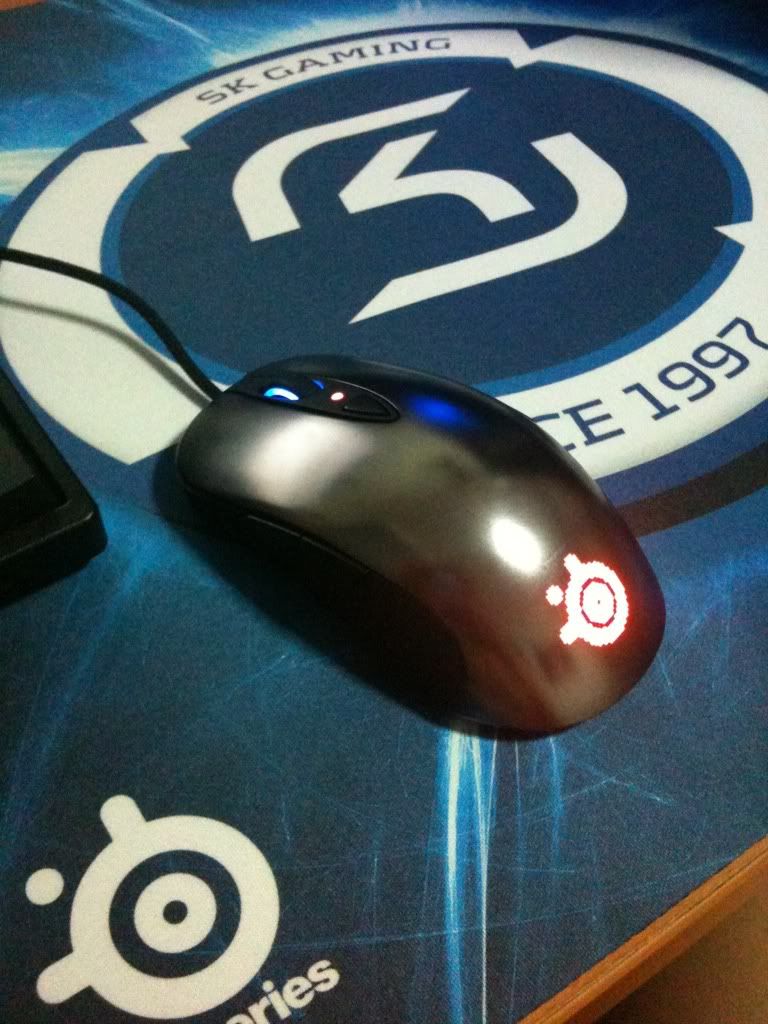 |
|
|
Oct 12 2011, 09:05 PM
Return to original view | Post
#16
|
|
Junior Member
116 posts Joined: Sep 2011
|
QUOTE(b3nji23 @ Oct 12 2011, 08:55 PM) Yes it's my new sensei is that cloth pad u're using? do u notice any negative acceleration? obvious? read lot about sensei/xai -ve acceleration on cloth pad fill my curiousity plz |
|
|
Oct 12 2011, 10:07 PM
Return to original view | Post
#17
|
|
Junior Member
116 posts Joined: Sep 2011
|
QUOTE(Everdying @ Oct 12 2011, 09:50 PM) acceleration in xai is usually felt by those ppl with a big stick up their ass. haha, i'm sure mine is clear from any sort of stick.. in general, most ppl will not notice it. pity can't find anywhere to try the xai/sensei.. wonder if it feels just like normal mice (its shape like one) regardless,what's the best mouse pad for the sensei/xai? |
|
|
Oct 12 2011, 10:29 PM
Return to original view | Post
#18
|
|
Junior Member
116 posts Joined: Sep 2011
|
QUOTE(b3nji23 @ Oct 12 2011, 10:16 PM) So far i haven't encounter any acceleration issues yet on my sensei and with the correct settings i can use it perfectly on my QcK+ cloth pad where can get the QcK pad? been searching thru the price lists in lowyat but can't find one... |
|
|
Oct 13 2011, 05:23 PM
Return to original view | Post
#19
|
|
Junior Member
116 posts Joined: Sep 2011
|
went to lowyat today n bought xai + QcK pad
 it tracks well on the QcK pad n feels comfortable having a hard time finding the setting that suits me... already downloaded some profiles from steelseries but need help here??  |
|
|
Oct 13 2011, 07:27 PM
Return to original view | Post
#20
|
|
Junior Member
116 posts Joined: Sep 2011
|
QUOTE(antonio @ Oct 13 2011, 06:01 PM) Run the stock settings for a couple of days to get a feel of the mouse....then make tiny adjustment and test another couple of hours gaming to see if the settings suits you...Continue doing so until u find the perfect settings. . . will do.. almost bought the deathadder but after test at ALL IT store i bought the xai (price range +60 which is much lesser than i thought )plus i've read bout razer mice having trouble with left click button after a year (one of many cases) pfff.. a YEAR?? i guess razer wanna troll the buyer |
|
Topic ClosedOptions
|
| Change to: |  0.0534sec 0.0534sec
 0.81 0.81
 7 queries 7 queries
 GZIP Disabled GZIP Disabled
Time is now: 1st December 2025 - 11:09 PM |
 Quote
Quote