Welcome Guest ( Log In | Register )

6 Pages < 1 2 3 4 5 > » Bottom

Outline · [ Standard ] · Linear+

 Huawei Ideos X5 - Official Thread, Stunning, Fast, Affordable!

views
     
waseken2
post Jun 15 2011, 05:52 PM

Getting Started
**
Junior Member
174 posts

Joined: Sep 2008
QUOTE(ghs06565 @ Jun 15 2011, 05:17 PM)
what is stock rom and custom rom
i'm new user
so many thing i dont know sorry
before i also use android phone
but never face this type problem

after i move the apps to phone then restart the phone
the problem gone already but other still disappear
why will be like that
x5 cant move the apps to the sd card
*
stock rom is the original os for android which pre-install in ur phone.
custom rom is like mod the os for better performance like B160.

may be is ur sd card problem or may be the program problem, u can try other card or install to ur internal sd,
but u have to use other software, i got it but is in chinese version...
waseken2
post Jun 15 2011, 07:16 PM

Getting Started
**
Junior Member
174 posts

Joined: Sep 2008
QUOTE(ghs06565 @ Jun 15 2011, 06:07 PM)
can u share the software to me
when i remove the sd card
i used apps2sd card
it can detect the internal sd card
but after i bug in the external card again
apps2sd cant show the internal sd card only can show external sd card
*
here

this software actually is pre-install in u8800 in cina, but i dun,t know why it take out from our malaysia unit
waseken2
post Jun 15 2011, 08:08 PM

Getting Started
**
Junior Member
174 posts

Joined: Sep 2008
QUOTE(ghs06565 @ Jun 15 2011, 07:27 PM)
how to use this
i install already
appinstaller
this apps onli show the uninstall program
and want to to install again
*
sorry, i miss understand liao, i just try and u are right, u can just uninstall this program...
really sorry about that... sweat.gif


Added on June 15, 2011, 8:09 pm
QUOTE(shadow111 @ Jun 15 2011, 07:58 PM)
hey guys.. plan to reflash my rom tmr..
but now, i wanna backup my gameloft save data/etc..
anyone know how to do this? thanks.
*
titanium backup

This post has been edited by waseken2: Jun 15 2011, 08:09 PM
waseken2
post Jun 15 2011, 08:37 PM

Getting Started
**
Junior Member
174 posts

Joined: Sep 2008
QUOTE(ghs06565 @ Jun 15 2011, 08:24 PM)
nvm
i just wan to know why i cant move the apps to sd card only
internal external also cant
haiz
*
oohh, sorry again, after u install, u can go to setting>application,
u will c preferred install location, just choose internal sd storage.


Added on June 15, 2011, 8:39 pm
QUOTE(shadow111 @ Jun 15 2011, 08:34 PM)
once i install titanium backup, how do i backup the save game?
*
actually i haven,t test any gameloft game yet... so u have to explore ur self...
sorry... sweat.gif sweat.gif

This post has been edited by waseken2: Jun 15 2011, 08:39 PM
waseken2
post Jun 15 2011, 09:58 PM

Getting Started
**
Junior Member
174 posts

Joined: Sep 2008
QUOTE(ghs06565 @ Jun 15 2011, 08:56 PM)
your mean is after install the appsinstaller
and change the preference
the system will automatic move the apps to internal sd card?
but i see the apps2sd
the apps also can move to the external sd card only and not internal
*
ok, after u install appsinstaller, go to setting>application>u can set where to install for your new apk.
the program/apk after u install will not move to sd card by this program.
waseken2
post Jun 15 2011, 10:15 PM

Getting Started
**
Junior Member
174 posts

Joined: Sep 2008
wah... my x5 become desire hd already... the new rom automatic swap 200m memory when playing hd game...
gona try some hd game..

» Click to show Spoiler - click again to hide... «

waseken2
post Jun 15 2011, 10:18 PM

Getting Started
**
Junior Member
174 posts

Joined: Sep 2008
QUOTE(mavezai1984 @ Jun 15 2011, 10:16 PM)
Lol hows gaming performance especially gameloft's?  laugh.gif
*
haha, haven,t try yet since i dun,t have any...
google now... sweat.gif
waseken2
post Jun 15 2011, 11:16 PM

Getting Started
**
Junior Member
174 posts

Joined: Sep 2008
QUOTE(shadow111 @ Jun 15 2011, 11:13 PM)
thanks.. guess i hv to do perform a factory reset first n then do the backup..
after that only root n maybe update the ROM..
*
why factory reset first? it will wipe all you data.. better backup first..


Added on June 15, 2011, 11:22 pm
QUOTE(ghs06565 @ Jun 15 2011, 10:38 PM)
but i want to move to sd card
bcz i dont want x5 store many thing
but cant move to sd card bcz when i move to sd card
after restart phone all the apps in sd card will not show in the menu
but i still can find it on the manage application
u know what i mean
then i try already for the program
i set to internal store device then install a program from the market
the apps also store in phone cant move to sd card
*
ok.. i understand what u means, now, after u install the program, simply just go to setting (which allow u to set time n date n etc)

after that, tough the application, u will c Preferred install location, tough that, u can select removable sd card.

what i means that the program u download from market n install before u install the software the i send u the link cannot move to sd card, u have to uninstall
the program u download from market and install again. now, this time it will install in your sd card.

This post has been edited by waseken2: Jun 15 2011, 11:22 PM
waseken2
post Jun 16 2011, 12:27 AM

Getting Started
**
Junior Member
174 posts

Joined: Sep 2008
QUOTE(mavezai1984 @ Jun 15 2011, 10:25 PM)
Btw can u share the link method u use to change your phone's model, kinda lost it since last time pc format?  smile.gif
*
i flash the rom n it direct change to desire hd, here is the link..
but this rom i can,t download thing from market..
still finding solution
waseken2
post Jun 16 2011, 05:25 PM

Getting Started
**
Junior Member
174 posts

Joined: Sep 2008
i read in some chinese forum, (www.5irom.com) is better to flash to official firmware b4 to custom rom, which means
our stock is B136 (malaysia unit) and B160 is for China, if stock rom B136 straight flash to custom rom B160 might cause
the battery getting hot easily....

however, is more safe if u flash to B160 stock rom and flash to custom B160.

the statement true or not i also dun,t know.. but i just flash to stock B160 b4 to custom B160... just for safe..
waseken2
post Jun 16 2011, 05:48 PM

Getting Started
**
Junior Member
174 posts

Joined: Sep 2008
QUOTE(Silver_Shadow @ Jun 16 2011, 05:41 PM)
Root, Clockworkmod & Partition is far enuf for me for now.
Flash ROM will be later.
Now just wan familiar with Ori ROM 1st. Hehehehehe.
*
hahah, i also acting like u few day age, but once u start flash to custom rom, u will never miss the stock rom.. smile.gif


Added on June 16, 2011, 5:55 pm
QUOTE(piumiu @ Jun 16 2011, 10:09 AM)
Up to 1.8Ghz but I only set the oc to 1.2ghz.
*
hi piumiu, can i ask ur rom market can use or not? is yes i will extract out...
the rom i flash market can,t use..
thank you.

This post has been edited by waseken2: Jun 16 2011, 05:55 PM
waseken2
post Jun 17 2011, 05:15 PM

Getting Started
**
Junior Member
174 posts

Joined: Sep 2008
QUOTE(shadow111 @ Jun 17 2011, 10:33 AM)
i press the power button.. after that, its back to normal..
i'm performing another restoration again..

makes me feel like restoring back the huawei ori rom.. n start everything again from there..  blush.gif
*
Did you feel improvement for speed in application drawer, restart/shut down phone, back to home screen while using other application and etc?

give some comment lah bro nod.gif
waseken2
post Jun 17 2011, 06:20 PM

Getting Started
**
Junior Member
174 posts

Joined: Sep 2008
QUOTE(shadow111 @ Jun 17 2011, 05:29 PM)
got it.. but what does freeze means?


Added on June 17, 2011, 5:32 pm

cant really comment much coz i just play around with B160 for less than 1 hr..
i dont really like the home screen.. n then, i found that all my install app/etc is still there..
n it's a bit laggy when i tryin to navigate thru the app list/etc..

most important.. i play the dungeon hunter, it's laggin too.. guess most probably due to my cheap dna sdcard..
now revert back to my ori rom with root n 1.2GB internal memory..
*
Hmm... did u format/factory reset be4 install B160?
last time when i flash i forgot to format first, it make my x5 more lagging with stock rom....
waseken2
post Jun 17 2011, 07:31 PM

Getting Started
**
Junior Member
174 posts

Joined: Sep 2008
QUOTE(shadow111 @ Jun 17 2011, 06:33 PM)
i didn't do any factory reset b4 install...  doh.gif
maybe will try again nxt time.. btw, how to change the cpu speed for b160? need to manual install setcpu?
*
yes, u can download setcpu to control cpu speed...
now i download B136 custom rom. C got any different or not.. smile.gif
Btw, ur B160 language is English (singapore) or Engliah (Malaysia)?
my B160 dun,t have malaysia, it take much much longer time for sync google map....
waseken2
post Jun 17 2011, 09:20 PM

Getting Started
**
Junior Member
174 posts

Joined: Sep 2008
QUOTE(Silver_Shadow @ Jun 17 2011, 08:58 PM)
About the partition, can we set manually?
Any 1 know how to do it?
*
yes, u have to download cuspartition.bat
after that run at ur window (pc)
input the size u need and press enter
this will create a file call partition

unzip partition.zip, replace it and zip again.
copy partition.zip to sd card, flash at recovery mode.
waseken2
post Jun 17 2011, 10:52 PM

Getting Started
**
Junior Member
174 posts

Joined: Sep 2008
QUOTE(shadow111 @ Jun 17 2011, 10:07 PM)
hv u tested b4? normal winzip will do?
*
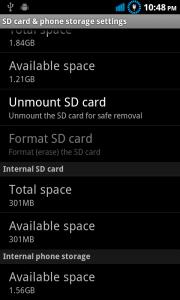
Attached Image

yes, backup everything first, u have to partition the space first which i show the guide earlier.

download cust partition here


Added on June 17, 2011, 10:54 pm
QUOTE(Silver_Shadow @ Jun 17 2011, 09:44 PM)
Thanks ...
Will try later.
Now kind of busy.
U got flash ur ROM? Use wat version?
Sorry ya. Where to download cuspartition.bat ?
*
yupe, flash my x5 alot... smile.gif
currently still using B160 bone version...

This post has been edited by waseken2: Jun 17 2011, 10:54 PM
waseken2
post Jun 17 2011, 11:30 PM

Getting Started
**
Junior Member
174 posts

Joined: Sep 2008
QUOTE(shadow111 @ Jun 17 2011, 11:12 PM)
ic.. i'll repartition mine again later.. smile.gif

i try b160 earlier, but dun like it.. so restore my earlier backup..
*
remember, repartition will format all ur data...
hahaha, want 2 try the rom that i flash? it convert x5 to desire hd, auto swap 200m physical data to rom, no extra unuse program (keyborad also dun,t have lol)...
waseken2
post Jun 17 2011, 11:41 PM

Getting Started
**
Junior Member
174 posts

Joined: Sep 2008
QUOTE(shadow111 @ Jun 17 2011, 11:35 PM)
repartition only will format the internal sd card, rite..
all the current installed app/etc will still remain as it is?
*
no... all ur phone data,
only not format sd card.
waseken2
post Jun 17 2011, 11:52 PM

Getting Started
**
Junior Member
174 posts

Joined: Sep 2008
QUOTE(Silver_Shadow @ Jun 17 2011, 11:45 PM)
That mean after re-partition the internal memory.
Need to recovery all the data I just backup just now?
*
yupe...
waseken2
post Jun 18 2011, 12:10 AM

Getting Started
**
Junior Member
174 posts

Joined: Sep 2008
QUOTE(shadow111 @ Jun 17 2011, 11:58 PM)
i did the repartition yesterday.. all my data and app is still intact..  hmm.gif
*
weird... cause it format my.... rclxub.gif

6 Pages < 1 2 3 4 5 > » Top
 

Change to:
| Lo-Fi Version
0.0548sec    0.97    7 queries    GZIP Disabled
Time is now: 9th December 2025 - 11:10 PM