Welcome Guest ( Log In | Register )

6 Pages < 1 2 3 4 > » Bottom

Outline · [ Standard ] · Linear+

 Huawei Ideos X5 - Official Thread, Stunning, Fast, Affordable!

views
     
waseken2
post Jun 14 2011, 03:08 PM

Getting Started
**
Junior Member
174 posts

Joined: Sep 2008
QUOTE(monkimajik @ Jun 14 2011, 02:16 AM)
I'm trying to customize the internal storage space using this. http://forum.xda-developers.com/showthread.php?t=1112857 I'm confused between Internal SD card and Internal phone storage. Does Internal storage mean the partition for the OS/system files? And Data means space for the user to use? Whats the recommended minimum then for the internal SD card size? What would happen if we just used all for data? Would the phone allow that?

So does this mean our phone actually has 2723MB internal storage? Is space already allocated for the system files then cause its such a weird number with storage space usually being the multiples of 2.

Anyone who can help me understand this, I am much grateful.
*
internal sd is like ur sd card which built inside ur phone, it act like ur ex sd, u can save ur song, pic etc.
internal storage is where u application install, like the program u download from market.
however, u can partition u internal sd space ard 1ghz to internal storage without flash to custom rom,
i have link the method n pic here

if u dun,t want to use this kinda of method, u can use app2sd, which can download at the market.. but not all the program u can transfer to sd card.
as far i know B160 rom allow u to choose where u want 2 install ur program, either internal sd or internal storage.

hope this is helping u.

edit - ur android os is store at ur rom.

This post has been edited by waseken2: Jun 14 2011, 03:09 PM
waseken2
post Jun 14 2011, 03:15 PM

Getting Started
**
Junior Member
174 posts

Joined: Sep 2008
QUOTE(shadow111 @ Jun 14 2011, 03:12 PM)
i hv read thru the guide on how to do this.. but is it possible to allocate all the 2gb internal sd as internal storage?
*
yes, but u have u install the other patch, which i haven,t try, u can allocate u own partition space, weather u want to use it all as internal storage, or leave a small space as a internal sd.
waseken2
post Jun 14 2011, 06:07 PM

Getting Started
**
Junior Member
174 posts

Joined: Sep 2008
QUOTE(mikeeeee @ Jun 14 2011, 05:44 PM)
yes, just remove the apk and it will be gone smile.gif
*
hey bro, may i know when u power on you phone, first boot screen is ideox and the second boot screen is android with flash light?

just found the simply way to remove the app, download official firmware and do not put the UPDATE_CUST, and the demo game will not install by default.


waseken2
post Jun 14 2011, 06:26 PM

Getting Started
**
Junior Member
174 posts

Joined: Sep 2008
QUOTE(shadow111 @ Jun 14 2011, 06:18 PM)
oh. u mean the official rom from here?  http://wiki.modaco.com/index.php/Huawei_Firmware_U8800

what other things is missing if we don't run the update_cust?
*
yupe, demo game, but i,m not sure it stable or not, leave my phone ard 1 hour n make a few call, no problem, now on the way flash 2 custom rom.

the purpose i did this just to ensure that is i,m not happy with the rom i choose, i can always roll back to original rom...

but trust me, once u have feel the speed and smooth of the custom rom, u will not miss ur original rom...


ps: doc to go still are on the system.
waseken2
post Jun 14 2011, 07:26 PM

Getting Started
**
Junior Member
174 posts

Joined: Sep 2008
QUOTE(shadow111 @ Jun 14 2011, 07:07 PM)
once u done. can post the step here? thanks.


Added on June 14, 2011, 7:09 pm

u sure our phone can be rooted using this?

normally, it's advised to take out the sd card in case somethin goes wrong during the rooting and it won't accidentally wipe out yr sd content.
*
the simple way to root is just place a recovery.img to u phone when u in bootload..

it will root n install clockworkmod at once.. this will not flash ur rom..

for partition space, clockworkmod must be install as well..
waseken2
post Jun 14 2011, 07:33 PM

Getting Started
**
Junior Member
174 posts

Joined: Sep 2008
For those who love the phone with no application pre-install

» Click to show Spoiler - click again to hide... «

waseken2
post Jun 14 2011, 07:36 PM

Getting Started
**
Junior Member
174 posts

Joined: Sep 2008
QUOTE(ShengHow @ Jun 14 2011, 07:33 PM)
oh no!
i have done rooted
when i switch on my phone
after the " Ideos " animation
my phone turned to blue screen and no more response.
omg! what shld i do now  rclxub.gif


Added on June 14, 2011, 7:34 pm

oh no!
i have done rooted
when i switch on my phone
after the " Ideos " animation
my phone turned to blue screen and no more response.
omg! what shld i do now  rclxub.gif
*
unplug battery and insert back, hold power button n vol + together until the screen boot into recovery mood.
from there u try reset factory default.


waseken2
post Jun 14 2011, 07:51 PM

Getting Started
**
Junior Member
174 posts

Joined: Sep 2008
QUOTE(mavezai1984 @ Jun 14 2011, 07:39 PM)
Which rom is it anyway?
*
B160.1 "slim version" still testing weather stable or not..
this rom really slim down all the android os, even keyboard also dun,t have, now looking for nice keyboard to replace..
if stable i will post a guide to how 2 flash this rom.

recovery can say is a boot menu before u run into android, if any thing goes wrong, u can reset over there..

clockworkmod is like advancing the menu which allow u to select zip file 2 update, clear cache and other function. also, it will rooting ur device as well..
waseken2
post Jun 14 2011, 08:10 PM

Getting Started
**
Junior Member
174 posts

Joined: Sep 2008
QUOTE(ShengHow @ Jun 14 2011, 08:00 PM)
can i have your msn?
so i can ask you straightly
cos im quite worried with my phone cry.gif
*
i didn,t use msn long time already.. smile.gif
anyway, any problem u can pm me, or just post here, i will try 2 assist u...
remember, if anything bad happen to ur phone, u can always try factory reset..
waseken2
post Jun 14 2011, 08:41 PM

Getting Started
**
Junior Member
174 posts

Joined: Sep 2008
QUOTE(ShengHow @ Jun 14 2011, 08:15 PM)
shit! after factory reset
i switch on it
it's still blue screen cry.gif


Added on June 14, 2011, 8:40 pm

can i do the same way back and put the original .img file back?
*
yes, try 2 replace n c..

btw, ur screen color is in blue or in purple?

This post has been edited by waseken2: Jun 14 2011, 08:45 PM
waseken2
post Jun 14 2011, 08:52 PM

Getting Started
**
Junior Member
174 posts

Joined: Sep 2008
QUOTE(ShengHow @ Jun 14 2011, 08:49 PM)
GOD BLESS ME!!
finally recover back!!  cry.gif
will some errors appear or some negative effect ?
*
ok, first of all, i do not know which root file u are using for,
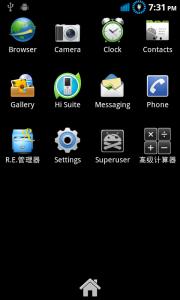
now u can check at ur app drawer, if go superuser icon which means u root u phone success.
waseken2
post Jun 14 2011, 09:21 PM

Getting Started
**
Junior Member
174 posts

Joined: Sep 2008
QUOTE(ShengHow @ Jun 14 2011, 08:55 PM)
i just reput back the file which is belonged to the phone atcually biggrin.gif


Added on June 14, 2011, 8:57 pm

i used Superboot image. which is taught in this thread
definitely didn't root success
because i delete the superboot and put the original one back
thanks to the god biggrin.gif


Added on June 14, 2011, 8:58 pm

I followed the exact rooting step just now
but at the end blue screen happens
is that my own problem? rclxub.gif
*
ok, let me guide u the step to do this..

1) download the recovery here, unzip it, u will have a file call recovery.img

2) turn off ur phone, press vol + and vol - and power button together, the first screen of ideos will show, do not release this 3 button until a purple screen show up.

3) when purple screen show, release the button and connect to your pc via usb cable.

4) on ur pc, new window pop up, go to image folder or cust_backup folder or whatever folder it contain a recovery.img file.. (sorry, i flash too many rom until now i can,t recall the ori folder name)

5) copy out the recovery.img file to ur pc and put it safety.

6) now copy the recovery.img file from the folder that u just download, and replace it ur phone. window will ask u want to replace or no, just click copy and replace.

7) after replace, unplug use cable and take out the battery, and insert again. press only power button to start ur phone.

8) here u go, rooting and clockworkmod is done!

This post has been edited by waseken2: Jun 14 2011, 09:22 PM
waseken2
post Jun 14 2011, 09:51 PM

Getting Started
**
Junior Member
174 posts

Joined: Sep 2008
QUOTE(ShengHow @ Jun 14 2011, 09:40 PM)
need to tick the USB debugging,m i right?
the recovery.img file, do you mean the one i removed just nw?
the one i removed just nw was "boot" wor
sorry im a smartphone nerd
can i knw what is clockworkmod? icon_question.gif
*
the way i guide u is rooting + install clockworkmod together, i stone kill 2 bird.. smile.gif

to do this, only connect your phone to pc after the purple screen show up. (which u off ur phone and on it by press 3 button)

again, u can say clockworkmod is an advanced recovery mode, later u will need it for flash to custom rom, re-partition and update zip (patch).
waseken2
post Jun 14 2011, 10:03 PM

Getting Started
**
Junior Member
174 posts

Joined: Sep 2008
QUOTE(ShengHow @ Jun 14 2011, 10:00 PM)
so what is the use of advanced recovery mode for now and for me?
sry im really a smartphone nerd ><
*
currently... nope.. unleash u want to flash custom rom, which i will post the step later. smile.gif
waseken2
post Jun 14 2011, 11:29 PM

Getting Started
**
Junior Member
174 posts

Joined: Sep 2008
Guide for partition your X5[SIZE=7]

1) backup ur 2G internal sd storage, cause this will wipe it clear.

2) backup ur contact etc, this can be done by installing hi suit, u can download it from huawei face book.

3) install ClockWorkMod, the step are here, if u already have it ignore this step.

4) download partition.zip here

5) copy partition.zip to ur root of sd card, make sure ur sd card have ard 1g space. and no dload folder which contain official firmware

6) turn off ur phone and boot to recovery boot. (press only power and vol + button) if u have clockworkmod install, u will c the screen like this

» Click to show Spoiler - click again to hide... «


7) in ur clockworkmod screen, pressing down (using vol - button) and select install zip from sdcard by pressing power button.

8) select choose zip from sdcard

9) select partition.zip and press the power button.

10) select Yes - install partition.zip

11) after install, go to advance menu, if u can c the advance me, press the back button on ur phone

12) select reboot recovery and press the power button. repeat step 7 until step 10 (yes, u have to install the same zip file twice.)

13) restart ur phone and done! smile.gif


waseken2
post Jun 14 2011, 11:54 PM

Getting Started
**
Junior Member
174 posts

Joined: Sep 2008
QUOTE(ShengHow @ Jun 14 2011, 11:50 PM)
if im not going to backup anything
Hisuite is not needed, right? ( for rooting also)
cos internet speed is too slow for me to dl it rclxub.gif

if i root my phone according to the step u given just now
i may skip the step 3 for this
correct?
*
yes, hi suit is no need if u dun,t want 2 backup ur contact, but anyway, u can sync with ur google acct.

if u have install clockworkmod, u can skip step 3


waseken2
post Jun 15 2011, 12:49 AM

Getting Started
**
Junior Member
174 posts

Joined: Sep 2008
QUOTE(ShengHow @ Jun 15 2011, 12:30 AM)
still not working
no superuser icon and cant uninstall the apps
*
i dun,t understand, which part u unsuccess? i believe my guide have been very easy 2 understand..
waseken2
post Jun 15 2011, 12:57 AM

Getting Started
**
Junior Member
174 posts

Joined: Sep 2008
QUOTE(mavezai1984 @ Jun 15 2011, 12:51 AM)
Not necessarily, mine done rooting using superboot but still failed to remove system apps.  hmm.gif
*
to check ur device is root or not, just simply go to application drawer c got superuser or not

Attached Image


Arr.. new rom market not working...
waseken2
post Jun 15 2011, 05:07 PM

Getting Started
**
Junior Member
174 posts

Joined: Sep 2008
QUOTE(ShengHow @ Jun 15 2011, 05:00 PM)
hey guys
is there anyway to test whether my phone is rooted or not?
*
after reading ur post, i believe that ur phone is root, which u can c the superuser icon. the reason ur titanium backup failed is i believe u have to install busy box,
u can google that.

root will not let all the market app become free, it just let u have the right to full access ur phone, acting like admin in window,
it will not change ur phone speed, memory and etc.


Added on June 15, 2011, 5:10 pm
QUOTE(ghs06565 @ Jun 15 2011, 05:06 PM)
hey anyone can help me
everytime when i restart my x5
many apps cany show in the menu
but i still can find it in the manage application
why will be like that
how i can solve it
*
stock rom or custom rom? u use app like app 2 sd and move the data to sd?
if yes, try to move to phone n c..


This post has been edited by waseken2: Jun 15 2011, 05:10 PM
waseken2
post Jun 15 2011, 05:23 PM

Getting Started
**
Junior Member
174 posts

Joined: Sep 2008
QUOTE(ShengHow @ Jun 15 2011, 05:14 PM)
wow
nice one
was waiting for u for a long time x.x
there is a BusyBox by Stephen (stericson) in market
use that?
that means appbrain is just like the normal market?
applanet is only usable when the server is online?

anything recommend to my rooted phone to do? rclxm9.gif
i dont knw what can i do thou i've rooted the phone rclxub.gif
*
i didn,t install busy box, but u can always try root explore.

after rooting, play ard u phnoe and google some info, after that, custom rom lo rclxms.gif


6 Pages < 1 2 3 4 > » Top
 

Change to:
| Lo-Fi Version
0.0261sec    0.56    7 queries    GZIP Disabled
Time is now: 9th December 2025 - 06:38 PM