

Added on June 7, 2011, 2:30 pm
Do like me , flip a coin


[/quote]
don't flip ur phone dah la.....
SAMSUNG GALAXY S II Official thread V4, Best and Greatest Android now ?
|
|
  Jun 7 2011, 02:33 PM Jun 7 2011, 02:33 PM
|
 
Junior Member
26 posts Joined: Jun 2006  
|
Added on June 7, 2011, 2:30 pm Do like me , flip a coin [/quote] don't flip ur phone dah la..... |
|
|
|
|
|
Jun 7 2011, 02:38 PM
|
|
Junior Member
42 posts Joined: Oct 2004
|
[quote=Noobi3,Jun 7 2011, 02:29 PM]
Go to " Market " , download " Widget Locker " . Added on June 7, 2011, 2:30 pm Do like me , flip a coin [/quote] lol...really? u choose ur phone with flip a coin?  i give myself another few days, will decide after i come b from oversea...if i still cant decide...then i have to learn from u to flip a coin already.... i give myself another few days, will decide after i come b from oversea...if i still cant decide...then i have to learn from u to flip a coin already....  [quote=arthos7,Jun 7 2011, 02:33 PM] Added on June 7, 2011, 2:30 pm Do like me , flip a coin [/quote] don't flip ur phone dah la..... [/quote] haha...i only flip my phone when got a call that i do not want to pick up in order to silent it...  |
|
|
Jun 7 2011, 02:38 PM
|

Junior Member
153 posts Joined: Jul 2009 
|
QUOTE(Noobi3 @ Jun 7 2011, 02:29 PM) Go to " Market " , download " Widget Locker " . anyone tried widget locker, it cost a few bucks?QUOTE(KiToRo @ Jun 7 2011, 02:33 PM) ya...still high chance i will go for sgs2... have any compare pic??  just try out the close up camera shoot...sensation win in this...sgs2 fail into this...sensation can close up shoot up to about 4cm object while sgs2 about 8cm only can successfully focus on the object... |
|
|
Jun 7 2011, 02:42 PM
|

Senior Member
2,392 posts Joined: Dec 2009
|
QUOTE(ventrilocks @ Jun 7 2011, 11:22 AM) its like sensation UI..go try it..download at market.. thx bro i wonder why ppl keep complaining about UI since it is just a software thing. flash flash lah |
|
|
Jun 7 2011, 02:46 PM
|

Senior Member
1,186 posts Joined: May 2009
|
QUOTE(ellebasi @ Jun 7 2011, 02:38 PM) anyone tried widget locker, it cost a few bucks? Do you wanted to change the stock lock screen wallpaper or change the lock screen altogether?have any compare pic?? |
|
|
Jun 7 2011, 02:46 PM
|

Senior Member
4,539 posts Joined: Feb 2006 From: LocOmoT|oN.L0co|oti0N
|
Hi guys, im try to disable the camera sound. But I can't move the .prop file to /data with Astro, even tried with using desktop to explore.
How you guys move files into /data folder? |
|
|
|
|
|
Jun 7 2011, 02:50 PM
|

Senior Member
4,984 posts Joined: May 2010 From: South Pole
|
Was looking for some books for Photoshop CS5 in Kinokuniya and I came across this book
 
Seriously , a book on how to use a phone ? Wouldnt be long b4 there is SGS2 version |
|
|
Jun 7 2011, 02:50 PM
|
|
Junior Member
153 posts Joined: Jul 2009
|
QUOTE(Bugeca @ Jun 7 2011, 02:46 PM) Do you wanted to change the stock lock screen wallpaper or change the lock screen altogether? Just the wallpaper.  |
|
|
Jun 7 2011, 02:50 PM
|
|
Senior Member
4,984 posts Joined: May 2010 From: South Pole
|
QUOTE(yehlai @ Jun 7 2011, 02:46 PM) Hi guys, im try to disable the camera sound. But I can't move the .prop file to /data with Astro, even tried with using desktop to explore. Use Root ExplorerHow you guys move files into /data folder? |
|
|
Jun 7 2011, 02:52 PM
|
|
Junior Member
142 posts Joined: Sep 2010
|
QUOTE(ccm @ Jun 7 2011, 11:04 AM) please view this link can your camera focus on far object? if it can then this could be the object too near to focus..i can't focus on the object near and i have 2 pictures there to compare, one can be focused by nexus s and one is galaxy s 2 link is here different camera will have different focus distance.. you may want to move backward a litlle bit when try to focus the near object.. or is there macro mode on sgs2?? sorry i dun know as i dun have one.. |
|
|
Jun 7 2011, 02:58 PM
|
|
Senior Member
4,984 posts Joined: May 2010 From: South Pole
|
QUOTE(Hianz @ Jun 7 2011, 02:52 PM) can your camera focus on far object? if it can then this could be the object too near to focus.. More exact , go to " settings " and select " text " mode ..... That's macro modedifferent camera will have different focus distance.. you may want to move backward a litlle bit when try to focus the near object.. or is there macro mode on sgs2?? sorry i dun know as i dun have one.. |
|
|
Jun 7 2011, 03:00 PM
|

Senior Member
669 posts Joined: Jan 2003 From: From Cheras Currently @ Kota Kinabalu
|
QUOTE(Noobi3 @ Jun 7 2011, 02:58 PM) More exact , go to " settings " and select " text " mode ..... That's macro mode it has just the "macro mode"it also has a scene mode called "text mode" unfortunately both setting are unable to focus near objects.. |
|
|
Jun 7 2011, 03:01 PM
|
|
Junior Member
42 posts Joined: Oct 2004
|
QUOTE(ellebasi @ Jun 7 2011, 02:38 PM) anyone tried widget locker, it cost a few bucks? I try my best to show u...have any compare pic?? SGS2  Sensation  you can notice that...sensation take closer shoot... |
|
|
|
|
|
Jun 7 2011, 03:02 PM
|
|
Senior Member
669 posts Joined: Jan 2003 From: From Cheras Currently @ Kota Kinabalu
|
QUOTE(Hianz @ Jun 7 2011, 02:52 PM) can your camera focus on far object? if it can then this could be the object too near to focus.. it can be focus on far object.. otherwise the camera is defect one..different camera will have different focus distance.. you may want to move backward a litlle bit when try to focus the near object.. or is there macro mode on sgs2?? sorry i dun know as i dun have one.. if sgs2 really can't handle these near object focusing, then its camera really very bad.. |
|
|
Jun 7 2011, 03:04 PM
|

Senior Member
3,030 posts Joined: Sep 2006 From: GGWP
|
QUOTE(h11g @ Jun 7 2011, 12:59 PM) bro angelo 1.5 that bad? was contemplating whether i should download and update it and after reading ur comments i think its wiser to stick with 1.4 for now. 1.4 aint giving me any problem and after deleting the apk file, the battery seems good as well. yeah..not smooth like v1.4..some lagging in power amp..  the launcher pro also not smooth like v1.4 |
|
|
Jun 7 2011, 03:09 PM
|
|
Senior Member
4,539 posts Joined: Feb 2006 From: LocOmoT|oN.L0co|oti0N
|
QUOTE(Noobi3 @ Jun 7 2011, 02:50 PM) Use Root Explorer Thanks bro, I just tried with root file browser. Its FOC and it works |
|
|
Jun 7 2011, 03:12 PM
|
|
Junior Member
142 posts Joined: Sep 2010
|
QUOTE(ccm @ Jun 7 2011, 03:02 PM) it can be focus on far object.. otherwise the camera is defect one.. you may try to use other camera software which possible to get close focusing..if sgs2 really can't handle these near object focusing, then its camera really very bad.. |
|
|
Jun 7 2011, 03:12 PM
|
|
Junior Member
153 posts Joined: Jul 2009
|
QUOTE(KiToRo @ Jun 7 2011, 03:01 PM) I try my best to show u... SGS2 » Click to show Spoiler - click again to hide... « Sensation » Click to show Spoiler - click again to hide... « you can notice that...sensation take closer shoot... the detail is clearer too on the chrome for sensation shot....sigh like they said: you can't win all the time |
|
|
Jun 7 2011, 03:18 PM
|

Junior Member
45 posts Joined: Jan 2011
|
Hi friends,
I just realize that suddenly my phone got something strange screen just after make a call.. I think I got this screen after I install some apps last nite... you can see from the image... try to uninstall a few app that being download recently but the screen still having the same problem.. every time after I make a call... I need to wait 7 sec before I can start using back my phone.. unless if i click cancel button... the screen is really annoying.. please advice.. 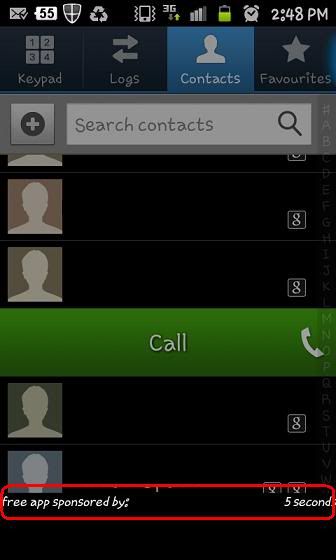 |
|
|
Jun 7 2011, 03:23 PM
|
|
Newbie
0 posts Joined: May 2006
|
to change the lockscreen wallpaper;
1. go to your gallery. 2. select the folder containing the picture that you want. 3. touch the picture and you will see a menu saying; "Set as". 4. select that menu. 5. you will be presented with a pop-up menu; a) Contact icon b) Home screen wallpaper c) Lock screen wallpaper d) QuickPic Wallpaper (in my case since I installed QuickPic) 6. select the one that said; "Lock screen wallpaper". 7. That's it. You are done. 8. Press the power button to off your phone. Wait for a few seconds, press it back ON. You will see the new lockscreen wallpaper. please try and post feedbacks/comments. regards, morisa |
|
Topic ClosedOptions
|
| Change to: |  0.0265sec 0.0265sec
 0.17 0.17
 6 queries 6 queries
 GZIP Disabled GZIP Disabled
Time is now: 9th December 2025 - 08:28 AM |
 Quote
Quote