Welcome Guest ( Log In | Register )

Outline · [ Standard ] · Linear+

 GIGABYTE G1.Assassin Complete Guide, Custom Made for Games G1-Killer X58 MB

views
     
TSwindwithme
post May 13 2011, 06:24 PM, updated 15y ago

Enthusiast
*****
Senior Member
971 posts

Joined: Jul 2005
user posted image

I still remember Intel launched the 1st Core i7 platform in Nov 2008 to depart from Core 2 Duo structure.
The 1st Core i7 chipset is X58 and CPU socket is LGA 1366 which position in extreme segment.
In mid 2009, Intel launched same structure with LGA 1156 socket which is mid to high end market.
Early this year, the 2nd generation Core i structure, LGA 1155, launched and the position is overlap with LGA 1156.

In the market, there are 3 platforms for Core i7 structure, but the most high-end is still X58.
As per the internet news, LGA 1366 product line will be available till end of 2011, and the life cycle will be over 3 years.
The existing time for the platform is catching up LGA 775.

GIGABYTE latest G1-Killer X58 series has 3 models, G1.Sniper, G1.Guerrilla and G1.Assassin
Even though this is late X58 products, if you use Intel latest Core i7-990X, it’s still the most top LGA 1366 platform.
Of course the cost is also high end market level.

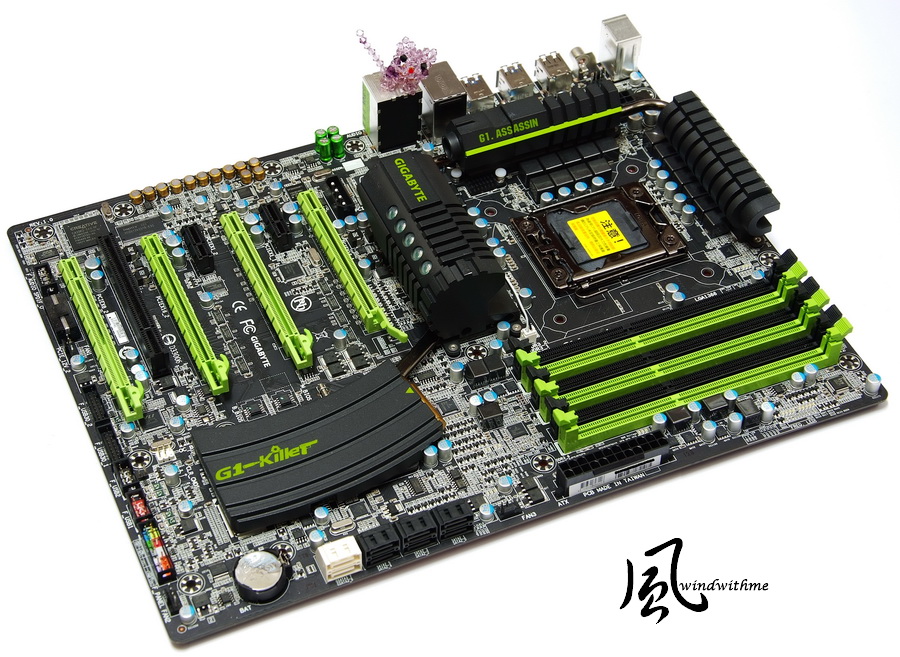
G1.Assassin is the most high-end model of G1-Killer series.
The form factor is XL-ATX, 34.5cm x 26.3cm. The XL-ATX Case is still rare in the market.
The pantone is black and green. This is the first time for GIGABYTE MB.
There are 5 Smart Fan headers. The users can control the chassis temperature more efficiently.
user posted image

G1-Killer is also the first GIGABYTE Gaming series MB.
In the past, many brands used to launch gaming series high end boards.
No matter components usage and features, G1.Assassin is really fit for Gaming. You will see the detail as following my further introduction.
user posted image

Accessories
Product manual, Software manual, Driver CD, I/O shield, SATA cables and CrossFireX/SLI bridge
user posted image

G1-Killer poster and stickers
user posted image

Front Access Control Panel
It offers 2 USB 3.0 and 1 Power eSATA
Left side Quick Boost button can switch user to OC mode to enhance the system performance.
user posted image

Lower-Left Corner
2 X PCI-E X16 support X16 bandwidth
2 X PCI-E X16 support X8 bandwidth
The PCI-E can support up to 4-Way ATI CrossFireX and 3-Way NVIDIA SLI
2 X PCI-E X1
1 X PCI
Bigfoot Killer E2100 LAN chip
Creative CA20K2 Audio chip supports Dolby Digital Live, DTS Connect, X-Fi Xtreme Fidelity and EAX Advanced HD 5.0 technology.
It supports up to 7.1 channel and High Definition Audio.
Design in Taipei
user posted image

Lower-Right Corner
6 X black SATAII, provided by ICH10R, SATA2 and support RAID 0, RAID 1, RAID 5 and RAID 10
2 X white SATAIII, provided by Marvell 9182, SATA3 and support RAID 0, RAID 1
2 X 16 Mbit flash, Dual BIOS, dual protection.
user posted image

Upper-Right Corner
6 X DIMM DDR3 support 800/1066/1333/2200 and max capacity is 24GB
DDR3 has 2 phase PWM and next is 24-PIN power connector
user posted image

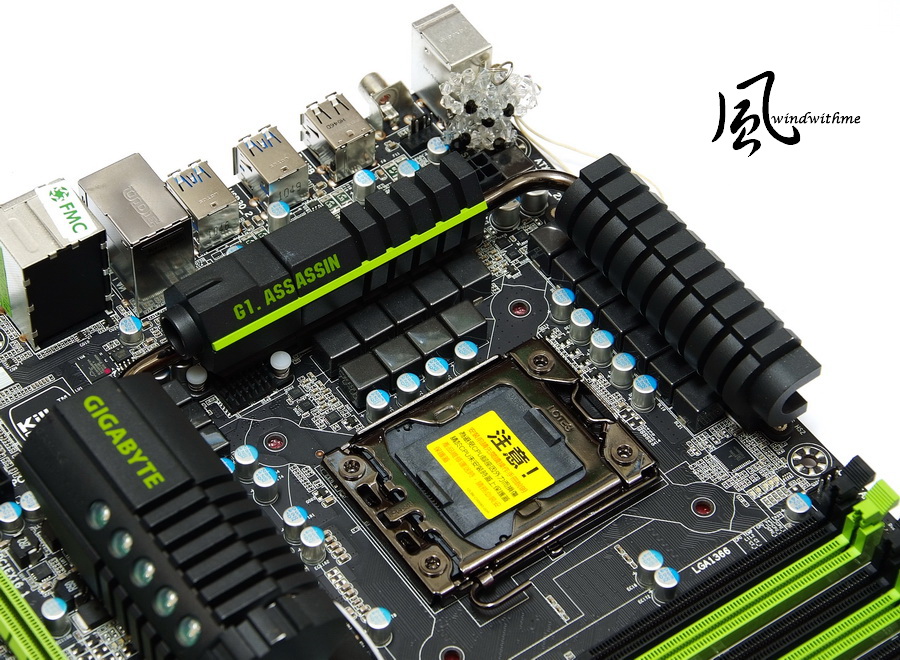
Upper-Left Corner
LGA 1366 CPU Socket, CPU metal cover uses plating one
G1.Assassin uses 16 phases PWM and support dual 8 phases power switching mode.
It needs GIGAYTE Dynamic Energy Saving (DES2) software to enable the dual power switching function.
Back is two 8 PIN design for enhancing system stability under high loading condition
user posted image
matnur_83
post May 31 2011, 11:31 PM

On my way
****
Senior Member
683 posts

Joined: Jun 2009
nice...
TSwindwithme
post Jun 4 2011, 09:58 AM

Enthusiast
*****
Senior Member
971 posts

Joined: Jul 2005
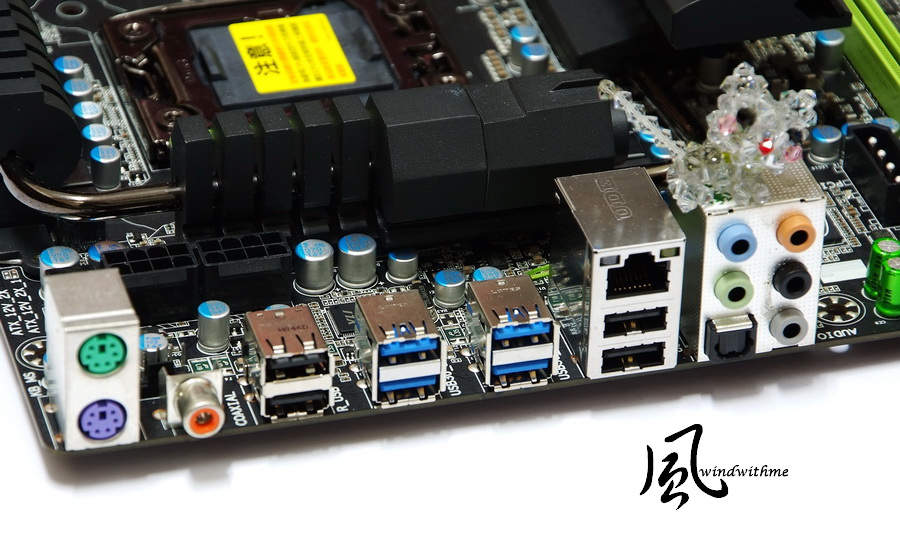
IO
4 X USB 2.0(black)
4 X USB 3.0(blue)
1 X RJ-45 LAN
1 X S/PDIF Optical/Coaxial output
user posted image

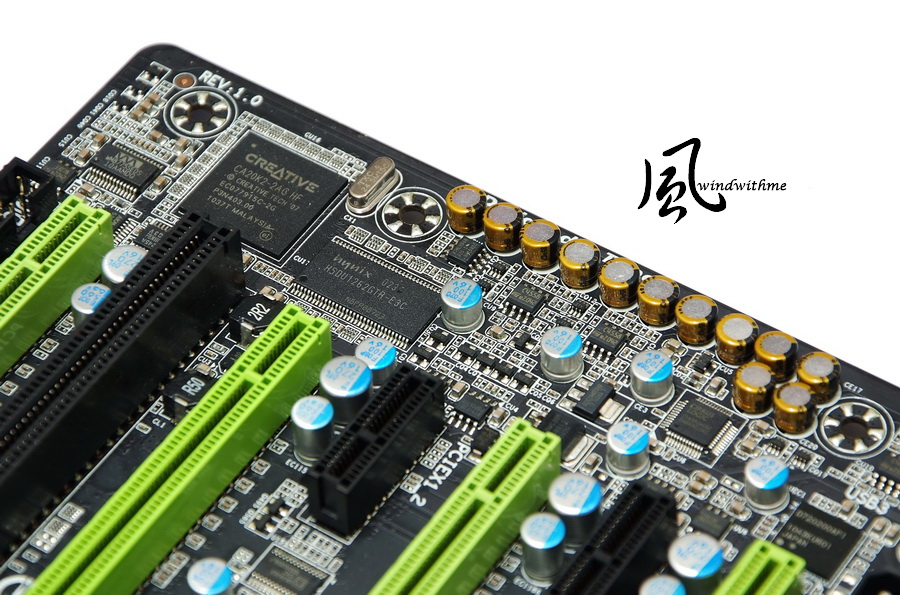
Creative Sound Blaster X-Fi Audio Processor, 20K2
Built-in 128MB Memory cache for 20K2. In my impression, this design is for Creative high-end audio card only.
Nichicon MUSE ES(green) and MW(yellow) Bi-Polarized audio capacitors. You can see the intention in audio design to get the best audio quality.
This is the first time I saw such high end audio chip, capacitors and cache design in MB. I have very high expectation for the audio quality.
Of course, this kind of design and other brands X-FI audio card quality must be made real comparison to see the difference.
user posted image

LAN Chip is one more G1-Killer important features. It uses Killer E2100 chip, also called NPU.
Besides the past CPU and GPU, now you also can see NPU. You can feel how fast the computer hardware technology improvement.
It built-in 1GB DDR2 to process the network traffic control. It helps offload network traffic from the CPU.
Another feature is Game Networking, DNA, technology. It offloads gaming data directly to the NPU to deliver tremendous speed benefits.
user posted image

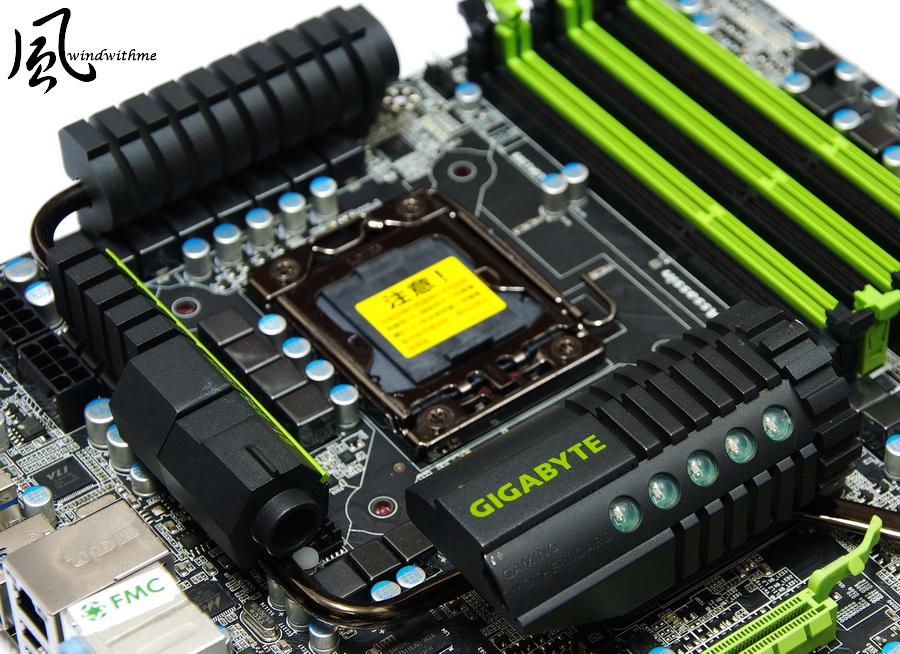
The complete new design thermal module is based on bullet and cartridge, called Locked and Loaded Heatpipe Design .
The Upper-Mid and Left are VRM heatpipe.
Lower is X58 chipset heatsink and the 5 green LEDs are glowing after power on.
user posted image

This SB ICH10R heatsink is very special Visual effect.
The outlook is copy cartridge with one copper bullet. It’s really eye catching.
Also the big heatsink, this thermal solution is both for good looking and performance.
user posted image

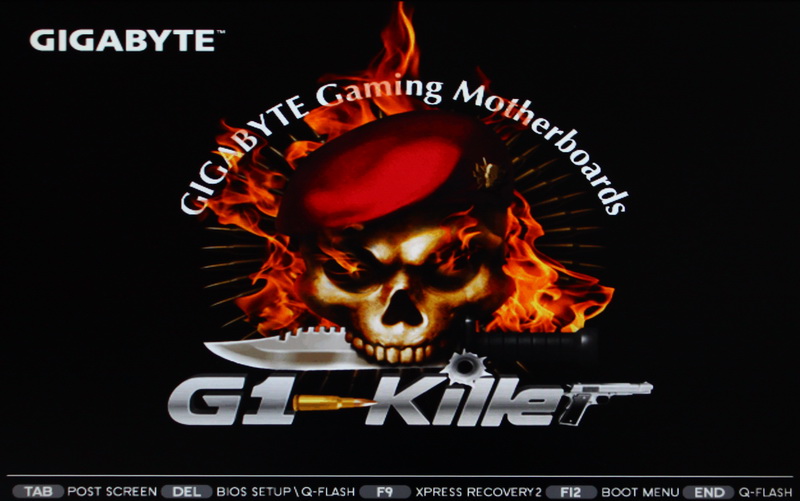
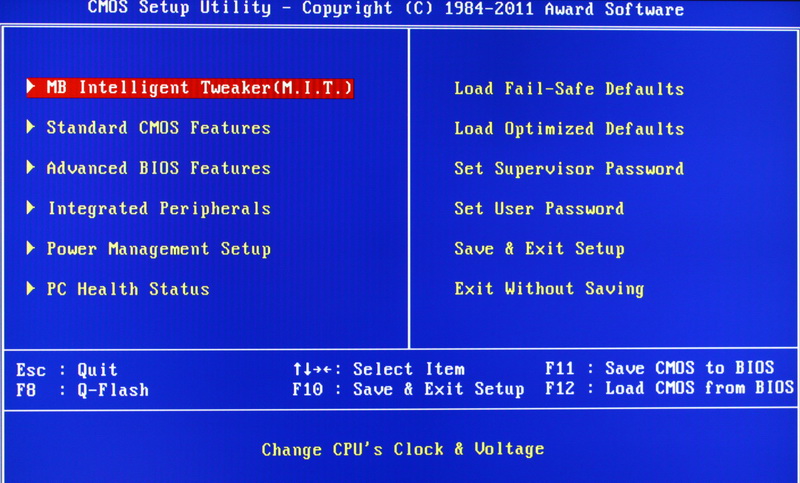
Boot Screen
user posted image

BIOS Main Page
user posted image

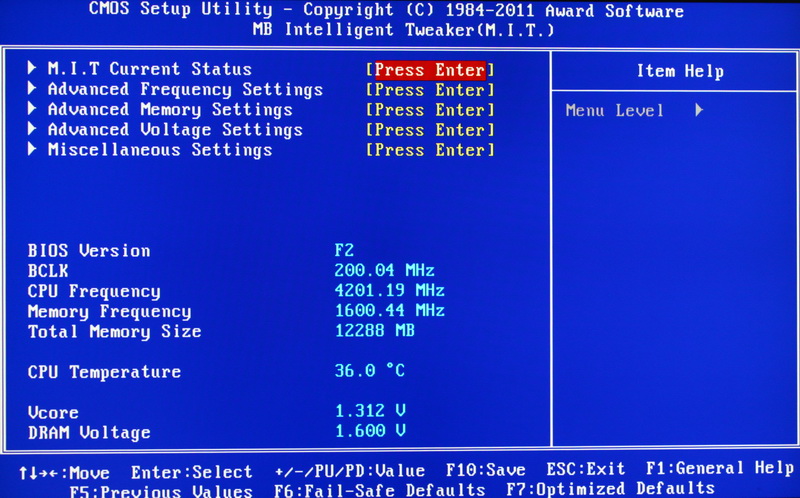
Main BIOS Tuning Menu, called M.I.T.
It displays BIOS version, CPU/DRAM clock, DDR3 capacity, CPU temperature and CPU/DRAM voltage info.
user posted image

You can adjust CPU ratio, clock and DDR3 multiplier.
The pic is CPU 200Mhz/DDR3 1600 set up screen.
user posted image

CPU Related Technology Items
C1E is for power saving.
Intel Turbo Boost is contrary with C1E. The CPU can boost speed during high load mode.
user posted image
gengstapo
post Jun 4 2011, 10:35 AM

Retired enthusiast
********
All Stars
10,688 posts

Joined: Jan 2005
Is the colored caps not Japanese solid caps? hmm.gif
killer00
post Jun 4 2011, 11:00 AM

Getting Started
**
Junior Member
140 posts

Joined: May 2011
From: 172.18.154.1


nice review bro..
TSwindwithme
post Jun 4 2011, 11:59 AM

Enthusiast
*****
Senior Member
971 posts

Joined: Jul 2005
Memory Setup Page
user posted image

Advanced DDR3 parameters setup
user posted image

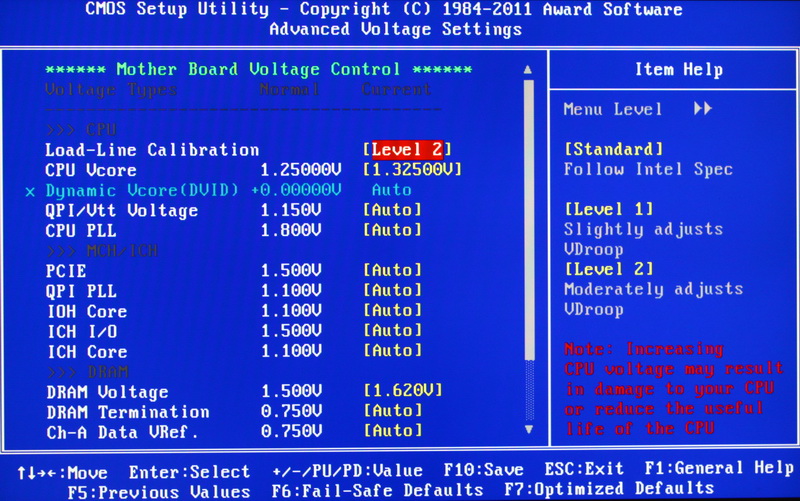
Voltage Page
Load-Line Calibration Standard/Level1/Level2
CPU Vcore 0.50000~1.90000V
QPI/Vtt Voltage 1.120~2.000V
CPU PLL 1.300~2.520V
ICH Core 0.920~2.380V
DRAM Voltage 1.300~2.600V
user posted image

PC Health Status
user posted image

During OC, besides CPU and DDR3 quality, the voltage tuning is also very important.
In above G1.Assassin setup screen, QPI/Vtt Voltage item is the key to pull high CPU clock.
This i7-930 CPU quality is not bad, in 200/1600 ratio, I don’t need to adjust QPI/Vtt Voltage.
If you want to run stable at 200/2000 ratio, the proper voltage is the key factor to OC X58 chipset.

System Configuration
CPU: Intel Core i7-930
MB: GIGABYTE G1.Assassin
DRAM: CORSAIR VENGEANCE CMZ12GX3M3A1600C9
VGA: msi N560GTX-Ti Twin Frozr II
HD: Intel X25-V 40GB RAID 0
POWER: be quiet! STRAIGHT POWER GOLDEN 550W
Cooler: Mega Shadow Deluxe Edition
OS: Windows7 Ultimate 64bit
user posted image

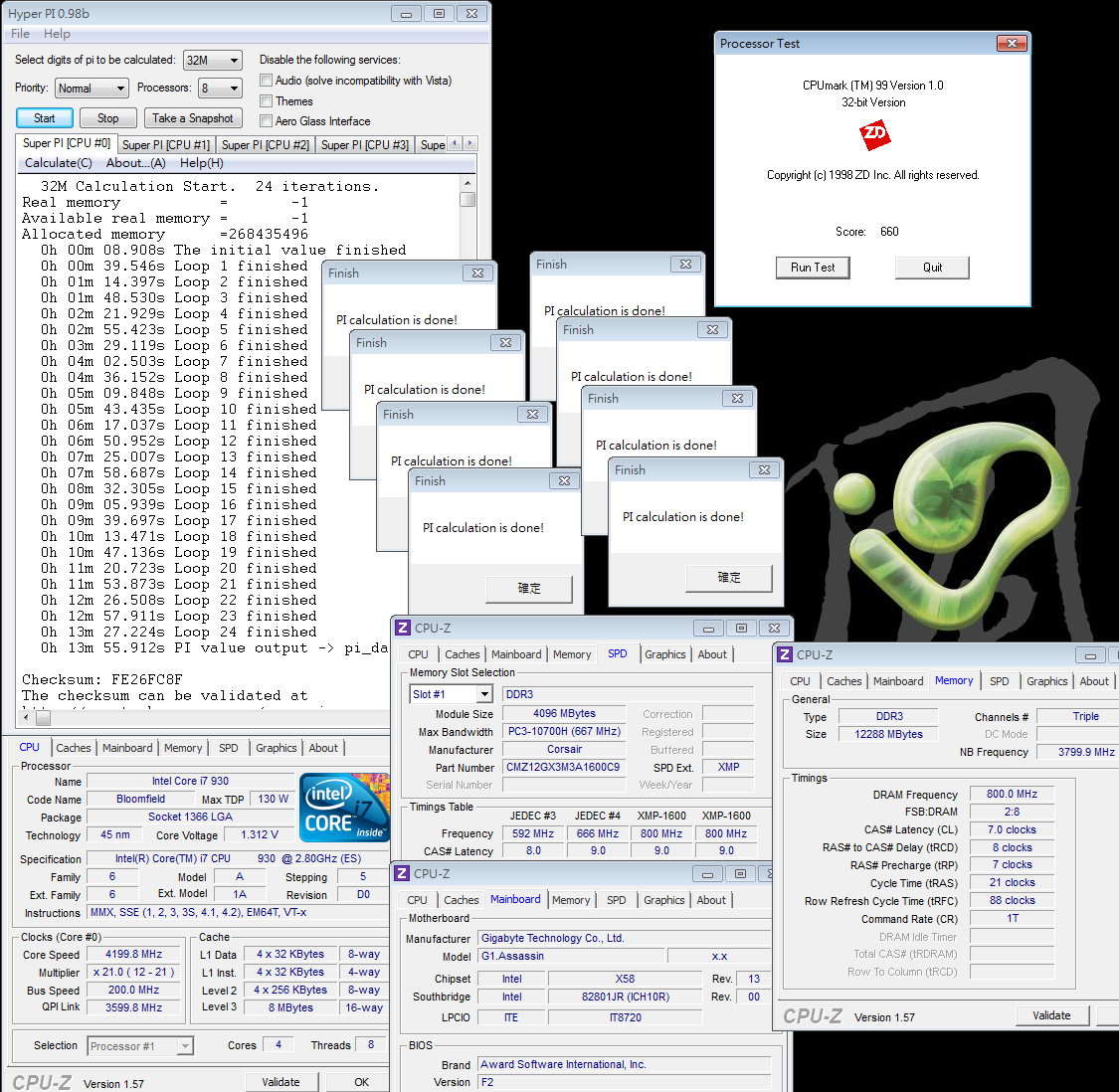
OC Performance
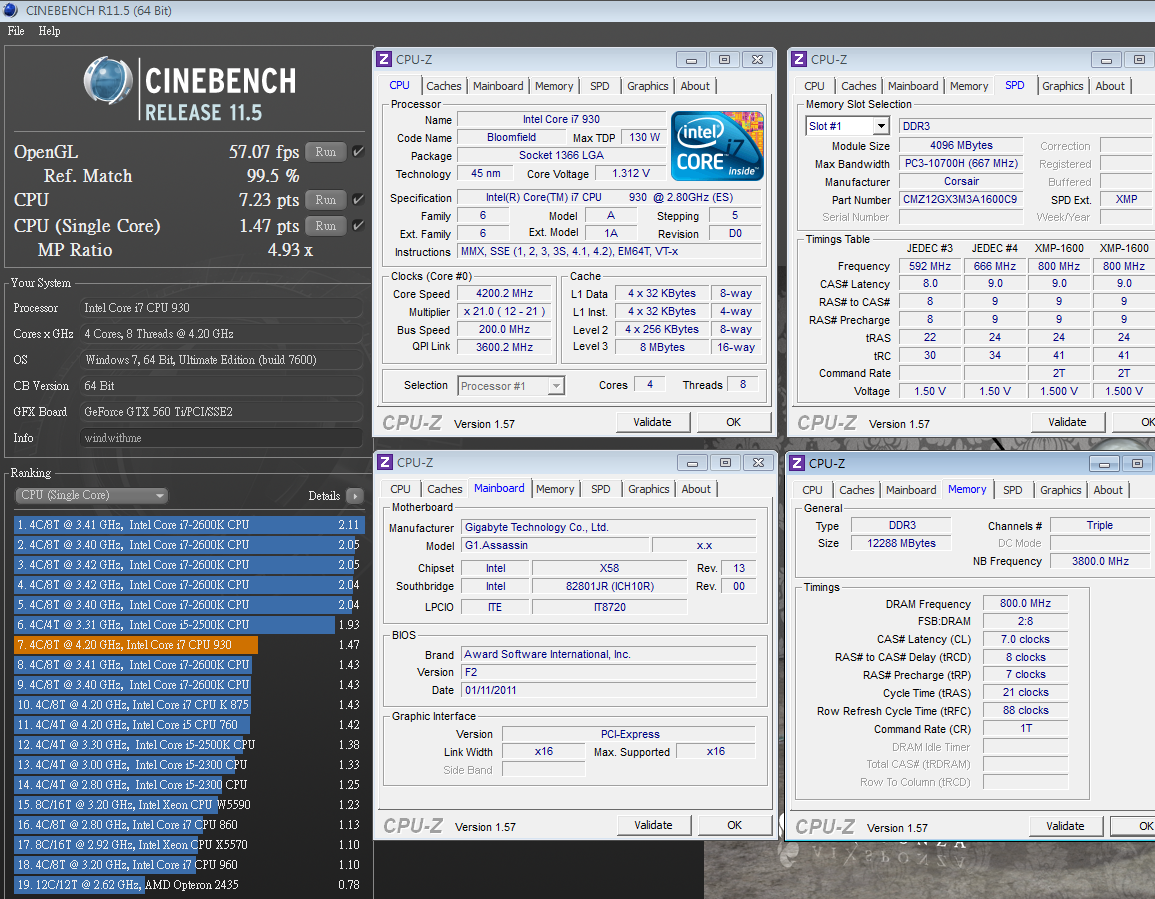
CPU 200 X 21 => 4199.8MHz 1.325V
DDR3 1600 CL7 8-7-21 1T 1.600V

Hyper PI 32M X8 => 13m 55.912s
CPUMARK 99 => 660
user posted image

Nuclearus Multi Core => 28279
Fritz Chess Benchmark => 32.02/15368
user posted image

CrystalMark 2004R3 => 313604
user posted image

CINEBENCH R11.5
CPU => 7.23 pts
CPU(Single Core) => 1.47 pts
user posted image

Windows Experience Index - CPU 7.7
user posted image
derek_86
post Jun 28 2011, 09:55 AM

Getting Started
**
Junior Member
65 posts

Joined: Dec 2006
Nice review you have there! May I know if i can still use my old pieces of dual channel ram on this motherboard?? like 2X2GB 1333Mhz RAM... because i only saw something like this on the official website..
"3/Dual channel memory architecture..." I keep wondering if this can works or not... please advice.. thanks in advanced!
TSwindwithme
post Jun 29 2011, 01:41 AM

Enthusiast
*****
Senior Member
971 posts

Joined: Jul 2005
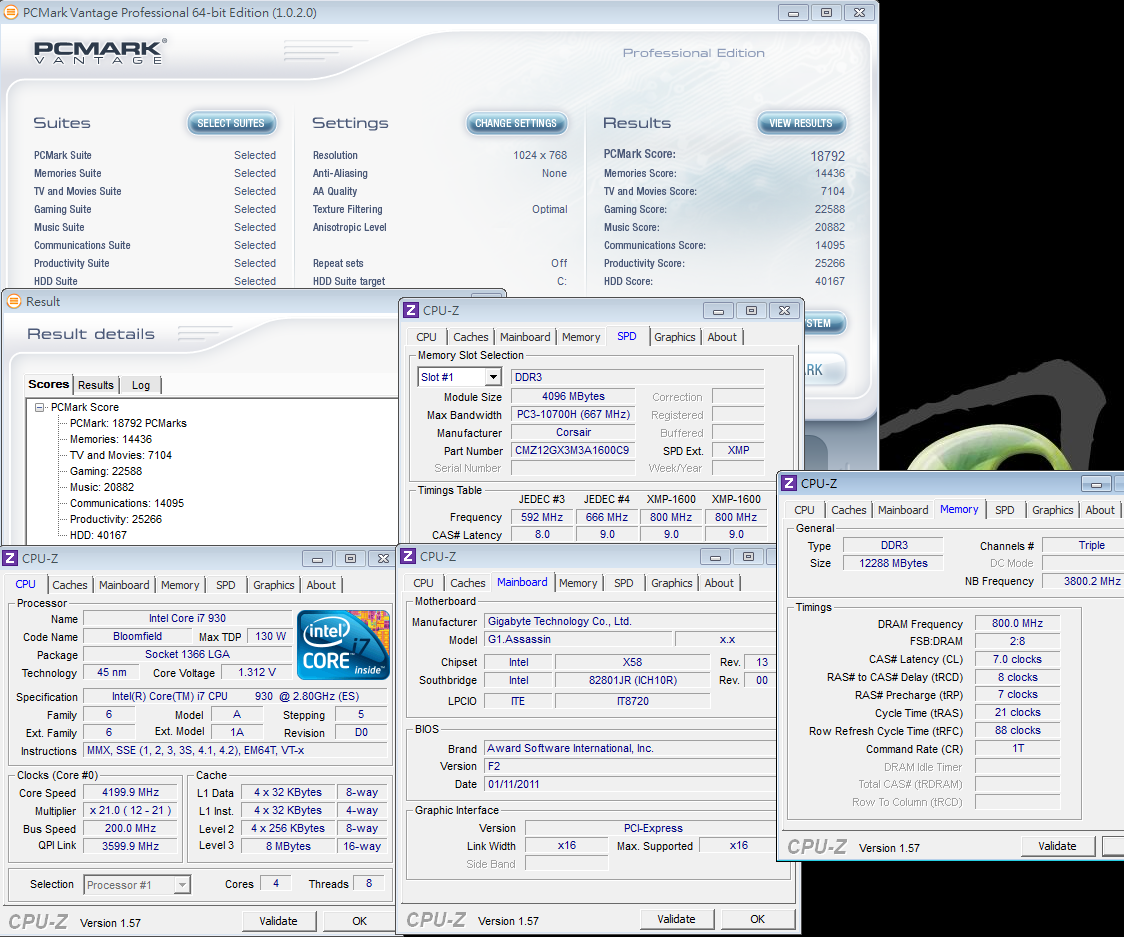
PCMark Vantage => 18792
user posted image

This Intel Core i7 930 is 45nm but the OC range is very good. I just need 1.325V to achieve 4.2GHz.
After that, I try to increase the CPU voltage and I can achieve 4.4GHz to run most software at around 1.4V.
However, I cannot run all software stable, so I give up this setting.
X58 platform OC performance is able to support most applications and conditions. Of course, for users, the speed demand is never enough.
Faster and faster DeskTop PC performance is always the never changed goal for IT industry.

DDR3 Bandwidth Comparison
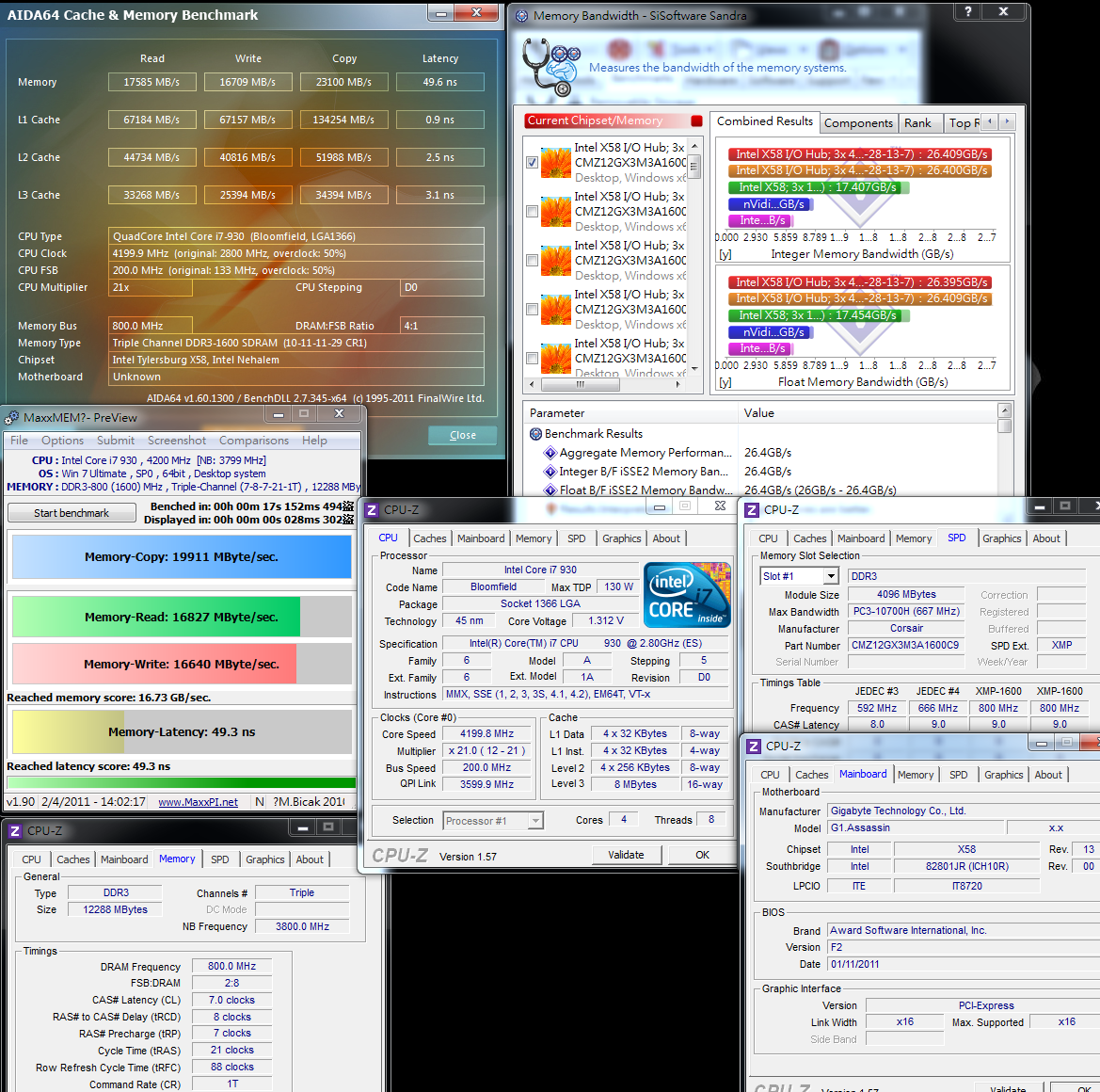
DDR3 1600 CL7 8-7-21 1T 1.600V
Sandra Memory Bandwidth - 26409 MB/s
ADIA64 Memory Read - 17585 MB/s
MaXXMEM Memory-Copy - 19911 MB/s
user posted image

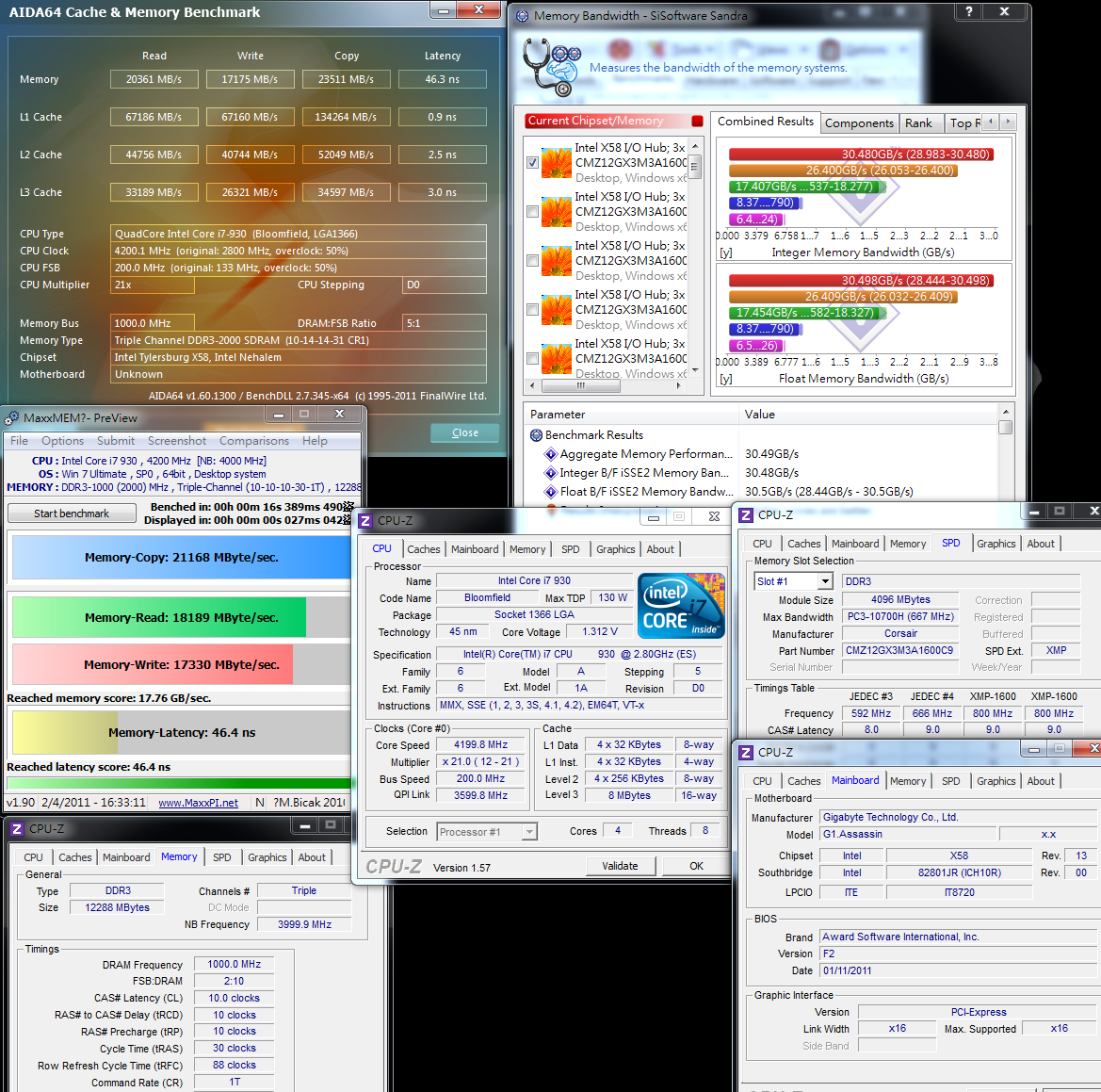
DDR3 2000 CL10 10-10-30 1T 1.640V
Sandra Memory Bandwidth - 30480 MB/s
ADIA64 Memory Read - 20361 MB/s
MaXXMEM Memory-Copy - 21168 MB/s
user posted image

LGA 1366 is the only 3 channel platform. The DDR3 bandwidth is extremely high.
Even though the latest Sandy Bridge LGA 1155 platform optimizes the Memory Controller, these 2 platforms have each own advantages.
X58 DDR3 bandwidth is key features and DDR3 OC range is better.
In this test, the CORSAIR VENGEANC DDR 1600 CL9 can OC to DDR3 2000 CL10.
Even the CL is not as good as DDR3 1600, pulling to higher clock is still good for bandwidth performance.

Temperature
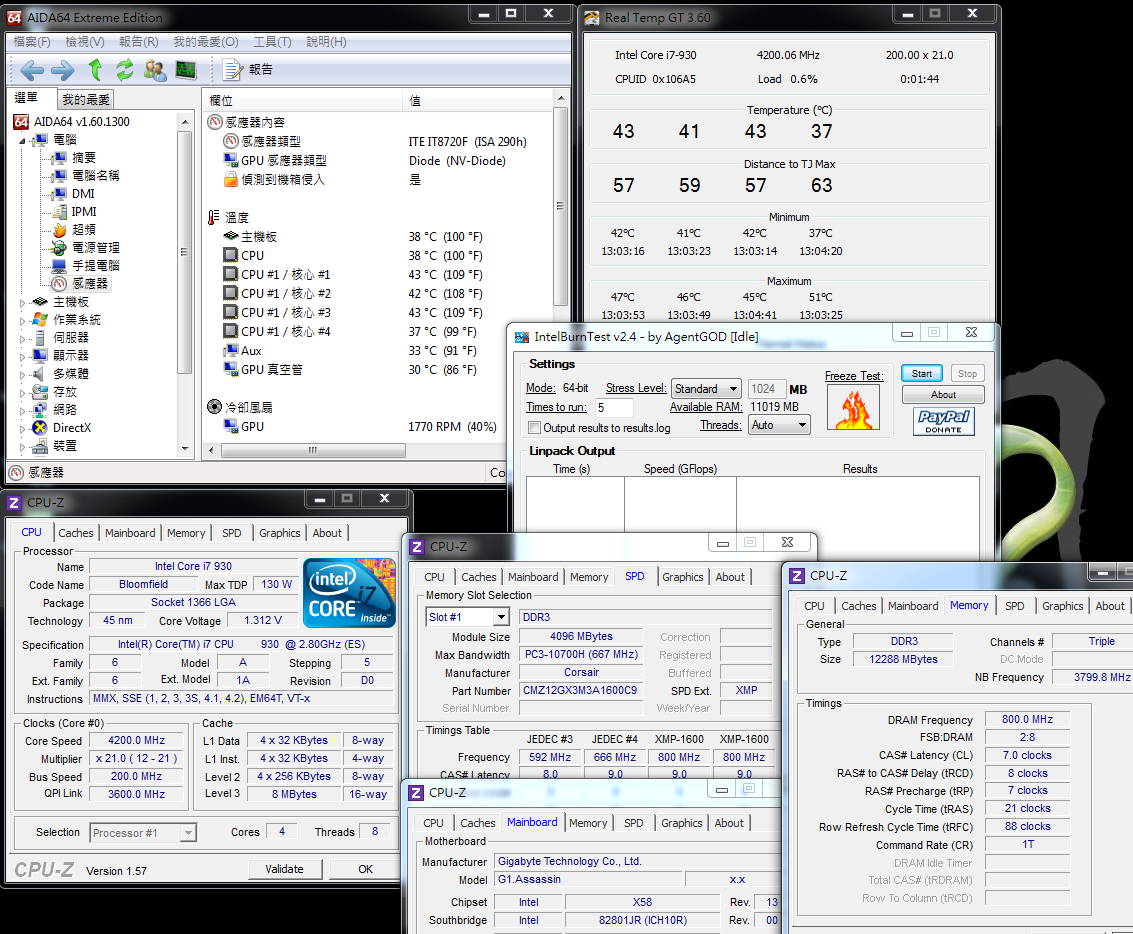
Enter to Desktop - 37~43
user posted image

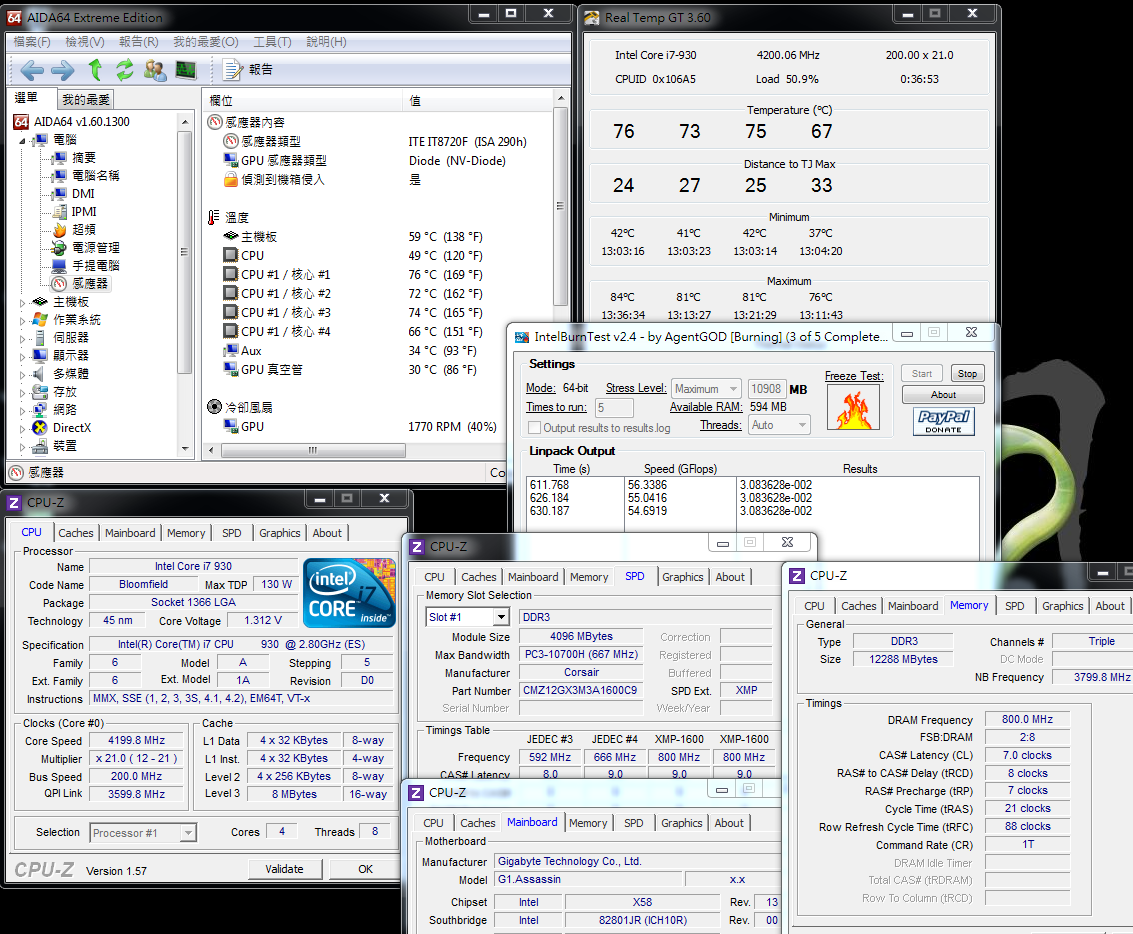
CPU Full Speed - 66~76
Intel Burn Test v2.4,Stress Level Maximum
user posted image

CPU OC voltage is low, so the temperature is lower as well. This is a good result.
In full speed, the temperature is around 66~76.
If you put all system into case and make good air flow, it will increase 5~8 maximum. For long time usage, the system is able to be stable

Power Consumption
Enter to Desktop - 158W
user posted image

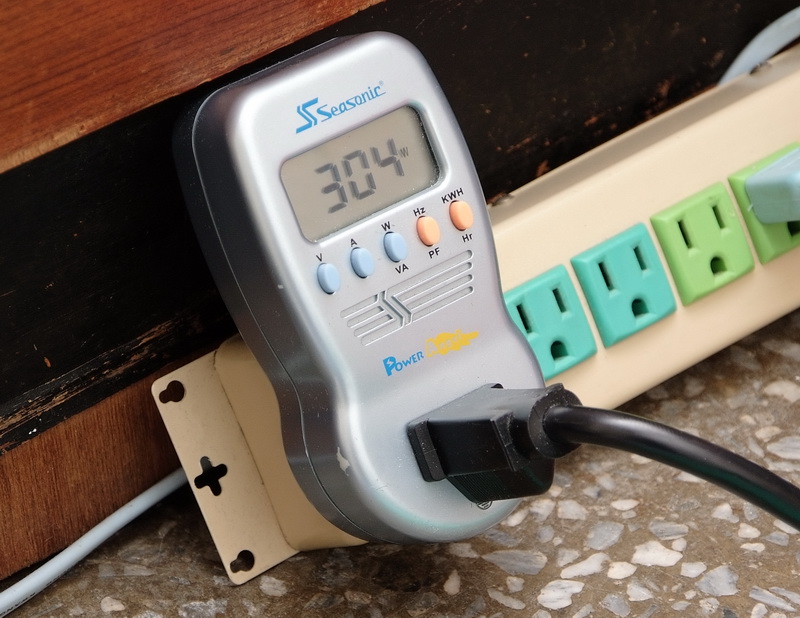
CPU Full Speed - 304W
Intel Burn Test v2.4,Stress Level Maximum
user posted image

OCCT POWER SUPPLY Mode - 525W
user posted image

The VGA is nVIDIA latest mid-end GTX 560 Ti.
After OC, the power consumption as entering to Desktop is still acceptable. In 4.2GHz/4Cores full speed condition, it’s also just around 300W.
If you use OCCT to make CPU/VGA be full load, the total power consumption is going to 525W.
Normally, the PC power consumption is directly proportional. I recommend 600W Power Supply for this system.

3D Performance Test
msi N560GTX-Ti Twin Frozr II default is GPU 880/2100

3DMark Vantage => P23278
user posted image

StreetFighter IV Benchmark
1920 X 1080 => 289.56 FPS
user posted image


Change to:
| Lo-Fi Version
0.0154sec    0.56    5 queries    GZIP Disabled
Time is now: 11th December 2025 - 04:27 PM