

QUOTE(benny888 @ May 9 2011, 08:01 PM)
2. Access paid apps Market to get more free apps and to buy paid apps

SAMSUNG GALAXY S II Official thread V3, The ultimate Android super smartphone ??
|
|
 May 10 2011, 12:01 AM May 10 2011, 12:01 AM
Return to original view | Post
#1
|
 
Senior Member
1,219 posts Joined: Jan 2003 
|
Hi Benny, can u explain how u accomplish #2? I've already rooted mine. Thanks in advance!
QUOTE(benny888 @ May 9 2011, 08:01 PM) 2. Access paid apps Market to get more free apps and to buy paid apps |
|
|
|
|
|
May 10 2011, 12:18 AM
Return to original view | Post
#2
|
|
Senior Member
1,219 posts Joined: Jan 2003
|
Ok thanks.
Edit : Yes, I can access paid apps in The market! This post has been edited by welwitchia: May 10 2011, 12:31 AM |
|
|
May 13 2011, 12:35 PM
Return to original view | Post
#3
|
|
Senior Member
1,219 posts Joined: Jan 2003
|
Guys, I've got a question if u don't mind me asking. I've rooted my phone. What happens if I update the firmware. Do I lose my root? If yes, do I unroot it again using the same method?
Thanks in advance! |
|
|
May 13 2011, 12:57 PM
Return to original view | Post
#4
|
|
Senior Member
1,219 posts Joined: Jan 2003
|
@Bugeca, the root method is for the KD firmware, but we can use it again for the KE firmware?
Maybe I should just flash it to the latest and forget about rooting it first. |
|
|
May 15 2011, 09:40 PM
Return to original view | Post
#5
|
|
Senior Member
1,219 posts Joined: Jan 2003
|
Benny, if we flash back to the stock kernel does that mean that we are basically "unrooting" it. If so, do we lose what we can do with a rooted phone? Eg. run Market Enabler which require SU.
I might as well ask, can we upgrade our firmware OTA or we have to use ODIN? Thanks! QUOTE(benny888 @ May 15 2011, 08:33 PM) You need to install insecure kernel so that you can root with Superoneclick Supercurio will root automatically and kernel created is similarly insecure With insecure kernel, when you boot - you will see a Yellow triangle - a obvious sign that you have change kernel . To remove this yellow triangle, you have to flash back a stock kernel - it just take a minute and all your data is intact To those who have yet to root/flash upgraded rom/kernel etc - it is very , very SAFE and the chance you have problem bricking phone is zero. Important point, make sure your phone is at least 50% charge. I look at the steps, there is virtually no chance you can brick your phone if you follow the steps accordingly |
|
|
May 15 2011, 10:00 PM
Return to original view | Post
#6
|
|
Senior Member
1,219 posts Joined: Jan 2003
|
Thanks. So the only reason to flash back to the stock kernel is to lose the yellow exclamation mark during boot up?
 |
|
|
|
|
|
May 15 2011, 11:57 PM
Return to original view | Post
#7
|
|
Senior Member
1,219 posts Joined: Jan 2003
|
Thanks Benny! At least I can choose to pay if I wish to instead of blindly "downloading" apps.
And perfect timing too with the Asus Transformer just around the corner...I don't know why but I've switched from an iPhone 4 to a HTC Incredible S then finally to a SGS II. Now I'm contemplating from an iPad 2 to the Asus Transformer. LOL.. QUOTE(benny888 @ May 15 2011, 11:46 PM) Flashing to stock kernel is just to remove the yellow triangle warning. The root remains This post has been edited by welwitchia: May 16 2011, 12:00 AMAny for your info, about 2 days ago Paid apps market already available in Malaysia. NO need to use apps like Market Enabler anymore. Any non rooted Android phone can now access and buy paid apps You will " DIE" trying to update your firmware thro KIES if it is available. Kies is the worst and heavily inefficient bloated software I have even seen. Download the firmware zip and use Odin to flash is so much simpler, faster and efficient |
|
|
May 16 2011, 11:17 AM
Return to original view | Post
#8
|
|
Senior Member
1,219 posts Joined: Jan 2003
|
Hi guys, I have a question regarding ODIN.
I know I have to put the phone in DOWNLOAD mode. After that I connect the phone to the PC and run ODIN. After that, what do I do? Will ODIN automatically detect that I have a SGS II connected via USB and then download the latest firmware automatically or do I have to download the firmware @ Samfirmware.com (http://www.samfirmware.com/WEBPROTECT-i9100.htm). If I have to download it before hand, I know it's a tar file and I should not untar it right? Also, what about the checkboxes in ODIN? Which do I need to click? Thanks in advance!. |
|
|
May 16 2011, 12:01 PM
Return to original view | Post
#9
|
|
Senior Member
1,219 posts Joined: Jan 2003
|
Thanks guys. The support I get in the thread is unbelievable. Very much appreciated for guiding newbies like us.
|
|
|
May 16 2011, 07:10 PM
Return to original view | Post
#10
|
|
Senior Member
1,219 posts Joined: Jan 2003
|
Updated to the latest firmware and rooted it. Thanks guys for the pointers.
|
|
|
May 21 2011, 04:16 PM
Return to original view | Post
#11
|
|
Senior Member
1,219 posts Joined: Jan 2003
|
Read post 1010 to 1012 in this thread.
Uncle Benny and 2 other users (sorry can't remember their names) posted URLs that will help u upgrade and root it in no time. Just follow the instructions and you'll be fine. QUOTE(h11g @ May 21 2011, 03:45 PM) uncle benny, when you upgraded your fw, did you download MULTI - CSC - XEUKD1 or MULTI - CSC - OXAKE2? |
|
|
May 21 2011, 09:12 PM
Return to original view | Post
#12
|
|
Senior Member
1,219 posts Joined: Jan 2003
|
I believe u need to install Kies 2 so that the appropriate USB drivers get installed to detect the phone.
|
|
|
May 24 2011, 03:29 PM
Return to original view | Post
#13
|
|
Senior Member
1,219 posts Joined: Jan 2003
|
Hi, where did u get the SGP SP and for how much? Thanks!
QUOTE(OrangePillow @ May 24 2011, 02:14 PM) 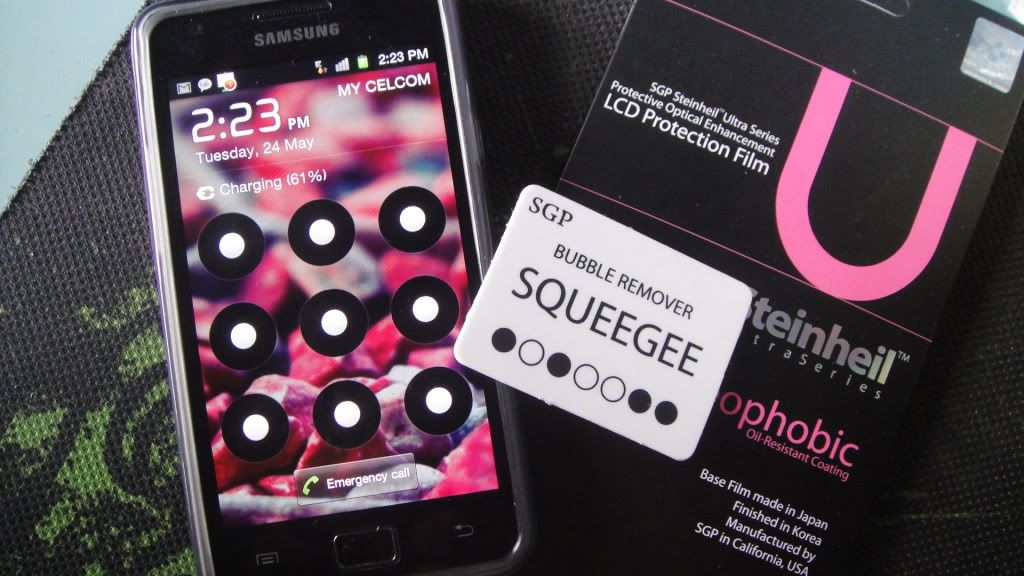 |
|
Topic ClosedOptions
|
| Change to: |  0.0566sec 0.0566sec
 0.68 0.68
 7 queries 7 queries
 GZIP Disabled GZIP Disabled
Time is now: 8th December 2025 - 03:52 PM |
 Quote
Quote