Welcome Guest ( Log In | Register )

29 Pages « < 2 3 4 5 6 > » Bottom

Outline · [ Standard ] · Linear+

 NVIDIA Geforce GT540M POISON!, Gameplay Videos + Reviews

views
     
[PF] T.J.
post May 9 2011, 12:18 PM

20k VIP Club
Group Icon
Elite
24,193 posts

Joined: Feb 2010
From: Perak
QUOTE(astria @ May 9 2011, 12:03 PM)
well, srry that i was busy + being lazy...

thinking of how to revamp the thread... i will probably scrap the results on first post part...
*
Yay, new thread coming up by astria sifu rclxms.gif
I'm interested in learning all these technicals stuffs as well wub.gif
AlexLai
post May 9 2011, 01:16 PM

Look at all my stars!!
*******
Senior Member
5,531 posts

Joined: Feb 2009
From: Kajang, Selangor


QUOTE(astria @ May 9 2011, 12:03 PM)
well, srry that i was busy + being lazy...

thinking of how to revamp the thread... i will probably scrap the results on first post part...
*
Maybe add in newer and more relevant results.
astria
post May 9 2011, 01:24 PM

an apple a day keeps the doctor away
*********
Senior Member
22,158 posts

Joined: Aug 2008
From: Singapore


QUOTE(AlexLai @ May 9 2011, 01:16 PM)
Maybe add in newer and more relevant results.
*
yeah, that's for sure... i think i will juz put in a link to the post instead of summarizing it in the first post...
AlexLai
post May 9 2011, 01:27 PM

Look at all my stars!!
*******
Senior Member
5,531 posts

Joined: Feb 2009
From: Kajang, Selangor


Don't hesitate to ask for help. biggrin.gif

I'm very free these next 2 weeks. Perhaps I can start writing the recommendation table for the <12" section.
SUSngkhanmein
post May 9 2011, 03:44 PM

カラカラ Karakara
*******
Senior Member
7,727 posts

Joined: Jan 2010
From: Ara Damansara, Petaling Jaya & Batu Pahat, Johor.


QUOTE(wilsonphua @ May 9 2011, 11:18 AM)
because i enabled the Extra Touch Ink...

u mean the colour of the gameplay?
*
ya.. the gameplay color + i got use the cheat engine unlocked some player but did u know how to fully unlocked all like ps3 + xbox?
like this 1 http://www.eventhubs.com/news/2009/dec/18/...een-more-shots/
got a lot characters..
cowithgun
post May 9 2011, 08:31 PM

A cow that can play notebook & phone
*******
Senior Member
2,248 posts

Joined: Sep 2010
I think this final battle with Meridith in Dragon Age 2 is pretty cool. It was running at DX11, so graphic still a little choppy during cut-scene, but not affected during game play.

Spoiler ahead!


TSwilsonphua
post May 9 2011, 09:04 PM

Gear Up. Game On.
*******
Senior Member
2,152 posts

Joined: Nov 2008
QUOTE(ngkhanmein @ May 9 2011, 03:44 PM)
ya.. the gameplay color + i got use the cheat engine unlocked some player but did u know how to fully unlocked all like ps3 + xbox?
like this 1 http://www.eventhubs.com/news/2009/dec/18/...een-more-shots/
got a lot characters..
*
I used the cheats from cheat happens. But I didnt use it in that video (I forgot lol)

Press F1 and numpad 7, all characters unlocked.

owh, and something wrong. The link you gave me is SUPER Street Fighter 4. But we are playing Street Fighter 4 in our laptop.

SUPER Street Fighter 4 not yet out for the PC. Only for consoles. Will be released in July.

you have ps3?

QUOTE(cowithgun @ May 9 2011, 08:31 PM)
I think this final battle with Meridith in Dragon Age 2 is pretty cool. It was running at DX11, so graphic still a little choppy during cut-scene, but not affected during game play.

Spoiler ahead!


*
Huh? I don't think you're running on DX11. I run Dragon Age 2 using DX9. If I use DX11, the fps is less than 5. It happens when I enabled the high resolution textures under DX11.

and what resolution are u using when you're recording the gameplay? looks smooth
cowithgun
post May 10 2011, 01:57 AM

A cow that can play notebook & phone
*******
Senior Member
2,248 posts

Joined: Sep 2010
QUOTE(wilsonphua @ May 9 2011, 09:04 PM)
Huh? I don't think you're running on DX11. I run Dragon Age 2 using DX9. If I use DX11, the fps is less than 5. It happens when I enabled the high resolution textures under DX11.

and what resolution are u using when you're recording the gameplay? looks smooth
*
But I am running at DX11 and using High Res Texture too. brows.gif All my gameplay are recorded in native res 1366x768. I heard driver 270 solve the poor performance of Dragon Age 2 in nVidia card.

http://forums.anandtech.com/showthread.php?t=2148492

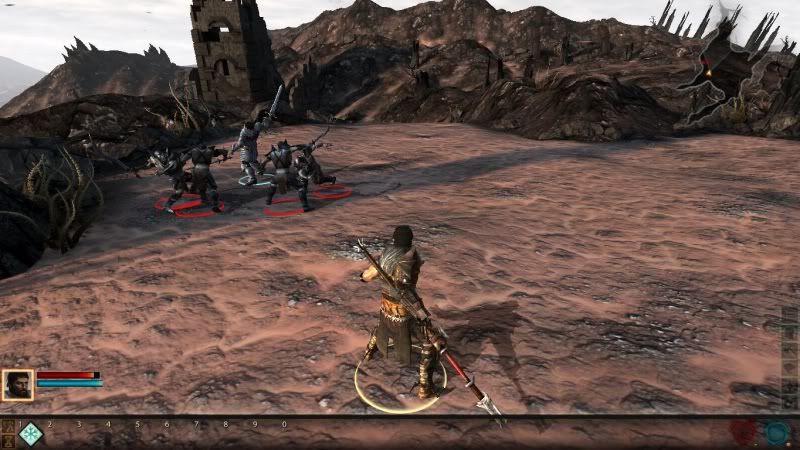
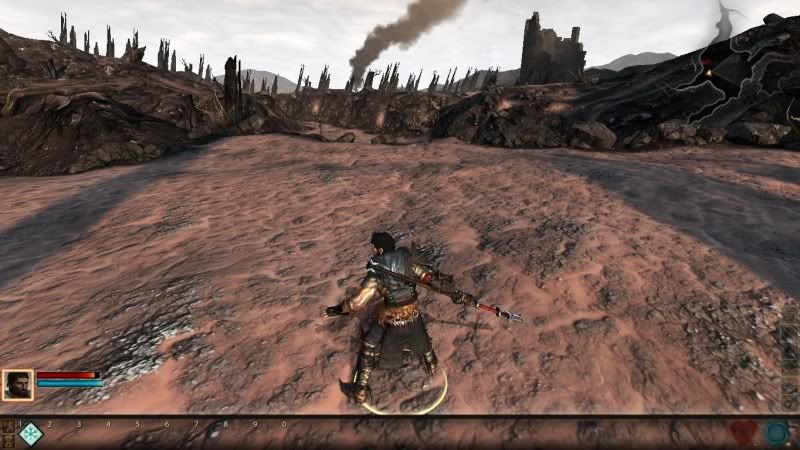
Compare Dx11 (left) and Dx9 (right). Although the encoded movie in youtube is blur (left) compare to the screen capture in Dx9 (right), you can see the difference in my Champion Armor. Both using High Res texture. You also should see that the floor in Youtube movie is even sharper than the screen capture.

user posted image

This post has been edited by cowithgun: May 10 2011, 02:32 AM
SUSngkhanmein
post May 10 2011, 09:11 AM

カラカラ Karakara
*******
Senior Member
7,727 posts

Joined: Jan 2010
From: Ara Damansara, Petaling Jaya & Batu Pahat, Johor.


it called super street fighter 4!

got ssf4 : 3d edition

latest ssf4 : arcade edition

press F1 + numpad 7 ? press both in same time at where? option?
TSwilsonphua
post May 10 2011, 09:36 AM

Gear Up. Game On.
*******
Senior Member
2,152 posts

Joined: Nov 2008
QUOTE(cowithgun @ May 10 2011, 01:57 AM)
But I am running at DX11 and using High Res Texture too.  brows.gif All my gameplay are recorded in native res 1366x768. I heard driver 270 solve the poor performance of Dragon Age 2 in nVidia card.

http://forums.anandtech.com/showthread.php?t=2148492

Compare Dx11 (left) and Dx9 (right). Although the encoded movie in youtube is blur (left) compare to the screen capture in Dx9 (right), you can see the difference in my Champion Armor. Both using High Res texture. You also should see that the floor in Youtube movie is even sharper than the screen capture.

user posted image
*
Man, I can't even run DX11. Gotta try it now. Downloaded and installed the driver 270 but i havent played Dragon Age 2 yet.

QUOTE(ngkhanmein @ May 10 2011, 09:11 AM)
it called super street fighter 4!

got ssf4 : 3d edition

latest ssf4 : arcade edition

press F1 + numpad 7 ? press both in same time at where? option?
*
you mean you have super street fighter 4 in your laptop?

press them when you have the cheats..

http://www.cheathappens.com/show_download.asp?ID=25891
[PF] T.J.
post May 10 2011, 09:54 AM

20k VIP Club
Group Icon
Elite
24,193 posts

Joined: Feb 2010
From: Perak
QUOTE(AlexLai @ May 9 2011, 01:27 PM)
Don't hesitate to ask for help. biggrin.gif

I'm very free these next 2 weeks. Perhaps I can start writing the recommendation table for the <12" section.
*
Yeah thumbup.gif
I was just going to remind you about that laugh.gif laugh.gif
TSwilsonphua
post May 10 2011, 01:45 PM

Gear Up. Game On.
*******
Senior Member
2,152 posts

Joined: Nov 2008
NEW GAMEPLAY VIDEOS. NOW WITH DIRECTX 11 ENABLED! drool.gif

Great thanks to @cowithgun. I have updated my Nvidia driver to version 270.61. Now, I can run Dragon Age 2 with DirectX11 enabled at medium settings, with 45 - 50 FPS without Fraps.


» Click to show Spoiler - click again to hide... «


Watch it in 720p HD, if not, you won't see the effect of DirectX 11.


The real graphics quality (just for drillz)

user posted image

user posted image

Now uploading Need For Speed Hot Pursuit with High Resolution Texture enabled!

skycrawler
post May 10 2011, 10:55 PM

New World ^^
*******
Senior Member
2,227 posts

Joined: Jan 2009


QUOTE(wilsonphua @ May 10 2011, 01:45 PM)

Now uploading Need For Speed Hot Pursuit with High Resolution Texture enabled!
*
Absolutely no lag at all . thumbup.gif
joe90cool
post May 13 2011, 09:51 AM

Getting Started
**
Junior Member
59 posts

Joined: Jun 2010
Nice work ! Hope to see more updates
cowithgun
post May 13 2011, 12:24 PM

A cow that can play notebook & phone
*******
Senior Member
2,248 posts

Joined: Sep 2010
@wilsonphua: is there any lag at all in cut-scene like what i experience in my video? my setting:

Graphic details: High setting
no AA
1366x768
Hi Res
DX11
V-Sync on.

Thanks for sharing.
GreaseMonkey90
post May 13 2011, 01:35 PM

Alienware Bencher
****
Senior Member
563 posts

Joined: Feb 2007
From: Alberta, Canada and Alor Setar


hmmm. pretty nice scores for the 540M
cowithgun
post May 13 2011, 02:56 PM

A cow that can play notebook & phone
*******
Senior Member
2,248 posts

Joined: Sep 2010
Trying compare my ATI 5650M with nVidia 540M. This is my best Street Fighter 4 score: 12391

Res: 1366x768
No AA
Variable frame rate
No V-Sync
Texture filter: Default
Everything else Highest.
Extra touch: Ink

user posted image
TSwilsonphua
post May 13 2011, 07:35 PM

Gear Up. Game On.
*******
Senior Member
2,152 posts

Joined: Nov 2008
QUOTE(cowithgun @ May 13 2011, 12:24 PM)
@wilsonphua: is there any lag at all in cut-scene like what i experience in my video? my setting:

Graphic details: High setting
no AA
1366x768
Hi Res
DX11
V-Sync on.

Thanks for sharing.
*
Nope, no lag in the cutscenes. I can hardly see any screen tearing also.

My graphic settings:
1366x768
Texture detail = Medium
DX11
Vsync and all other graphic options like BLOOM, LIGHTING, AMBIENT OCCLUSION all TURNED OFF.

maybe u shud turn them off biggrin.gif

QUOTE(GreaseMonkey90 @ May 13 2011, 01:35 PM)
hmmm. pretty nice scores for the 540M
*
Thanks. But its not really that good for high resolution gaming...maybe for mid end games and for casual gaming, its good enough
cowithgun
post May 13 2011, 08:30 PM

A cow that can play notebook & phone
*******
Senior Member
2,248 posts

Joined: Sep 2010
QUOTE(wilsonphua @ May 13 2011, 07:35 PM)
Nope, no lag in the cutscenes. I can hardly see any screen tearing also.

My graphic settings:
1366x768
Texture detail = Medium
DX11
Vsync and all other graphic options like BLOOM, LIGHTING, AMBIENT OCCLUSION all TURNED OFF.

maybe u shud turn them off  biggrin.gif
*
I see. I was using the default High setting. As you can see the effect of lag in cut-scene is really minimal, so, i prefer to set it High for better quality. I also enabled Vsync because I dont like to see any screen tearing at all. It's a beautiful game.

What is your maximum Street Fighter 4 score if using the setting like mine? The benchmark in SF4 is really fun to watch, especially when they are in fast forward motion thumbup.gif

Res: 1366x768
No AA
Variable frame rate
No V-Sync
Texture filter: Default
Everything else Highest.
Extra touch: Ink
TSwilsonphua
post May 13 2011, 08:38 PM

Gear Up. Game On.
*******
Senior Member
2,152 posts

Joined: Nov 2008
QUOTE(cowithgun @ May 13 2011, 08:30 PM)
I see. I was using the default High setting. As you can see the effect of lag in cut-scene is really minimal, so, i prefer to set it High for better quality. I also enabled Vsync because I dont like to see any screen tearing at all. It's a beautiful game.

What is your maximum Street Fighter 4 score if using the setting like mine? The benchmark in SF4 is really fun to watch, especially when they are in fast forward motion  thumbup.gif

Res: 1366x768
No AA
Variable frame rate
No V-Sync
Texture filter: Default
Everything else Highest.
Extra touch: Ink
*
I set all my settings to highest. I max it. I run benchmark and the average FPS is 59.75FPS

how do u manage to get this? I run the benchmark, they only show videos, and they didnt give results like this one (your one)

» Click to show Spoiler - click again to hide... «


29 Pages « < 2 3 4 5 6 > » Top
 

Change to:
| Lo-Fi Version
0.0291sec    0.62    6 queries    GZIP Disabled
Time is now: 7th December 2025 - 08:45 AM