

hi, can i ask, can the Q5II can display the tiles like in Popcorn hour?
is it possible?
HiMedia Media Player, All about HiMedia
HiMedia Media Player, All about HiMedia
|
|
 Oct 11 2013, 08:32 AM Oct 11 2013, 08:32 AM
|
 
Senior Member
1,043 posts Joined: May 2006 
|
hi, can i ask, can the Q5II can display the tiles like in Popcorn hour?
is it possible? |
|
|
|
|
|
Oct 11 2013, 10:04 AM
|

Junior Member
251 posts Joined: Jul 2012
|
Hi, I'm interested in getting either one of Q5II or Q10. I went to read the detailed specs of Q5II and Q10 from taobao.com, I found this feature on Q5II but not from Q10. Can those who own Q5II tell me is the feature useful for old people to have easier access?
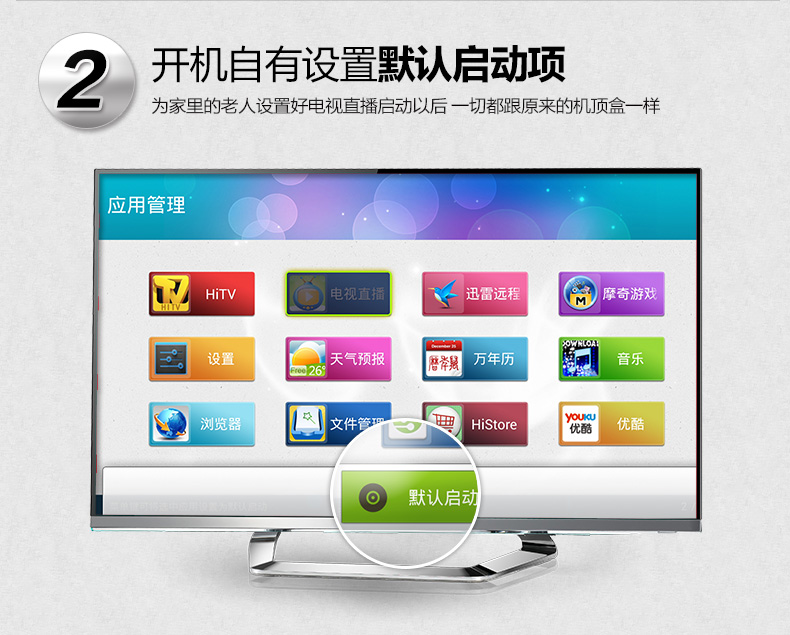 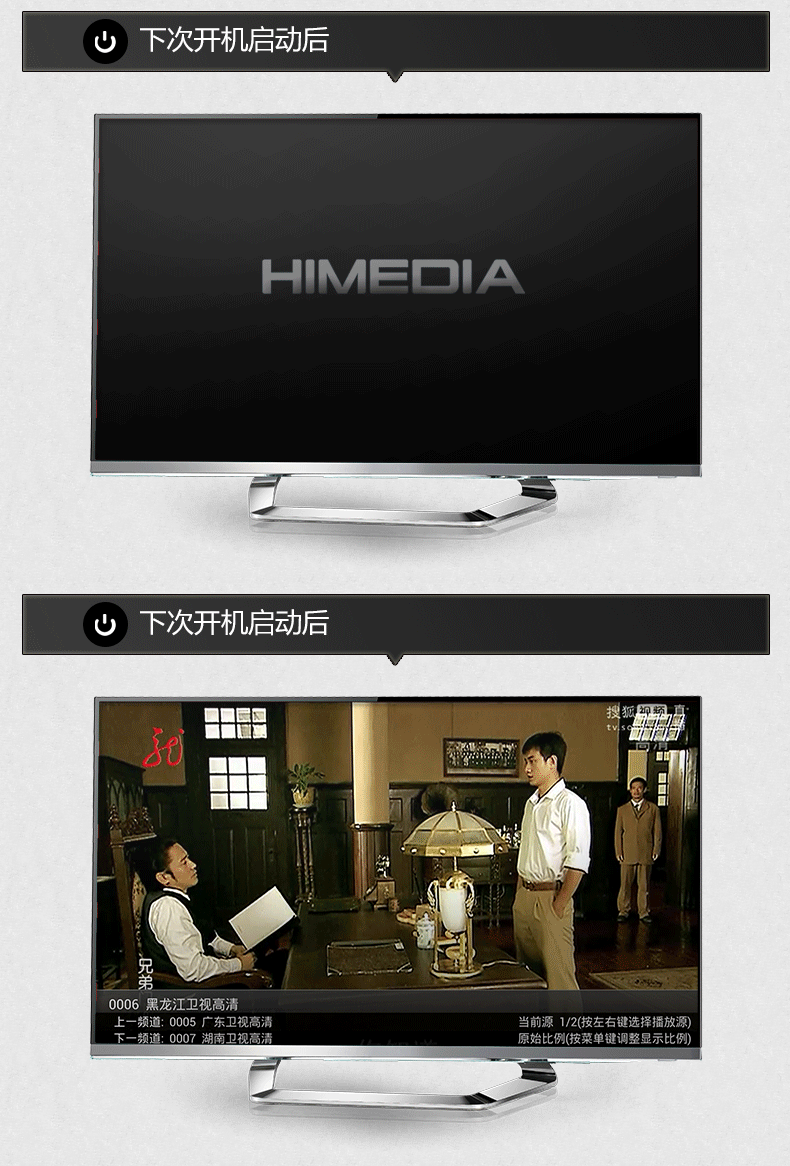 from here. |
|
|
Oct 12 2013, 09:39 AM
Show posts by this member only | IPv6 | Post
#723
|

Junior Member
234 posts Joined: Apr 2010
|
QUOTE(t1231 @ Oct 11 2013, 10:04 AM) Hi, I'm interested in getting either one of Q5II or Q10. I went to read the detailed specs of Q5II and Q10 from taobao.com, I found this feature on Q5II but not from Q10. Can those who own Q5II tell me is the feature useful for old people to have easier access? hmm, it's an interesting and useful feature. any comment from sifus?from here.  |
|
|
Oct 13 2013, 10:36 PM
|

Senior Member
857 posts Joined: Mar 2009 
|
Got XBMC in the Q5 II but the problem is why it cant see the file on my external hard disk? One more,how to install netflix?
|
|
|
Oct 13 2013, 10:39 PM
|
|
Junior Member
375 posts Joined: Mar 2008 From: Selangor
|
QUOTE(shadowblack @ Oct 13 2013, 10:36 PM) Got XBMC in the Q5 II but the problem is why it cant see the file on my external hard disk? One more,how to install netflix? mine also face the same prob.. |
|
|
Oct 13 2013, 10:46 PM
|
|
Senior Member
857 posts Joined: Mar 2009
|
QUOTE(yed @ Oct 13 2013, 10:39 PM) mine also face the same prob.. Yeah,only can play video via the 'Media Center' but it kinda suck because can access file 1 by 1 with only writing on it.No picture and nothing at all like when I use xbmc at home =.= |
|
|
|
|
|
Oct 14 2013, 12:55 AM
|

Junior Member
108 posts Joined: Aug 2011 From: Penang
|
QUOTE(shadowblack @ Oct 13 2013, 10:36 PM) Got XBMC in the Q5 II but the problem is why it cant see the file on my external hard disk? One more,how to install netflix? Bro, please follow the below steps :1). Goto Videos -> Files  2). Add Videos  3). Then Add Video Source, click browse.  4). Select Root filesystem -> mnt -> (sda) or (sdb) depend on your HDD sequence -> (sda1) or (sdb1) 5). You should see the files in your external harddisk. 6). Please do not choose file by file, select the folder contain your videos and click OK button 7). xBMC will auto scan all the movie files in the folder. To be noted you can add more than one than folders in one media source, just click the "Add" button. 8). Enter the name of the media source and click OK to save the media source. 9). Go back one screen, click Video you will see all the video in the folder. Officially Netflix service is not available in Malaysia, you need US VPN to install Netflix from Google Play Store. This post has been edited by nicety: Oct 14 2013, 01:41 AM |
|
|
Oct 14 2013, 02:42 AM
|
|
Senior Member
857 posts Joined: Mar 2009
|
QUOTE(nicety @ Oct 14 2013, 12:55 AM) Bro, please follow the below steps : Waaa,Thanks bro.That really help me A LOT!1). Goto Videos -> Files 2). Add Videos 3). Then Add Video Source, click browse. 4). Select Root filesystem -> mnt -> (sda) or (sdb) depend on your HDD sequence -> (sda1) or (sdb1) 5). You should see the files in your external harddisk. 6). Please do not choose file by file, select the folder contain your videos and click OK button 7). xBMC will auto scan all the movie files in the folder. To be noted you can add more than one than folders in one media source, just click the "Add" button. 8). Enter the name of the media source and click OK to save the media source. 9). Go back one screen, click Video you will see all the video in the folder. Officially Netflix service is not available in Malaysia, you need US VPN to install Netflix from Google Play Store. About Netflix,didnt know about need to use VPN to enter google play store US because usually I use US itunes account |
|
|
Oct 14 2013, 12:18 PM
|

Senior Member
2,451 posts Joined: Jan 2003 From: Darkness to Light 
|
Hi i just bought a HD600A and it is unable to detect my hard disk. The firmware revision seema to be the latest (1.0.9.6?)
Anyone encounter this before and any workaround for this? Thanks |
|
|
Oct 14 2013, 02:40 PM
|

Junior Member
188 posts Joined: Nov 2008
|
is the decoder can be use at old version tv? crt size?
|
|
|
Oct 14 2013, 03:02 PM
|
|
Senior Member
2,429 posts Joined: Jul 2007
|
I'm using Q5II with my CRT...connected using RCA cables. The only issue if the fonts can be very small for certain programs as well as browsing....
QUOTE(jobok @ Oct 14 2013, 02:40 PM) is the decoder can be use at old version tv? crt size? |
|
|
Oct 14 2013, 03:08 PM
|
|
Junior Member
188 posts Joined: Nov 2008
|
QUOTE(jutamind @ Oct 14 2013, 03:02 PM) I'm using Q5II with my CRT...connected using RCA cables. The only issue if the fonts can be very small for certain programs as well as browsing.... is it can watch normal channel as usual? tv1 until tv9? |
|
|
Oct 14 2013, 03:39 PM
|
|
Senior Member
2,429 posts Joined: Jul 2007
|
if you can find an apps/link that can stream msian channel, then should be no problem. or you can go to www.tonton.com.my via browser and watch online.
QUOTE(jobok @ Oct 14 2013, 03:08 PM) is it can watch normal channel as usual? tv1 until tv9? |
|
|
|
|
|
Oct 14 2013, 05:01 PM
|

Junior Member
107 posts Joined: Jun 2013 From: kl.klang. 
|
QUOTE(shadowblack @ Oct 14 2013, 03:42 AM) Waaa,Thanks bro.That really help me A LOT! dont use itunes la bro, so expensive oneAbout Netflix,didnt know about need to use VPN to enter google play store US because usually I use US itunes account get one from me at cheper price one  feel free to refer my siggy |
|
|
Oct 14 2013, 05:09 PM
|
|
Senior Member
857 posts Joined: Mar 2009
|
QUOTE(cikalakacikaci @ Oct 14 2013, 05:01 PM) dont use itunes la bro, so expensive one No la,that time use for trial only.Dont know what to subscribe or not because sometimes only manage to get 480 instead of 720 and 1080 using 4mbps =.=get one from me at cheper price one feel free to refer my siggy |
|
|
Oct 17 2013, 01:43 PM
|

Senior Member
2,084 posts Joined: Jul 2005
|
i m using HD600B with a Seagate 2TB HDD inside.
i been getting this problem for some time now. Some of my movie files will be corrupted. For instance, i can still see the size of a movie file over 4GB but when i player, its only 1min30sec. Its not something tat happen recently but yesteray when i check all my movie file, almost 20 over files was corrupted. i was running FW 1.0.4.21 and just updated to 1.0.7.28 just a few hours ago. i will give this player one last chance. some months back, the player even corrput the whole HDD. i have to plug it out and use a PC to repair it. anyone have issue with the Himedia corrupting movie file or HDD? |
|
|
Oct 17 2013, 04:20 PM
|
|
Junior Member
7 posts Joined: Jan 2007
|
Hi there,
I already bought Q5II and installed XBMC until now facing problem with chopping and jerking picture while playing 720p and 1080p HD file. Any idea what is suitable version of xmbc for solve it. Please help. |
|
|
Oct 17 2013, 04:35 PM
|

Senior Member
4,153 posts Joined: Jan 2003 From: Cheras, KL
|
QUOTE(demio121 @ Oct 17 2013, 01:43 PM) i m using HD600B with a Seagate 2TB HDD inside. The latest custom fw will be 1.0.9.5i been getting this problem for some time now. Some of my movie files will be corrupted. For instance, i can still see the size of a movie file over 4GB but when i player, its only 1min30sec. Its not something tat happen recently but yesteray when i check all my movie file, almost 20 over files was corrupted. i was running FW 1.0.4.21 and just updated to 1.0.7.28 just a few hours ago. i will give this player one last chance. some months back, the player even corrput the whole HDD. i have to plug it out and use a PC to repair it. anyone have issue with the Himedia corrupting movie file or HDD? https://1073-max.googlecode.com/files/install.1.0.9.5.zip Enable the safe shutdown/power off in the setting will protect your hdd. Custom firmware installation guide: 1) Turn off HD600A/B, and remove all HDDs, USB devices and network. 2) Download the firmware, unrar it into the root of USB disk, and rename the HD600_1.0.x.x.img file to install.img. Windows may only show HD600_1.0.x.x without img extension. In that case, please just rename HD600_1.0.x.x to install 3) Remove all storage devices from HD600A/B, connect the USB disk to HD600A/B, press and hold the Restore button in the hole besides the HDMI port, turn on HD600A/B(still hold the Restore button and release it after 5 seconds) and the firmware upgrade screen will shows up. Do NOT remove the USB disk while upgrading. 4)The unit will reboot itself after it shows upgrade finished message This post has been edited by BOTAK_WAI: Oct 17 2013, 04:39 PM |
|
|
Oct 17 2013, 04:38 PM
|
|
Senior Member
4,153 posts Joined: Jan 2003 From: Cheras, KL
|
QUOTE(leadaxer @ Oct 14 2013, 12:18 PM) Hi i just bought a HD600A and it is unable to detect my hard disk. The firmware revision seema to be the latest (1.0.9.6?) Had you tried Custom Firmware?Anyone encounter this before and any workaround for this? Thanks https://1073-max.googlecode.com/files/install.1.0.9.5.zip 1) Turn off HD600A/B, and remove all HDDs, USB devices and network. 2) Download the firmware, unrar it into the root of USB disk, and rename the HD600_1.0.x.x.img file to install.img. Windows may only show HD600_1.0.x.x without img extension. In that case, please just rename HD600_1.0.x.x to install 3) Remove all storage devices from HD600A/B, connect the USB disk to HD600A/B, press and hold the Restore button in the hole besides the HDMI port, turn on HD600A/B(still hold the Restore button and release it after 5 seconds) and the firmware upgrade screen will shows up. Do NOT remove the USB disk while upgrading. 4)The unit will reboot itself after it shows upgrade finished message |
|
|
Oct 17 2013, 05:17 PM
|

Senior Member
1,404 posts Joined: Jul 2006 From: Puchong
|
QUOTE(BOTAK_WAI @ Oct 17 2013, 04:38 PM) Had you tried Custom Firmware? what does this custom fw bring? any screen shot?https://1073-max.googlecode.com/files/install.1.0.9.5.zip 1) Turn off HD600A/B, and remove all HDDs, USB devices and network. 2) Download the firmware, unrar it into the root of USB disk, and rename the HD600_1.0.x.x.img file to install.img. Windows may only show HD600_1.0.x.x without img extension. In that case, please just rename HD600_1.0.x.x to install 3) Remove all storage devices from HD600A/B, connect the USB disk to HD600A/B, press and hold the Restore button in the hole besides the HDMI port, turn on HD600A/B(still hold the Restore button and release it after 5 seconds) and the firmware upgrade screen will shows up. Do NOT remove the USB disk while upgrading. 4)The unit will reboot itself after it shows upgrade finished message |
|
Topic ClosedOptions
|
| Change to: |  0.0239sec 0.0239sec
 0.70 0.70
 6 queries 6 queries
 GZIP Disabled GZIP Disabled
Time is now: 8th December 2025 - 01:15 AM |
 Quote
Quote