

QUOTE(Scissorshand @ Apr 5 2017, 07:29 PM)
Will be ordering from Nicety pretty soon or it is cheaper from Lazada?

Well...your know that one...Plumberly answered the question you're really after...
HiMedia Media Player, All about HiMedia
|
|
 Apr 5 2017, 08:20 PM Apr 5 2017, 08:20 PM
|
 
Senior Member
6,230 posts Joined: Jun 2006  
|
QUOTE(Scissorshand @ Apr 5 2017, 07:29 PM) Will be ordering from Nicety pretty soon or it is cheaper from Lazada? Well...your know that one...Plumberly answered the question you're really after... |
|
|
|
|
|
Apr 5 2017, 08:29 PM
Show posts by this member only | IPv6 | Post
#2262
|

Senior Member
1,787 posts Joined: Jul 2007
|
QUOTE(Scissorshand @ Apr 5 2017, 07:29 PM) Will be ordering from Nicety pretty soon or it is cheaper from Lazada? Lol... I vote for Nicety if you are buying tis model |
|
|
Apr 5 2017, 11:13 PM
Show posts by this member only | IPv6 | Post
#2263
|
|
Senior Member
858 posts Joined: Jan 2003
|
Just sharing!
My Himedia H8+ doesn't come with remote apps. So after a lot of testing. I found a 100% compatible app that worked with Himedia platform and all the apps. Inclusive KODI. For those that are interested. It's a freeware. There are 2 apk files you need to install. One install to the Android TV BOX (tv client), another to your smart devices. Cheers! |
|
|
Apr 5 2017, 11:29 PM
|
|
Senior Member
3,936 posts Joined: Dec 2010
|
100% recommended. I buy from him too.
QUOTE(plumberly @ Apr 5 2017, 08:09 PM) I bought my Himedia from Nicety more than a year ago. I recommend either Q5 Pro or Q10 Pro. Even IF you can find one at a slightly cheaper price than Nicety's, I strongly recommend that you get it from Nicety. His after sales service is second to none! You will need help from sifu like Nicety if you are new to TV Box. Even if you are an IT guru, Android TV box is a different fish. He keeps the latest apps, add-ons, firmwares etc for his customers. That is a great help for me. Many of Nicety's customers have provided positive feedback on his after sales service in this forum. You will not regret it if you get it from him. Enjoy your new TV box! QUOTE(dwRK @ Apr 5 2017, 08:20 PM) Well...your know that one... Plumberly answered the question you're really after... QUOTE(GuyM @ Apr 5 2017, 08:29 PM) Lol... I vote for Nicety if you are buying tis model |
|
|
Apr 5 2017, 11:35 PM
|
|
Senior Member
6,230 posts Joined: Jun 2006
|
QUOTE(OCMAX @ Apr 5 2017, 11:13 PM) Just sharing! I guess this for the Rockchip models...the Hisilicon models have HiControl...My Himedia H8+ doesn't come with remote apps. So after a lot of testing. I found a 100% compatible app that worked with Himedia platform and all the apps. Inclusive KODI. For those that are interested. It's a freeware. There are 2 apk files you need to install. One install to the Android TV BOX (tv client), another to your smart devices. Cheers! You can also try Teamviewer...this you can control your box even when you're roaming overseas...or check what your kids / parents are watching...  just no volume control.... just no volume control....This post has been edited by dwRK: Apr 5 2017, 11:38 PM |
|
|
Apr 5 2017, 11:52 PM
Show posts by this member only | IPv6 | Post
#2266
|
|
Senior Member
858 posts Joined: Jan 2003
|
QUOTE(dwRK @ Apr 5 2017, 11:35 PM) I guess this for the Rockchip models...the Hisilicon models have HiControl... Both my kids are in college d. LOL You can also try Teamviewer...this you can control your box even when you're roaming overseas...or check what your kids / parents are watching... just no volume control.... but teamviewer is good to transfer some files over the box.  This post has been edited by OCMAX: Apr 6 2017, 12:14 AM |
|
|
|
|
|
Apr 5 2017, 11:57 PM
|
|
Senior Member
6,230 posts Joined: Jun 2006
|
QUOTE(OCMAX @ Apr 5 2017, 11:52 PM) Both my kids has are in college d. LOL but teamviewer is good to transfer some files over the box.  |
|
|
Apr 12 2017, 07:27 PM
|
|
Senior Member
1,787 posts Joined: Jul 2007
|
Apparently this will work on Android 5 above, configure at Android box for those with Geo block to China
Anyone willing to try out? https://bbs.uku.im/t/ios-android-firefox-unblock-youku/27 Attached thumbnail(s) 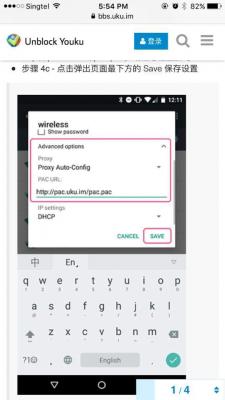
|
|
|
Apr 18 2017, 11:09 AM
|

Senior Member
1,129 posts Joined: Jan 2003
|
hi all hi media users, can verify is the following true? quote from avforums
"There are some almost inevitable compromises, most notably the occasional loss of synch with 23.976 frames per second content – which accounts for most movies and blockbuster TV series – and the ‘wrapper’ solution for KODI isn’t ideal" https://www.avforums.com/review/himedia-q10...er-review.12668 HiMedia Q10 Pro review |
|
|
Apr 18 2017, 11:21 AM
Show posts by this member only | IPv6 | Post
#2270
|
|
Senior Member
858 posts Joined: Jan 2003
|
QUOTE(Hou_JaI @ Apr 18 2017, 11:09 AM) hi all hi media users, can verify is the following true? quote from avforums I'm using a lower end unit Himedia H8 Plus and updated to new firmware. I don't see is there any noticeable the occasional loss of synch. Even playing a 4K 60fps 5.1ch vid. Is very smooth. I believed Q5pro does better. "There are some almost inevitable compromises, most notably the occasional loss of synch with 23.976 frames per second content – which accounts for most movies and blockbuster TV series – and the ‘wrapper’ solution for KODI isn’t ideal" https://www.avforums.com/review/himedia-q10...er-review.12668 HiMedia Q10 Pro review |
|
|
Apr 18 2017, 11:26 AM
|
|
Senior Member
1,129 posts Joined: Jan 2003
|
QUOTE(OCMAX @ Apr 18 2017, 11:21 AM) I'm using a lower end unit Himedia H8 Plus and updated to new firmware. I don't see is there any noticeable the occasional loss of synch. Even playing a 4K 60fps 5.1ch vid. Is very smooth. I believed Q5pro does better. hmmm from this web site, http://streaming-media-players.specout.com...Himedia-Q10-Proit seems like q5pro doesn't support a lot of video format, or its not really a concerns, i.e. q5pro can play most of the COMMON video formats |
|
|
Apr 18 2017, 11:32 AM
|

Senior Member
7,120 posts Joined: Oct 2011 From: Wakanda
|
QUOTE(Hou_JaI @ Apr 18 2017, 11:26 AM) hmmm from this web site, http://streaming-media-players.specout.com...Himedia-Q10-Pro You might want to wait and listen to reviews from actual daily users of the device you are interested in, VS some review that was probably written back when the device was introduced. Take the AVF review of the HiMedia Q10 Pro, its was reviewed back in Jun 18, 2016. Since then till now, I believe the device must have received a firmware update or 2, which squashed a few bugs and improved performance. That's the beauty of spending more in the beginning to buy such brands.. As they attempt to fix things along the way..it seems like q5pro doesn't support a lot of video format, or its not really a concerns, i.e. q5pro can play most of the COMMON video formats This post has been edited by voncrane: Apr 18 2017, 11:32 AM |
|
|
Apr 18 2017, 11:33 AM
Show posts by this member only | IPv6 | Post
#2273
|
|
Senior Member
858 posts Joined: Jan 2003
|
QUOTE(Hou_JaI @ Apr 18 2017, 11:26 AM) hmmm from this web site, http://streaming-media-players.specout.com...Himedia-Q10-Pro Maybe the native player but mine has no problem but you can also use MX Player/KODI to play movies which can handle most of the format.it seems like q5pro doesn't support a lot of video format, or its not really a concerns, i.e. q5pro can play most of the COMMON video formats |
|
|
|
|
|
Apr 18 2017, 11:36 AM
Show posts by this member only | IPv6 | Post
#2274
|
|
Senior Member
858 posts Joined: Jan 2003
|
QUOTE(voncrane @ Apr 18 2017, 11:32 AM) You might want to wait and listen to reviews from actual daily users of the device you are interested in, VS some review that was probably written back when the device was introduced. Take the AVF review of the HiMedia Q10 Pro, its was reviewed back in Jun 18, 2016. Since then till now, I believe the device must have received a firmware update or 2, which squashed a few bugs and improved performance. That's the beauty of spending more in the beginning to buy such brands.. As they attempt to fix things along the way.. +1 like my Hmedia H8+. the native player missed out some feature and playing 4K 60fps movie not smooth but after firmware update. Is all fine now. |
|
|
Apr 18 2017, 11:52 AM
|
|
Junior Member
43 posts Joined: Jan 2010
|
anyone have Nicety contact?
|
|
|
Apr 18 2017, 02:43 PM
|

All Stars
24,454 posts Joined: Nov 2010
|
QUOTE(KIT39 @ Apr 18 2017, 11:52 AM) anyone have Nicety contact? https://forum.lowyat.net/topic/2807510/+560#bottom |
|
|
Apr 18 2017, 03:10 PM
|
|
All Stars
24,454 posts Joined: Nov 2010
|
QUOTE(Hou_JaI @ Apr 18 2017, 11:09 AM) hi all hi media users, can verify is the following true? quote from avforums i am quite sure u do not know what is meant by that bolded sentence. "There are some almost inevitable compromises, most notably the occasional loss of synch with 23.976 frames per second content – which accounts for most movies and blockbuster TV series – and the ‘wrapper’ solution for KODI isn’t ideal" https://www.avforums.com/review/himedia-q10...er-review.12668 HiMedia Q10 Pro review that sentence refers to playback with KODI player, as in the app KODI. that, is the heartache of many boxes using kodi - pls read kodi thread. becos many people like to playback their hdd collections with KODI player - for kodi's artwork. some like playback with other players like MX or VLC. take note some boxes do not come with native player, i.e. a player where u play direct clean and simple, no need another app player. himedia used to be a pure media player co., every box they make comes with their own himedia player. Q5/Q10 pro native player is a powerful one, with imprex engine2, can do extras like HDR, dolby vision, DTSX, online subtitle download, picture quality parameters adjustment/tuning - not found in most other players. so, that sentence refers to playback with kodi app as it is. the last bit about wrapper means if u insist on playing back with kodi player, himedia's solution is to use the wrapper, an app which "wraps" the stream from kodi, bypass it and play thru the native player. this wrapper, for now, works fine if u playback with kodi but does not work with regular kodi online streaming, something that needs to be fixed by a new firmware, not done yet. i do not like local playback with kodi, prefer playback direct with native player. have used q10pro for 3 months now, have hv not seen a single file in my collection that does not play correctly. i do not know what files u have in yr collection, but i have banyak terabytes  ... all sorts... incl 50, 66gb, 4k, hevc, 10bit, mkv, m2ts, iso, whatever... ... all sorts... incl 50, 66gb, 4k, hevc, 10bit, mkv, m2ts, iso, whatever...QUOTE(Hou_JaI @ Apr 18 2017, 11:26 AM) hmmm from this web site, http://streaming-media-players.specout.com...Himedia-Q10-Pro afaik, the native player in q5pro is the same with q10pro.it seems like q5pro doesn't support a lot of video format, or its not really a concerns, i.e. q5pro can play most of the COMMON video formats there are 2 diff between the two - q5pro is 2/8gb while q10pro is 2/16gb; q10pro has a compartment to slot in an internal HDD while q5pro does not. as far as USB playback with ext HDD is concerned, there should be no diff at all. if u decide to buy one of these, i suggest to confirm with seller about the latest firmwares. the current q10pro firmware is 2.0.1 (there is a very new 2.0.3 which i hv not tested yet). q5pro, i don't know. This post has been edited by AVFAN: Apr 18 2017, 03:20 PM |
|
|
Apr 18 2017, 03:29 PM
|
|
Junior Member
145 posts Joined: Feb 2007
|
QUOTE(AVFAN @ Apr 18 2017, 03:10 PM) i do not know what files u have in yr collection, but i have banyak terabytes ... all sorts... incl 50, 66gb, 4k, hevc, 10bit, mkv, m2ts, iso, whatever... |
|
|
Apr 18 2017, 03:43 PM
|
|
All Stars
24,454 posts Joined: Nov 2010
|
QUOTE(Mali @ Apr 18 2017, 03:29 PM) how about steam from PC or NAS? i do not know what "nas" u have but i can say:.. to stream over wifi from windows file sharing to box is easy and simple with SMB, a feature found in a native app called "media center". this, i can stream up to 1080p dd/dts or 4k/aac only becos my router is a poor one. i am quite sure with a better router, can do 4k/dtshdma, etc. .. i have known a couple of cases where users of q10pro had problems doing nas when using a 3rd party app or kodi but no problem when they use the native media center. This post has been edited by AVFAN: Apr 18 2017, 03:46 PM |
|
|
Apr 18 2017, 03:47 PM
Show posts by this member only | IPv6 | Post
#2280
|
|
Senior Member
858 posts Joined: Jan 2003
|
QUOTE(Mali @ Apr 18 2017, 03:29 PM) how about steam from PC or NAS? QUOTE(AVFAN @ Apr 18 2017, 03:43 PM) i do not know what "nas" u have but i can say: I used my 2TB airport time capsule to stream 4k 5.1DTS vid wtihin the house using 5ghz wifi. no problem! the transfer speed is about 10mb. .. to stream over wifi from windows file sharing to box is easy and simple with SMB, a feature found in an native app called "media player". this, i can stream up to 1080p dd/dts only becos my router is a poor one. i am quite sure with a better router, can do 4k, dtshdma, etc. .. i have known a couple of cases where users of q10pro had problems doing nas when using 3rd party apps or kodi but no problem when they use the native media center. This post has been edited by OCMAX: Apr 18 2017, 04:56 PM |
|
Topic ClosedOptions
|
| Change to: |  0.0163sec 0.0163sec
 0.59 0.59
 6 queries 6 queries
 GZIP Disabled GZIP Disabled
Time is now: 8th December 2025 - 01:33 AM |
 Quote
Quote