Welcome Guest ( Log In | Register )

Bump Topic Topic Closed RSS Feed
126 Pages « < 82 83 84 85 86 > » Bottom

Outline · [ Standard ] · Linear+

 HP Pavillion DV6-6XXX series Owners Lounge, ~thou shall read 1st post or get troll.

views
     
blue16
post May 28 2011, 09:23 AM

Metal Box-Blue16
****
Senior Member
618 posts

Joined: Dec 2006
From: Metal Box Enterprise JB
[quote=Acid_RuleZz,May 28 2011, 04:18 AM]
Lol... you need to enter Bios and disable the "Action" key.
Yup, if your window partition running out of space it will slow down the whole system. But my fren only have 1.6GB left in his Windows partition but it didn't slow down so much like yours. sweat.gif


[quote=ThisIsBoletaria,May 28 2011, 07:55 AM]
Switching Off HP Action Keys

Action Keys is HP code for "let's take a standard keyboard layout and make the keys do things that people don't expect them to do". In the context of the dv6, this means that pressing F2 will cause the screen brightness to go down instead of, you know, triggering whatever command F2 is supposed to trigger normally, like Rename File. The dv6 has this enabled out of the box, and it can be very confusing. I don't know how many people actually like it, but I'm certainly not one of them, which is why I turned it off.

This is how I did it:
1) Reboot computer. Keep pressing the Escape button as the screen turns on. This will lead you to a screen with a few text options that look something like this:

CODE
F6 - Boot Device Select
F8 - Advanced Startup
F10 - BIOS Setup
F11 - Recovery
...
etc.


I can't remember what the options are, so pick the one that leads to BIOS setup or similar.

2) Look for the option called Action Keys. It should be under either Advanced or Miscellaneous.

3) Set it to "Off" or "Disabled". If the option is called "Disable Action Keys", then obviously set it to "On" or "Enabled". The point is you want to turn Action Keys off; PMR level English will help you greatly here.

4) Go to the last screen of the BIOS menu and select "Exit and Save Changes". When prompted, choose "Yes". This will save the changes to your BIOS and reboot your computer.

And that's it: your function keys will now be accessible without pressing the Fn button, and the special functions are accessible by pressing Fn+F<whatever>. As it should be.
It may interest you to know that my hard drive (also the Samsung one) also suffered a huge slowdown out of stock whenever I tried to copy a lot of files from my external HDD to my internal HDD. Windows slowed down, everything slowed down. It was insane, but it sped back up as soon as the file copy was done. So, check these things first:

1) Are there any big files copying/downloading/torrenting? If there are, try stopping it first and see if your system speeds up.

2) Try defragging the hard drive. I use Auslogics Disk Defrag because it's bloody billions of times faster than the built-in Windows defragger. A fragmented hard drive (one where lots of files have pieces everywhere instead of being ordered in one sequential line) will always suffer slowdowns as the hard drive head will have to go everywhere instead of just following a simple line whenever it's reading or writing files.

3) Run Scandisk. Open Windows Explorer/My Computer, right click on your hard drive, Properties -> Tools, Error-checking, Check now. This will scan your hard drive for serious problems. Pray that it doesn't find any because it would mean your hard drive has serious problems that cannot be fixed.

Anyway, because I screwed up my initial setup, I ended up recovering to factory settings using the recovery disks. After redoing my setup properly, there was no huge slowdown when copying stuff. Consider doing this; it takes a long time (about 3 hours minimum to recover if you deleted the recovery partition like I did), but it seemed to fix the issue.
*

[/quote]


thanks for telling man laugh.gif


Added on May 28, 2011, 9:25 am[quote=clfoong,May 28 2011, 07:57 AM]
Got ur dv6 oredi?
*

[/quote]


yea bro
nice lappy =]

This post has been edited by blue16: May 28 2011, 09:25 AM
TSAcid_RuleZz
post May 28 2011, 11:00 AM

ミウ ❤
*******
Senior Member
6,612 posts

Joined: Jan 2003
From: Tomorrow


QUOTE(imationyj @ May 28 2011, 09:21 AM)
how do u update it? which to download? i download but it says my graphic card is not the right one... can provide me wif the link?  notworthy.gif
*
I simply download the Catalyst Control Center [79.7 MB] from Amd website and update/install the driver. sweat.gif

Did you switched to the Radeon card before updating it?

Link : Catalyst Control Center 11.5
imationyj
post May 28 2011, 11:10 AM

Casual
***
Junior Member
494 posts

Joined: Apr 2010
QUOTE(Acid_RuleZz @ May 28 2011, 11:00 AM)
I simply download the Catalyst Control Center [79.7 MB] from Amd website and update/install the driver.  sweat.gif

Did you switched to the Radeon card before updating it?

Link : Catalyst Control Center 11.5
*
im in radeon card in default.. now downloading
Bboy4Life
post May 28 2011, 11:17 AM

~My Style, My Flava~
******
Senior Member
1,855 posts

Joined: May 2011
From: Cat City
QUOTE(jammerlee711 @ May 28 2011, 04:02 AM)
6001 or 6114??
*
6001 smile.gif
imationyj
post May 28 2011, 12:15 PM

Casual
***
Junior Member
494 posts

Joined: Apr 2010
i click the update driver in catalyst control centre and choose the specs then it shows me this website http://support.amd.com/us/gpudownload/wind...ob_win7-64.aspx
i downloaded it but it says i don have the right gpu


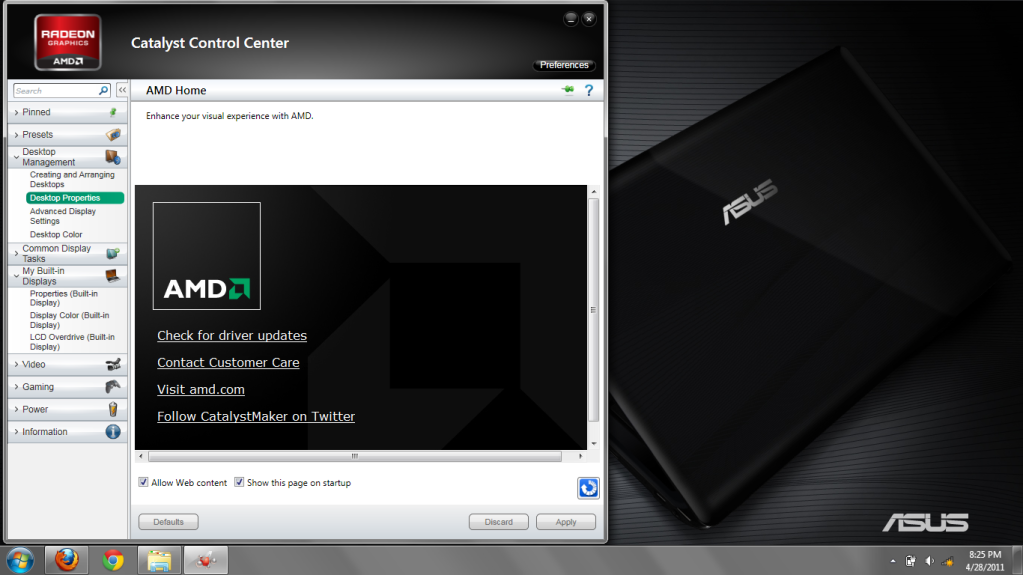
Added on May 28, 2011, 12:21 pmwhy i don have the option under the desktop management like the picture?user posted image
i jz have the advanced display settings option only... hmm.gif i have already chg to advanced view d

This post has been edited by imationyj: May 28 2011, 12:21 PM


Attached thumbnail(s)
Attached Image
dingding
post May 28 2011, 01:44 PM

Getting Started
**
Junior Member
248 posts

Joined: Oct 2005


QUOTE(imationyj @ May 28 2011, 12:15 PM)
i click  the update driver in catalyst control centre and choose the specs then it shows me this website http://support.amd.com/us/gpudownload/wind...ob_win7-64.aspx
i downloaded it but it says i don have the right gpu


Added on May 28, 2011, 12:21 pmwhy i don have the option under the desktop management like the picture?user posted image
i jz have the advanced display settings option only... hmm.gif  i have already chg to advanced view d
*
I tried and got the same thing as you...
TSAcid_RuleZz
post May 28 2011, 01:47 PM

ミウ ❤
*******
Senior Member
6,612 posts

Joined: Jan 2003
From: Tomorrow


QUOTE(imationyj @ May 28 2011, 12:15 PM)
i click  the update driver in catalyst control centre and choose the specs then it shows me this website http://support.amd.com/us/gpudownload/wind...ob_win7-64.aspx
i downloaded it but it says i don have the right gpu
*
what the.. doh.gif

i'm don't know why.. already updated your windows?

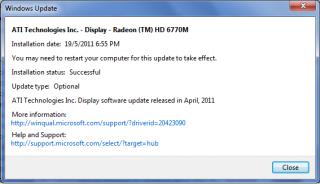
do you have this installed?

Attached Image

check your Window Update history.
alien66
post May 28 2011, 02:02 PM

New Member
*
Newbie
0 posts

Joined: Apr 2011
i am prefer alienware product. now i have m17x r3 with 2gb ati 6970. before this using m15x.
if you want the high end notebook especially for gaming, quality build, display and sound better take alienware. worth for your money. now have m14x r3.
TSAcid_RuleZz
post May 28 2011, 02:06 PM

ミウ ❤
*******
Senior Member
6,612 posts

Joined: Jan 2003
From: Tomorrow


QUOTE(alien66 @ May 28 2011, 02:02 PM)
i am prefer alienware product. now i have m17x r3 with 2gb ati 6970. before this using m15x.
if you want the high end notebook especially for gaming, quality build, display and sound better take alienware. worth for your money. now have m14x r3.
*
how much is mx14x r3 and how much u spent for that mx17x r3?
ashwin1234
post May 28 2011, 02:06 PM

║█║▌║█║▌│║▌║▌█║
*****
Senior Member
779 posts

Joined: Dec 2010
From: Everywhere


QUOTE(alien66 @ May 28 2011, 02:02 PM)
i am prefer alienware product. now i have m17x r3 with 2gb ati 6970. before this using m15x.
if you want the high end notebook especially for gaming, quality build, display and sound better take alienware. worth for your money. now have m14x r3.
*
m14x R3? Really? This is the first 14'' laptop they have produced. Get your facts straight.

The m17x r3 isn't meant for gaming, the m17x r2 is. Infact, the 15x is nearly as powerful as the 17x r3
dingding
post May 28 2011, 02:10 PM

Getting Started
**
Junior Member
248 posts

Joined: Oct 2005


QUOTE(Acid_RuleZz @ May 28 2011, 01:47 PM)
what the..  doh.gif

i'm don't know why.. already updated your windows?

do you have this installed?

Attached Image

check your Window Update history.
*
Yes. I have that windows update installed. What does that signify?
TSAcid_RuleZz
post May 28 2011, 02:15 PM

ミウ ❤
*******
Senior Member
6,612 posts

Joined: Jan 2003
From: Tomorrow


QUOTE(dingding @ May 28 2011, 02:10 PM)
Yes. I have that windows update installed. What does that signify?
*
because early on i get the same the version of your graphic adapter is not supported, but somehow after that i can install the CCC from AMD website.

you guys use the 79.7MB CCC installer right? not the 1MB.
dingding
post May 28 2011, 02:18 PM

Getting Started
**
Junior Member
248 posts

Joined: Oct 2005


Oh sorry.. I tried the 1MB thing. Now trying the 70+MB thingy...

This post has been edited by dingding: May 28 2011, 02:22 PM
TSAcid_RuleZz
post May 28 2011, 02:30 PM

ミウ ❤
*******
Senior Member
6,612 posts

Joined: Jan 2003
From: Tomorrow


QUOTE(dingding @ May 28 2011, 02:18 PM)
Yep. the 70MB + thingy. So we install that? I'm downloading that now..
*
Anyway what u guys installing is just Catalyst Control Center... not the graphic driver itself. hmm.gif

If there is no problem with ur current driver i suggest not to install 11.5.. ntg much changed.
dingding
post May 28 2011, 02:40 PM

Getting Started
**
Junior Member
248 posts

Joined: Oct 2005


I got 2 BSODs in these 2 weeks of using this laptop...
Both happened minutes after windows telling me that "Display driver stopped responding and has recovered"

Anyone faced this before? Dont know what's the cause..

So thought of maybe updating it to see if it helps..

This post has been edited by dingding: May 28 2011, 02:41 PM
imationyj
post May 28 2011, 02:47 PM

Casual
***
Junior Member
494 posts

Joined: Apr 2010
QUOTE(dingding @ May 28 2011, 02:10 PM)
Yes. I have that windows update installed. What does that signify?
*
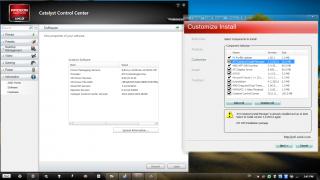
i have this only doh.gif


Attached thumbnail(s)
Attached Image
SomaCruz89
post May 28 2011, 02:57 PM

Getting Started
**
Junior Member
289 posts

Joined: Feb 2009


QUOTE(ThisIsBoletaria @ May 28 2011, 07:55 AM)
Switching Off HP Action Keys

Action Keys is HP code for "let's take a standard keyboard layout and make the keys do things that people don't expect them to do".  In the context of the dv6, this means that pressing F2 will cause the screen brightness to go down instead of, you know, triggering whatever command F2 is supposed to trigger normally, like Rename File.  The dv6 has this enabled out of the box, and it can be very confusing.  I don't know how many people actually like it, but I'm certainly not one of them, which is why I turned it off.

This is how I did it:
1) Reboot computer.  Keep pressing the Escape button as the screen turns on.  This will lead you to a screen with a few text options that look something like this:

CODE
F6 - Boot Device Select
F8 - Advanced Startup
F10 - BIOS Setup
F11 - Recovery
...
etc.


I can't remember what the options are, so pick the one that leads to BIOS setup or similar.

2) Look for the option called Action Keys.  It should be under either Advanced or Miscellaneous.

3) Set it to "Off" or "Disabled".  If the option is called "Disable Action Keys", then obviously set it to "On" or "Enabled".  The point is you want to turn Action Keys off; PMR level English will help you greatly here.

4) Go to the last screen of the BIOS menu and select "Exit and Save Changes".  When prompted, choose "Yes".  This will save the changes to your BIOS and reboot your computer.

And that's it: your function keys will now be accessible without pressing the Fn button, and the special functions are accessible by pressing Fn+F<whatever>.  As it should be.
It may interest you to know that my hard drive (also the Samsung one) also suffered a huge slowdown out of stock whenever I tried to copy a lot of files from my external HDD to my internal HDD.  Windows slowed down, everything slowed down.  It was insane, but it sped back up as soon as the file copy was done.  So, check these things first:

1) Are there any big files copying/downloading/torrenting?  If there are, try stopping it first and see if your system speeds up.

2) Try defragging the hard drive.  I use Auslogics Disk Defrag because it's bloody billions of times faster than the built-in Windows defragger.  A fragmented hard drive (one where lots of files have pieces everywhere instead of being ordered in one sequential line) will always suffer slowdowns as the hard drive head will have to go everywhere instead of just following a simple line whenever it's reading or writing files.

3) Run Scandisk.  Open Windows Explorer/My Computer, right click on your hard drive, Properties -> Tools, Error-checking, Check now.  This will scan your hard drive for serious problems.  Pray that it doesn't find any because it would mean your hard drive has serious problems that cannot be fixed.

Anyway, because I screwed up my initial setup, I ended up recovering to factory settings using the recovery disks.  After redoing my setup properly, there was no huge slowdown when copying stuff.  Consider doing this; it takes a long time (about 3 hours minimum to recover if you deleted the recovery partition like I did), but it seemed to fix the issue.
*
Ermm correction mine hard drive is Toshiba. Yeah when i copying stuffs from one drive to another, everything slow down. Anyone experience this in their dv6? Try copy some big files from one drive to another, then run a game and see is there any slow down or lag during the game.

TSAcid_RuleZz
post May 28 2011, 03:05 PM

ミウ ❤
*******
Senior Member
6,612 posts

Joined: Jan 2003
From: Tomorrow


Anyway there is a hotfix for Catalyst 11.5 and i just installed it. It bring improved performance for Brinks and Dirt 3.
I think it also installed the latest graphic driver instead of using the old 1 from HP. hmm.gif

Install it if you feel adventurous or wait for HP to officially release it. =x
Changelog : AMD Catalyst™ 11.5b hotfix
Download Link : AMD Catalyst 11.5b Hotfix for Windows® 7

Before : Driver Packaging - 8.83.6 | CCC - 2011.0419
Attached Image

After : Driver Packaging - 8.85.6 | CCC - 2011.0525
Attached Image

I haven't test it tho... and i still have switchable graphic option.

QUOTE(dingding @ May 28 2011, 02:40 PM)
I got 2 BSODs in these 2 weeks of using this laptop...
Both happened minutes after windows telling me that "Display driver stopped responding and has recovered"

Anyone faced this before? Dont know what's the cause..

So thought of maybe updating it to see if it helps..
*
Oh.. i get that prompt few times also when i'm playing Shift 2 and benchmarking with 3DMarkVantage while overclocking. But i didn't get any BSOD yet. What is the temperatures at that time?

QUOTE(imationyj @ May 28 2011, 02:47 PM)
i have this only  doh.gif
*
Aiks? doh.gif


ThisIsBoletaria
post May 28 2011, 03:06 PM

Getting Started
**
Junior Member
108 posts

Joined: Jan 2010
From: Jemapoh To Manchestee
QUOTE(Acid_RuleZz @ May 28 2011, 02:15 PM)
because early on i get the same the version of your graphic adapter is not supported, but somehow after that i can install the CCC from AMD website.

you guys use the 79.7MB CCC installer right? not the 1MB.
*
Looks like a guide is necessary for this Acid.


QUOTE(SomaCruz89 @ May 28 2011, 02:57 PM)
Ermm correction mine hard drive is Toshiba. Yeah when i copying stuffs from one drive to another, everything slow down. Anyone experience this in their dv6? Try copy some big files from one drive to another, then run a game and see is there any slow down or lag during the game.
*
Like I said, I experienced the same thing when I first got my dv6. Try defragging your hard drive, and if that doesn't help, then try restoring your system to factory settings. It could simply be that something you installed messed up a default program or something.

This post has been edited by ThisIsBoletaria: May 28 2011, 03:12 PM
TSAcid_RuleZz
post May 28 2011, 03:18 PM

ミウ ❤
*******
Senior Member
6,612 posts

Joined: Jan 2003
From: Tomorrow


QUOTE(SomaCruz89 @ May 28 2011, 02:57 PM)
Ermm correction mine hard drive is Toshiba. Yeah when i copying stuffs from one drive to another, everything slow down. Anyone experience this in their dv6? Try copy some big files from one drive to another, then run a game and see is there any slow down or lag during the game.
*
Can i try using pendrive instead? I don't have an external HDD. sweat.gif
Do you experienced the same thing with pendrive?

QUOTE(ThisIsBoletaria @ May 28 2011, 03:06 PM)
Looks like a guide is necessary for this Acid.
*
sweat.gif sweat.gif

U can install the driver from AMD website? Or you get the same prompt like them too?

126 Pages « < 82 83 84 85 86 > » Top
Topic ClosedOptions
 

Change to:
| Lo-Fi Version
0.0206sec    0.61    6 queries    GZIP Disabled
Time is now: 2nd December 2025 - 10:34 AM