Outline ·
[ Standard ] ·
Linear+
♠ Samsung Galaxy Ace S5830 ♠ Official Thread V2, mid range phone ,released date feb 2011
|
danielcmugen
|
 Jul 3 2011, 03:49 PM Jul 3 2011, 03:49 PM
|

|
QUOTE(mnsnazri @ Jul 3 2011, 01:01 AM) you are welcome bro...about that game...do you got the game from your friends or you take it from market?..if you got from your friends..i usually put in my sdcard and using Astro manager or using My Files to install apk...but if it about to transfer the files..usually using Kies This link Nemes!S gave: http://www.filesonic.com/file/721552184/NE...HIFT_v1.0.4.apkHow to transfer this using kies? This post has been edited by danielcmugen: Jul 3 2011, 03:52 PM |
|
|
|
|
|
danielcmugen
|
Jul 3 2011, 11:14 PM
|
|
|
QUOTE(mnsnazri @ Jul 3 2011, 05:15 PM) actually using a Kies..you have to click the button view in explorer...after that it gonna show the content that you have in sdcard...view in explorer its mean it gonna view your sdcard...so just transfer the apk file inside that sd card...after that using ASTRO apps to install it..or maybe you can open it from My Files icon Just installed in my sd card but i dont know how to use ASTRO file manager. I tried pressing 'Up' and press sd card and then when i click on the game it says file type ink not found. So how? |
|
|
|
|
|
danielcmugen
|
Jul 3 2011, 11:42 PM
|
|
|
QUOTE(mnsnazri @ Jul 3 2011, 11:34 PM) do you found icon My Files??...try using that.. You mean my files in ASTRO? I couldnt find it, but sd card seems same as my files...  So how? |
|
|
|
|
|
danielcmugen
|
Jul 3 2011, 11:56 PM
|
|
|
QUOTE(mnsnazri @ Jul 3 2011, 11:48 PM) Actually you can install it but you can't play this game...i don't know why...maybe the version of OS...anyway don't try to install when your SGA is connected with pc or laptop...your SGA can't see it...install it after you disconnected your pc or laptop with your phone. you also can used My Files to install it My Files is a icon...you can find it because it's already install in that SGA So means most likely i cant play this game?  When i tried to install that time already disconnect with pc. How to install using My Files? Sorry im still quite new with android......i hope theres still hope in installing this |
|
|
|
|
|
danielcmugen
|
Jul 4 2011, 12:24 AM
|
|
|
QUOTE(mnsnazri @ Jul 4 2011, 12:08 AM) okay...when you click My Files..it's gonna open straight to your sd card..just follow the picture i give below Well, yours seem pretty different from mine  Well, sorry for another noob question......after i installed this into pc, i right click-copy-paste into my sd card.....is it right? Because i saw in your sd card list your file has this sort of like android logo on it and mine is like a piece of blank white paper  So did the method i used to copy this game into sd card correct? |
|
|
|
|
|
danielcmugen
|
Jul 4 2011, 12:43 AM
|
|
|
QUOTE(mnsnazri @ Jul 4 2011, 12:31 AM) when you SGA connected to pc..your sdcard gonna be blank...you can see anything...but you still can send the files to your sdcard...after that..disconnected your SGA from pc...after disconnected..your SGA can read the files inside your sdcard...you gonna see your NSF Shift apk files was there I did what you said, but the same thing still happened. Im gonna try redownload this game again and see if it works.....
Added on July 4, 2011, 1:01 amQUOTE(danielcmugen @ Jul 4 2011, 12:43 AM) I did what you said, but the same thing still happened. Im gonna try redownload this game again and see if it works..... Still cant work......when i try to open the file on my phone, it keeps saying no applications can perform this action....do i need to download certain applications to make this file work??? Or when downloading the file to pc that time do i need to change certain settings or so or just click download and click next-next-next?  This post has been edited by danielcmugen: Jul 4 2011, 01:01 AM This post has been edited by danielcmugen: Jul 4 2011, 01:01 AM |
|
|
|
|
|
danielcmugen
|
Jul 4 2011, 12:30 PM
|
|
|
QUOTE(mnsnazri @ Jul 4 2011, 01:38 AM) do you used froyo???i'm using gingerbread...but i don't think its because OS..damn...i wish i know how to solved this problem Im using froyo. I managed to get that android logo that you have by renaming the file. At first it was blablabla.apk.Ink. , i renamed it to blablabla.apk instead and i got that android logo....but when i press on it this was what happened This post has been edited by danielcmugen: Jul 4 2011, 12:31 PM Attached thumbnail(s)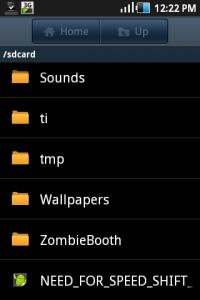

|
|
|
|
|
|
danielcmugen
|
Jul 4 2011, 03:31 PM
|
|
|
QUOTE(mnsnazri @ Jul 4 2011, 01:56 PM) do you ask your friend how he do it?...its like got a problem to loading...it's mean..when i open that game...i saw EA logo...after that it go back to apps menu...damn i did not get that game from my friend. Another forummer in this thread(Nemes!S) gave the link..... This post has been edited by danielcmugen: Jul 4 2011, 03:34 PM |
|
|
|
|
|
danielcmugen
|
Jul 5 2011, 10:44 PM
|
|
|
QUOTE(kenny13 @ Jul 5 2011, 03:43 PM) my phone oredy running HFS SHift when i bought it from dealer, they install for me and its runs ok le. Ever try to send the .apk file to phone using bluethooth? I transfer all the .apk file from pc to SGA using bluetooth and install from there... work everytime without any hiccup... Pharsing 1 i think the .apk file u download is not complete, try looks for other source to download... Do you have the link of where you downloaded that game? Is it from android market? If its not I would like to know that is it safe to download this game from these websites? Quite scared to download from those websites that are not official android market....  |
|
|
|
|
|
danielcmugen
|
Jul 6 2011, 09:42 PM
|
|
|
1) Has anyone tried downloading need for speed shift from android market?
2) How to stop google maps auto update?
|
|
|
|
|
|
danielcmugen
|
Jul 7 2011, 09:55 PM
|
|
|
QUOTE(moniqee @ Jul 7 2011, 07:09 AM) i did... but it's lite version as the normal version need to pay... How come i cannot find the lite version of that game in market there?
Added on July 7, 2011, 9:59 pmQUOTE(gkl83 @ Jul 7 2011, 09:20 AM) maybe try to disable "auto sync" under the "applications" previously my google map keep auto update and wasting my data quota + draining battery life... so i disabled it, so far no update from google map... How come i couldnt find 'auto sync' under 'applications'? But theres 1 under the 'accounts and sync'. I disabled auto sync from there a long time ago but google maps still kept updating
Added on July 7, 2011, 10:27 pmBtw, can we register e-warranty by ourselves through samsung website? This post has been edited by danielcmugen: Jul 7 2011, 10:27 PM |
|
|
|
|
|
danielcmugen
|
Jul 8 2011, 03:58 PM
|
|
|
QUOTE(gkl83 @ Jul 8 2011, 10:34 AM) but ur expectation was too high on low-mid range smart phone... yup... my silly mistake, should under "account and sync"  anyway, i reset my phone last week and i tried to access into andriod market via wifi to download google map manually (to avoid auto update)... i cant find the google map apps no matter how i search around...  later i use my laptop access into the website, realized that market andriod informed me that google map no compatible with my SGA... no idea why like that, maybe i disabled the "auto sync" once i reseted my phone to factory settings, so my google maps no able to communicate with market andriod whether my phone can pair with google map... the error message as below prompted from market andriod I just realised that i forgot that when i go android market that time i need to on the background data which also on 'auto sync', then no wonder the google maps also auto update...my mistake....so i think disabling 'auto sync' would stop maps auto update. Why not you on back auto sync and wait for update, seems after uninstalling update, it auto updates quickily again.....thats what i noticed... |
|
|
|
|
|
danielcmugen
|
Jul 8 2011, 05:58 PM
|
|
|
Must i backup my phone if i wanna update my phone through KIES?
|
|
|
|
|
|
danielcmugen
|
Jul 9 2011, 11:17 PM
|
|
|
QUOTE(danielcmugen @ Jul 8 2011, 05:58 PM) Must i backup my phone if i wanna update my phone through KIES? Need help..... |
|
|
|
|
|
danielcmugen
|
Jul 11 2011, 04:27 PM
|
|
|
Must i backup my phone if i wanna update my phone through kies?
|
|
|
|
|
|
danielcmugen
|
Jul 15 2011, 03:28 PM
|
|
|
QUOTE(hanizhan @ Jul 15 2011, 11:10 AM) how to set contact picture on my phonebook...?? didnt found it...help You have to save your contacts into phone and not sim card. Then long-press the contact and press 'edit', then tap on the contact picture  |
|
|
|
|
|
danielcmugen
|
Jul 15 2011, 05:15 PM
|
|
|
QUOTE(hanizhan @ Jul 15 2011, 04:53 PM) You're welcome  |
|
|
|
|
|
danielcmugen
|
Jul 16 2011, 02:41 PM
|
|
|
my black back cover got quite some dust there....very susah to remove the dust, if scrape too hard scared damage the cover. Haizz.....i think have to use vacuum cleaner....
|
|
|
|
|
|
danielcmugen
|
Jul 18 2011, 09:57 PM
|
|
|
QUOTE(gkl83 @ Jul 17 2011, 03:55 PM) u can clean the cover by flushing with water, but make sure dry it before install back to your SGA... Thanx  Just gave it a try just now and it worked, but when i wiped and dry it some dust stick to it again So next time have to be more careful..... This was how i put in water.....i put the cover in the water and let the dust float up This post has been edited by danielcmugen: Jul 18 2011, 10:05 PM Attached thumbnail(s)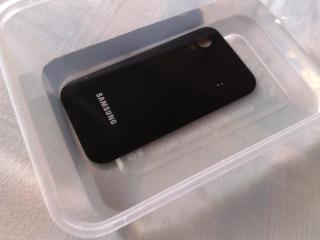
|
|
|
|
|
|
danielcmugen
|
Jul 19 2011, 10:16 PM
|
|
|
QUOTE(gkl83 @ Jul 19 2011, 09:15 AM) perhaps get a epikcase casing instead, no worry about dust... then the phone will not be so cantik.......  |
|
|
|
|




 Quote
Quote
 0.0241sec
 0.38
0.38
 7 queries
 GZIP Disabled