Welcome Guest ( Log In | Register )

Bump Topic Topic Closed RSS Feed

Outline · [ Standard ] · Linear+

 ASUS A | N | U Series Combined Thread V4, All about ASUS...

views
     
kelvinclyap88
post May 16 2011, 04:11 PM

Getting Started
**
Junior Member
116 posts

Joined: Mar 2010
QUOTE(skysoblue93 @ May 16 2011, 03:15 PM)
my temp. Normal use (wifi, browsing and high perfomance mode) is around 50c

edit: oh wait,, ure using cooler.. ok thats high. lol. if on cooler, im idling at 45c

edit 2: sorry again. lol. 45c is the temp. of normal use.
i left my laptop to idle abit, and it drops to 38c with cooler.
*
mine idle without cooler around 45-47c
not yet get a cooler for it...
will source for u2 @ around RM70 then~~ any place you know selling @ RM70?? tongue.gif
yea, not much lubang, any left side is a bit hot... still acceptable compare to previous dell
kelvinclyap88
post May 16 2011, 09:58 PM

Getting Started
**
Junior Member
116 posts

Joined: Mar 2010
QUOTE(lee_what2004 @ May 16 2011, 09:30 PM)
^what about HDD temp ?
*
HWMonitor fail to detect my HDD temperature
any other program? tongue.gif
kelvinclyap88
post May 16 2011, 11:12 PM

Getting Started
**
Junior Member
116 posts

Joined: Mar 2010
QUOTE(skysoblue93 @ May 16 2011, 10:42 PM)
My temperature.
Setting - balance.
-On Battery.
-Wifi, Google Chrome, Hwmonitor,battery care
-No cooler.
-No aircond.

Edit : Gpu core drop to 38% after i screencapture. lol.
nvm, the max value is what important. lol

Battery care showing that im discharging at 10.5w..


Added on May 16, 2011, 10:57 pm

Try Everest.
*
huh, why ur HWmonitor can detect so much things? but mine only mobo and cpu temperature hmm.gif
kelvinclyap88
post May 16 2011, 11:41 PM

Getting Started
**
Junior Member
116 posts

Joined: Mar 2010
QUOTE(lee_what2004 @ May 16 2011, 11:16 PM)
You use what version ? Try 1.16..
*
1.17 from ur siggy tongue.gif
okie, will try it out later biggrin.gif
kelvinclyap88
post May 17 2011, 12:02 AM

Getting Started
**
Junior Member
116 posts

Joined: Mar 2010
QUOTE(lee_what2004 @ May 16 2011, 11:48 PM)
My siggy should be 1.16 hmm.gif
*
oops... then dunno where i download it biggrin.gif tongue.gif
sowie~~

This post has been edited by kelvinclyap88: May 17 2011, 12:03 AM
kelvinclyap88
post May 18 2011, 08:41 PM

Getting Started
**
Junior Member
116 posts

Joined: Mar 2010
hi sifus~~
Fn + F9 for keypad lock??
tried but not functioning~~
how ar?? which driver tongue.gif
kelvinclyap88
post May 18 2011, 08:48 PM

Getting Started
**
Junior Member
116 posts

Joined: Mar 2010
QUOTE(lee_what2004 @ May 18 2011, 08:45 PM)
Touchpad driver installed ?
*
oppps... is touchpad, not keypad
sorry for mess up both tongue.gif
what driver for it??
cause im using mouse and want to lock it to avoid from accidentally touch it tongue.gif
kelvinclyap88
post May 18 2011, 08:51 PM

Getting Started
**
Junior Member
116 posts

Joined: Mar 2010
QUOTE(lee_what2004 @ May 18 2011, 08:49 PM)
Can your touchpad do scrolling, zoom and such ?
*
nope hmm.gif
kelvinclyap88
post May 18 2011, 09:11 PM

Getting Started
**
Junior Member
116 posts

Joined: Mar 2010
QUOTE(lee_what2004 @ May 18 2011, 08:53 PM)
done... thx sifu notworthy.gif
another question Fn + V is for what?
press already but nothing out hmm.gif

This post has been edited by kelvinclyap88: May 18 2011, 09:13 PM
kelvinclyap88
post May 18 2011, 09:32 PM

Getting Started
**
Junior Member
116 posts

Joined: Mar 2010
QUOTE(lee_what2004 @ May 18 2011, 09:13 PM)
^can disable already ?
Fn + V for camera, you need to install Asus LifeFrame3 if not mistaken...
*
yup, can disable already
can scroll already... but not that smooth...
and don't know how to zoom and "next page"
not very sure is it this functions

and another problem occurred!
after installing csl modem - using celcom, mouse can't function, touchpad oki
how ar?? hmm.gif
kelvinclyap88
post May 18 2011, 09:38 PM

Getting Started
**
Junior Member
116 posts

Joined: Mar 2010
QUOTE(lee_what2004 @ May 18 2011, 09:35 PM)
Is that using Intel HD to play the movies ?
If you set it to nVidia, how ?
Try use modded inf from laptopvideo2go.
zoom, two finger spreading, like scissor..
If unplug the modem, how ?
*
har?!?! are you god?
really unplug the modem then can use the mouse
what happen, why asus like a lot problem on driver?
kelvinclyap88
post May 18 2011, 10:04 PM

Getting Started
**
Junior Member
116 posts

Joined: Mar 2010
QUOTE(lee_what2004 @ May 18 2011, 09:41 PM)
Does that mean you haven't tried using Intel HD ?
If go nVidia control panel and maximize the quality settings ?
Just guessing tongue.gif
When you plug the modem and the mouse not functioning, can go to device manager and see if got any exclamation mark (!) ?
*
err... tried many times... after restart both modem and mouse can use...
and after connect, around 3-5 mins of using the mouse, it stop functioning again (with modem, connected to internet)

checked on device manager (USB controllers no "!"... even networks and adapters section also don't have "!")
with modem/without modem, with mouse/without mouse also don't have "!"
sorry for my poor explanation tongue.gif
kelvinclyap88
post May 19 2011, 12:00 AM

Getting Started
**
Junior Member
116 posts

Joined: Mar 2010
QUOTE(lee_what2004 @ May 18 2011, 10:52 PM)
Is the mouse and modem connected on the same side of usb port ?
Not using usb hub, right ?
*
nope... modem on left side, mouse on right side
not using usb hub... and weird thing is that the mouse need to install on every usb, total 4 and need install 4 times if pluck on different usb hole
weird weird hmm.gif
is it any problem on usb driver??
kelvinclyap88
post May 19 2011, 02:29 PM

Getting Started
**
Junior Member
116 posts

Joined: Mar 2010
QUOTE(lee_what2004 @ May 19 2011, 12:13 AM)
Got other computer to test with ?
*
yup... use on hp mini and dell 1420 no problem
only happen when use on n43sl hmm.gif
so troublesome cry.gif
kelvinclyap88
post May 20 2011, 09:45 PM

Getting Started
**
Junior Member
116 posts

Joined: Mar 2010
QUOTE(lee_what2004 @ May 19 2011, 07:21 PM)
Can try it on safe mode ? See if same problem occur or not...
*
err... i think no problem already after change another mouse...
maybe is the mouse spoiled

but installed COD black ops but can't play...
no directx wor...
where can i get it?? hmm.gif
i thought it should be already install in laptop??
kelvinclyap88
post May 21 2011, 08:30 PM

Getting Started
**
Junior Member
116 posts

Joined: Mar 2010
QUOTE(PF T.J. @ May 21 2011, 07:12 PM)
Yes, you can extend the warranty  nod.gif
*
around RM300-RM400 if not mistaken
got write on their monthly cataloge
bloody expensive for only 1 year extension doh.gif
kelvinclyap88
post May 22 2011, 12:45 AM

Getting Started
**
Junior Member
116 posts

Joined: Mar 2010
QUOTE(lee_what2004 @ May 21 2011, 08:50 PM)
^but its international ?
*
yup... worth for those going international...
but don't think im going oversea this few years, not that worth to extend it tongue.gif

QUOTE(heavyduty @ May 22 2011, 12:21 AM)
c-zone digital mall

RM2500 after long bargain and charming the auntie there lol.8GB RAM and 2 bags
*
wow, super great price! i should bargain more! doh.gif
anyway, gratx on ur purchase! rclxms.gif
kelvinclyap88
post Jun 7 2011, 03:27 PM

Getting Started
**
Junior Member
116 posts

Joined: Mar 2010
sorry for MIA for long time tongue.gif
1) want to ask what are some programs for:
Asus Vibe
Asus Virtual Camera
WinFlash
and how to uninstall Asus Vibe & WinFlash, not in ccleaner list

2) Media Espresso and Power Director got use? need serial number for it

3) and few of my programs are not functioning:
Cyberlink Powerdvd 10 - press but nothing out
Cyberlink Power2Go - error "The file [Language\\P2GRC.dll] is missing"
both this Cyberlink need pay for using right??

4) and till now my mouse still having issue, tried different mouses and it will suddenly stop functioning after using a while rclxub.gif
don't want to use touch pad cry.gif

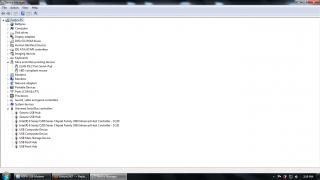
Attached Image
from device manager, it shows mouse and usb are functioning well, but mouse not working at all
tried 2 sensonic mouse, 1 a4tech
once it stop working, it need to restart so that the mouse can working again
kelvinclyap88
post Jun 8 2011, 11:01 PM

Getting Started
**
Junior Member
116 posts

Joined: Mar 2010
QUOTE(pandera999 @ Jun 8 2011, 09:09 AM)
winflas need use for update the bios... dun uninstall it.... cyberlink if gt error try remove it.... and if want lisence 1, can purchase it oso....
what model u use? erm, the mouse xfunctioning? hmm.gif  usb port prob or the driver itself hmm.gif
*
ohhh, okie
N43SL... yup, mouse not functioning
usb port oki, i tried every port with pendrive etc when the mouse not functioning
maybe mouse got clashes with CSL u1-tf broadband stick... only will not functioning if im using that broadband
if use yes, temporary no this issue rclxub.gif
anyone can help??


Added on June 8, 2011, 11:01 pm
QUOTE(pandera999 @ Jun 8 2011, 09:09 AM)
winflas need use for update the bios... dun uninstall it.... cyberlink if gt error try remove it.... and if want lisence 1, can purchase it oso....
what model u use? erm, the mouse xfunctioning? hmm.gif  usb port prob or the driver itself hmm.gif
*
ohhh, okie
N43SL... yup, mouse not functioning
usb port oki, i tried every port with pendrive etc when the mouse not functioning
maybe mouse got clashes with CSL u1-tf broadband stick... only will not functioning if im using that broadband
if use yes, temporary no this issue rclxub.gif
anyone can help??

This post has been edited by kelvinclyap88: Jun 8 2011, 11:01 PM

Topic ClosedOptions
 

Change to:
| Lo-Fi Version
0.0464sec    0.47    7 queries    GZIP Disabled
Time is now: 5th December 2025 - 01:52 AM