Welcome Guest ( Log In | Register )

Bump Topic Topic Closed RSS Feed

Outline · [ Standard ] · Linear+

 ASUS A | N | U Series Combined Thread V4, All about ASUS...

views
     
de4thscythell
post Dec 21 2011, 04:47 PM

in progress
******
Senior Member
1,941 posts

Joined: Mar 2007


QUOTE(wutedo @ Dec 21 2011, 04:36 PM)
hi guys, i want to buy A43SJ for my sisters, come with i3 proc is this laptop good? it's only what i can afford with my 2k budget.
*
I'm using A43SJ, but the older model, the one without USB 3.0. But my brother use the new USB 3.0 version smile.gif
So far, we both not having any problem with this model. Very satisfied thumbup.gif

A43SJ is more than enough if your sister using it for college. It can handle some games too icon_rolleyes.gif
It even come with multiple color variant too biggrin.gif

Just my 2 cents.. blush.gif
de4thscythell
post Dec 24 2011, 07:27 PM

in progress
******
Senior Member
1,941 posts

Joined: Mar 2007


QUOTE(wutedo @ Dec 24 2011, 07:19 PM)
finally today i have bought a43sj-chill blue for my sister, can anyone show me to to open back panel of the laptop? i want to add another stick of ram into the laptop.
*
Just open the part directly under the palm rest + card reader. the one with ventilation hole. There should be a RAM symbol at the cover smile.gif
de4thscythell
post Dec 25 2011, 01:23 AM

in progress
******
Senior Member
1,941 posts

Joined: Mar 2007


Any specific way of cleaning the aluminium palm rest?
de4thscythell
post Jan 1 2012, 03:00 PM

in progress
******
Senior Member
1,941 posts

Joined: Mar 2007


QUOTE(aspire2oo6 @ Dec 24 2011, 09:57 PM)
I am using  Asus Zenbook UX21E-KX004V I was wondering can i upgrade the ram of this unit?

user posted image
Nokia N8 @ Asus Zenbook UX21E-KX004V by JTproductions, on Flickr
*
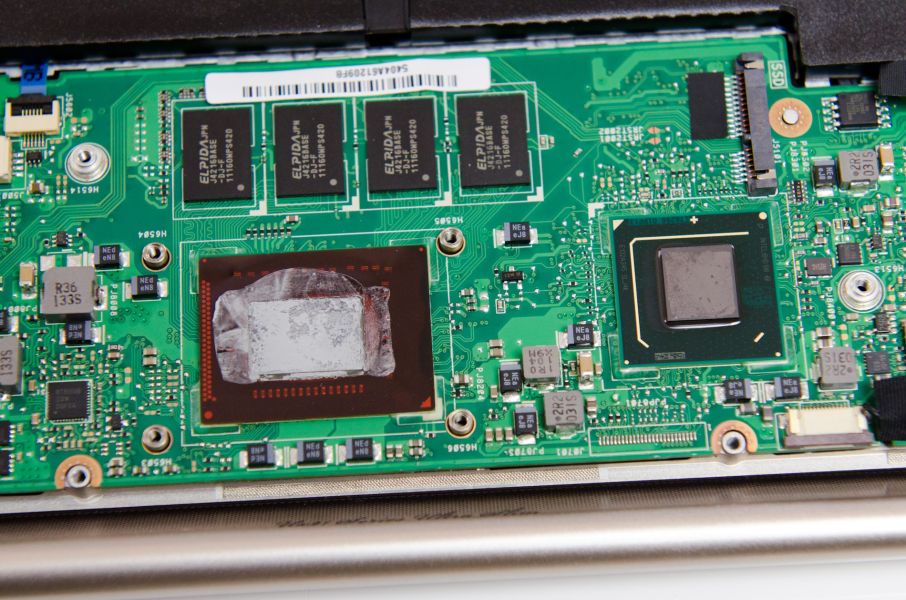
It say here : No memory upgrade possibility on the UX21

The RAM is soldered onto the board, refer pic:
» Click to show Spoiler - click again to hide... «


Source:
ASUS Zenbook UX21 Teardown
ASUS UX21 System & Dissection Tour
de4thscythell
post Jan 4 2012, 08:36 PM

in progress
******
Senior Member
1,941 posts

Joined: Mar 2007


Just want to share this nice little app: Asus Mainframe Utility blush.gif
as reviewed in this article by addictivetips: Asus Multiframe Utility: Resize & Snap App Windows To 9 Screen Regions Per Monitor


Added on January 4, 2012, 8:43 pm
QUOTE(azliayob @ Jan 4 2012, 12:22 AM)
Alex, add me to your list.

How do i know the laptop is already full charge. I did not switch on...

Thanks
*
On my A43SJ, there's an LED indicator light, under the touchpad that turn RED when the battery is charging, and turn GREEN when the battery is fully charged.
Not sure bout your model. Might be the same blush.gif

This post has been edited by de4thscythell: Jan 4 2012, 08:44 PM
de4thscythell
post Jan 13 2012, 04:10 PM

in progress
******
Senior Member
1,941 posts

Joined: Mar 2007


QUOTE(naspek @ Jan 13 2012, 02:55 PM)
Hey guys... I'm planning to buy a new laptop..

budget around 2k
usage: game (Crysis, COD, Portal, Battle Field, NFS, PES2012)
        : internet browsing, microsoft office, MATLAB..

i'm using A42jv right now.. all working fine..
wanna give it to my brother and get me a new lappy.. happy.gif

Could u guys suggest to me any asus model?

Thanks in advance.. =)
*
My bro using A43SJ, the not so new model, the one with USB 3.0, and he can play all the game you stated above nod.gif
I helped him bought it for RM1700++ , below RM2k, last year.
Haven't heard any complain from my bro yet biggrin.gif

Actually, I'm also using A43SJ, but the older model, the one without USB 3.0.
Plus, this model got variety of color thumbup.gif

Topic ClosedOptions
 

Change to:
| Lo-Fi Version
0.0395sec    0.17    7 queries    GZIP Disabled
Time is now: 5th December 2025 - 08:47 PM