

QUOTE(ASUSmy @ Dec 22 2016, 10:08 AM)
gg seem like dont have around rm 700 for white themes?ASUS Malaysia Component and Hardware
ASUS Malaysia Component and Hardware
|
|
 Dec 22 2016, 11:21 AM Dec 22 2016, 11:21 AM
|
 
Senior Member
5,893 posts Joined: Jun 2006  
|
QUOTE(ASUSmy @ Dec 22 2016, 10:08 AM) gg seem like dont have around rm 700 for white themes? |
|
|
|
 |
Dec 23 2016, 10:15 AM
|

Senior Member
2,319 posts Joined: Mar 2010
|
QUOTE(silrave @ Dec 22 2016, 11:21 AM) gg seem like dont have around rm 700 for white themes? Hi silrave, Nope, current selling models only have those 2 with white theme for socket 1151. Thank you |
|
|
Dec 23 2016, 10:23 AM
|

Senior Member
3,809 posts Joined: Sep 2007 From: Jakarta
|
Hi AsusMY,
Do you have an installation guide / video for Asus Sabertooth Z-170 for M.2 NVME SSD? I understand that I would have to remove one of the shrouds. Thank you. |
|
|
Dec 23 2016, 10:30 AM
|

Senior Member
718 posts Joined: Apr 2009 From: KL
|
hi
any asus mb for amd X4 cpu? entry level with all built in? can i have model n specs pls? tq |
|
|
Dec 23 2016, 10:39 AM
|
|
Senior Member
5,893 posts Joined: Jun 2006
|
QUOTE(ASUSmy @ Dec 23 2016, 10:15 AM) Hi silrave, ok thx sirNope, current selling models only have those 2 with white theme for socket 1151. Thank you seem like just need to wait i7-7700 out then see new mobo got white themes with reasonable price or not |
|
|
Dec 23 2016, 11:46 AM
|
|
Senior Member
2,319 posts Joined: Mar 2010
|
QUOTE(kianweic @ Dec 23 2016, 10:23 AM) Hi AsusMY, Hi kianweic,Do you have an installation guide / video for Asus Sabertooth Z-170 for M.2 NVME SSD? I understand that I would have to remove one of the shrouds. Thank you. Sorry we don't have video guide for that, but it is easy to open the cover. Open the screw shown on the red circle on the image below. And beside the screw hole you will see a little gap where you can use your finger nail to pull up the cover. Thank you This post has been edited by ASUSmy: Dec 23 2016, 11:47 AM Attached thumbnail(s) 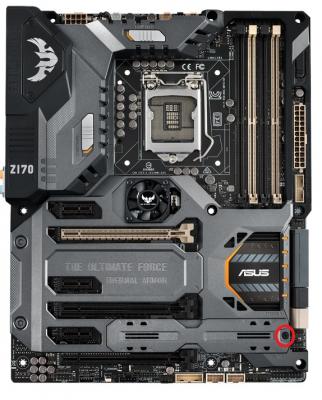
|
|
|
|
|
|
Dec 23 2016, 11:54 AM
|
|
Senior Member
2,319 posts Joined: Mar 2010
|
QUOTE(MISMan @ Dec 23 2016, 10:30 AM) hi Hi MISMan,any asus mb for amd X4 cpu? entry level with all built in? can i have model n specs pls? tq Do you mean AMD motherboard with FM2+ socket? If yes, for entry level you can have a look at A68HM-E, and for higher segment, you can have a look at A88XM-A. Thank you |
|
|
Dec 23 2016, 11:58 AM
|
|
Senior Member
3,809 posts Joined: Sep 2007 From: Jakarta
|
QUOTE(ASUSmy @ Dec 23 2016, 11:46 AM) Hi kianweic, Thank you, this is helpful.Sorry we don't have video guide for that, but it is easy to open the cover. Open the screw shown on the red circle on the image below. And beside the screw hole you will see a little gap where you can use your finger nail to pull up the cover. Thank you |
|
|
Dec 23 2016, 12:10 PM
|

Senior Member
1,591 posts Joined: Mar 2014 From: 75°26'11.6"S, 136°16'16.0"E
|
-removed-
This post has been edited by lolzcalvin: Dec 23 2016, 01:32 PM |
|
|
Dec 23 2016, 12:52 PM
|
|
Senior Member
718 posts Joined: Apr 2009 From: KL
|
QUOTE(ASUSmy @ Dec 23 2016, 11:54 AM) Hi MISMan, Sorry, AM3+, coz using X4-FX4300 3.8Ghz processorDo you mean AMD motherboard with FM2+ socket? If yes, for entry level you can have a look at A68HM-E, and for higher segment, you can have a look at A88XM-A. Thank you would like to have such features: -4 dimm ram slots - DDR4 ram type if possible -6gb SATA - optional wifi, bluetooth thanks |
|
|
Dec 23 2016, 03:34 PM
|
|
Senior Member
2,319 posts Joined: Mar 2010
|
QUOTE(MISMan @ Dec 23 2016, 12:52 PM) Sorry, AM3+, coz using X4-FX4300 3.8Ghz processor Hi MISMan,would like to have such features: -4 dimm ram slots - DDR4 ram type if possible -6gb SATA - optional wifi, bluetooth thanks Below are the AM3+ motherboard that we are selling now, all don't have WiFi and Bluetooth. SABERTOOTH 990FX R2.0 - 4xDIMM, DDR3 M5A99X EVO R2.0 - 4xDIMM, DDR3 M5A97 R2.0 - 4xDIMM, DDR3 M5A78L-M LX3 - 2xDIMM, DDR3 https://www.asus.com/my/Motherboards/ Thank you |
|
|
Dec 26 2016, 04:51 PM
|

Senior Member
1,486 posts Joined: Jun 2005 From: Cyberjaya/Kamunting
|
removed
This post has been edited by xen0: Dec 28 2016, 03:57 PM |
|
|
Dec 28 2016, 12:13 PM
|
|
Senior Member
2,319 posts Joined: Mar 2010
|
QUOTE(xen0 @ Dec 26 2016, 04:51 PM) hello asus, any advise on this matter? Hi xen0,» Click to show Spoiler - click again to hide... « condition tested: same channel.. same chan. width.. same range... turned ON only ONE router for each ping test.. even upgraded firmware still giving the same result gaming experience are better and smooth when using router T.. it was an agony when using RT-N12HP with all the ping spike to the router itself. thank you. Do post networking question on the link below, this topic is for desktop component related. http://forum.lowyat.net/topic/2651405 If can do mention what is the T router model. The distance when doing the testing. Is there any obstacle between your device and the router. Thank you This post has been edited by ASUSmy: Dec 28 2016, 12:20 PM |
|
|
|
|
|
Dec 31 2016, 05:51 PM
|

Senior Member
4,897 posts Joined: Aug 2005 
|
Z170M-E D3 this MB ok ma?
Not into gaming.  |
|
|
Jan 3 2017, 04:05 AM
|

Senior Member
680 posts Joined: Aug 2008 From: Malaysia
|
Hi again,
I've got a question, does anyone know where or whom I can approach to service/check my old ASUS P8Z68 V/Gen3 LGA1155 Motherboard? To see if it's fully functioning and etc? ANd also the rough estimated prices I'm looking at? I do not like my current temporary MOBO that I bought here because it feels weird. Thanks! biggrin.gif |
|
|
Jan 4 2017, 09:53 AM
Show posts by this member only | IPv6 | Post
#1536
|
|
Senior Member
2,319 posts Joined: Mar 2010
|
QUOTE(feralee @ Dec 31 2016, 05:51 PM) Z170M-E D3 this MB ok ma? Hi feralee,Not into gaming. Depending on your usage, it is a decent motherboard. Multi-VGA output support : HDMI/DVI-D/RGB ports RAM can up to 64GB. mATX form factor You can check our website for more information. https://www.asus.com/Motherboards/Z170M-E-D3/specifications/ Thank you ' |
|
|
Jan 9 2017, 10:45 AM
Show posts by this member only | IPv6 | Post
#1537
|
|
Senior Member
2,319 posts Joined: Mar 2010
|
QUOTE(VinceCheong @ Jan 3 2017, 04:05 AM) Hi again, Hi VinceCheong,I've got a question, does anyone know where or whom I can approach to service/check my old ASUS P8Z68 V/Gen3 LGA1155 Motherboard? To see if it's fully functioning and etc? ANd also the rough estimated prices I'm looking at? I do not like my current temporary MOBO that I bought here because it feels weird. Thanks! biggrin.gif We don't have any factory here to do the full inspection of the motherboard, all our RMA unit are send back to factory/RMA centre outside of Malaysia for repair. You can try 2nd hand shop or motherboard repair shop at Low Yat Plaza or Imbi Plaza if you are around KL. Thank you |
|
|
Jan 12 2017, 10:20 AM
|

Senior Member
787 posts Joined: Jan 2003
|
Hi Asus team
How do I revert my BIOS for my B150M-A D3 mobo to an older version? I flashed the latest BIOS from your support website version B150M-A-D3-ASUS-2001 From this link http://dlcdnet.asus.com/pub/ASUS/mb/LGA115...4085.1484187260 Now my system just freezes in POST screen. I can enter BIOS but the moment I choose to manually select my boot drive, system freezes again. If I turn on PC, leave it for 1 min, it freezes, doesn't boot into OS. When I try to revert to an older version of BIOS file it says the BIOS file is not correct. I have tried all previous versions and it is not accepted to revert to older version. However it will accept a reflash of the most current BIOS and still freezes. Jumper reset on MB still freezes. Remove RAM and reinstall, still freezes. Remove all PCI cards, still freezes. Loading default setting and save, still freezes. This post has been edited by laytiong: Jan 12 2017, 10:21 AM |
|
|
Jan 12 2017, 11:01 AM
Show posts by this member only | IPv6 | Post
#1539
|
|
Senior Member
2,319 posts Joined: Mar 2010
|
QUOTE(laytiong @ Jan 12 2017, 10:20 AM) Hi Asus team Hi laytiong,How do I revert my BIOS for my B150M-A D3 mobo to an older version? I flashed the latest BIOS from your support website version B150M-A-D3-ASUS-2001 From this link http://dlcdnet.asus.com/pub/ASUS/mb/LGA115...4085.1484187260 Now my system just freezes in POST screen. I can enter BIOS but the moment I choose to manually select my boot drive, system freezes again. If I turn on PC, leave it for 1 min, it freezes, doesn't boot into OS. When I try to revert to an older version of BIOS file it says the BIOS file is not correct. I have tried all previous versions and it is not accepted to revert to older version. However it will accept a reflash of the most current BIOS and still freezes. Jumper reset on MB still freezes. Remove RAM and reinstall, still freezes. Remove all PCI cards, still freezes. Loading default setting and save, still freezes. May I know what Windows are you using? At the BIOS setting, can you help check what the is the setting for the Boot->CSM->Launch CSM? Boot->Secure Boot->OS Type? Thank you |
|
|
Jan 12 2017, 02:42 PM
|
|
Senior Member
787 posts Joined: Jan 2003
|
QUOTE(ASUSmy @ Jan 12 2017, 11:01 AM) Hi laytiong, Win7 HomeMay I know what Windows are you using? At the BIOS setting, can you help check what the is the setting for the Boot->CSM->Launch CSM? Boot->Secure Boot->OS Type? Thank you Secure Boot is off. I have deleted the keys too. OS type is "UEFI + Legacy OS". There is no option for Legacy OS only. |
| Change to: |  0.0192sec 0.0192sec
 0.61 0.61
 6 queries 6 queries
 GZIP Disabled GZIP Disabled
Time is now: 9th December 2025 - 02:31 PM |
 Quote
Quote
