

For sure I know N53SN can upgrade till 16GB. Hope this is not out of topic post...

Asus N53SN review, and discussion
|
|
 Mar 31 2011, 03:33 PM Mar 31 2011, 03:33 PM
Return to original view | Post
#1
|
 
Junior Member
20 posts Joined: Jul 2010   
|
guys, very soon I'll be joining you all as the owner of an Asus N series laptop. just wanna double confirm with you all, what is the maximum memory capacity can be upgraded in N53SV? Is it 8GB or 16GB? I read few specs online including the one from Asus web page itself but confused with it.
For sure I know N53SN can upgrade till 16GB. Hope this is not out of topic post... |
|
|
|
|
|
Apr 1 2011, 10:19 AM
Return to original view | Post
#2
|
|
Junior Member
20 posts Joined: Jul 2010
|
thanks for the info bro. so N53SV can only upgrade till 8GB.
another question, you guys mentioned that there's some sort of LED display which shows which graphic card the laptop is currently utilizing. can provide more explanation on that ar? thanks alot!!! |
|
|
Apr 1 2011, 10:24 AM
Return to original view | Post
#3
|
|
Junior Member
20 posts Joined: Jul 2010
|
another info needed, is there integrated multimedia "hot keys" in the Asus N series laptop?
err... N series Malaysia's version to be exact...  |
|
|
Apr 1 2011, 03:08 PM
Return to original view | Post
#4
|
|
Junior Member
20 posts Joined: Jul 2010
|
@Trance4eva, the LED which shows which GPU the laptop is currently utilizing, how to differentiate ar?
Added on April 1, 2011, 3:10 pm QUOTE(sUpErNoVa @ Apr 1 2011, 10:24 AM) another info needed, is there integrated multimedia "hot keys" in the Asus N series laptop? but i saw some videos on youtube has it...err... N series Malaysia's version to be exact...  Added on April 1, 2011, 3:15 pmhttp://www.youtube.com/watch?v=F20IUcZpllk the multimedia hot keys is on the left side, same row with the LEDs... This post has been edited by [s]UpErNoVa: Apr 1 2011, 03:15 PM |
|
|
Apr 5 2011, 11:34 PM
Return to original view | Post
#5
|
|
Junior Member
20 posts Joined: Jul 2010
|
hey, anyone of you all using GPU monitor gadget? any recommendation?
|
|
|
Apr 6 2011, 10:37 AM
Return to original view | Post
#6
|
|
Junior Member
20 posts Joined: Jul 2010
|
QUOTE(retsmot @ Apr 6 2011, 12:32 AM) i use gpu observer by orbmu2k, and coretemp. both widgets. yea, i also installed that one, but do you realize that when you turn on that gadget, the system automatically switches to GT540M? sometimes it even switches few times for a period of time. the LED will turn blue then white then blue and goes on...@trance so its confirmed drop priced ah? is that normal? |
|
|
|
|
|
Apr 8 2011, 10:24 AM
Return to original view | Post
#7
|
|
Junior Member
20 posts Joined: Jul 2010
|
QUOTE(lee_what2004 @ Apr 6 2011, 11:34 AM) ^Well, else how it want to detect nVidia temp... this means that it's normal? i'm just worried that it keeps on switching between Intel HD and Nvidia GPU, somehow or somewhat the system will just go spoil...  |
|
|
Apr 10 2011, 05:59 PM
Return to original view | Post
#8
|
|
Junior Member
20 posts Joined: Jul 2010
|
guys, any ways to check the RAM specifications installed inside the laptop? i tried searching for it in device manager but can't find it...
This post has been edited by [s]UpErNoVa: Apr 10 2011, 06:05 PM |
|
|
Apr 11 2011, 09:44 AM
Return to original view | Post
#9
|
|
Junior Member
20 posts Joined: Jul 2010
|
QUOTE(nvrgivup @ Apr 11 2011, 12:37 AM) why n53sn startup time stil slow like shit >.<....hais...i do recovery...n i ady unstall evrythg...those asus software.. i evrytime take 90sec++ to start up.. My N53SV start-up time around 35-40s after configuring "msconfig startup", installed all games and applications, defragment hard disks once and did recovery CD already (just last night). so far very satisfied with the laptop... my fren vaio...old version...startup time 40sec >.<  Added on April 11, 2011, 9:46 am QUOTE(reevephon @ Apr 10 2011, 07:22 PM) Please use CPU-Z software to check the specific RAM info. Added on April 10, 2011, 7:22 pm Please use CPU-Z software to check the specific RAM info. QUOTE(Trance4eva @ Apr 10 2011, 07:26 PM) Download CPU-Z or another better way is....open up the casing and see the sticker on the RAM alright... will download the software tonight. thanks for the info bro!   This post has been edited by [s]UpErNoVa: Apr 11 2011, 09:46 AM |
|
|
Apr 11 2011, 11:06 AM
Return to original view | Post
#10
|
|
Junior Member
20 posts Joined: Jul 2010
|
QUOTE(Trance4eva @ Apr 11 2011, 10:21 AM) Another satisfied N53 user yup... no regrets buying it! though i was pretty mesmerized by the price drop just a week after i bought mine. can save RM 200 for another 4GB RAM eh... haha... Ain't this laptop just awesome This post has been edited by [s]UpErNoVa: Apr 11 2011, 11:24 AM |
|
|
Apr 11 2011, 11:24 AM
Return to original view | Post
#11
|
|
Junior Member
20 posts Joined: Jul 2010
|
noob question of mine, since I'm a first time owner of a laptop, is the GPU upgradable in the future?
|
|
|
Apr 11 2011, 01:47 PM
Return to original view | Post
#12
|
|
Junior Member
20 posts Joined: Jul 2010
|
QUOTE(Trance4eva @ Apr 11 2011, 12:27 PM) Nope cause its soldered to the motherboard. Only for certain laptop can be upgrade how can it be determined that a laptop's GPU can be upgraded? like in what specific range of laptops can be done so? |
|
|
Apr 17 2011, 01:27 AM
Return to original view | Post
#13
|
|
Junior Member
20 posts Joined: Jul 2010
|
guys, how do you all read the RAM specifications? there's no "1333 Mhz" as claimed to be supplied with the laptop...
i'm using N53SV btw... Attached thumbnail(s) 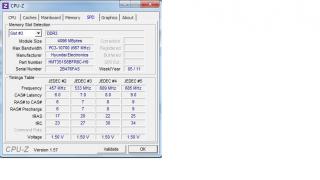
|
|
|
|
|
|
Apr 17 2011, 01:34 AM
Return to original view | Post
#14
|
|
Junior Member
20 posts Joined: Jul 2010
|
QUOTE(Trance4eva @ Apr 17 2011, 01:31 AM) 667=1333mhz oh... is that so? some sort of computer engineering calculation; 667 MHz x 2 = 1334 MHz ~ 1333 MHz? Added on April 17, 2011, 1:32 am about the hybernation thing....i think im the only one having it..i think Its most prob cause I have AVG???or windows update????or most prob cause i have a crappy/useless Seagate HDD cause most ppl is having a WD |
|
|
Apr 17 2011, 01:46 AM
Return to original view | Post
#15
|
|
Junior Member
20 posts Joined: Jul 2010
|
QUOTE(AsusFans @ Apr 17 2011, 01:43 AM) I went to digital mall just now to have a look at NS3SN, the flex keyboard was indeed quite annoying to me....Not very good because the outlook looks so solid, but the keyboard is "fragile" it's the matter of getting used to it. in the beginning, i also find it quite "disturbing" in the sense that seeing the keyboard flexing when you are typing. |
|
|
Apr 17 2011, 02:12 AM
Return to original view | Post
#16
|
|
Junior Member
20 posts Joined: Jul 2010
|
QUOTE(lee_what2004 @ Apr 17 2011, 01:50 AM) DDR = Double Data Rate, so 666.6..x2 = 1333.3..MHz.. thanks sifu Lee for the clarification!  |
|
|
Apr 18 2011, 12:34 AM
Return to original view | Post
#17
|
|
Junior Member
20 posts Joined: Jul 2010
|
@sifu lee: i think this question has been posted by someone before in this forum but i couldn't seem to be able to find it now.
how do you set which program to run with Nvidia GPU? which control panel ah?  |
|
|
Apr 19 2011, 12:58 AM
Return to original view | Post
#18
|
|
Junior Member
20 posts Joined: Jul 2010
|
QUOTE(rjedeleon @ Apr 18 2011, 03:09 PM) got my ASUS N53SN from PC Fair last saturday for 3399: not considered to be expensive, since got upgrade RAM to 8GB. any other free gifts given? btw, what laptop bag do they provide with N53SN?i7-2630QM GT-550m 8GB(I upgraded from 4GB) 640GB(5400 RPM) - they don't allow upgrade  Very happy on my purchase ,, will post here if I experienced any problem or comments...Added on April 19, 2011, 1:05 am QUOTE(shredder @ Apr 18 2011, 10:06 PM) dont blame the laptop itself. its just a machine. its all depends on the user too. some of them did not read the manual and start complaining this and that. i wonder why lots of user think the laptops are the problem. i've been using my n53sn for almost a month but theres nothing much to complaint. all i can say is it really serve me well. totally agree with you. sometimes it's not the laptop which is problem, gotta depend on the way the user handle the laptop as well. i've been using my N53SV for almost a month as well, no complains at all so far. to tell the truth, it NEVER hanged not even once since the first turn on of the laptop till now. i've got total of 12 games installed with each one of them running 100% fine with high graphics, microsoft office 2010, trend micro anti-virus and those usual web-browsing programs. defragmented once so far. all i can say is, i'm very satisfied with the performance of this laptop so far. Added on April 19, 2011, 1:08 am@thieflord: seems like you are one owner of N53SV just like me just wanna ask, what laptop bag did u get from Asus when purchasing the laptop? sling / backpack?This post has been edited by [s]UpErNoVa: Apr 19 2011, 01:08 AM |
| Change to: |  0.0272sec 0.0272sec
 0.82 0.82
 7 queries 7 queries
 GZIP Disabled GZIP Disabled
Time is now: 8th December 2025 - 09:18 AM |
 Quote
Quote