Welcome Guest ( Log In | Register )

13 Pages < 1 2 3 4 5 > » Bottom

Outline · [ Standard ] · Linear+

 Asus N53SN review, and discussion

views
     
nvrgivup
post Apr 11 2011, 12:37 AM

On my way
****
Senior Member
607 posts

Joined: Jan 2011
why n53sn startup time stil slow like shit >.<....hais...i do recovery...n i ady unstall evrythg...those asus software.. i evrytime take 90sec++ to start up..
my fren vaio...old version...startup time 40sec >.<
nvrgivup
post Apr 11 2011, 09:35 AM

On my way
****
Senior Member
607 posts

Joined: Jan 2011
QUOTE(Kyozen @ Apr 11 2011, 02:01 AM)
mine startup 23sec for the 1st time, after sometime 29sec +-
did u run msconfig and disable some useless startup? got do defragmenter at c drive atleast once? got follow my guideline?
*
i thk nope...i jus do recovery...


open windows update?


This post has been edited by nvrgivup: Apr 11 2011, 09:38 AM
nvrgivup
post Apr 11 2011, 01:57 PM

On my way
****
Senior Member
607 posts

Joined: Jan 2011
i finis defrate bt start up time also same...mayb faster 20sec....bt stil take 80sec++ >.<

u guys using wat to defrag??
i use iobit de defrag...
nvrgivup
post Apr 11 2011, 02:49 PM

On my way
****
Senior Member
607 posts

Joined: Jan 2011
QUOTE(Kyozen @ Apr 11 2011, 02:05 PM)
i used windows 1~ ts wanna pin up the guide on how to achieve faster boot up at 1st page? lots of ppl keeps complaining our n53 boot up like turtle  shakehead.gif
*
sob sob....ok ltr nite i try ur method...oh ya....then i nid do recovery again??

or jus install frame 4 then wpt ?
nvrgivup
post Apr 11 2011, 08:35 PM

On my way
****
Senior Member
607 posts

Joined: Jan 2011
QUOTE(Trance4eva @ Apr 11 2011, 05:35 PM)
How did you time your boot up time???? Stopwatch or use BootTimer


Added on April 11, 2011, 5:36 pm
Done  laugh.gif  rclxms.gif
*
i use a software call 360 china de ....


Added on April 11, 2011, 8:35 pm
QUOTE(Kyozen @ Apr 11 2011, 08:15 PM)
try instaling back fast boot up software. during 1st few bootup or always slower? highly recommend you follow the 1st post guide to achieve fast boot up~
*
i din uninstall tat fastboot...always....like 80sec++

hais...do i nid to do recovery again???


btw...may i ask u guys 1 thg...the ori asus giv de ram is 1067mhz ??or 1333mhz ?

the window defrag thg 0% framengted mean wat???no nid to defrag??


Added on April 11, 2011, 9:06 pm
Slot 1 : 2048MB (8500)
Slot 1 Manufacturer : Kingston
Slot 2 : 2048MB (10700)
Slot 2 Manufacturer : Elpida
Slot 3 : 2048MB (8500)
Slot 3 Manufacturer : Kingston
Slot 4 : 2048MB (10700)
Slot 4 Manufacturer : Elpida

wat the meaning?? the shop ppl say the Elpida is 1067mhz....bt i on9 search seem like 1333mhz....any1 noe??

This post has been edited by nvrgivup: Apr 11 2011, 09:06 PM

nvrgivup
post Apr 11 2011, 09:55 PM

On my way
****
Senior Member
607 posts

Joined: Jan 2011
QUOTE(Trance4eva @ Apr 11 2011, 09:53 PM)
Why use china de... doh.gif  Go download BootTimer http://www.planetsoft.org/

Im sure its 1333mhz. If you wan confirm it urself then open the back lo  thumbup.gif
*
dunid use tat china de...i also noe very slow >.<hehe

tat shop de ppl say is 1067 >.<


Added on April 11, 2011, 11:09 pmok...nw startup time 37sec...keke....thk bro trance n kyozen..

may i noe the asus give de ram de mhz??

This post has been edited by nvrgivup: Apr 11 2011, 11:09 PM
nvrgivup
post Apr 11 2011, 11:34 PM

On my way
****
Senior Member
607 posts

Joined: Jan 2011
QUOTE(Kyozen @ Apr 11 2011, 11:30 PM)
confirm is 1333mhz
*
do i nid to change the 1067 ram to 1333mhz to fit the ori ram?
nvrgivup
post Apr 12 2011, 12:09 AM

On my way
****
Senior Member
607 posts

Joined: Jan 2011
QUOTE(Trance4eva @ Apr 11 2011, 11:56 PM)
The Ori RAM/Elpida is 1333mhz, your Kingston also should be 1333mhz right???? Unless the shopkeeper insert wrong RAM
*
THE SHOPKEEPER SAY KINGSTON IS 1067 N THE ORI ELPIDA ALSO 1067 BT I wonder becuz i use cpu-z check it is 1333mhz...n i go check some say 1067 some say 1333mhz >.<
nvrgivup
post Apr 12 2011, 12:44 AM

On my way
****
Senior Member
607 posts

Joined: Jan 2011
I use cpuz elpida is 667mhz
nvrgivup
post Apr 12 2011, 12:48 AM

On my way
****
Senior Member
607 posts

Joined: Jan 2011
Slot 1 : 2048MB (8500)
Slot 1 Manufacturer : Kingston
Slot 2 : 2048MB (10700)
Slot 2 Manufacturer : Elpida
Slot 3 : 2048MB (8500)
Slot 3 Manufacturer : Kingston
Slot 4 : 2048MB (10700)
Slot 4 Manufacturer : Elpida

wat tis mean??
nvrgivup
post Apr 12 2011, 03:11 AM

On my way
****
Senior Member
607 posts

Joined: Jan 2011
QUOTE(lee_what2004 @ Apr 12 2011, 01:46 AM)
You got 2 Kingston 1066MHz and 2 Elpida 1333MHz..
*
ok...i try to change it to 1333mhz

or will it affect much?? if 1067 n 1333mhz together?
nvrgivup
post Apr 12 2011, 03:41 AM

On my way
****
Senior Member
607 posts

Joined: Jan 2011
QUOTE(lee_what2004 @ Apr 12 2011, 03:20 AM)
Noticeable changes? No...
*
so u segest me make them same 1333mhz?
nvrgivup
post Apr 12 2011, 12:24 PM

On my way
****
Senior Member
607 posts

Joined: Jan 2011
QUOTE(my_nickleo @ Apr 12 2011, 08:14 AM)
I think he refer to me  happy.gif

See below, is 1333MHz for Elpida.
» Click to show Spoiler - click again to hide... «


Here's my CPUZ detail for ram:
» Click to show Spoiler - click again to hide... «

*
waaa. thk u


Added on April 12, 2011, 12:32 pmerm...ask 1 question...the shop keeper ask me dun change the ram use 1067...he say he dunhav wat so call 1333mhz wif 8biji black chip on it de ram....all is 4biji de....so may inoe if the number chip on ram diferent will cuz the problem???


This post has been edited by nvrgivup: Apr 12 2011, 01:18 PM


Attached thumbnail(s)
Attached Image
nvrgivup
post Apr 12 2011, 06:18 PM

On my way
****
Senior Member
607 posts

Joined: Jan 2011
QUOTE(xplay88 @ Apr 12 2011, 05:41 PM)
wah i follow all the guide for fast booting but still it took more than 95 sec how come ar...can anyone help me...or is it coz im using the AVG...coz i realize after the avg finish loading then it show the boot time 95++ sec...
*
see 1st page....jus 4low...nw my startup time is 41sec---1mins


Added on April 12, 2011, 6:20 pmguys...may i noe hw many chips on ur extra added ram...cuz nw i use apacer wif 4chips + elpida wif 8chips all is 1333mhz ram 2gb...bt keep corupted..crash

This post has been edited by nvrgivup: Apr 12 2011, 06:20 PM
nvrgivup
post Apr 12 2011, 06:34 PM

On my way
****
Senior Member
607 posts

Joined: Jan 2011
QUOTE(Karpanan @ Apr 12 2011, 06:25 PM)
guys i heard that n53sn have some good build quality right, then i supposed it would not be a problem to exert a little bit pressure like 1 or 2 thick book (0.5-1kg) on the laptop lid (aluminium cover)when its closed because my table is really small and i don't really have space to spare.
*
put on the floor thn
nvrgivup
post Apr 12 2011, 07:09 PM

On my way
****
Senior Member
607 posts

Joined: Jan 2011
QUOTE(Karpanan @ Apr 12 2011, 06:53 PM)
the problem is i believe it wont cause damage so easily right, its like i pay more just for the build quality.
*
dunno ler...for me i will put the book on the floor...hehe...like...u buy a bmw...u noe it is tough...bt i wont go try it hardness by hiting the wall.... laugh.gif
nvrgivup
post Apr 12 2011, 10:11 PM

On my way
****
Senior Member
607 posts

Joined: Jan 2011
QUOTE(my_nickleo @ Apr 12 2011, 09:16 PM)
Have no idea about it... RAM should be depending on type (DDR2/DDR3) & MHz only... never heard bout number of chips will affect...
Don't have the mouse with me now, is just a cheap mouse.
At physical ram, look at the number (10600), that's refer to 1333MHz... also can check in CPUZ, for 1333MHz ram, it will display 667MHz, whereas 1066MHz ram will display as 533MHz.
*
tq bro~!!i thk is clock problem...nw i try figuring ...
nvrgivup
post Apr 13 2011, 12:34 AM

On my way
****
Senior Member
607 posts

Joined: Jan 2011
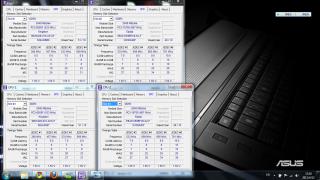
my two ram having diferent latency...izit the problem cuz my laptop to crash???

the shopkeeper sugest me to giv them my ori ram then they giv me 4x2gb 1067mhz kingston ram...

wat shud i do ??
i thk they dunwan change another ram for me...>.<becuz they claim tat thier ram is ok...


Attached thumbnail(s)
Attached Image
nvrgivup
post Apr 13 2011, 04:35 PM

On my way
****
Senior Member
607 posts

Joined: Jan 2011
QUOTE(my_nickleo @ Apr 13 2011, 12:24 PM)
My ram also have different latency, but no problem at all wor....
*
bt my laptop crash >.<


Added on April 13, 2011, 4:37 pm
QUOTE(Trance4eva @ Apr 13 2011, 02:51 PM)
walao they suppose to give you 1333mhz leh
*
tat y....bt they claim tat their ram is no problem....haiss...i also dunno wat to do...if 2x2gb elpida ram + 2x2gb apacer ram then my laptop will crash...bt if jus use 2 apacer or 2 elpida alone...then nth happen >><


This post has been edited by nvrgivup: Apr 13 2011, 04:37 PM
nvrgivup
post Apr 13 2011, 05:17 PM

On my way
****
Senior Member
607 posts

Joined: Jan 2011
QUOTE(Kyozen @ Apr 13 2011, 05:12 PM)
you kena tipu d....suppose is 1333mhz default. maybe the shop ppl change it before giving it to you. which shop u buy from? go complain?
*
no la...the ram ori come is elpida 2gb 1333mhz pc3-1066s-9-10-F1 rite???


then they giv me extra 2 x2gb 1333mhz apacer...bt is pc3-1066-xxxxx bt no s 1066S..so i wondering izit the problem...


13 Pages < 1 2 3 4 5 > » Top
 

Change to:
| Lo-Fi Version
0.0261sec    0.29    7 queries    GZIP Disabled
Time is now: 7th December 2025 - 08:11 PM