Welcome Guest ( Log In | Register )

Bump Topic Topic Closed RSS Feed

Outline · [ Standard ] · Linear+

 ♠ Samsung Galaxy Ace S5830 ♠ Official Thread V1, Decent mid range phone at RM9xx

views
     
ezonemy
post Mar 28 2011, 07:13 AM

Getting Started
**
Junior Member
64 posts

Joined: Nov 2008


New SGA OWNER bought on 26/03/2011. Still cant figure out how to use papago in SGA. it seems dont want to lock position eventhough GPS is on. any sifus can help?


ezonemy
post Mar 29 2011, 10:37 AM

Getting Started
**
Junior Member
64 posts

Joined: Nov 2008


there are duplicate contacts in sms contacts using stock sms but my phone contact dont have duplicate. any1 hv the same prob?
ezonemy
post Mar 30 2011, 09:52 PM

Getting Started
**
Junior Member
64 posts

Joined: Nov 2008


QUOTE(Music Mania @ Mar 29 2011, 04:59 PM)
I faced this funny issue with my Optimus One back then.

Do you have your contacts synced to the phone from the SIM card by any chance? Mine showed duplicate cause it's showing both the phone and SIM contacts.
*
yup i sync form my sim card, so any solution to make make it single and not duplicate?
ezonemy
post Apr 5 2011, 01:23 PM

Getting Started
**
Junior Member
64 posts

Joined: Nov 2008


me too having the same prob with mms, i hv set the digi internet APN to mms only and enalbed my packet data but still cant send or rx mms. btw im using digi prepaid.
ezonemy
post Apr 5 2011, 01:50 PM

Getting Started
**
Junior Member
64 posts

Joined: Nov 2008


manage to send and rx mms alredi
ezonemy
post Apr 5 2011, 02:24 PM

Getting Started
**
Junior Member
64 posts

Joined: Nov 2008


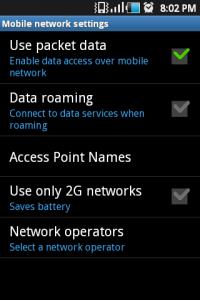
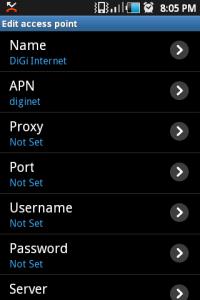
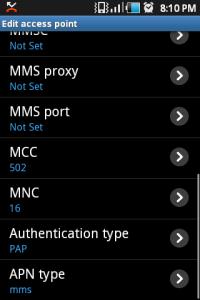
step to enable MMS with using data/internet for DIGI (im using prepaid);

- go to settings
- choose wireless and networks
- choose to mobile networks
- choose to acess point names
- open DiGi Internet
- change the APN type to mms (far end below)
- save the setting by pressing the menu and save
- go back to mobile netwok settings
- tick the use packet data
- restart phone and u can send and rx mms


it works for me !


Added on April 5, 2011, 2:30 pm
QUOTE(karim_effendy @ Apr 5 2011, 02:06 PM)
looks like this galaxy ace got lot of problem
*
so far did not encounter prob even with Wifi. this my first android phone and so far its really value for money.

This post has been edited by ezonemy: Apr 5 2011, 02:30 PM

ezonemy
post Apr 5 2011, 02:51 PM

Getting Started
**
Junior Member
64 posts

Joined: Nov 2008


QUOTE(kidz1412 @ Apr 5 2011, 02:36 PM)
it seems like doesn't work for me.
erm.....do you had setting MMS proxy in your DIGI Internet APN?
*
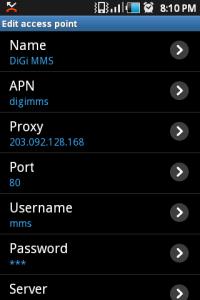
no its not set, there apn settings for digi mms in this thread page 1 try to change tat n try again. the digi internet apn must change the apn type to mms. make sure you restart the phone coz juz now it worked after restart only.
ezonemy
post Apr 5 2011, 03:42 PM

Getting Started
**
Junior Member
64 posts

Joined: Nov 2008


for papago u need to on ur packet data and gps. the packet data used to lock ur position will take around 5-10min then u may off ur packet data.
ezonemy
post Apr 5 2011, 03:54 PM

Getting Started
**
Junior Member
64 posts

Joined: Nov 2008


QUOTE(nkkhong84 @ Apr 5 2011, 03:46 PM)
the papago apps pop out the msg say cannot read the papago files in my sd card. ask me to re-insert the sd card with papago files.
*
sori no idea a my phone came with papago
ezonemy
post Apr 5 2011, 05:36 PM

Getting Started
**
Junior Member
64 posts

Joined: Nov 2008


QUOTE(SniperZ8 @ Apr 5 2011, 04:45 PM)
you DONT need to turn packet data on to use papago. just turn on your gps receiver
*
how come i thought SGA is A-GPS (assisted GPS) without data plan how to lock position, wen i tested my GPS initially without packet data it didnot work as it cannot lock my position, later i turn on the packet data it locked my position and then i tun off packet data to continue use my papago. SniperZ8 r u really sure no need packet data to use papago then how it will lock ur current position without internet to lock position? this not stand alone gps device like garmin.

This post has been edited by ezonemy: Apr 5 2011, 05:37 PM
ezonemy
post Apr 5 2011, 06:10 PM

Getting Started
**
Junior Member
64 posts

Joined: Nov 2008


QUOTE(nkkhong84 @ Apr 5 2011, 05:56 PM)
i have copy completely the NaviSea folder download from papago website and paste it in line with the other foolders like android, DCIM, media, and etc.
but still
the message asked me to insert the papago files MC

无法读取有效的地图资讯!请将已安装papago m7 的存储卡插入手机并重新启动程式.

i translate as unable to read the effective maps data! please insert the pre-installed papago m7 Sd card into handphone and restart.

= =
*
pls check which version of papago u installed, its suppose to be papago x5 my&sg and not papago m7
ezonemy
post Apr 5 2011, 08:21 PM

Getting Started
**
Junior Member
64 posts

Joined: Nov 2008


QUOTE(karkadeeh @ Apr 5 2011, 07:14 PM)
i second that. i disable packet data for papago using droidwall. then my papago wont lock my position eventhough theres like 10 satelitte detected using gps test. i turned it back on, and papago can lock my position. no charge/credit required (based on my experience)
now having problem that i cant receive or send MMS
*
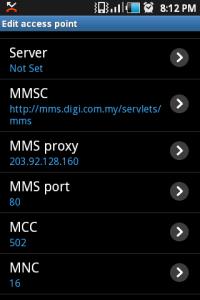
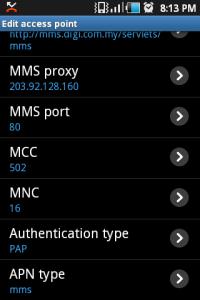
here is my setting for MMS screenshot;

Attached Image Attached Image Attached Image Attached Image Attached Image Attached Image Attached Image

im using DIGI PREPAID and test working fine on MMS (send and rx)


This post has been edited by ezonemy: Apr 5 2011, 08:22 PM
ezonemy
post Apr 5 2011, 08:39 PM

Getting Started
**
Junior Member
64 posts

Joined: Nov 2008


QUOTE(afad @ Apr 5 2011, 08:28 PM)
» Click to show Spoiler - click again to hide... «

do u check the 'use 2g only'?
or must enable it for 3g?
*
did not select ' Use only 2G networks'


ezonemy
post Apr 5 2011, 09:19 PM

Getting Started
**
Junior Member
64 posts

Joined: Nov 2008


here is the link for papago instalation

papago.com.tw/android/Download/install_SGMY_X5.htm

ezonemy
post Apr 6 2011, 09:43 AM

Getting Started
**
Junior Member
64 posts

Joined: Nov 2008


QUOTE(nkkhong84 @ Apr 5 2011, 10:23 PM)
Trial version only boh...
any possibility to make it full version??LOL
*
google
ezonemy
post Apr 6 2011, 09:52 AM

Getting Started
**
Junior Member
64 posts

Joined: Nov 2008


there is 2 way for GPS to lock;

1) Use wireless networks (wifi / mobile network)
2) Use GPS satelites

these selection can be found in settings > location and security

This post has been edited by ezonemy: Apr 6 2011, 09:57 AM
ezonemy
post Apr 6 2011, 09:54 AM

Getting Started
**
Junior Member
64 posts

Joined: Nov 2008


QUOTE(kidz1412 @ Apr 6 2011, 09:50 AM)
I did it. I am just delete the DIGI Internet APN. it is work.
*
at last, congratz. but if u delete the digi internet apn later if u wanna use normal 3g data u have to reset the apn
ezonemy
post Apr 6 2011, 01:11 PM

Getting Started
**
Junior Member
64 posts

Joined: Nov 2008


QUOTE(Bugeca @ Apr 6 2011, 11:39 AM)
When the GPS is off (manually), it will use wifi/mobile network. Anyway, I never switch off my GPS on both phones even though i did not use GPS app. The battery usage is quite minimal as long as you configure the GPS depended app schedules correctly.
*
thanks for making it clear
ezonemy
post Apr 6 2011, 07:16 PM

Getting Started
**
Junior Member
64 posts

Joined: Nov 2008


QUOTE(nkkhong84 @ Apr 6 2011, 06:53 PM)
My ace dead screen 3 times today.
*
y?
ezonemy
post Apr 6 2011, 09:10 PM

Getting Started
**
Junior Member
64 posts

Joined: Nov 2008


QUOTE(XeactorZ @ Apr 6 2011, 07:44 PM)
haha luckily i got card reader
if not sure waste alot time
so i jus use card reader n plug in stock microsd and copy to PC n copy back to new microsd
but also waste time,nid to copy 2time ><
*
i just changed my wife's SD card frm 2gb to 8gb, i didnot use the memory card reader but used the phone as storage transfer to pc then insert new SD then copy frm pc to SD. So far all working fine she did'nt complaint thumbup.gif

2 Pages  1 2 >Top
Topic ClosedOptions
 

Change to:
| Lo-Fi Version
0.0474sec    0.64    7 queries    GZIP Disabled
Time is now: 12th December 2025 - 10:12 AM