Sweet Holiday

Simple n nice is my style.
2011 "Post Your Desktop" Thread. [IMAGE HEAVY]
|
|
 Mar 11 2011, 12:49 PM Mar 11 2011, 12:49 PM
Return to original view | Post
#1
|
 
Senior Member
3,657 posts Joined: Aug 2009 
|
Sweet Holiday Simple n nice is my style. |
|
|
|
|
|
Mar 11 2011, 01:30 PM
Return to original view | Post
#2
|
|
Senior Member
3,657 posts Joined: Aug 2009
|
QUOTE(JunRio @ Mar 11 2011, 12:55 PM) look neat n simple Dark Glass, Tech-Vision, Simple Sentence, Fly Away, Crooked Calender. ..mind share what rainmeter u using? ..mind share what rainmeter u using?   |
|
|
Mar 12 2011, 11:34 PM
Return to original view | Post
#3
|
|
Senior Member
3,657 posts Joined: Aug 2009
|
QUOTE(thelion4ever @ Mar 12 2011, 08:51 PM) Mind sharing ur wallie ?? 
Added on March 12, 2011, 11:37 pm QUOTE(darkddly @ Mar 12 2011, 11:03 PM) tq... Thanks for praising.duckies and xiao ban also nais..and the bicyle pic one..however this stuff i notice it will cause hangness when on starup, nevertheless is still good that it was introduced to the public. Actually im still a newbie and im quite lazy to edit it. If you realize it, i didn't change my theme and icon for a long long time. Moreover, Window Vista does not have much nice theme.  This post has been edited by Xiia0Ban: Mar 12 2011, 11:37 PM |
|
|
Mar 17 2011, 09:54 AM
Return to original view | Post
#4
|
|
Senior Member
3,657 posts Joined: Aug 2009
|
QUOTE(bearyfishy @ Mar 17 2011, 12:32 AM) A very nice skin. Thanks for sharing. |
|
|
Mar 17 2011, 03:15 PM
Return to original view | Post
#5
|
|
Senior Member
3,657 posts Joined: Aug 2009
|
QUOTE(TechnoG @ Mar 17 2011, 11:40 AM) uumm. Just asking, how you change your taskbar icons? I'm stuck at that part TechnoG you using win vista also? » Click to show Spoiler - click again to hide... «  |
|
|
Mar 17 2011, 03:45 PM
Return to original view | Post
#6
|
|
Senior Member
3,657 posts Joined: Aug 2009
|

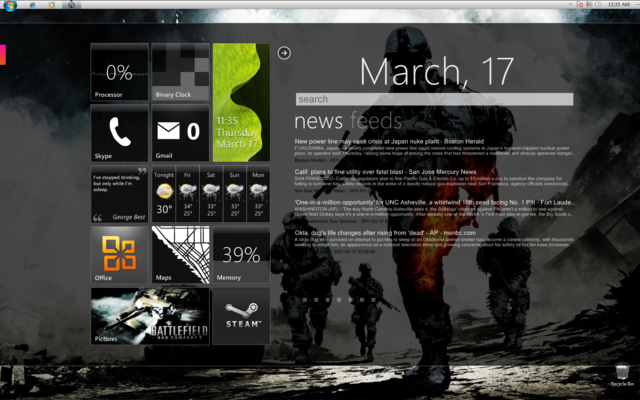
Not much changed. Simple & Nice. Getting bored with this theme, any Win Vista theme introduce? |
|
|
|
|
|
Mar 17 2011, 04:20 PM
Return to original view | Post
#7
|
|
Senior Member
3,657 posts Joined: Aug 2009
|
QUOTE(TechnoG @ Mar 17 2011, 04:17 PM) Roger that! Perhaps i should try it whether i manage to do it or not.I've downloaded the DayDreamer by Solmider, managed to change the Windows logo at the taskbar, but I want to change the entire thing. How do you do that? If i can i will try to share my way. |
|
|
Mar 17 2011, 08:06 PM
Return to original view | Post
#8
|
|
Senior Member
3,657 posts Joined: Aug 2009
|
QUOTE(Duckies @ Mar 17 2011, 06:47 PM) » Click to show Spoiler - click again to hide... « Hey this is nice.Can u list out wat theme pack and program u used? Dark glass tech-vision simple sentence fly away Crooked calender Objeckdock with Token Icon CAD with tooltip skin |
|
|
Mar 17 2011, 08:45 PM
Return to original view | Post
#9
|
|
Senior Member
3,657 posts Joined: Aug 2009
|
QUOTE(yurblex1a @ Mar 17 2011, 08:38 PM) may i know how to put the link for facebook and all that? Tech-Vision's link |
|
|
Mar 18 2011, 10:05 AM
Return to original view | Post
#10
|
|
Senior Member
3,657 posts Joined: Aug 2009
|

Here you are. |
|
|
Mar 20 2011, 11:33 AM
Return to original view | Post
#11
|
|
Senior Member
3,657 posts Joined: Aug 2009
|
QUOTE(bearyfishy @ Mar 19 2011, 10:19 PM) teach me the how to insert the facebook feed! been looking for that Just copy the RSS feed from facebook and put into the skin. |
|
|
Mar 20 2011, 10:05 PM
Return to original view | Post
#12
|
|
Senior Member
3,657 posts Joined: Aug 2009
|
QUOTE(kingkingyyk @ Mar 20 2011, 09:23 PM) Mine : Still using your own edited skin? » Click to show Spoiler - click again to hide... «  |
|
|
Mar 23 2011, 06:19 PM
Return to original view | Post
#13
|
|
Senior Member
3,657 posts Joined: Aug 2009
|
QUOTE(Chyan @ Mar 23 2011, 01:39 AM) » Click to show Spoiler - click again to hide... « |
|
|
|
|
|
Apr 9 2011, 08:40 PM
Return to original view | Post
#14
|
|
Senior Member
3,657 posts Joined: Aug 2009
|

Every Colour Represent My Love To You. Getting lazy to find new skin and customize it. Simple & Nice |
|
|
Apr 12 2011, 10:52 PM
Return to original view | Post
#15
|
|
Senior Member
3,657 posts Joined: Aug 2009
|
QUOTE(deShinyDevil @ Apr 12 2011, 04:07 PM) hi, i wonder how u all design or download those nice UI. will it slow down the system? isit compatible with windows vista? See a few post above that i posted.Im using Window Vista and im running very smooth. |
|
|
Apr 24 2011, 10:22 AM
Return to original view | Post
#16
|
|
Senior Member
3,657 posts Joined: Aug 2009
|
QUOTE(thelion4ever @ Apr 23 2011, 11:21 PM) List of widgets pls Yeah especially system status |
|
|
May 5 2011, 01:48 PM
Return to original view | Post
#17
|
|
Senior Member
3,657 posts Joined: Aug 2009
|
QUOTE(creative_fla @ May 5 2011, 01:14 PM) i have another question, how do you actually display the skins when you press win + D (show desktop) or alt tab to desktop, i find that my skins are gone and i have to click other application to make them show up. Skin>Setting>Position>On Desktop |
|
Topic ClosedOptions
|
| Change to: |  0.0187sec 0.0187sec
 0.36 0.36
 7 queries 7 queries
 GZIP Disabled GZIP Disabled
Time is now: 24th December 2025 - 04:38 AM |
 Quote
Quote