Welcome Guest ( Log In | Register )

Outline · [ Standard ] · Linear+

 MBP 13' screen freeze, pls help!

views
     
TSsamsudds
post Feb 20 2011, 12:49 PM, updated 15y ago

New Member
*
Junior Member
23 posts

Joined: Jan 2011


Hi all,
I got problem here. juz newly bought mbp 13" 2.4ghz with ram ugraded 8gb and 500gb hdd. After 3 hours playing around for 1st time, my mbp freeze when trying to restart.
Figured out the ram used is Mushkin 991647 - 4GB DDR3 PC3-10666 9-9-9-24 Essentials x 2 pcs. And hdd is WD5000BEVT SATA (WD Scorpio Blue)
user posted image
user posted image

The sympthom is the spinning wheel freeze while displaying grey screen with apple logo.

My friend tried PRAM/VRAM/SafeMode/Diskrepair/etc but still the same.

What could be the actual root-caused? Is it ram itself or hdd?

Pls help since i have very limited knowledge on this machine...many thanks

Ps. ....so frustrated and despair.....
esssymanex
post Feb 20 2011, 12:53 PM

On my way
****
Senior Member
596 posts

Joined: Sep 2004


You need test it one by one...last time also had same problem with WD Blue 500GB. After changing to Seagate, now no problem.
wei
post Feb 20 2011, 12:55 PM

Get your Macs done right!
*******
Senior Member
6,496 posts

Joined: Jan 2003
From: Kota Damansara


Did you install any accessories and/or apps before the crash?

You can try booting into Verbose mode and see where & what cause the freeze.

First have you try place back the stock RAM?
Does it work? If no then move on.

Put in the DVD came with your Mac, hold down C then power on. See if that boot.
If yes, then your boot volume is not booting, need repair or reinstallation If no it could be hardware related.

This post has been edited by wei: Feb 20 2011, 01:06 PM
TSsamsudds
post Feb 20 2011, 01:08 PM

New Member
*
Junior Member
23 posts

Joined: Jan 2011


QUOTE(esssymanex @ Feb 20 2011, 12:53 PM)
You need test it one by one...last time also had same problem with WD Blue 500GB. After changing to Seagate, now no problem.
*
did WD Blue got warranty? in case i need to RMA

QUOTE(wei @ Feb 20 2011, 12:55 PM)
Did you install any accessories and/or apps before the crash?

First have you try place back the stock RAM?
Does it work? If no then move on.

Put in the DVD came with your Mac, hold down C then power on. See if that boot.
If yes, then your boot volume is not booting, need repair or reinstallation If no it could be hardware related.
*
1. well, when i turned online, got notification for software update. i did d/load the sw-package and installed, later it re-started the mbp, where it freezeing all the sudden

2. i do not have the stock RAM or original RAM...forgot to ask back when upgrading

3. DVD can be inserted, it can boot, try select the DVD-drive icon, but it still freeze again while try to load/read the DVD

4. If RAM-related, what the best RAM to be used?
wei
post Feb 20 2011, 01:15 PM

Get your Macs done right!
*******
Senior Member
6,496 posts

Joined: Jan 2003
From: Kota Damansara


3. Please confirm you are booting from the DVD. Sometime it will boot from the HDD if you did not press "C" soon enough or let go too early.

Insert the DVD and restart/re-power on holding Options (alt) key. You should see similar screen like this (but with less icons):
user posted image

Select the DVD icon to boot.

This post has been edited by wei: Feb 20 2011, 01:15 PM
TSsamsudds
post Feb 20 2011, 01:27 PM

New Member
*
Junior Member
23 posts

Joined: Jan 2011


hi wei,
what is the proper steps again? i'm bit confuse when tto press C-button and when Option-button...thx
wei
post Feb 20 2011, 01:29 PM

Get your Macs done right!
*******
Senior Member
6,496 posts

Joined: Jan 2003
From: Kota Damansara


Keep holding Option (alt) when you power on/restart. Until you see similar screen I posted. Let go. Choose the DVD to boot. You can also put in the DVD during that screen and wait the new icon pop ups.
dvlzplayground
post Feb 20 2011, 06:28 PM

Web developer Nadzim.com
*******
Senior Member
7,916 posts

Joined: Jul 2005
From: Kuala Lumpur


pressing the Option button (after the chime, before apple logo comes up) will let u pick where to boot (dvd, another partition, another hard drive etc) just like in the photo

pressing C means picking to boot from the dvd drive only

anyway yes WD blue got warranty, i've successfully RMA'd before.

since u dont have ur original RAM, try install back ur stock HDD. if can boot, then the WD blue may be faulty. u can also take out one RAM, n try boot. if can boot, meaning the RAM u take out is faulty
TSsamsudds
post Feb 21 2011, 03:13 AM

New Member
*
Junior Member
23 posts

Joined: Jan 2011


hi experts,
problem solved! managed to get back to seller and he installed back original ram and things back to normal again...:-)

surprisingly, the original ram is SAMSUNG brand, i thought Kingston KTA, am i been conned?? :-(


wei
post Feb 21 2011, 10:26 AM

Get your Macs done right!
*******
Senior Member
6,496 posts

Joined: Jan 2003
From: Kota Damansara


No, Apple is known to use Samsung, Micron & Hynix for stock RAM. Never Kingston (unless in early PPC era). KTA is trusted DIY upgrade option.

This post has been edited by wei: Feb 21 2011, 10:28 AM
dvlzplayground
post Feb 21 2011, 12:42 PM

Web developer Nadzim.com
*******
Senior Member
7,916 posts

Joined: Jul 2005
From: Kuala Lumpur


QUOTE(samsudds @ Feb 21 2011, 03:13 AM)
hi experts,
problem solved! managed to get back to seller and he installed back original ram and things back to normal again...:-)

surprisingly, the original ram is SAMSUNG brand, i thought Kingston KTA, am i been conned?? :-(
*
KTA is good but it's a third party RAM. kingston tests the RAM on macs, but apple never configured KTA as a mac's stock RAM

samsung RAM is normal. samsung is a huge memory supplier
TSsamsudds
post Feb 21 2011, 02:40 PM

New Member
*
Junior Member
23 posts

Joined: Jan 2011


many thanks for clarifications...will opt for KTA on my next upgrade + SSD....


Added on February 21, 2011, 3:29 pmi just surfed and found MUSHKIN also have dedicated ram for MBP:

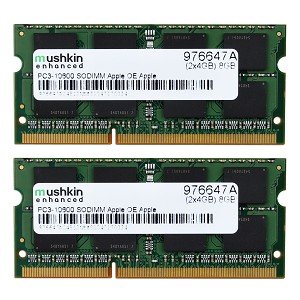
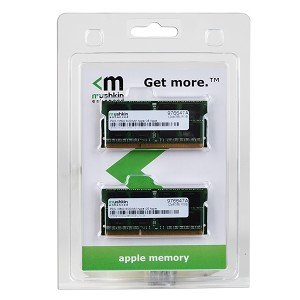
Mushkin Enhanced 8GB (2x4GB) DDR3 RAM PC3-10600 204-pin Laptop SODIMM for Apple MacBook Pro
user posted image
user posted image

and, the price is moreless the same as KTA:
user posted image

This post has been edited by samsudds: Feb 21 2011, 03:30 PM
wei
post Feb 21 2011, 05:04 PM

Get your Macs done right!
*******
Senior Member
6,496 posts

Joined: Jan 2003
From: Kota Damansara


Almost all big brand will have Apple RAM. Crucial, corsair, kingston, micron, mushkin, OCZ... Just that, can you get them here or not.
TSsamsudds
post Feb 21 2011, 05:38 PM

New Member
*
Junior Member
23 posts

Joined: Jan 2011


QUOTE(wei @ Feb 21 2011, 05:04 PM)
Almost all big brand will have Apple RAM. Crucial, corsair, kingston, micron, mushkin, OCZ...  Just that, can you get them here or not.
*
one seller in LYN could help you to get it....best price for KTA 8GB is rm500. still searching around if got any cheaper
kuekwee
post Mar 24 2011, 10:26 AM

Trading for a living
*****
Senior Member
877 posts

Joined: Aug 2008
From: Kingdom far far away
how is freeze screen look like? i got kernel panic not sure if it's the mushkin ram problem or not...so confirm it's ram problem?
TSsamsudds
post Mar 24 2011, 01:48 PM

New Member
*
Junior Member
23 posts

Joined: Jan 2011


QUOTE(kuekwee @ Mar 24 2011, 10:26 AM)
how is freeze screen look like? i got kernel panic not sure if it's the mushkin ram problem or not...so confirm it's ram problem?
*
same as yours....frozen grey screen with apple logo and spinning wheel......
the culprit is Mushkin ram....restore the stock ram Samsung, failure gone, till now....
MightyPirates
post Mar 24 2011, 02:11 PM

New Member
*
Junior Member
16 posts

Joined: Mar 2011
QUOTE(samsudds @ Feb 21 2011, 05:38 PM)
one seller in LYN could help you to get it....best price for KTA 8GB is rm500. still searching around if got any cheaper
*
who is the seller. looking to upgrade to 8gb. notworthy.gif
TSsamsudds
post Mar 25 2011, 07:21 AM

New Member
*
Junior Member
23 posts

Joined: Jan 2011


QUOTE(MightyPirates @ Mar 24 2011, 02:11 PM)
who is the seller. looking to upgrade to 8gb. notworthy.gif
*
Tot yours WTS?
kuekwee
post Mar 25 2011, 05:04 PM

Trading for a living
*****
Senior Member
877 posts

Joined: Aug 2008
From: Kingdom far far away
Your MBP is the latest 2011?
TSsamsudds
post Apr 5 2011, 06:21 PM

New Member
*
Junior Member
23 posts

Joined: Jan 2011


QUOTE(kuekwee @ Mar 25 2011, 05:04 PM)
Your MBP is the latest 2011?
*
nope, it's mbp 13" 2010....bought from famous ajul...recommended seller biggrin.gif
kuekwee
post Apr 6 2011, 10:32 AM

Trading for a living
*****
Senior Member
877 posts

Joined: Aug 2008
From: Kingdom far far away
QUOTE(samsudds @ Apr 5 2011, 06:21 PM)
nope, it's mbp 13" 2010....bought from famous ajul...recommended seller biggrin.gif
*
2010 model is using 1066mhz ram.. i think u bought the wrong one that'y freeze...mine is 1066mhz working like charm
HenDiaoMa
post Apr 22 2011, 07:06 PM

New Member
*
Junior Member
11 posts

Joined: Aug 2008
QUOTE(wei @ Feb 21 2011, 05:04 PM)
Almost all big brand will have Apple RAM. Crucial, corsair, kingston, micron, mushkin, OCZ...  Just that, can you get them here or not.
*
Yes, you can find Mushkin RAM in Malaysia, that is specific for Apple.


kuekwee
post Apr 24 2011, 12:57 AM

Trading for a living
*****
Senior Member
877 posts

Joined: Aug 2008
From: Kingdom far far away
RAM that is specific for Apple cost u 3x more...
loverjinx
post Apr 24 2011, 04:17 AM

Casual
***
Junior Member
377 posts

Joined: May 2010
QUOTE(kuekwee @ Apr 24 2011, 12:57 AM)
RAM that is specific for Apple cost u 3x more...
*
heard from ppl that kingston is the best choice of RAM for MAC ?
TSsamsudds
post Apr 27 2011, 04:07 PM

New Member
*
Junior Member
23 posts

Joined: Jan 2011


QUOTE(kuekwee @ Apr 6 2011, 10:32 AM)
2010 model is using 1066mhz ram.. i think u bought the wrong one that'y freeze...mine is 1066mhz working like charm
*
yup, mushkin RAM purchased from ajul as well, as he claimed even using 1333MHz ram doesn't matter as the system will capped at 1066Mhz only...

guess, he was wrong and me just unlucky..... biggrin.gif tongue.gif


Added on April 27, 2011, 4:08 pm
QUOTE(loverjinx @ Apr 24 2011, 04:17 AM)
heard from ppl that kingston is the best choice of RAM for MAC ?
*
i would propose OWC or Crucial for MAC....but Kingston is the most famous. nod.gif


Added on April 27, 2011, 4:14 pmforgot to inform good news....
my mbp 13" 2010 been given to my brother...

and now i'm more than happy with my newly mba 11".....no more HDD crash or RAM to be upgraded..... rclxms.gif brows.gif


This post has been edited by samsudds: Apr 27 2011, 04:14 PM
HenDiaoMa
post May 3 2011, 05:50 PM

New Member
*
Junior Member
11 posts

Joined: Aug 2008
QUOTE(kuekwee @ Apr 24 2011, 12:57 AM)
RAM that is specific for Apple cost u 3x more...
*
You can check with some dealers in KL. It's not that expensive. But the standard RAM works well too...
deadangel
post Jul 14 2011, 10:52 PM

Getting Started
**
Junior Member
135 posts

Joined: Jul 2007
From: kl


hi guys,my macbook pro 2011 got problem when i shut down.when i shut down then the menu bar and dock close after that hang on thr....wont shut down....what does it mean???

whatever i press oso useless...the only thing i can do is long pressing the power and force close it...

any pro can help me to fix it???thank you.


Change to:
| Lo-Fi Version
0.0239sec    0.85    5 queries    GZIP Disabled
Time is now: 17th December 2025 - 12:36 AM