Welcome Guest ( Log In | Register )

Bump Topic Topic Closed RSS Feed
115 Pages « < 40 41 42 43 44 > » Bottom

Outline · [ Standard ] · Linear+

Unifi Official TM UniFi High Speed Broadbrand Thread V9, save RM200 from 16 February - 31 March !

views
     
kienhow
post Mar 7 2011, 09:04 PM

Getting Started
**
Junior Member
82 posts

Joined: May 2009
To all unifi

Unifi Service enquiry under mysupport is useless. pls dun log any case there
coz no ppl will reply or call u for anything... my experince is i open a log for more than 3 week to change my phone to 62616932..
but until now still no reply...

and when i call yesterday.... they say the number is been used by other ppl...
what nonsense is this.... when the time i passup is still available 1....


useless support .....
Mgsrulz
post Mar 7 2011, 09:09 PM

30 years of Metal Gear
********
All Stars
14,258 posts

Joined: Mar 2005


QUOTE(ahpaul82 @ Mar 7 2011, 07:39 PM)
Hi all,

interested to apply Unifi,

question,
i need to terminate my existing Streamyx & Fixed line services first in order to apply Unifi?  blink.gif
*
you dont need to.
my line is still active,as well as streamyx account wacko.gif
havent gone to tmpoint yet to cancel the line & streamyx account

QUOTE(ahpaul82 @ Mar 7 2011, 07:39 PM)
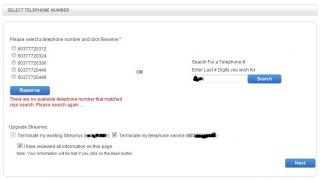
and i have reserved the last 4digits number for my new telephone,
but when i click NEXT, it dis-allow me to continue...

nvm i re-apply online again,
it show: There are no available telephone number that matched your search. Please search again ...   sad.gif
*
try later.
this happened to me before..hours later it'll be available again.
believe it or not,even UniFi's portal team doesn't know that the phone number becomes available again after a few hours. (they told me on the phone once it's reserved, the system reserves the number indefinitely...then i told them otherwise, that i just re-registered the same number, then they got abit of a shock. laugh.gif doh.gif )
rattan
post Mar 7 2011, 09:14 PM

Droid
Group Icon
Trade Dispute
3,379 posts

Joined: Apr 2006
From: KL


Went to my customer place for a site visit today. Installers were doing installation, 2 1/2 hours kawtim. Installers are quite efficient.

Customer also happy bcos I manage to get him 7 days for appointment.

Helped customer hook up his IPTV, customer were a happy person rclxms.gif

wink.gif

This post has been edited by rattan: Mar 7 2011, 09:15 PM
VerM
post Mar 7 2011, 10:43 PM

Getting Started
**
Junior Member
117 posts

Joined: Jan 2003
From: Place where number 1 is very famous


Hello Unifiers,

I have just become one of you.....today... rclxms.gif

Initial impressions...hmmm... not lightning fast as one would think...browsing wise probably a little bit better than streamyx...(still not that fast considering using the 'fibre')...

Downloading is a significant jump but not overly overwhelmed by it considering Mbps versus MB/s...


Will plan to do sth with the setup... soon...
tHeRiDdLeR
post Mar 7 2011, 10:47 PM

Getting Started
**
Junior Member
247 posts

Joined: Jan 2003
From: Sri Serdang


QUOTE(supercharger @ Mar 7 2011, 08:15 PM)
the wireless connection with DIR-615 is really bad, my laptop always disconnected
currently I use TP-Link WiFi access point, connection & signal strength is good  thumbup.gif
*
can u give me the product/model no. thx smile.gif

farhannordin
post Mar 7 2011, 11:19 PM

Getting Started
**
Junior Member
74 posts

Joined: May 2008


why my iptv got problem on first day of installation?
rattan
post Mar 7 2011, 11:27 PM

Droid
Group Icon
Trade Dispute
3,379 posts

Joined: Apr 2006
From: KL


QUOTE(farhannordin @ Mar 7 2011, 11:19 PM)
why my iptv got problem on first day of installation?
*
Define problem.
farhannordin
post Mar 7 2011, 11:43 PM

Getting Started
**
Junior Member
74 posts

Joined: May 2008


ok my problem is wait i upload picture


Added on March 7, 2011, 11:51 pmuser posted image
i oredi on off the router and everything but still the same

This post has been edited by farhannordin: Mar 7 2011, 11:51 PM
jitbeng
post Mar 8 2011, 01:16 AM

Casual
***
Junior Member
302 posts

Joined: Jan 2003
From: Petaling Jaya


QUOTE(tHeRiDdLeR @ Mar 7 2011, 06:19 PM)
count me in - VIP10.  not happy with wireless signal(dir-615). the signal very weak when i entered my room. is there any suggestion to increase the signal.
*
Try this:-

Access into the router. Select "Setup" on the top menu > select "wireless setup" on the left menu. Click on "Manual wireless connection setup". Untick "enable auto channel selection". Under "wireless channel" (there are 1 to 13 channel to select), try out all if necessary to get the best signal. I have tried & so far am happy with channel 9. Don't forget to click "Save settings" below. Hope it will work for you.


benny838
post Mar 8 2011, 01:48 AM

Getting Started
**
Junior Member
128 posts

Joined: May 2008
From: Subang Jaya


Anyone experienced slow torrent download recently?
rattan
post Mar 8 2011, 03:13 AM

Droid
Group Icon
Trade Dispute
3,379 posts

Joined: Apr 2006
From: KL


QUOTE(farhannordin @ Mar 7 2011, 11:43 PM)
ok my problem is wait i upload picture


Added on March 7, 2011, 11:51 pmuser posted image
i oredi on off the router and everything but still the same
*
Check your network cable, and make sure u connect iptv to port number 4 on the Wireless Dlink router bundled with TM's UniFi.
f0ul99
post Mar 8 2011, 05:17 AM

New Member
*
Junior Member
21 posts

Joined: Nov 2006
From: Shah Alam


Yuhu... Pls put me in the list. BIZ5 brows.gif
farhannordin
post Mar 8 2011, 06:20 AM

Getting Started
**
Junior Member
74 posts

Joined: May 2008


thanks problem solved biggrin.gif
dimenxion
post Mar 8 2011, 08:11 AM

Getting Started
**
Junior Member
289 posts

Joined: Jan 2003
From: Shah Alam


i have issue with my iptv as well. only certain channel works. like TV1, TV2, MNC, and few others. but most of the channel cant be watched, it's like astro channel during heavy rain. i checked the cable and changed it same thing. is it possible the IPTV box problem? the installer havent come and change it yet. it has been 4 days since installation now
vin_ann
post Mar 8 2011, 08:40 AM

10k Club
********
All Stars
10,912 posts

Joined: Feb 2006
Ah.. Finally i received email clarification on the promotion below:

(21 January 2011) http://twitter.com/TMCorp/status/28417285165158400
UniFi installation promo 15 Jan-15 Feb.RM200 installation fee waived 4all new successful subscriber registrations

QUOTE
Refer to your e-mail dated 5th March 2011 on your inquiry, please be informed that all registration between promotion period (15th January 2011 – 31st March) will entitle for free installation fee worth RM200. Upon checking in system, your order created on 07/01/2011. Thus, we regret to inform that you are not entitle for the promotion.


my order was created on 7 Jan.. but installation on 9 Feb.

Do i have any valid reason to argue with Unigi ???

dimenxion
post Mar 8 2011, 08:45 AM

Getting Started
**
Junior Member
289 posts

Joined: Jan 2003
From: Shah Alam


QUOTE
OTE
Refer to your e-mail dated 5th March 2011 on your inquiry, please be informed that all registration between promotion period (15th January 2011 – 31st March) will entitle for free installation fee worth RM200. Upon checking in system, your order created on 07/01/2011. Thus, we regret to inform that you are not entitle for the promotion.


maybe this part cant make u argue
koochy_rat
post Mar 8 2011, 09:49 AM

Getting Started
**
Junior Member
278 posts

Joined: Dec 2004


QUOTE(jitbeng @ Mar 8 2011, 01:16 AM)
Try this:-

Access into the router.  Select "Setup" on the top menu > select "wireless setup" on the left menu.  Click on "Manual wireless connection setup".  Untick "enable auto channel selection".  Under "wireless channel" (there are 1 to 13 channel to select), try out all if necessary to get the best signal.  I have tried & so far am happy with channel 9. Don't forget to click "Save settings" below. Hope it will work for you.
*
Yeah, this also helps improve the wifi connection for me. Previously it always fail to connect or connect but cannot get ip. I think somehow the 'auto channel selection' is messing things up.
doremon
post Mar 8 2011, 10:01 AM

eMPtiNess =`(
*******
Senior Member
2,619 posts

Joined: Jan 2005


You all to busy for wireless improvements while im busy to disconnect the wireless 101% LOL. Yesterday got a call from my neighbor he said he still able to access my unifi. Really give up on this matter. I simply shut the modem and router the whole night yesterday just because of that incident. Bummer. How the hell he can get/crack my wireless after I shut everything down. Really puzzle me here huhuhu
bai1101
post Mar 8 2011, 10:31 AM

I am Pervert
******
Senior Member
1,613 posts

Joined: Feb 2008
From: Sg Long/Serdang


QUOTE(doremon @ Mar 8 2011, 10:01 AM)
You all to busy for wireless improvements while im busy to disconnect the wireless 101% LOL. Yesterday got a call from my neighbor he said he still able to access my unifi. Really give up on this matter. I simply shut the modem and router the whole night yesterday just because of that incident. Bummer. How the hell he can get/crack my wireless after I shut everything down. Really puzzle me here huhuhu
*
hide ur SSID lo of u really scare ppl hack
so far only pro hacker can hack such hiding SSID
and use superlong WPA password i am sure even he want to crack it still take ton of times
btw dont use wEP can been easily hack through with just overnight atk on ur wifi
ahpaul82
post Mar 8 2011, 10:51 AM

.:保罗:.
*******
Senior Member
3,795 posts

Joined: Jan 2003
From: .: Old Klang Road :.


QUOTE(Mgsrulz @ Mar 7 2011, 09:09 PM)
you dont need to.
my line is still active,as well as streamyx account wacko.gif
havent gone to tmpoint yet to cancel the line & streamyx account
try later.
this happened to me before..hours later it'll be available again.
believe it or not,even UniFi's portal team doesn't know that the phone number becomes available again after a few hours. (they told me on the phone once it's reserved, the system reserves the number indefinitely...then i told them otherwise, that i just re-registered the same number, then they got abit of a shock. laugh.gif  doh.gif )
*
Thanks for your reply.

Seems like i have no fate to apply online sad.gif

Attached Image

Reserved the number i wanted previously but it disallow me to continue to next page... rclxub.gif

115 Pages « < 40 41 42 43 44 > » Top
Topic ClosedOptions
 

Change to:
| Lo-Fi Version
0.0702sec    0.86    7 queries    GZIP Disabled
Time is now: 10th December 2025 - 12:13 AM