Welcome Guest ( Log In | Register )

Bump Topic Topic Closed RSS Feed
115 Pages « < 29 30 31 32 33 > » Bottom

Outline · [ Standard ] · Linear+

Unifi Official TM UniFi High Speed Broadbrand Thread V9, save RM200 from 16 February - 31 March !

views
     
doremon
post Mar 4 2011, 09:27 AM

eMPtiNess =`(
*******
Senior Member
2,619 posts

Joined: Jan 2005


Question2.

Y so many people change router? I think best is still default. Unless something wrong with default router then change it lor. So far after 4 days of Unifi installation, my download speed quite consistent. Maintaining 19mb/s to 22mb/s (Only sometimes jump to 30mb/s to 35mb/s) but like i said maybe unifi/tm minor glitch. Need only 2 days to finish up my 27GB+ download. Quite satisfy with Unifi performance.

Y is it people change router?
JinXXX
post Mar 4 2011, 09:55 AM

Look at all my stars!!
*******
Senior Member
2,516 posts

Joined: Feb 2007
From: Uarla Umpur


QUOTE(dimenxion @ Mar 4 2011, 08:51 AM)
hi all,
my unifi gonna install tomorrow.
so i am planning to get microtik RB250GS
so the only company that sells this is landasan.com.my?
*
yeah.. for local its landasan.. there is also another distributor in singapore..

so depends on you... smile.gif price about the same maybe abt 10 bux difference...

QUOTE(doremon @ Mar 4 2011, 09:27 AM)

Y is it people change router?
*
cause the default router punya wireless is totally crap and useless, apart from that is also the firmware and the device.. eg stability issues and so on.. other router is much more stable and or has more function and features that might be required..
dimenxion
post Mar 4 2011, 10:20 AM

Getting Started
**
Junior Member
289 posts

Joined: Jan 2003
From: Shah Alam


QUOTE(JinXXX @ Mar 4 2011, 09:55 AM)
yeah.. for local its landasan.. there is also another distributor in singapore..

so depends on you...  smile.gif price about the same maybe abt 10 bux difference...
cause the default router punya wireless is totally crap and useless, apart from that is also the firmware and the device.. eg stability issues and so on.. other router is much more stable and or has more function and features that might be required..
*
calling landasan but seems no one pickup.


doremon~ based on my experience with them, their supplied modem is kinda like a low end type. so i decided to do this way.
ScaryClown
post Mar 4 2011, 10:28 AM

New Member
*
Junior Member
42 posts

Joined: Jun 2010
QUOTE(IwanAGP @ Mar 4 2011, 01:30 AM)
What the hell is this!

Found inside my log!!

Mar 4 01:27:22 Attack! SYN flooding attack from WAN (ip:79.81.124.247) detected.
Mar 4 01:26:45 Attack! SYN flooding attack from WAN (ip:88.184.153.127) detected.
Mar 4 01:26:39 Attack! SYN flooding attack from WAN (ip:84.215.37.217) detected.
Mar 4 01:26:39 Attack! SYN flooding attack from WAN (ip:78.96.142.195) detected.
Mar 4 01:26:36 Attack! SYN flooding attack from WAN (ip:78.96.142.195) detected.
Mar 4 01:26:35 Attack! SYN flooding attack from WAN (ip:173.192.48.104) detected.
Mar 4 01:25:49 Attack! SYN flooding attack from WAN (ip:78.147.192.133) detected.
Mar 4 01:25:32 Attack! SYN flooding attack from WAN (ip:88.168.80.24) detected.
Mar 4 01:23:54 Attack! SYN flooding attack from WAN (ip:91.138.137.51) detected.
Mar 4 01:22:44 Attack! SYN flooding attack from WAN (ip:81.16.174.8) detected.
*
Some ppl are ddos your network , i hosted an website with my unifi biz 20 also have this issues those lame less country love to ddos us.
doremon
post Mar 4 2011, 10:49 AM

eMPtiNess =`(
*******
Senior Member
2,619 posts

Joined: Jan 2005


QUOTE(dimenxion @ Mar 4 2011, 10:20 AM)
doremon~ based on my experience with them, their supplied modem is kinda like a low end type. so i decided to do this way.
*
Bro, I still don't see the logic to this rclxub.gif . Once you get your router, please update to me on the new situation. How consistent it can supply the download mb/s. The the result is same as mine, then pointless lor bro sad.gif .

BlueWind
post Mar 4 2011, 10:57 AM

Sianzation
*******
Senior Member
2,901 posts

Joined: Jan 2007


QUOTE(doremon @ Mar 4 2011, 10:49 AM)
Bro, I still don't see the logic to this  rclxub.gif . Once you get your router, please update to me on the new situation. How consistent it can supply the download mb/s. The the result is same as mine, then pointless lor bro  sad.gif .
*
If you have been faithfully following this thread since V1, lots of them complaining about its reliability. Lots of router breakdown issue and not to mention intermittent lost of wireless connection. Maybe you're just new to it, so save your comments later on. smile.gif

As a matter of fact, when I told TM that my line was down and they came to my house, the only thing that they brought for replacement was the router itself even though when they inspected it and it wasn't the problem. So I guess that pretty much sums up why and TM themselves also know the reliability issues of it.

This post has been edited by BlueWind: Mar 4 2011, 11:02 AM
jAkUn
post Mar 4 2011, 11:01 AM

Casual
***
Junior Member
326 posts

Joined: Jan 2005
From: Damansara

QUOTE(vergas @ Mar 4 2011, 08:58 AM)
Nice, what download manager is that?
*
IDM, internet download manager
doremon
post Mar 4 2011, 11:19 AM

eMPtiNess =`(
*******
Senior Member
2,619 posts

Joined: Jan 2005


QUOTE(BlueWind @ Mar 4 2011, 10:57 AM)
If you have been faithfully following this thread since V1, lots of them complaining about its reliability. Lots of router breakdown issue and not to mention intermittent lost of wireless connection. Maybe you're just new to it, so save your comments later on. smile.gif

As a matter of fact, when I told TM that my line was down and they came to my house, the only thing that they brought for replacement was the router itself even though when they inspected it and it wasn't the problem. So I guess that pretty much sums up why and TM themselves also know the reliability issues of it.
*
True2. Well Im new here tongue.gif

But why is that What is the Unifi set-up you used most of the time? (Suggested by - vergas) and D-Link -default is leading for 36.80%.

Y is that this option still top on the list if you said "Lots of router breakdown issue and not to mention intermittent lost of wireless connection."

Really puzzle here rclxub.gif


BlueWind
post Mar 4 2011, 11:30 AM

Sianzation
*******
Senior Member
2,901 posts

Joined: Jan 2007


QUOTE(doremon @ Mar 4 2011, 11:19 AM)
True2. Well Im new here  tongue.gif

But why is that What is the Unifi set-up you used most of the time? (Suggested by - vergas) and D-Link -default is leading for 36.80%.

Y is that this option still top on the list if you said "Lots of router breakdown issue and not to mention intermittent lost of wireless connection."

Really puzzle here  rclxub.gif
*
You're not puzzled, you just don't see the point there. Like I said earlier, you haven't been following the thread faithfully enough since the start of it, so of course you don't see a point for you to change but that's your choice. I'm here to just point out the reason why some of us here want to change.
jAkUn
post Mar 4 2011, 11:46 AM

Casual
***
Junior Member
326 posts

Joined: Jan 2005
From: Damansara

Doremon, most of them are early subscriber that got the early batch of D-Link modem. D-Link modem are famous for its limited range of wireless signals and signals type distribution as N signal which causes most of the wireless devices unable to recognize b/g/h signal. It's also unstable and also facing frequent disconnections and overheating problem.

Needless to say, other RGs equipment out there is much more reliable than the current D-Link supplied by TM at the moment. Right now I am experimenting with the D-Link modem whether it can last more than a month without switching off. So far, no problems, no disconnections at all.


pupp82
post Mar 4 2011, 11:55 AM

Getting Started
**
Junior Member
57 posts

Joined: Oct 2007


Just wondering, How bad is the default router in terms of wifi connection? I'd have it installed by end of this week. Gonna get a PCI Wifi adapter for my desktop, and the router would be place some 6m away between a wall. Since im going to buy the wifi adapter, should i just buy a router as well, or recommended i try the default router first? I do download and game a lot, would just use cables but my queen would kill me if i do, so gotta use wifi which i have no experience in, hopefully the connection ain't as bad as i think it is rclxub.gif

A bit confused with custom routers. For TP link its TL-WR841ND right? What about TL-WR941ND ?
ckwhy
post Mar 4 2011, 11:55 AM

Casual
***
Junior Member
367 posts

Joined: Jun 2005


My Unifi is installed on Wednesday 1 pm , down on Thursday 1 am. Only used it for few hours. The engineer can only come on Sunday 12.30 pm.
Is it still unstable at Cheras Batu 9 area?
BlueWind
post Mar 4 2011, 12:02 PM

Sianzation
*******
Senior Member
2,901 posts

Joined: Jan 2007


QUOTE(pupp82 @ Mar 4 2011, 11:55 AM)
Just wondering, How bad is the default router in terms of wifi connection? I'd have it installed by end of this week. Gonna get a PCI Wifi adapter for my desktop, and the router would be place some 6m away between a wall. Since im going to buy the wifi adapter, should i just buy a router as well, or recommended i try the default router first? I do download and game a lot, would just use cables but my queen would kill me if i do, so gotta use wifi which i have no experience in, hopefully the connection ain't as bad as i think it is  rclxub.gif 

A bit confused with custom routers. For TP link its TL-WR841ND right? What about TL-WR941ND ?
*
You just have to test the wireless first and see how's the signal strength. If it doesn't satisfy you, do make a proper research for any good wireless router and WR941ND is fine as long as you bridge it together with the 615.


doremon
post Mar 4 2011, 12:06 PM

eMPtiNess =`(
*******
Senior Member
2,619 posts

Joined: Jan 2005


QUOTE(BlueWind @ Mar 4 2011, 11:30 AM)
You're not puzzled, you just don't see the point there. Like I said earlier, you haven't been following the thread faithfully enough since the start of it, so of course you don't see a point for you to change but that's your choice. I'm here to just point out the reason why some of us here want to change.
*
Bro, I actually understand your concern and your point. Is just that so far on my case never happen yet (Maybe still a new router tongue.gif ). Heard lots2 people complaining on there wireless re abilities. I also looking for backup router incase my router gone nuts tongue.gif


Added on March 4, 2011, 12:10 pm
QUOTE(rattan @ Mar 4 2011, 12:06 PM)
One of the forum member is getting his UniFi VIP10 installed today. He applied with me on Tuesday. Congrats bro. Enjoy yr new connection.

Anyone who wants to apply for UniFi can PM me. Free installation till 31st March. I can assure you I will get you a date earlier then TM can assign u.

If you have already apply with other sources I am sorry I wont be able to help. I can only help if you apply with me.

Enjoy guys !
*
Bro, can quote for me business packages for my office at plaza mont kiara? From low end to high end. Want to show to my boss lah kekeke

This post has been edited by doremon: Mar 4 2011, 12:10 PM
rizvanrp
post Mar 4 2011, 12:19 PM

Getting Started
Group Icon
Elite
195 posts

Joined: Sep 2006


QUOTE(IwanAGP @ Mar 4 2011, 01:30 AM)
What the hell is this!

Found inside my log!!

Mar 4 01:27:22 Attack! SYN flooding attack from WAN (ip:79.81.124.247) detected.
Mar 4 01:26:45 Attack! SYN flooding attack from WAN (ip:88.184.153.127) detected.
Mar 4 01:26:39 Attack! SYN flooding attack from WAN (ip:84.215.37.217) detected.
Mar 4 01:26:39 Attack! SYN flooding attack from WAN (ip:78.96.142.195) detected.
Mar 4 01:26:36 Attack! SYN flooding attack from WAN (ip:78.96.142.195) detected.
Mar 4 01:26:35 Attack! SYN flooding attack from WAN (ip:173.192.48.104) detected.
Mar 4 01:25:49 Attack! SYN flooding attack from WAN (ip:78.147.192.133) detected.
Mar 4 01:25:32 Attack! SYN flooding attack from WAN (ip:88.168.80.24) detected.
Mar 4 01:23:54 Attack! SYN flooding attack from WAN (ip:91.138.137.51) detected.
Mar 4 01:22:44 Attack! SYN flooding attack from WAN (ip:81.16.174.8) detected.
*
If this is from the DIR-615's SPI firewall log it's likely just a false positive. Happens when you P2P via Bittorrent, etc.
nairud
post Mar 4 2011, 02:24 PM

One Leg Kick Ultra
Group Icon
Staff
7,529 posts

Joined: Jan 2003
QUOTE(rattan @ Mar 4 2011, 12:06 PM)
One of the forum member is getting his UniFi VIP10 installed today. He applied with me on Tuesday. Congrats bro. Enjoy yr new connection.

Anyone who wants to apply for UniFi can PM me. Free installation till 31st March. I can assure you I will get you a date earlier then TM can assign u.

If you have already apply with other sources I am sorry I wont be able to help. I can only help if you apply with me.

Enjoy guys !
*
Please refrain from posting your service here. If you want to promote your business, you can do it at the Service Noticeboard subforum
DPBaker2
post Mar 4 2011, 04:56 PM

Getting Started
**
Junior Member
60 posts

Joined: Nov 2008


Just wanted to let everyone know that if your UniFi breaks, you can expect to be without Internet, Telephone & TV for quite a while.
Mine failed on 1st March. Today, 4th March they finally gave me an appointment date for rectification - 16th March!

Absolutely incredible that a company that is making 1.2billion in profit cannot provide customer service - or maybe that is why they made so much? Sign up suckers like me & then don't bother to fix the system and don't allow me to cancel my 2 year contract?

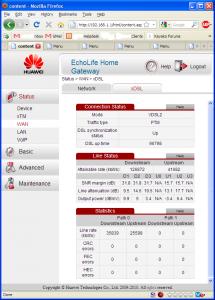
For the 1st 2 days I had no DSL light. Now I notice I do have a DSL light so maybe they did some work on their side & fixed part of it and maybe now the only problem is my side.....? I am trying to fault-find myself. I am in a condo so connection from basement is by phone lines. I have a Huawei HG655a with DSL light on and Internet light blinking every so often, presumably when the D-Link DIR-615 tries to connect to Internet.

I tried removing the D-Link and have connected my PC into the HG665a and logged in with Admin/Admin. Network status is that ptm1.400 is always 'Connecting' and ptm1.600 and ptm1.500 are both 'Connected' though Online Duration is 0 and - respectively.
The xDSL info is as per the attachment.
Attached Image
Any experts on this HG655a that can tell me if it is dead and can tell me if I can buy my own tonight or tomorrow? Or an equivalent? I don't necessarily need phone & tv for the time being but cannot survive without Internet (typing this on my Celcom connection at the moment!)

Dave
Ticket 1-827347499.
janson_kaniaz
post Mar 4 2011, 05:32 PM

...
*******
Senior Member
6,955 posts

Joined: Apr 2008


Was wondering whether we could actually, in anyway, retain our existing TM phone number instead of getting a new one. From the online application, it seems like it's not possible. Anyone done it b4?
JinXXX
post Mar 4 2011, 06:57 PM

Look at all my stars!!
*******
Senior Member
2,516 posts

Joined: Feb 2007
From: Uarla Umpur


QUOTE(DPBaker2 @ Mar 4 2011, 04:56 PM)
Just wanted to let everyone know that if your UniFi breaks, you can expect to be without Internet, Telephone & TV for quite a while.
Mine failed on 1st March. Today, 4th March they finally gave me an appointment date for rectification - 16th March!

Absolutely incredible that a company that is making 1.2billion in profit cannot provide customer service - or maybe that is why they made so much? Sign up suckers like me & then don't bother to fix the system and don't allow me to cancel my 2 year contract?

For the 1st 2 days I had no DSL light. Now I notice I do have a DSL light so maybe they did some work on their side & fixed part of it and maybe now the only problem is my side.....? I am trying to fault-find myself. I am in a condo so connection from basement is by phone lines. I have a Huawei HG655a with DSL light on and Internet light blinking every so often, presumably when the D-Link DIR-615 tries to connect to Internet.

I tried removing the D-Link and have connected my PC into the HG665a and logged in with Admin/Admin. Network status is that ptm1.400 is always 'Connecting' and ptm1.600 and ptm1.500 are both 'Connected' though Online Duration is 0 and - respectively.
The xDSL info is as per the attachment.
Attached Image
Any experts on this HG655a that can tell me if it is dead and can tell me if I can buy my own tonight or tomorrow? Or an equivalent? I don't necessarily need phone & tv for the time being but cannot survive without Internet (typing this on my Celcom connection at the moment!)

Dave
Ticket 1-827347499.
*
hey if ur dsl is up.. is your VOIP light green ???

if dsl is up and ur voip is not up means there might be a problem on their side or on ur RG...

if dsl is up and voip is up.. check the router.. but if your using default router.. im not sure how i can help..


Added on March 4, 2011, 6:58 pm
QUOTE(janson_kaniaz @ Mar 4 2011, 05:32 PM)
Was wondering whether we could actually, in anyway, retain our existing TM phone number instead of getting a new one. From the online application, it seems like it's not possible. Anyone done it b4?
*
cannot retain old number..

cause unifi numbers run on voip while old numbers runs on pots..

so its different system.. its too much hassle for them to make the integration so they tell customer cannot retain end of story...

This post has been edited by JinXXX: Mar 4 2011, 06:58 PM

Neptern
post Mar 4 2011, 07:14 PM

On my way
****
Junior Member
518 posts

Joined: Aug 2005
Anybody using any cooler for the BTU and router?

115 Pages « < 29 30 31 32 33 > » Top
Topic ClosedOptions
 

Change to:
| Lo-Fi Version
0.0475sec    0.23    7 queries    GZIP Disabled
Time is now: 7th December 2025 - 01:42 PM