Welcome Guest ( Log In | Register )

Bump Topic Topic Closed RSS Feed
20 Pages « < 3 4 5 6 7 > » Bottom

Outline · [ Standard ] · Linear+

 SAMSUNG GALAXY TAB Official Thread V1, ..best and most portable Android tablet

views
     
TSbenny888
post Feb 8 2011, 02:48 PM

Gadget Freak
Group Icon
Elite
27,801 posts

Joined: Jun 2007
From: Johor


QUOTE(saerah80 @ Feb 8 2011, 02:14 PM)
has anybody tried the navigation features? Can we use it? I tried on Sunday to get away from massive jam at PLUS highway but it doesn't seem to work or we don't have in here yet?
*
The Navigation function in Google Maps 5.0 and above cannot work in Malaysia and many other countries. If you want to have voice assisted navigation , you can installed the brut version of google maps .

Refer post# 2 Q10 n 11 : I have post link to download brut and instructions how to installed it


Added on February 8, 2011, 2:49 pm
QUOTE(Lennox @ Feb 8 2011, 01:39 PM)
Recommended resin casing seller here. Flexible and very fitting to my device. Love it  rclxms.gif

Price is RM26.
Delivery using pos express is RM4.50.
Total is RM30.50

http://forum.lowyat.net/topic/1613479

Galaxy Tab casing refer to post 15
*
Good price . Are the edges smooth and soft ?

This post has been edited by benny888: Feb 8 2011, 02:49 PM
TSbenny888
post Feb 8 2011, 05:47 PM

Gadget Freak
Group Icon
Elite
27,801 posts

Joined: Jun 2007
From: Johor


QUOTE(saerah80 @ Feb 8 2011, 05:42 PM)
do you mean about this one?

10. Which is the best app to take screenshots , preferably FREE ?

» Click to show Spoiler - click again to hide... «All screenshot apps required the TAB to be rooted. My favorite is "ShootMe" follow by "Screen Capture". Both apps are free, download it from the Market.
11. How do I access the PAID apps in the market ?

» Click to show Spoiler - click again to hide..
*
Sorry it is post#3
TSbenny888
post Feb 8 2011, 08:08 PM

Gadget Freak
Group Icon
Elite
27,801 posts

Joined: Jun 2007
From: Johor


QUOTE(alleybird @ Feb 8 2011, 03:55 PM)
Greetings,

I'd like to find out if anybody has encountered problems with the latest Google Map 5.1?

After upgrading to the latest Google Map 5.0 and the recent 5.1, I've notice the following:

1. Unable to pinpoint location when indoor using WIFI/GSM network. Before updating to Map 5.0 or 5.1, there was no problem to pinpoint the location. I have Google Map [Brut] which is based on Google Map 4.6 running and it has no problem in locating the device location indoor.

2. Frequent hanging followed by "Force Close" occurrence for Google Map 5.1. This happens even when Google Map is not running.

Would appreciate if anybody can share their experience on this. Thanks~!
*
Brut Maps can work perfectly in presence of Google Maps ( as long as it is ver 5.0 and below ) and vice versa. You will notice when Google Maps 5.0 was released many Android phones cannot install the brut version unless the official ver 5.0 is removed. Those that were able to install has incompatible issues , example like you say force closures. The best way to get rid of these FC is just to uninstall the official version and just use the brut version or use official version but no navigation.

Before ver 5.0 one could use the official version to locate and use Brut to navigate. No one really knows when Google will licensed out navigation to countries outside USA and UK - apparently a lot of licensing money is involved to get the other country governments to agree to it. Many had speculated that if this goes through , it would not be free anymore

Anyway some guy in China had cracked Google Maps 5.1 to have voice assisted navigation. Interested - just google for the APK file with name maps5.1xxxxTiger. You have to remove the official version before installing this cracked APK. I did not try but based on the forum reports, it seems to be working well. It is not appropriate for me to point out the source. Just a tip and further discussion on this cracked APK not encouraged here

This post has been edited by benny888: Feb 8 2011, 08:10 PM
TSbenny888
post Feb 10 2011, 10:04 AM

Gadget Freak
Group Icon
Elite
27,801 posts

Joined: Jun 2007
From: Johor


QUOTE(rahuldave @ Feb 10 2011, 09:22 AM)
I have reposted this thread from the previous SGT thread
*
This source is much cheaper US$25

http://mobuy.com.tw/Android/Default_SingMala.aspx

This link provided by another forumer - can try.

At this link you can see all the map views available

If you go to the Papago threads in this Android forum ( not this thread ) , there are 2 I think - spent time digging it - some guys has given some alternative "free" links. I never try as I bought mine

This post has been edited by benny888: Feb 10 2011, 10:04 AM
TSbenny888
post Feb 10 2011, 11:30 AM

Gadget Freak
Group Icon
Elite
27,801 posts

Joined: Jun 2007
From: Johor


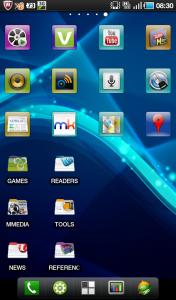
My screenshots : Simple and basic. I am using ADW Launcher. Click on shot to have a better view

Main homescreen

Attached Image

Others :

Attached Image Attached Image

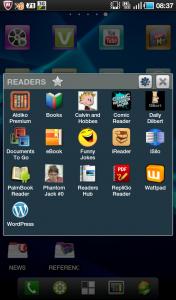
Some apps organized into folders using Folder Organizer and example of opening one folder to display apps in it

Attached Image Attached Image

This post has been edited by benny888: Feb 10 2011, 11:31 AM
TSbenny888
post Feb 10 2011, 12:58 PM

Gadget Freak
Group Icon
Elite
27,801 posts

Joined: Jun 2007
From: Johor


QUOTE(Lennox @ Feb 10 2011, 12:34 PM)
can teach me how to make like this? =D
Really noob on customize, 1st time on Android  icon_question.gif


Added on February 10, 2011, 12:37 pmThis is mine, God Damn simple. i want customize like Benny 1  cool2.gif like the power control bar, which i have only 5 - Wi-fi, BlueTooth, GPS, SYNC and brightness. I want that benny using which have 2 extra control. And the Clock + weather + temp widget. And the Battery Status. 1 more thing, i only got 3 option at the bottom there, how u guys make it into 5 option?  icon_question.gif
*
Please refer to post # 4 , first entry link on commonly used widgets , well presented by XDA. See which is suitable for you ?

Homescreen Launcher : ADW Launcher EX - you have option to have different types of docks up to 5 apps ; icons sizing and customization etc ; customize no of apps on column/rows on both homescreen and menu drawers etc

I use following widgets

Data monitor : Data counter widget
Battery : BatteryLife
Clock/Weather : Fancy Widgets
Folder Organizer for organizing apps in folders
Sticky Notes on homescreen : Post it desk
Calendar : S2 Calendar Widget2 Free, Smooth Calendar
Power Control : SwitchPro Widget - allows up to 8 selections ; I use 7 only

You can get more ideas from other Android users ; some are very good, fancy, colorful and unique : http://forum.lowyat.net/topic/1488942

This post has been edited by benny888: Feb 10 2011, 01:19 PM
TSbenny888
post Feb 10 2011, 05:59 PM

Gadget Freak
Group Icon
Elite
27,801 posts

Joined: Jun 2007
From: Johor


QUOTE(jloi @ Feb 10 2011, 05:42 PM)
wow benny using HTC weather widget..what widget is tat?
*
Fancy Widgets - plenty of clock , weather types you can choose. Another similar alternative is Beautiful Widgets equally good
TSbenny888
post Feb 12 2011, 09:23 AM

Gadget Freak
Group Icon
Elite
27,801 posts

Joined: Jun 2007
From: Johor


QUOTE(jloi @ Feb 11 2011, 02:32 PM)
the fancy widget clock i try to change d skin but it doesnt work..it still using d default 1..any help?
*
At Menu, launch Fancy Widget
Appearance Settings/Widget style - select your choice - if you want flip clock select it to match your clock type
Clock skin - tap on it ; select All tab : It will download all the clock types - as of now there are about 50 clock types you can choose> tap on the one tyou want, it will auto download install. After done, go back to Installed tab and just tap on the one you wish displayed- select Apply and close program. You will have new clock displayed
Waether Skin - tap on it ; select All tab : It will download all the clock types - as of now there are about 11 weather types you can choose. Prtocess to change same as clock


Added on February 12, 2011, 9:25 am
QUOTE(saerah80 @ Feb 11 2011, 03:42 PM)

Do we have to root the phone first?
*
You need to root : so that you can uninstall the official Maps and installed the "cracked" version

This post has been edited by benny888: Feb 12 2011, 09:25 AM
TSbenny888
post Feb 12 2011, 12:39 PM

Gadget Freak
Group Icon
Elite
27,801 posts

Joined: Jun 2007
From: Johor


QUOTE(jloi @ Feb 12 2011, 12:28 PM)
the 10 inch aspect ratio doesnt right..is way wider n longer..suddenly remind me of LG chocolate


Added on February 12, 2011, 12:34 pm

ya did tat but it still using the default clock skin =X
*
Strange. Are you using the Pro version - I am using it ; cost only US1.99 worth every sen.
Pro version exclusive features:
- Choice of Google or WeatherBug weather forecast
- Severe weather alerts with customizable notification options
- Extra flip clock widget style with skin support
- Access to the Fancy Widget Market and convenient skin management
- Fancy weather animations (rain, storm, snow, etc.)
- Compact home widget with clock and weather (4x1)
- Clock only widget (4x1)
- Weather only widget (4x1)
- Weather forecast widget (4x1)
- Even more customization options

If you are using some other versions ( even PRO) - cannot comment further why it won't work as there are just too many of such types out there
TSbenny888
post Feb 12 2011, 07:01 PM

Gadget Freak
Group Icon
Elite
27,801 posts

Joined: Jun 2007
From: Johor


Good news to all gamers on Valentine's day ; should you be playing games on your TAB this day or ???

Excerpt from AndroidandMe ( edited) : Starting 12 Feb till February 15th, all Gameloft HD titles for Android are 60% off. This means you can now download some of the best games that Android has to offer for only $1.99, but you will have to do so through Gameloft’s web store.

If this is your first time purchasing a game from Gameloft, we have a few tips to share. The easiest way to complete a purchase is by visiting Gameloft.com on your Android phone. It will provide a list of games that are optimized for your device. If no games are listed for your device, you can also trick their web store to send you a download link by selecting a comparable phone on their desktop site

Gameloft updated their policy to allow you to re-download the games you purchase, but they are still limited to the original device that you installed them on. Some users have reported that Gameloft allowed them to transfer their purchased game library to a new device, but you might have to contact customer service for that to occur.

This post has been edited by benny888: Feb 12 2011, 07:02 PM
TSbenny888
post Feb 13 2011, 11:05 AM

Gadget Freak
Group Icon
Elite
27,801 posts

Joined: Jun 2007
From: Johor


More news on Galaxy Tab 2 : SOURCE

For me, this Tab 2 will interest those who wish to look for an iPAD alternative on Android. The Motorola XOOM looks very impressive ; wonder how this TAB2 will fare against it. I will not consider this as I find the 7" size is best for portability. I could even put inside my 3/4 length short s and pants side pockets !!
For a 10" gadget, I will stick to my MacBook Air 11" which is more versatile

QUOTE : ... the Samsung Galaxy Tab 2 is going to blast forth with a 10.1-inch screen with what we’re pretty sure will be a TFT panel (as opposed to any kind of AMOLED type panel.) On the back is going to be an 8 megapixel camera with Full HD video recording. This tablet will have dual surround sound speakers. This tablet will be working with an NVIDIA dual-core Tegra processor instead of an Exynos or Qualcomm CPU. Inside this tablet, there’s said to be 16GB of internal storage plus room for expansion via a microSD card slot.
Additionally, the Samsung Galaxy Tab 2 is said to not only have a bigger screen than the iPad, but a smaller bezel and will be weighing in at around 200 grams lighter than the iPAD
TSbenny888
post Feb 13 2011, 11:31 AM

Gadget Freak
Group Icon
Elite
27,801 posts

Joined: Jun 2007
From: Johor


An active XDA member fastcx has just started a Malaysian user group of the TAB :

http://forum.xda-developers.com/group.php?...scussionid=1120
TSbenny888
post Feb 14 2011, 02:19 PM

Gadget Freak
Group Icon
Elite
27,801 posts

Joined: Jun 2007
From: Johor


QUOTE(MAAG @ Feb 14 2011, 01:20 PM)
SGT ,my new toy

MaaG/Digi Malaysia/P1000DXJJ2/DXJK2 (kernel 2.6.32.9)

WTA Benny888,
-I already root my tab, can I upgrade/update my firmware?
-Can u show tutorial how to update?

tq, appreacite ur help.
*
This is the best guide to the Galaxy Tab roms :
http://forum.xda-developers.com/forumdisplay.php?f=807

tutorials are usually briefly listed in some of the roms = browse around - get a feel first ; don't jump straight in. Of course if you kena drown, can always call for help here -many of us willl be most willing to guide you
You can also refer to my blog for guidelines where I also summarized the steps:

Flashing a new rom:
http://leemn.wordpress.com/2011/01/25/gala...rotohammer-jme/

Upgrade file system to EXT4 and upgrade to ext4 based rom
http://leemn.wordpress.com/2011/01/27/gala...daco-rom-beta1/

You might need to patch your bootloader first to unsigned it : Refer here
http://forum.xda-developers.com/showthread.php?t=888071


This post has been edited by benny888: Feb 14 2011, 02:21 PM
TSbenny888
post Feb 15 2011, 11:02 AM

Gadget Freak
Group Icon
Elite
27,801 posts

Joined: Jun 2007
From: Johor


QUOTE(sphiroth @ Feb 15 2011, 10:52 AM)
I'm really interested om the EXT4 system. Just need some confirmation:
1) mine is My set, will the steps to flashed it the same with the one in your blog? (since yours is europe set)
2) my internal SD is almost full. do I need to bought an external SD 1st to create space for file conversion?
3) will all my contact/apps still intact?

TQ in advance.
*
You can follow the steps as I have outlined. However before you do that, you need to check whether your bootloader is signed - it is if is is a Msian set. Download and install the patch file from here:

http://forum.xda-developers.com/showthread.php?t=888071

Launch the program - you will see whther it is safe or not. If is signed bootloader , just select PATCH IT - Don't worry it is very safe to do this. Reboot Tab and you are now ready to flash/change to ext 4.

The default file system in the TAB is RFS. You have 2 choices - maintained RFS file system and just change the kernel to Modaco R3 OR change file system to EXT4 and kernel to Modaco R3. Seriously if one wishes to change the kernel to R3 might as well change to EXT4 file system which is more superior

One main advantage of using Modaco kernel is it will at sametime install a RECOVERY system. With this you can now do easy full backup/restotre and flash newer roms based on EXT4 system. No more need to connect to PC and use ODIN/or Heimdall to flash new roms

If you want to flash this new kernel - make sure your external micro SD card has sufficient space as about 1 GB of your system data/apps will be backed up. To be safe, have at least 4GB free space or use a new micro SD card
All your data/apps etc remains after conversion to EXT4

This post has been edited by benny888: Feb 15 2011, 11:05 AM
TSbenny888
post Feb 15 2011, 11:11 AM

Gadget Freak
Group Icon
Elite
27,801 posts

Joined: Jun 2007
From: Johor


QUOTE(klwong99 @ Feb 15 2011, 08:32 AM)
Just finish flashed [1.4ghz OC/UV] MCR EXT4 compatible/Voodoo Sound V13 and successful set the clock speed to 1.4GHz. So far didn't found any problem and TAB seem much faster than previous. Still yet test the battery performance. My TAB was Overcome v1.1.3 ROM btw.
*
I was on Modaco R1 rom and has failed to flash this OC kernel using version 6,7 and 11 - my TAB freeze and in all occasions I lost my internal SD card , completely wipe clean. Don't know why ?? Anyway not big issue I reflash using Odin Rotohammer JMG and revive my TAB. Thereafter convert back to ext4 file system and reinstall Modaco R1.

After I read you have successfully done, I just couldn't resist to try again. Was surprised to note new version R13 available. Downloaded the zip file and flash from recovery. VIOLA!! Flash successful all completed less than 2 minutes. Will monitor performance and update later
Anyway it is good to know that I can overclock it to 1.4 Ghz


Added on February 15, 2011, 11:26 amSpiroth : Just out of curiosity how come your internal SD card is nearly full ??? What type and how many apps you have been installing ??? The internal SD ( 16 GB) has up to 13 GB of space to install apps/data > I use only 3 GB so far and I have about 100 apps installed

Looks like you need to force install apps to external micro SD to have more space.

This post has been edited by benny888: Feb 15 2011, 11:26 AM
TSbenny888
post Feb 15 2011, 11:52 AM

Gadget Freak
Group Icon
Elite
27,801 posts

Joined: Jun 2007
From: Johor


QUOTE(MAAG @ Feb 14 2011, 09:01 PM)
i am still not understand what diff between JJ2, JJ3,JJ7,JM2,JM4,JK5?

JJx for stock ROM and JMx for mod ROM?
What a big diff using stock ROm vs RotoHammer ROM?
*
These codes is abbreviated description of rom sources : Look at list below ( might not be latest ) and by looking at your firmware coding you will know the original language/country, year, month and lastly version number

What do the letters and numbers mean in firmware names?

Example firmware P1000XXJK5

P1000 = Model which is the Galaxy Tab
XX = The linguistic area : which is Austria, Belgium, France, Germany, Hungary, Italy, Spain, United Kingdom, Denmark
J = Year which is 2010
K = Month which is November
5 = Version of month

The linguistic areas are as follows: Europe, Africa, Asia.

Europe:
BD Cyprus, Greece
CP Finland
DB Vietnam
DC Thailand
DD India
DT Australia
DX Indonesia, Malaysia, Philippines, Singapore, Vietnam
DZ Malaysia, Singapore
JA South Africa
JC Algeria, Morocco, Nigeria, South Africa, Tunisia
JP Arabic
JR Arabic
JV Algeria, Egypt, Iran, Iraq, Kuwait, Morocco, Nigeria, Oman, Pakistan, Saudi Arabia, South Africa, Syria, Tunisia, Turkey
MT Switzerland
XA Austria, France, Germany, Italy, Netherlands, Switzerland, United Kingdom
XB Denmark, Norway, Sweden
XC Portugal, Spain
XD Croatia, Czech, Hungary, Slovakia
XE Bulgaria, Estonia, Kazakhstan, Latvia, Lithuania, Russia, Ukraine
XF Bulgaria, Croatia, Romania
XX Austria, Belgium, France, Germany, Hungary, Italy, Spain, United Kingdom, Denmark
ZC China, Hong Kong
ZH Hong Kong
ZT Taiwan

Africa:
JC Algeria/Tunisia
JP/JR Arabic
JV Turkey

Asia:
DB Vietnam
DC Thailand
DD India
DT Australia
DX Thailand/Indonesia/Vietnam/Malaysia

Year:
A 2001
B 2002
C 2003
D 2004
E 2005
F 2006
G 2007
H 2008
I 2009
J 2010
K 2011

Month:
A January
B February
C March
D April
E May
F June
G July
H August
I September
J October
K November
L December

Why do we wish to flash a cooked rom and not use a stock rom ??

Stock rom are build to cater for the general masses. It is what we called a safe rom and should meet the demands of most users in the world. It is analogous to a basic car, say a Persona or Vios or a City. Yet we see such cars are being modified , owners spending extra RM 10000 to RM 30000 on it. Most non car owners or basic car owners will question this " extravagant" extra spending - which one can buy another used car or better spend on other items. These owners are just pushing their car to the maximum limit to enjoy a greater performance out from it

Similar for smartphones, cooked roms allow one to expand into areas beyond what the manufacturer allows - reduce bloatware in standard roms, free more memory, allow customization ( themings, overclocking, kernel changes etc ). As such enhance actions are free ( you can too donate a small sum to developer if you wish ) there is actually no loss on yourself to try. But seriously if you are already happen with the stock rom, it is not necessary. But I always say, you will miss what you never try


Added on February 15, 2011, 11:59 am
QUOTE(sphiroth @ Feb 15 2011, 11:35 AM)
Actually, most of the space are used to stored my media (mostly video clips, MTV and manga) which can easily copied out during the process. laugh.gif BTW, my gameloft HD games already used about 1.2G... tongue.gif
*
This is strange. Most Gameloft HD games ( additional data ) are downloaded to external micro SD card - there should be a gameloft folder created in the external microSD with the additional data downloaded. Some games example Dungeon Defender create another folder DunDef in the external card ( about 700 MB data )

BTW I maintain all my video/audio files on the external microSD as I don't see any major difference having it in the internal SD ; I tested a 2GB mp4 movie file in the internal SD - didn't notice any difference in terms of loading speed and viewing performance


This post has been edited by benny888: Feb 15 2011, 11:59 AM

TSbenny888
post Feb 15 2011, 12:57 PM

Gadget Freak
Group Icon
Elite
27,801 posts

Joined: Jun 2007
From: Johor


QUOTE(sphiroth @ Feb 15 2011, 12:47 PM)
I don't have ext SD card... laugh.gif
*
OIC> Well time to invest in one. SD cards getting cheaper. I am using a DNA 16GB Class 10 now - works extremely well though yet to know how lasting . My son has been using this brand on his SE for past 5 years still working well

BTW , Expansys has released price for the Galaxy S II smartphone ( unlock retail ):
http://www.expansys.com/samsung-i9100-gala...ii-16gb-209114/

It is is £649.99 about RM 3182

So let's guess the price for the Galaxy Tab 10.1 ??? I would think it will not be less than RM 3K if it hits M'sa. Expansys pricing is high now I believe just to catch the early birds who do not mind to pay a premium
TSbenny888
post Feb 15 2011, 04:16 PM

Gadget Freak
Group Icon
Elite
27,801 posts

Joined: Jun 2007
From: Johor


QUOTE(sphiroth @ Feb 15 2011, 04:09 PM)
benny888, after flashing the EXT4.tar using odin, my tab reset and freeze just like yours. So I turn it off and on again into recovery (vol up + power switch). Then it comes out error:

E failed to mount /system IInvalid argument)
/system may be rfs. Checking ...

(some other error here)

and it launch clockworkmod recovery with several option. which should i choose?
*
scroll and find reboot will complete it

TSbenny888
post Feb 15 2011, 04:20 PM

Gadget Freak
Group Icon
Elite
27,801 posts

Joined: Jun 2007
From: Johor


Reboot from menu. Scroll to go back n till you see reboot. Abyway wait it will take few minutes more to complete
TSbenny888
post Feb 15 2011, 04:25 PM

Gadget Freak
Group Icon
Elite
27,801 posts

Joined: Jun 2007
From: Johor


In recovery mode you select choices use vol up n vol down button. Press camera to execute your choice

20 Pages « < 3 4 5 6 7 > » Top
Topic ClosedOptions
 

Change to:
| Lo-Fi Version
0.0471sec    0.28    7 queries    GZIP Disabled
Time is now: 7th December 2025 - 01:28 PM