Welcome Guest ( Log In | Register )

Bump Topic Topic Closed RSS Feed
20 Pages « < 9 10 11 12 13 > » Bottom

Outline · [ Standard ] · Linear+

 SAMSUNG GALAXY TAB Official Thread V1, ..best and most portable Android tablet

views
     
TSbenny888
post Mar 1 2011, 10:47 AM

Gadget Freak
Group Icon
Elite
27,801 posts

Joined: Jun 2007
From: Johor


QUOTE(jloi @ Mar 1 2011, 10:42 AM)
Samsung Galaxy S already got gingerbread leaked..when is tab turn? biggrin.gif biggrin.gif
*
Hopefully soon, probably in a month's time since the SDK already out. I'd assume that the builtin 4 soft keys will be disabled with Honeycomb port


TSbenny888
post Mar 1 2011, 10:48 AM

Gadget Freak
Group Icon
Elite
27,801 posts

Joined: Jun 2007
From: Johor


QUOTE(twokick @ Feb 28 2011, 10:48 PM)
Sir Benny!

I followed the steps u given and my TAB finally have the market app! And my TAB still works well, minus the contact and message data they are all gone though.. lol. No problem, i'll just update that again.

Thank you for the advise.

Thank you Sir! WOOooohoooo!!
*
GOOD !! Will post up your unique situation in Q N A Tech Solutions Post #3

This post has been edited by benny888: Mar 1 2011, 11:17 AM
TSbenny888
post Mar 1 2011, 10:58 AM

Gadget Freak
Group Icon
Elite
27,801 posts

Joined: Jun 2007
From: Johor


QUOTE(klwong99 @ Mar 1 2011, 10:47 AM)
My curious here is, direct flash by using my existing CWM, will this consider as clean and full Overcome installation?
*
Wong : I suggest you reflash clean - that is what I did. Somehow when you directly flash Overcome 1.2 on top of existing Modaco Kernel - I noticed most obvious is the temperature. Even at stock 1 GHz my battery temperature on charge hovers about 38 to 42 degree. On normal operation modes was averaging 34 to 38 degree. Call me kiasu or kiasi, I am just not comfortable with such higher temperature though it is said to be acceptable

So what I did was : in recovery mode - clear cache partition, clear dalvik cache, clear data/factory reset. After reboot, I switch off. Go back to recovery only flash the full 1.2.0 zip.
Then I reinstall back my apps and restore some data using MyBackupPro. More tedious way

Immediately I noticed till today: at default 1 GHz - operating temperatures 28 to 32 degree ; while charging 34 to 36 degree. It is about at least a 5 degree difference


TSbenny888
post Mar 1 2011, 11:00 AM

Gadget Freak
Group Icon
Elite
27,801 posts

Joined: Jun 2007
From: Johor


QUOTE(ajay67 @ Mar 1 2011, 10:54 AM)
Just managed to root my phone. still a long way to catch up with u guys..
*
It is never too late to start. Better late than never. You may be the " tortoise" now but will win the race eventually ahead of us


Added on March 1, 2011, 11:01 am
QUOTE(basSist @ Mar 1 2011, 10:58 AM)
rooted & flash to overcome 1.20 + juice defender default setting

6 hours + sleep , wake up only drop 2-3% battery. drool.gif
*
You can achieve such figures too ( on no data background use ) without the use of juice defender


Added on March 1, 2011, 11:03 am
QUOTE(dvng @ Feb 28 2011, 11:16 PM)
I have only change the kernel from FS to ext4. When i was in recovery , the backup was performed twice and now I have two backup file in my CW. When i rebooted all the third party apps was missing and the original apps missing was the Market. When i reinstall the third part apps, it says overwrite existing apps but there's nothing on the screen. Strange? Anyway i reinstalll all the third part apps but i am quite sure the old apps files is still residing somewhere in the Internal SD.

This is my specs. GT-P1000, Firmware 2.2, Baseband P1000DXJM2,Kernel 2.6.32.9 paul@PAUL-OBrien-iMac-#55, Build Number FROYO DXJM4
*
I can only conclude, something must have gone awry since you recorded 2 backups file. Some files could have been deleted. You can safely delete the first one - just keep the second later one

This post has been edited by benny888: Mar 1 2011, 11:03 AM
TSbenny888
post Mar 1 2011, 11:15 AM

Gadget Freak
Group Icon
Elite
27,801 posts

Joined: Jun 2007
From: Johor


QUOTE(Hico @ Mar 1 2011, 11:08 AM)
Tab wifi rm1499  rclxms.gif
*
Great - another choice for potential users. But than limited data access unless you are always in a WiFi area
TSbenny888
post Mar 1 2011, 11:30 AM

Gadget Freak
Group Icon
Elite
27,801 posts

Joined: Jun 2007
From: Johor


QUOTE(klwong99 @ Mar 1 2011, 11:19 AM)
Thx for the explanation, benny.
What i thought was, in order to have clean flashing, we should flash back to stock ROM or Rotohammer's ROM.
Is mean just "clear cache partition, clear dalvik cache, clear data/factory reset" will consider as "clean flashing" as well?
*
This will give you a clean rom without your data, settings, apps etc. I don't know how this affects the kernel - but this always seems to work well when flashing new roms. This method also seems to remove if not eliminale all cases of apps force closures. I noted that such methods works extremely well when I flash my previous NexusOne and Dell Streak

You can still start from base one flashing with Rotohammer JM : this will definitely wipe clean all traces of Modaco's or any 3rd part kernel eg richardtrip 1.4 OC. I'd say this is the best way to really cleanup your kernel. Than only proceed change/upgrade newer kernels
TSbenny888
post Mar 1 2011, 11:45 AM

Gadget Freak
Group Icon
Elite
27,801 posts

Joined: Jun 2007
From: Johor


Another challenger to the 7' TAB, this time from Motorola :

Excerpt from : http://www.pcmag.com/article2/0,2817,2381132,00.asp

Motorola plans to release a 7-inch tablet and several phones with the same docking capabilities as the landmark Atrix 4G phone by the end of the year, CEO Sanjay Jha said at Morgan Stanley's Media and Telecom Conference today.
The company just released its first Android tablet, the Xoom, last week. Jha didn't give specific numbers for Xoom sales, but said they were a "good start" and that Motorola is already working on a "tiered" strategy with multiple tablets.
"There will be seven-inch, some version of eight-inch, some version of 10, 11 and 12 inch tablets" in the market, although not necessarily all from Motorola, Jha said. Seven inches is definitely on the schedule, though, and Motorola "will have other tablets out by the end of the year," Jha said.

This post has been edited by benny888: Mar 1 2011, 11:46 AM
TSbenny888
post Mar 1 2011, 01:13 PM

Gadget Freak
Group Icon
Elite
27,801 posts

Joined: Jun 2007
From: Johor


QUOTE(thepittbull @ Mar 1 2011, 01:09 PM)
I'm assuming you're using the Modaco kernel? Used to see it when I was using it with the Paul's ROM as well.

Seems to be just an animation glitch. Nothing to be really worried about.

Switching over to overcome, and it was gone.
*
Yes, just a minor glitch . Nothing to worry about. You flash richardtrip 1.4OC will see siimilar but color strips just narrower


Added on March 1, 2011, 1:15 pm
QUOTE(sphiroth @ Mar 1 2011, 12:41 PM)
Finally I'm on OC Rom + 1.4Ghz. I found a bug with this rom. When opening contact, its empty, but when opening dialer and then go to contact from the tab on top, its appear correctly.
*
No such bug on mine. I supposed you are using default contact app too


Added on March 1, 2011, 1:15 pm
QUOTE(benny888 @ Mar 1 2011, 01:13 PM)
Yes, just a minor glitch . Nothing to worry about. You flash richardtrip 1.4OC will see  siimilar but color strips just narrower


Added on March 1, 2011, 1:15 pm

No such bug on mine. I supposed you are using default contact app too
Never tried 1.4 O/C. How is the temperature readings ?

*
This post has been edited by benny888: Mar 1 2011, 01:15 PM
TSbenny888
post Mar 1 2011, 02:38 PM

Gadget Freak
Group Icon
Elite
27,801 posts

Joined: Jun 2007
From: Johor


QUOTE(mw5026 @ Mar 1 2011, 01:59 PM)
guys noob question,do really need external sd card before flashing?coz i,m rooting and check bootloader already and now ready to flashing new rom.. icon_question.gif
*
You need the external sd card if you want to flash kernel change to ext4. Once you convert to ext4 you can use the recovery to flash new roms which must be placed on ext sd card

If you flash rom using ODIN, no need to have ext sd card

TSbenny888
post Mar 1 2011, 02:42 PM

Gadget Freak
Group Icon
Elite
27,801 posts

Joined: Jun 2007
From: Johor


QUOTE(hkboey @ Mar 1 2011, 02:39 PM)
Flashed again also the same. sad.gif damn......
*
If you lose you internal sd card you must reflash rom using odin 1.7. Select repartition, PIT and PDA. Use rotohammer jmi to revive the internal sd card. Then only proceed to do modaco recovery n est4 change. then use recovery to flash again overcome 1.2

Additional info : If you notice that that modem not working ( ie no GPRS, 3G detected ) after flash Overcome 1.2, flash the modem file too when flashing JMI just as a extra measure. Save you trouble the second time to flash again using Odin. You can use this JMF modem file:

http://android.modaco.com/content/samsung-...eband-download/

This post has been edited by benny888: Mar 1 2011, 02:53 PM
TSbenny888
post Mar 1 2011, 03:12 PM

Gadget Freak
Group Icon
Elite
27,801 posts

Joined: Jun 2007
From: Johor


So far, recorded 109 users for the TAB. Wonder how many of them are still using it ??
TSbenny888
post Mar 1 2011, 03:34 PM

Gadget Freak
Group Icon
Elite
27,801 posts

Joined: Jun 2007
From: Johor


QUOTE(Lennox @ Mar 1 2011, 03:19 PM)
A lot or ppl selling tab in garage sales.  sad.gif
btw, im still using it, still with my stock rom and stock kernel, never flash this and that  biggrin.gif
*
True, but I have yet to see any great number of the users I recorded selling off in this forum ( solely based on their nickname) . There are two users I noted who has sold it. These two who had sold, apparently is still using it based on their queries they have been posting in this thread. Maybe they are resellers themselves selling off the extra units. I noted also many of the sales are actually units contracted with telco and the sellers is just trying to resell it at a profit


Added on March 1, 2011, 3:41 pm
QUOTE(dave18 @ Mar 1 2011, 03:16 PM)
@Benny : this is what i did. But at default 1 ghz, the batttery was 36deg and not the usual 30deg (when i went back to modaco kernel for a couple of days last week). What has gone wrong? maybe i need to hard reset ? which is the messy loh.

Come to think of it , I didn't shut down after wiping caches etc in cwm, I went straight to flash full overcome zip. Is that the problem?
*
Probably 'cos I would think a shutdown will complete the cleaning process. The higher temperature was distracting to me. I was worry probably due to my frequent flashing and testing of kernels plus O/C, my sensors were affected. But I was proven wrong. Everything is now back to normal. When not in used, my TAB records average 28 to 30 degree .
I have read ( forgot the link ) it is still alright for the TAB to hit mid 40 to 50 degree in temperature but I just don't feel confortable seeing such numbers. Anyway I don't use graphic intensive apps and don't play games, so the over-clocking tests is only an academic exercise to satisfy my curiosity

This post has been edited by benny888: Mar 1 2011, 03:41 PM

TSbenny888
post Mar 1 2011, 03:52 PM

Gadget Freak
Group Icon
Elite
27,801 posts

Joined: Jun 2007
From: Johor


QUOTE(ajay67 @ Mar 1 2011, 03:44 PM)
How to get the battery percentage appear at the top bar?
*
Overcome rom has this feature built in
TSbenny888
post Mar 1 2011, 06:46 PM

Gadget Freak
Group Icon
Elite
27,801 posts

Joined: Jun 2007
From: Johor


QUOTE(ajay67 @ Mar 1 2011, 05:48 PM)
Hico, I want to put the bat percentage on the top bar, same like phone, wifi signal & clock. Widget one got already
*

Added on March 1, 2011, 6:47 pm
QUOTE(benny888 @ Mar 1 2011, 06:46 PM)
Test out this apk from here - should work on the tab ; it is a generic type - no harm ; quite few TAB users confirm it works. It adds a circular battery % on the notification bar

http://forum.xda-developers.com/showthread.php?p=8639993
*

Added on March 1, 2011, 6:54 pm
QUOTE(rahuldave @ Mar 1 2011, 06:33 PM)
SGT Users, Any reply?
*
You can try and google for Time widgets - plenty on the web. You might not get an exact one . Most of these widgets are free
Example this one displayed time, date and location together
http://www.appbrain.com/app/digital-world-...roid.worldclock


Added on March 1, 2011, 6:59 pm
QUOTE(skypie @ Mar 1 2011, 06:10 PM)
sorry as i am new here and got my tab today

want to ask

which recommended pouch and protector casing that is reasonable price?
*
What is reasonable ?? Price range ??

Silicon/Resin back covers - budget RM 20 to RM 40 ; mid range RM 50 to RM60 ; high quality RM 120

Casing ( book type ) : Imitation leather PVC - RM 40 + ; Psuedo leather RM 90+ ; High quality genuine leather RM 180 to RM 220


Check at Garage sales - quite few sellers. Or just go to any PDA shop , plenty choices. Most DIGI centers i see also selling - mainly medium range.

This post has been edited by benny888: Mar 1 2011, 06:59 PM
TSbenny888
post Mar 1 2011, 07:48 PM

Gadget Freak
Group Icon
Elite
27,801 posts

Joined: Jun 2007
From: Johor


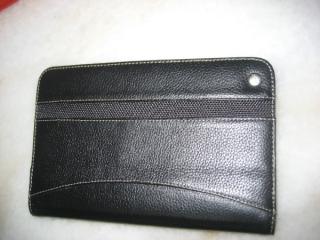
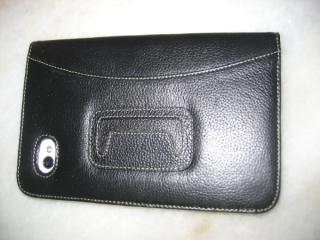
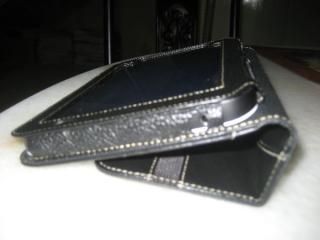
Pics of my case : Melkro
Very high quality genuine leather. Soft to the touch and protects TAB very well. I paid RM 180 for it after bargaining it from RM 220 at PJ Digital Mall. A worthy investment to protect your TAB. Even with the case it still fits in nicely my long pants side pockets and 3/4 knee shorts

Attached Image Attached Image

Attached Image Attached Image

One can buy similar psuedo leather types ( about RM 80 to RM 90 ) and PVC lookalike ( RM 40+ )

Can buy online more choices : US$ 69
http://www.melkco.com/scripts/main/viewite...FBKLC-GTAB.html


TSbenny888
post Mar 1 2011, 07:50 PM

Gadget Freak
Group Icon
Elite
27,801 posts

Joined: Jun 2007
From: Johor


QUOTE(rahuldave @ Mar 1 2011, 07:25 PM)
Are you using this case, if it falls, will it break?
*
This looks very nice n classy. Yes, you have a point here - it could break if drop. Reasonable pricing about RM 139

This post has been edited by benny888: Mar 1 2011, 07:53 PM
TSbenny888
post Mar 1 2011, 08:28 PM

Gadget Freak
Group Icon
Elite
27,801 posts

Joined: Jun 2007
From: Johor


QUOTE(Lennox @ Mar 1 2011, 08:11 PM)

im using a resin casing with only rm28. my another casing ( book type ) is kinda expensive, i been cheated  sad.gif  i bought it rm120 but i saw at garage sales only selling rm60. Careful on those book type casing
*
Book type casing like mine plenty available ; price ranges from RM 40 to RM 90 for PVC leather lookalike, psuedo leather . These types with prolong use, the cover coating will slowly peel as is not genuine leather. Should go and feel it in your hands to assess the quality of such casings. Some are soft, some are slightly stiff. However it will still offer protection. Look at your budget and decide

This post has been edited by benny888: Mar 1 2011, 08:28 PM
TSbenny888
post Mar 1 2011, 10:49 PM

Gadget Freak
Group Icon
Elite
27,801 posts

Joined: Jun 2007
From: Johor


QUOTE(L7Awesome @ Mar 1 2011, 10:38 PM)
Wow. It's expensive.  I saw it in Singapore and it's selling for SGD49.90.  No offence rahuldave. I just got the surprised that casing's price in Malaysia is a lot more expensive.

I am also using the Tab with Viva casing but it comes together with the Tab (used).
*
There are 2 types in spore. A cheaper s$59 and a premium soft leather vaux type s$79. These are listed official prices

This post has been edited by benny888: Mar 1 2011, 10:50 PM
TSbenny888
post Mar 1 2011, 11:00 PM

Gadget Freak
Group Icon
Elite
27,801 posts

Joined: Jun 2007
From: Johor


QUOTE(muffdiver @ Mar 1 2011, 10:49 PM)
Fancy a clone like what you got? Galaxy Tab Case 1

I actually just ordered from the same seller but chose this instead: Galaxy Tab Case 2

The same one is sold in Novacell for RM 138. Reach tomorrow so hopefully the quality is good. Been a bit scared to take it out naked for now covering with layers upon layers of pads and cloth.
*
there are imitations . I was offer a melkro copy looks exact same but poorer faked leather for rm80. There are plenty fakes esp in lowyat. I last bought a faked capdase resincase for my galaxy s for rm 45 when the original cost rm110 - the obvious difference in the patch logo at back. Original words is sharp and uniform size and patch perfect fit in embedded slot while fake is misaligned and words non uniform color and faded at some points. Resin quality for fake is hard while original is softer
TSbenny888
post Mar 2 2011, 12:00 AM

Gadget Freak
Group Icon
Elite
27,801 posts

Joined: Jun 2007
From: Johor


QUOTE(kokifung @ Mar 1 2011, 11:29 PM)
hi there,
newbie here,
just wanna setup my apn..
done as below,

but apn type ...
DIGI

1) Home -> Menu -> Settings -> Wireless & networks -> Mobile networks -> Access Points Name
2) Menu -> New APN
Name : DiGi Internet
User name : digi
APN: diginet
MCC: 502
MNC: 16
APN Type: default
(Others, blank)

choose wat?
internet + mms??
*
internet+mms
APN diginet only applicable for digi prepaid/postpaid
If you are using the prepaid internet package account ( no voice calls ) , APN is 3gdgnet

20 Pages « < 9 10 11 12 13 > » Top
Topic ClosedOptions
 

Change to:
| Lo-Fi Version
0.0444sec    0.10    7 queries    GZIP Disabled
Time is now: 7th December 2025 - 09:56 AM