QUOTE(valkjr @ Feb 1 2011, 01:20 AM)
what's your question again? might be able to help cos yesterday only started to learn nia

1. permaroot ( with visionary plus tool version r14) >>
Here2. go to market and download terminal emulator (sp?), install and run. Type su and enter, if come out this symbol "#" then ur dhd is permaroot
3. radio S-off >>
Here4. S-Off >>
Here5. Eng S-Off >>
Here6. Download Custom Rom ( Revo / Leedroid / etc) >>>
Revo's 2.0.9 >>>
Lee Droid (1.5.1)7. Download ROM manager from market and click on 1st option
8. After successful message on flash, select " Reboot into recovery"
9. In recovery menu, follow the instruction in the custom rom thread.
10. Download recomended radio ( there's link in the custom rom thread) or you can find them here if limited download traffic. Note: ***only flash recomended radio****>>
Here 11. Flash radio ( instruction) >>
HereCongrats......finish le...

PS: If there's any mistake as per above link and instructions or the sequence.....feel free to correct me

Please advice, newbie here

Step 3 and 4 is a MUST rite before flashing custom ROM?
From what i read, step 5 Eng S-Off is to improve battery or signal which is flashing radio rite?
Is it necessary to do step 5 if i just want to flash custom rom?
And for backups, should i backup 1st before do step 3 and 4 or how?
Thanks in advance.
Added on February 2, 2011, 3:06 pmQUOTE(warofexodus @ Feb 2 2011, 03:03 PM)
Get Desktop Visualizer at the market. Then download some custom pictures for your buttons you will need it. =) or you can make some with photoshop.
Here is a link to the tutorial. =)
Desktop Visualizer Tutorial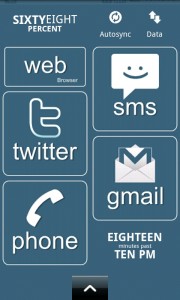
Enjoy XD
i think that link u stated only for .jpg, not a tutorial.
This post has been edited by rulmufc: Feb 2 2011, 03:06 PM 

 Jan 25 2011, 12:14 AM


 Quote
Quote


 0.0377sec
 0.44
0.44
 7 queries
 GZIP Disabled