


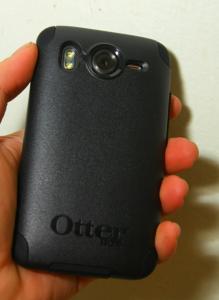
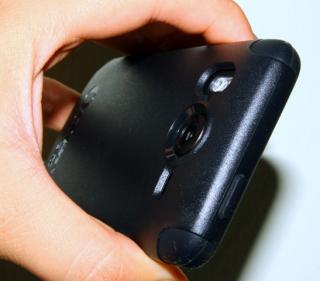
otterbox is a really good invest. only complain is the silicon part absorbs too much dust!!
 other than that, everything was perfect!!
 Attached thumbnail(s)



*** HTC Desire HD Official Thread V7 ***, HTC Flagship Android Machine!!!
|
|
 Jan 24 2011, 09:10 PM Jan 24 2011, 09:10 PM
|
 
Senior Member
3,373 posts Joined: Nov 2008 
|
hey guys!! here's the pictures. i just took it randomly. dont shoot me!
otterbox is a really good invest. only complain is the silicon part absorbs too much dust!! other than that, everything was perfect!! Attached thumbnail(s)
|
|
|
|
|
|
Jan 24 2011, 09:12 PM
|

Senior Member
2,301 posts Joined: Oct 2008 From: android#[me@linuxbox me]$ my_location 
|
QUOTE(billy_overheat @ Jan 24 2011, 09:10 PM) hey guys!! here's the pictures. i just took it randomly. dont shoot me! bottom there, gt cover for 3.5mm n micro usb? otterbox is a really good invest. only complain is the silicon part absorbs too much dust!! other than that, everything was perfect!!  |
|
|
Jan 24 2011, 09:15 PM
|
|
Senior Member
3,373 posts Joined: Nov 2008
|
QUOTE(napoli26 @ Jan 24 2011, 09:12 PM) bottom there, gt cover for 3.5mm n micro usb? yup, as shown in the last picture.  |
|
|
Jan 24 2011, 09:28 PM
|

Senior Member
684 posts Joined: Mar 2006
|
for those who had been holding out for better handsets, rejoice!
http://www.engadget.com/2011/01/24/nvidia-...dness-teased-b/ quad-core madness. @.@ |
|
|
Jan 24 2011, 09:31 PM
|

Junior Member
205 posts Joined: Feb 2008
|
QUOTE(billy_overheat @ Jan 24 2011, 10:10 PM) hey guys!! here's the pictures. i just took it randomly. dont shoot me! Nice aaa~~~ otterbox is a really good invest. only complain is the silicon part absorbs too much dust!! other than that, everything was perfect!! |
|
|
Jan 24 2011, 09:33 PM
|
|
Senior Member
3,373 posts Joined: Nov 2008
|
QUOTE(MacgyverWong @ Jan 24 2011, 09:31 PM) Nice aaa~~~ buy that then! |
|
|
|
|
|
Jan 24 2011, 09:34 PM
|
|
Senior Member
598 posts Joined: Dec 2006
|
haha y all so sokong otter, d sp provided oso not cut to fit the entire screen
 |
|
|
Jan 24 2011, 09:36 PM
|

Senior Member
1,413 posts Joined: Aug 2009 From: Damansara 
|
QUOTE(Ahkwang @ Jan 24 2011, 09:28 PM) for those who had been holding out for better handsets, rejoice! wait for fall 2011,will have 3D on phone+1366 resolution!..what a madness!.. http://www.engadget.com/2011/01/24/nvidia-...dness-teased-b/ quad-core madness. @.@  compare to that,DHD look very small but NOW,We are monster!..  This post has been edited by angrysnail: Jan 24 2011, 09:37 PM |
|
|
Jan 24 2011, 09:36 PM
|
|
Senior Member
2,301 posts Joined: Oct 2008 From: android#[me@linuxbox me]$ my_location
|
QUOTE(H2D @ Jan 24 2011, 09:34 PM) haha y all so sokong otter, d sp provided oso not cut to fit the entire screen me no money, using rm15 silicon caseAdded on January 24, 2011, 9:37 pm QUOTE(angrysnail @ Jan 24 2011, 09:36 PM) wait for fall 2011,will have 3D on phone+1920 resolution!..what a madness!.. if really out this phone, malaysia atleast need to wait to 2012 baru ada, somemore 2012= end of the world compare to that,DHD look very small but NOW,We are monster!..  This post has been edited by napoli26: Jan 24 2011, 09:37 PM |
|
|
Jan 24 2011, 09:38 PM
|

Senior Member
2,150 posts Joined: Feb 2006
|
QUOTE(H2D @ Jan 24 2011, 09:34 PM) haha y all so sokong otter, d sp provided oso not cut to fit the entire screen It doesn't fit the entire screen but it covers enough |
|
|
Jan 24 2011, 09:40 PM
|
|
Junior Member
135 posts Joined: Apr 2006
|
QUOTE(Ahkwang @ Jan 24 2011, 09:28 PM) for those who had been holding out for better handsets, rejoice! By that time, hopefully the battery technology is improving as well, else no point having a huge phone caring around or a slim phone but need to plug to power source most of the timehttp://www.engadget.com/2011/01/24/nvidia-...dness-teased-b/ quad-core madness. @.@ |
|
|
Jan 24 2011, 09:43 PM
|
|
Senior Member
684 posts Joined: Mar 2006
|
QUOTE(tweikiang @ Jan 24 2011, 09:40 PM) By that time, hopefully the battery technology is improving as well, else no point having a huge phone caring around or a slim phone but need to plug to power source most of the time haha. 3000mAH?  now already got 1900mAH.  Added on January 24, 2011, 9:44 pm QUOTE(angrysnail @ Jan 24 2011, 09:36 PM) wait for fall 2011,will have 3D on phone+1366 resolution!..what a madness!.. haha. +1 compare to that,DHD look very small but NOW,We are monster!.. This post has been edited by Ahkwang: Jan 24 2011, 09:44 PM |
|
|
Jan 24 2011, 09:46 PM
|
|
Junior Member
205 posts Joined: Feb 2008
|
To All DHD Bros...
Is it Workable????? Please advice...  QUOTE How to Install Apps to the SD Card by Default on Froyo The Android 2.2 Froyo feature that most people have been looking forward to is likely official support for installing apps to the SD card. It’s something that many feel should have been included from the start, and I beliwve all android users have gotten the dreaded “phone storage is getting low” notification on our Android devices at one point or the other. There are certain tricks to regain a couple of MB here and there, like clearing the cache that some applications use, but for those with a taste for apps and games, the phone storage limitation has been quite a nuisance. Android users with root access have been able to enjoy the Apps2SD utility, but getting it to work is a comparatively complicated process. Frozen yogurt to the rescue! To install an app to the SD card on Android Froyo, the application itself needs to support it. Actually most current apps can be moved to the external storage. However, the Froyo system installs all new applications on your device’s internal memory by default, except for those that explicitly request external installation. Luckily, it’s possible to make your Android 2.2 phone put apps on the SD card by default instead. Here’s how: First you have to enable USB debugging on your Android device from Settings > Applications > Development > USB debugging. Now you need to download and install the Android SDK on your computer from http://developer.android.com/sdk/. Once you’ve downloaded and extracted the package to the folder of your choice, run SDK Setup.exe and click on Available Packages to the left. If you get an error message at this point, enable “Force https://…” in the Settings. From the list of available packages, select “Usb Driver package”, click on the Install Selected button in the bottom right corner and follow the prompts. Connect your phone to your computer with a USB-cable. Your OS will prompt you to install new drivers. Choose to install them from the android-sdk/usb_driver folder. Do not mount your device; you only need to plug-in the cable. Next, run a command prompt and navigate to the Android-SDKtools folder. In Windows, this is done by selecting Run from the Start Menu (or by pressing Win+R) and typing cmd. You change drives in the command prompt by entering the drive letter followed by a colon (  , and change folders with the CD command. For example, to enter the Android-SDK folder, simply type cd android-sdk. , and change folders with the CD command. For example, to enter the Android-SDK folder, simply type cd android-sdk.In the Android-SDKtools folder, type in adb devices and you should get a serial number starting with “H” in return. All you have to do next is entering adb shell pm setInstallLocation 2. Voilà, you’re done! Android will now install apps to the SD card by default. To switch back to storing software on the internal memory, enter adb shell pm setInstallLocation 0. It’s preferable to install certain apps to the main memory, since it will take a while before the SD card becomes available when you start your phone. Applications installed on the memory card will also be unavailable to the system each time you mount your phone as a disk drive. The internal storage is probably quicker as well, even though Google claims that “there is no effect on the application performance so long as the external storage is mounted on the device.” In general, apps that integrate with the Android OS and that often run in the background is better to install on the internal storage, while games and most other applications will have no problem chilling outside on your SD. Source: http://downloadandroid.info/2010/08/how-to...fault-on-froyo/ Need clarification whether this is TRUE or NOT??? |
|
|
|
|
|
Jan 24 2011, 10:00 PM
|

Senior Member
2,050 posts Joined: Dec 2009 From: DC
|
Just finish flash radio succesfully
Thanks to napoli26, Atsutane-Shirane and monza84 who help me flashing rom and radio for the first time. anybody has doubt on flashing can ask this taiko going for set cpu now! QUOTE(MacgyverWong @ Jan 24 2011, 05:02 PM) Haha...problem solved as stated in above post... you should try flashing, then you will encounter a hundred of this.Just feel panic because FIRST time getting such error message.. then you not gonna panic anymore  QUOTE(hypermount @ Jan 24 2011, 09:06 PM) I just created ext and swap partition on the sdcard but dunno how top view them. i see this in cmw, but not sure what its for or does it really necessary  |
|
|
Jan 24 2011, 10:13 PM
|
|
Junior Member
52 posts Joined: Nov 2006
|
Dear TS..
My name not listed on the owner list. I have requested since V6.. Pls help update.. shiwamoto - Digi Malaysia. Thanks.. |
|
|
Jan 24 2011, 10:13 PM
|

Junior Member
53 posts Joined: Aug 2010 From: Kampar, Perak
|
anyone can teach me how to setup tethering??? I already successfully connected to the phone using usb and hotspot. but cant connect to the internet. what can I do??
|
|
|
Jan 24 2011, 10:15 PM
|

Senior Member
2,266 posts Joined: Jul 2009 From: Macintosh HD
|
Haiya... otterbox tempting me but i no money buy... most i can invest in is the capdase soft jacket expose
|
|
|
Jan 24 2011, 10:21 PM
|
|
Senior Member
2,050 posts Joined: Dec 2009 From: DC
|
QUOTE(Kyros90 @ Jan 24 2011, 10:13 PM) anyone can teach me how to setup tethering??? I already successfully connected to the phone using usb and hotspot. but cant connect to the internet. what can I do?? tethering mean that you on the wifi hotspot then use the mobile internet connection for your laptop (or other phone).This post has been edited by koinibler: Jan 24 2011, 10:21 PM |
|
|
Jan 24 2011, 10:24 PM
|
|
Junior Member
53 posts Joined: Aug 2010 From: Kampar, Perak
|
QUOTE(koinibler @ Jan 24 2011, 10:21 PM) tethering mean that you on the wifi hotspot then use the mobile internet connection for your laptop (or other phone). I know what is tethering.. the problem is after I turn on 3G and connect to my laptop, I cant go online....how to solve it? |
|
|
Jan 24 2011, 10:36 PM
|
|
Senior Member
598 posts Joined: Dec 2006
|
QUOTE(Kyros90 @ Jan 24 2011, 10:24 PM) I know what is tethering.. the problem is after I turn on 3G and connect to my laptop, I cant go online....how to solve it? go to wireless n network under setting there got check mark mardin read manual? |
|
Topic ClosedOptions
|
| Change to: |  0.0184sec 0.0184sec
 0.35 0.35
 6 queries 6 queries
 GZIP Disabled GZIP Disabled
Time is now: 7th December 2025 - 11:29 AM |
 Quote
Quote