Welcome Guest ( Log In | Register )

Bump Topic Topic Closed RSS Feed

Outline · [ Standard ] · Linear+

 Sandy Bridge Overclocking V1, 2500K/2600K/2700K | LGA1155 P67.Z68.Z77

views
     
Mavrix
post Oct 23 2011, 02:41 PM

Regular
******
Senior Member
1,118 posts

Joined: May 2008
From: Kuantan--Nilai--Kuantan--Nilai


Helo there..

Im new to Sandy Brigde proc..

Proc: i5 2500K
Cooler: Tuniq Tower 120 Extreme
Mobo: Asus P8Z68-V


Running at 4.3GHZ OC via Asus TurboV EVO apps.. and here's what i got:
» Click to show Spoiler - click again to hide... «


Someone suggest me to lower the BCLK fig due to might gonna hurt my proc.. so, any comments would be appreciated! thumbup.gif
Meanwhile, gonna fork at google for OC tips on this Sandy chip.. sweat.gif

My target is to reach a stable speed of 4.5GHZ for daily usage.. not planning on booting 24/7 though!

This post has been edited by Mavrix: Oct 23 2011, 02:44 PM
Mavrix
post Oct 23 2011, 07:13 PM

Regular
******
Senior Member
1,118 posts

Joined: May 2008
From: Kuantan--Nilai--Kuantan--Nilai


QUOTE(owikh84 @ Oct 23 2011, 06:26 PM)
Welcome to SB OC club!
The clickable bios interface is known as UEFI.
not all brands implement UEFI on their boards. To name a few, Asus, Asrock, MSI etc use UEFI; whereas Giga is using conventional BIOS, which is accessible by keyboard only.
Not only BCLK clocking would hurt ur CPU, any OC activity also might damage ur chip, or otger components ie mobo, DRAM, GC etc... BCLK frequency on SB is now tied together with PCIE, PCI hence make OCing a lil bit harder than previous platforms. U could raise BCLK just a few MHz so far i've seen 110MHz being the highest BCLK a SB chip can achieve. Max BCLK is highly depends on CPU & mobo. Some CPUs can do 108MHz but some chips are stuck at 107MHz only.
On SB it is very easy to do 4.5GHz or even 5.0GHz if ur cooling allowed. Just set multi 45x and bump up vcore if need and u are fine to get a stable machine.
*
Thanks for heads up bro owikh84.. will do when i get home later.. now lepak2 at koptiam wifi while surfing for best tricks and guide regarding OC this Sandy baby.. will post the results after this...

**i am pretty glad my old Tuniq fit very ngam2 with the board.. coz im sure this old cooler still can perform good on Sandy Bridge procs..
originally im planning to get the Corsair H80, but budget had to be use for other matter first.. biggrin.gif

» Click to show Spoiler - click again to hide... «

*** sory for the bad quality of the pics, taken with Nokia C3.. haha doh.gif

This post has been edited by Mavrix: Oct 23 2011, 07:20 PM
Mavrix
post Oct 24 2011, 12:39 AM

Regular
******
Senior Member
1,118 posts

Joined: May 2008
From: Kuantan--Nilai--Kuantan--Nilai


Manage to get 4.5GHZ!

Temp seems to be fine i guess:
» Click to show Spoiler - click again to hide... «


Well i guess it good enough for daily usage for now.. myb gonna go further later on.. thumbup.gif
Comments are welcome here! notworthy.gif

*i hope those pics are fine.. sweat.gif
Mavrix
post Oct 24 2011, 08:08 PM

Regular
******
Senior Member
1,118 posts

Joined: May 2008
From: Kuantan--Nilai--Kuantan--Nilai


I guess its just a business gimmick.

But! I'm happy with my Sandy now, easily reach 4.5GHZ just with a simple tweak.. its a very OC friendly chip to me.. a big jump from the i7 930 SC1366.

And runs cool too! biggrin.gif

I guess i just skip LGA2011 next year, myb just upgrade to i7 2700K if the price cheap at that time.. haha

This post has been edited by Mavrix: Oct 24 2011, 08:09 PM
Mavrix
post Oct 25 2011, 09:57 PM

Regular
******
Senior Member
1,118 posts

Joined: May 2008
From: Kuantan--Nilai--Kuantan--Nilai


QUOTE(owikh84 @ Oct 25 2011, 07:31 PM)
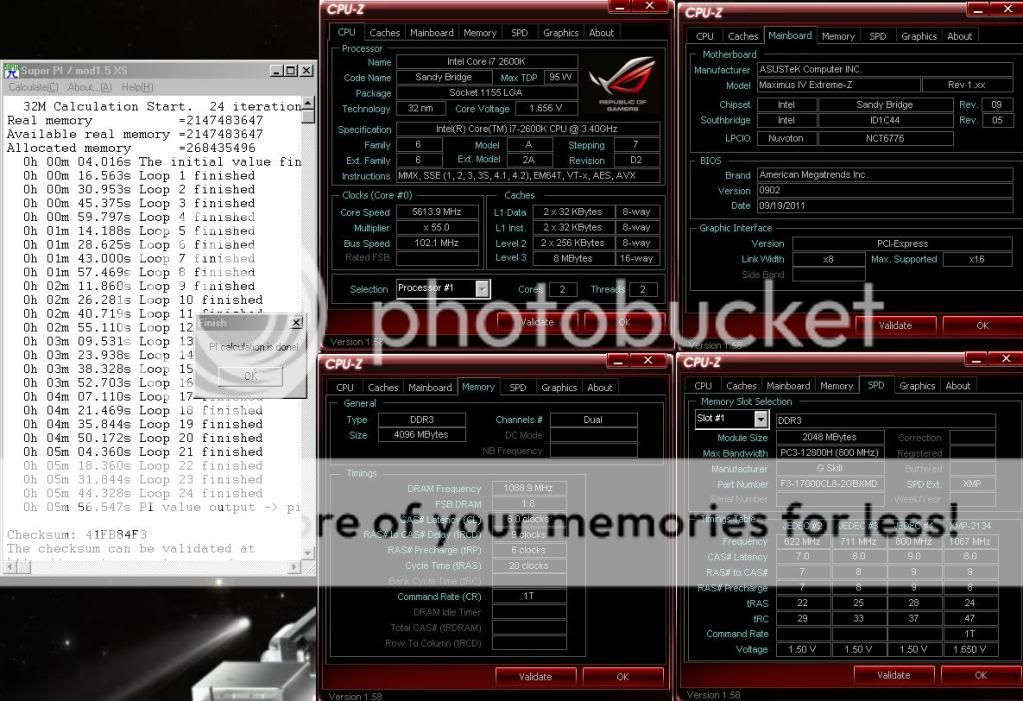
sub 6m  thumbup.gif

» Click to show Spoiler - click again to hide... «

*
Very2 good results there bro!

32M calculation in just 6min ar??
What the proc temps?? Under 60°C i guess?? On WC i see there.. thumbup.gif
Mavrix
post Oct 27 2011, 01:01 PM

Regular
******
Senior Member
1,118 posts

Joined: May 2008
From: Kuantan--Nilai--Kuantan--Nilai


QUOTE(ashraful @ Oct 27 2011, 08:25 AM)
BSOD have the code right? you have to know which one makes the blue screen.
maybe the vcore?

Anyway, have anybody has the problem of computer leaves blank display after standby? i have to off m computer manually with the button everytime....
Don't know what cause this....
*
I got this issue to, its happen when my pc goes to sleep mode and never got the windows on display after moving mouse or keyboard.. had to reboot the pc then the windows comes alive again with the current app running..

I guess this is the downside of the Z68 chipset, its some kind of bug or something.. anything else its run flawlessly! I never knew if updating BIOS will cure this bug but i just put it for last resort (had bad experience with BIOS updating.. sweat.gif )

One way to avoid this annoying matter, i've just go to Control Panel > Hardware and Sound > Power Options > Edit Plan Settings.. and just set the sleep mode to NEVER.. i just leave the monitor to turn off on certain2 period.. problem solve but the PC wouldnt go to sleep mode anymore (but power saving is not an option here)


Added on October 27, 2011, 1:01 pmOverall, im quite satisfied with this mobo and proc OC capability, so easy even for a beginner..

This post has been edited by Mavrix: Oct 27 2011, 01:01 PM
Mavrix
post Oct 29 2011, 01:24 AM

Regular
******
Senior Member
1,118 posts

Joined: May 2008
From: Kuantan--Nilai--Kuantan--Nilai


QUOTE(owikh84 @ Oct 28 2011, 10:50 AM)
Grats!
Ocing a SB is pretty easy. if u increased just the multiplier only then there's nothing else than the vCore.  thumbup.gif

acther is selling his SB rig HERE
omg... wat a damn nice combo  drool.gif
*
Wau!! Damn right sir! 11k can get myself a 600cc sportbike! haha.. brows.gif
But the spec is.. sure is drooling! drool.gif

*i'm running my rig for 3 days now (testing) and my average temp is on 39-41°C.. great temps for SB... sooooo satisfied!!! huhu. Planning to change the thermal paste with the Arctic Cooling MX-4 paste.. and see how is the performance..

Will update once it done!
Mavrix
post Nov 4 2011, 01:13 PM

Regular
******
Senior Member
1,118 posts

Joined: May 2008
From: Kuantan--Nilai--Kuantan--Nilai


QUOTE(owikh84 @ Nov 2 2011, 10:01 PM)
thanks stasio, i believe new bios will be released for Z as well soon.
*
I'm so phobia with BIOS update.. so scared gonna break my mobo like what i did to my ex- Asus P5NE-SLI.. suddenly dead after faill on updating..

But i guess newer mobo is free form this prob.. is Z68 has dual BIOS?? sweat.gif
Mavrix
post Mar 21 2012, 12:59 AM

Regular
******
Senior Member
1,118 posts

Joined: May 2008
From: Kuantan--Nilai--Kuantan--Nilai


QUOTE(tanghm @ Mar 20 2012, 05:07 PM)
What is the safe temp for Sandy Bridge ?
My 2700k temperature is touching 90'C when running IBT while Prime95 85'C.

Using Corsair H60
*
Thats seems to be quite high.. i supposed u not OC it? Or did u??
Might be the base of the cooler not seated perfectly hence the thermal not dissipate nicely through the cooler's..
Or ur cooler not functioning well?? The radiator, fans ect...

My i5 never exceed 55-60°C on my Tuniq in full load during prime95, and its OC to 4.5GHZ.. just for sharing..


Added on March 21, 2012, 1:02 am
QUOTE(riderz135 @ Mar 21 2012, 12:57 AM)
hi Pro Overclockerz and Sifuz ! ....

nid to ask a question regarding the CMV6GT and 2600K Performance ...

ive did prime test about 1 hour with V6GT running at 3.8GHZ ! .... d temp after 1 hour is 62C in full load / idle was 38C ..... is diz ok ??? ..... or too hot ??

im using arctic mx-4 ... and V6GT has been replaced with arctic f12 PWM x 2 !! push / Pull COnfig ! ....

can tell me izz da temp ok ?? or i nid to do sumthin ?? thx ! ... help very much appreciated !! ...
*
Ur temp is quite nice.. but i guess u can get more from ur 2600k.. heard it can be push to get 5.0ghz on air cooling!! (but i wouldnt dare to do so, need to prolong my cpu, 4.5 is enough for my daily apps)
But not all chip of cpu are the same, some can get higher, some just so so only.. but the diff is not that far..

Anyway, some quote from our OC master @owikh84:
QUOTE(owikh84 @ Mar 11 2012, 09:16 AM)
sharing your bios settings & PC specs would be helpful
noobs are advised to go thru these OC guides to avoid spoon-feeding.

LGA1155 Overclocking Glossary
Asus P67/Z68 OC Guides
Asus P67 OC Guides
*
This post has been edited by Mavrix: Mar 21 2012, 01:07 AM
Mavrix
post Mar 21 2012, 10:35 AM

Regular
******
Senior Member
1,118 posts

Joined: May 2008
From: Kuantan--Nilai--Kuantan--Nilai


QUOTE(tanghm @ Mar 21 2012, 09:20 AM)
OCed 4.6GHz (sig) VCore 1.360~1.368 cpuid reading, I dont think your temp is achievable. Some pages back some guy also achieve same temperature as me using the same cooler. i7 is very much hotter than i5 at same GHz.

I'm using push-pull, a 2400rpm high speed ball bearing as push fan. Should I reapply TIM ?  hmm.gif
*
Ooo yeap sory forgot to look out to ur siggy there..

Well, re-applying TIM should help reduce the heat a bit guess..

Or u might try to use other cooler if u can get one and compare it.. The CM hyper 212+ is a cheaper cpu cooler but have a good reviews on the net.. just to make sure if u have extra ringgit. Can get it below 100 i guess..

This post has been edited by Mavrix: Mar 21 2012, 10:35 AM
Mavrix
post Mar 21 2012, 10:49 AM

Regular
******
Senior Member
1,118 posts

Joined: May 2008
From: Kuantan--Nilai--Kuantan--Nilai


I guess need to wait for master owikh84 to answer ur concerns here..

But a lot of Ocer master here say, the best WC setup is the custom one, Not to say ur H60 is not good but the best result is from the custom setup with the best component out there.. but its very costly and risky.. thats the reason i always choose a conventional cooler with a fan + heatsink.. a little bulky but simple to me..

That's bcoz im not a true Ocer, just so so only.. hehe smile.gif

But what cooler does he use?? same as u?

QUOTE(tanghm @ Mar 21 2012, 10:39 AM)
» Click to show Spoiler - click again to hide... «
Mavrix
post Mar 25 2012, 11:03 AM

Regular
******
Senior Member
1,118 posts

Joined: May 2008
From: Kuantan--Nilai--Kuantan--Nilai


QUOTE(tanghm @ Mar 24 2012, 09:53 PM)
I now know why I play Shogun2 hang, coz I go set 1,2,3 cores active 4.8GHz and 4 cores active 4.5GHz.

Stress test sure pass lah, 4.5GHz nia zzz. If play game it will randomly spike to 4.8GHz where my vcore is not enough.

20 rounds ? 10 rounds also I scare, temp is at 90'C ya know.
*
wow! 90'C also scare me alot bro! I strongly suggest u to upgrade ur wc setup to get the best temp there.. Ur proc is hurting!

Topic ClosedOptions
 

Change to:
| Lo-Fi Version
0.0249sec    0.29    7 queries    GZIP Disabled
Time is now: 3rd December 2025 - 05:03 AM