Welcome Guest ( Log In | Register )

Outline · [ Standard ] · Linear+

 Tv cabinet, Can anybody share your tvcabinet design

views
     
Noregrets
post Jul 12 2013, 02:21 PM

Regular
******
Senior Member
1,124 posts

Joined: Oct 2012
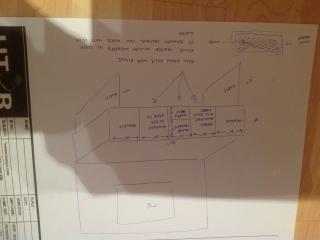
Can any ID or woodworking co quote how much for the attached design ?
Measurements are made to conceal all my AV stuff totally.
The reason for cloth wrapping the door covers is so that my remote controls work with the door closed.
Color should be gloss white or gloss black.
Back panel design - flexible - please propose
Attached Image

Sorry about the upside down picture. Tried a few times to straighten it but can't seem to be able to do it.

This post has been edited by sekkee: Jul 12 2013, 02:31 PM
Noregrets
post Aug 10 2015, 08:57 PM

Regular
******
Senior Member
1,124 posts

Joined: Oct 2012
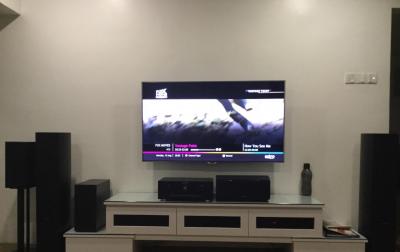
My current TV cabinet which I don't like as there are 2 bulky items on top.
When I made this cabinet the centre speaker was a small one which goes inside the cabinet. This one too big to go in so have to put it on top.
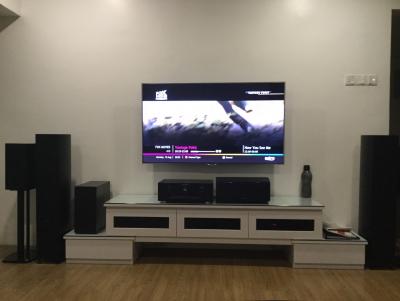
Attached Image

Ordered a new custom one as per drawing.
My house has minimalist concept to keeping it very simple.
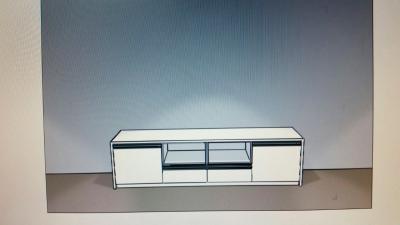
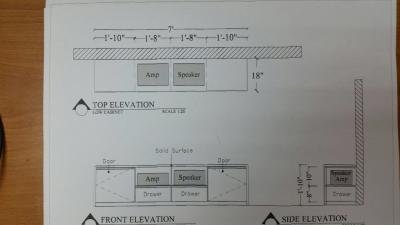
Attached Image

Attached Image

The top part is made of white solid surface.
The drawer and doors is made of white 4G doors.

Should be ready in 2 weeks time.
Noregrets
post Aug 20 2015, 02:07 PM

Regular
******
Senior Member
1,124 posts

Joined: Oct 2012
QUOTE(Shinka @ Aug 20 2015, 09:37 AM)
RM6500 after discount. Its made out of solid oak.
*
very nice. not cheap though
Noregrets
post Sep 1 2015, 09:13 PM

Regular
******
Senior Member
1,124 posts

Joined: Oct 2012
QUOTE(Noregrets @ Aug 10 2015, 08:57 PM)
My current TV cabinet which I don't like as there are 2 bulky items on top.
When I made this cabinet the centre speaker was a small one which goes inside the cabinet. This one too big to go in so have to put it on top.

Attached Image

Ordered a new custom one as per drawing.
My house has minimalist concept to keeping it very simple.

Attached Image

Attached Image

The top part is made of white solid surface.
The drawer and doors is made of white 4G doors.

Should be ready in 2 weeks time.
*
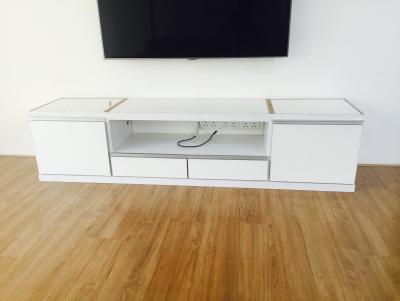
Installation was last Friday.
It was going ok with the wooden part already installed
Attached Image

Then when they were making holes (for the various speaker cables ) on the solid surface part, a worker slipped and the solid surface got smashed up vmad.gif

Attached Image

So they had to make a new solid surface and it was installed today

Attached Image

Attached Image

Overall I am very happy with it - it may not suit everyone's taste as it is so simple but it fits the minimalist concept of my whole house.

Here's the previous one for easy comparison
Attached Image

This post has been edited by Noregrets: Sep 1 2015, 09:25 PM

Noregrets
post Sep 2 2015, 09:41 PM

Regular
******
Senior Member
1,124 posts

Joined: Oct 2012
QUOTE(frequency @ Sep 2 2015, 07:47 PM)
Bro how u hide the hdmi, etc cables of the tv. Panel? Hack and conceal?
*
Hacked the wall for the HDMI and rear speaker cables, installed a power socket behind the TV.
Then skimmed the wall.
Did this when I renovated the whole house.
Didn't want any unsightly cables to keep the minimalist look.
Noregrets
post Sep 2 2015, 10:25 PM

Regular
******
Senior Member
1,124 posts

Joined: Oct 2012
QUOTE(nyunyu @ Sep 2 2015, 10:12 PM)
Mine 90% same as yours. I found that I should've add a few mesh for ventilation and cable slot at the far top to make it neat. Right now with Astro + Unifi BTU + Popcorn A210 + HDMI 5 port switch + PS4, it does feels warm in that area. My own next project would be to modify the cabinet adding vents and silent fan.

Maybe like this: http://www.cnet.com/au/how-to/diy-install-...-media-cabinet/
*
The original plan for this new cabinet is to have no equipment on top.
But the Astro unit got very hot in the enclosed part to the point that the remote control did not work so had to put it on top.
The blue ray and CD is in the cupboard - no issue with heat for these two units.
Noregrets
post Sep 3 2015, 11:31 PM

Regular
******
Senior Member
1,124 posts

Joined: Oct 2012
Mine used a trunking for a song HDMI.
I don't need 4 HDMI.
Only one from TV to SR.
All other equipment eg Astro, blue ray, Apple TV, etc is connected by HDMI to the SR
Noregrets
post Sep 4 2015, 09:18 PM

Regular
******
Senior Member
1,124 posts

Joined: Oct 2012
We better start a new thread for hiding cables as this is a cabinet thread.

Noregrets
post Sep 10 2015, 03:48 PM

Regular
******
Senior Member
1,124 posts

Joined: Oct 2012
QUOTE(pokchik @ Sep 10 2015, 02:13 PM)
bro, i have 1 question - is your AVR 2.1 or 5.1?
(with no cables on the floor, does this mean that you conceal the wiring of your other 2 surround speakers?)
*
Mine is 7.1
All cable concealed via hacking of wall. Back surround concealed by plater ceiling.
Noregrets
post Sep 10 2015, 08:03 PM

Regular
******
Senior Member
1,124 posts

Joined: Oct 2012
QUOTE(pokchik @ Sep 10 2015, 04:23 PM)
i see.. so concealed, and go through ceiling instead of underneath flooring.

err.. sorry if it's too much to ask, but care to share your surround speakers' placements & wall connections?
(e.g. if you have the wires protrude directly from the back wall, or you use sockets as termination)
*
Can you go to this specific thread in this same forum which I started to specifically discuss hiding cables so as not to hijack this TV cabinet topic. There are some pictures there.

> Hiding cables for home entertainment system, How to hide cables


Change to:
| Lo-Fi Version
0.0206sec    0.40    7 queries    GZIP Disabled
Time is now: 5th December 2025 - 05:02 AM