ok..like this...
i got problem here with flashing the 2.2 firmware back to 2.1 eclair...
i open odin...OPS i select EUROPA_I5508_v1.0...
at 1st, i try to use one package and change the I5503DXJG5 local.rar to . tar so that i can use the one package function...then i press down mid and on button..the download sign appear....then connect with cable....then odin response detect!...so i press start...it after a few second, it hang and show that odin is not responding....
2nd time i try it become a lil bit different.....i extract all..and manually put all the PDA,phones and etc.....no hang...in the bottom left column say start downloading start...like this...
Download Start...
<0> Create File...
<1> StartThread Detected : 1
<2> StartThread Detected : 0
<3> StartThread Detected : 0
<4> StartThread Detected : 0
<5> StartThread Detected : 0
<6> StartThread Detected : 0
<7> StartThread Detected : 0
<8> StartThread Detected : 0
<1> setup connection...
<1> odin mode.. check plcatform verification.
<1> VerifyPlatform:V0, P0,R0
<1> START!!!
<1> set download environment.
<1> big partition size!!
<1> big partition size!!
<1> mibib download..
but till now which is already 20 minutes....nothing happen....
so what is the problem here ya?....can someone help me to solve this problem.???..the reason why i re flash it back to eclair bcoz i think my hp got battery problem....in 5 hours the battery will finished....i didnt even on wifi...just a few message and a few calls...
so i think the battery got prob so i need to flash from 2.2 froyo to 2.1 eclair back so that they(warranty) cant detect i already change the firmware...but thing become more worse where now if i press on button...just got something like this image...But mine is terbalik... from PC to Phone...
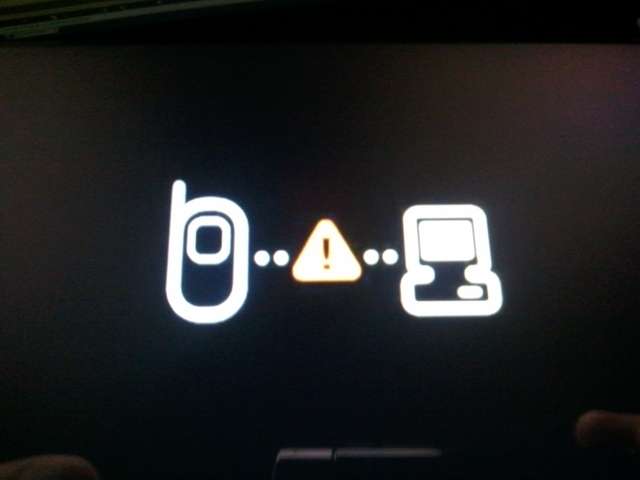
i already tried to flash to 2.2froyo back using the same normal method as i flash before...but it is still the same...it failed to flash...


 Jan 24 2011, 01:26 AM


 Quote
Quote


 0.0194sec
 0.39
0.39
 7 queries
 GZIP Disabled