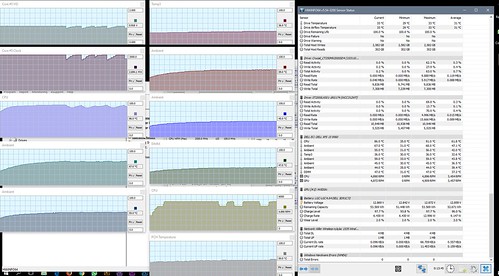
Enter XPS family, going repaste thermal paste + some undervolt.
Anyone can get thermalpad locally?
Dell XPS Series, Discuss everything about ur XPS
Dell XPS Series, Discuss everything about ur XPS
|
|
 Aug 13 2017, 03:58 PM Aug 13 2017, 03:58 PM
Return to original view | Post
#1
|
 
Senior Member
3,102 posts Joined: May 2005 From: Penang *̡͌l̡*̡̡ 
|
Enter XPS family, going repaste thermal paste + some undervolt.
Anyone can get thermalpad locally? |
|
|
|
|
|
Aug 29 2017, 12:50 PM
Return to original view | Post
#2
|
|
Senior Member
3,102 posts Joined: May 2005 From: Penang *̡͌l̡*̡̡
|
Just done undervolt + first repaste actity
Default Undervolt : Non CPU : 91c Ambient : 68c Fan : 4890 RPM » Click to show Spoiler - click again to hide... « Undervolt (1) Undervolt : CPU-0.14 iGPU-0.10 CPU : 83c Ambient : 65c Fan : 4070 RPM » Click to show Spoiler - click again to hide... « Undervolt (2) Undervolt : CPU-0.15 CPU : 80c Ambient : 65c Fan : -RPM » Click to show Spoiler - click again to hide... « Finally decide 0.14 for some safety factor Repaste + Repaste Undervolt : CPU-0.14 iGPU-0.10 Paste : Cooler Master Mastergel Maker CPU : 74c Ambient : 62c Fan : 3220RPM » Click to show Spoiler - click again to hide... « Repaste + Repaste Undervolt : CPU-0.14 iGPU-0.10 Paste : Artic MX4 CPU : -c Ambient : -c Fan : -RPM » Click to show Spoiler - click again to hide... « Cont... |
|
|
Aug 29 2017, 12:51 PM
Return to original view | Post
#3
|
|
Senior Member
3,102 posts Joined: May 2005 From: Penang *̡͌l̡*̡̡
|
Cont...
Detail Step 1. Preparation » Click to show Spoiler - click again to hide... « 2. Internal » Click to show Spoiler - click again to hide... « 3. SSD Thermal Pad » Click to show Spoiler - click again to hide... « 4. Paste » Click to show Spoiler - click again to hide... « 5. Before & After Pasting » Click to show Spoiler - click again to hide... « Cont... |
|
|
Aug 29 2017, 12:51 PM
Return to original view | Post
#4
|
|
Senior Member
3,102 posts Joined: May 2005 From: Penang *̡͌l̡*̡̡
|
Cont..
6. VRAM & Paste » Click to show Spoiler - click again to hide... « 7. VRM » Click to show Spoiler - click again to hide... « » Click to show Spoiler - click again to hide... « |
|
|
Oct 24 2017, 08:22 PM
Return to original view | Post
#5
|
|
Senior Member
3,102 posts Joined: May 2005 From: Penang *̡͌l̡*̡̡
|
QUOTE(thankyou @ Oct 24 2017, 02:32 PM) Hi, How's your XPS after 2 months? are you satisfy with the performance? I'll be getting it as company laptop by tomorrow so, just wonder do I need to perform the steps given by you to stabilize the heat issue? If you not into heavy GPU load stuff, just ignore the repaste, I had no wifi issue as my gaming is not really require high latency.What about the Killer WiFi? Any issue? TQ   |
|
|
Oct 26 2017, 04:28 PM
Return to original view | Post
#6
|
|
Senior Member
3,102 posts Joined: May 2005 From: Penang *̡͌l̡*̡̡
|
QUOTE(thankyou @ Oct 25 2017, 11:30 AM) You mean low latency yah? my bad, yes low latency...  I won't be playing much graphic intensive games. Probably would load 1 or 2 i.e. Dota2 or CS:GO. Thanks for the feedback! You always can give the game a try and monitor the GCU/CPU/Ambient temp by HWinfo before decide to repaste... Anyhow Undervolt shall give it a try no matter how... |
|
|
|
|
|
Oct 29 2017, 12:14 AM
Return to original view | Post
#7
|
|
Senior Member
3,102 posts Joined: May 2005 From: Penang *̡͌l̡*̡̡
|
QUOTE(rai_fuzz @ Oct 28 2017, 02:36 PM) Hi all, I just bought XPS last week. Was wonderingn if anyone had installed screen protector & skin on it? Perhaps can quote where you did it. Why need screen protector? even with touch screen so far the review it quite scratch resistant.Skin can opt for dbrand, >20USD will free delivery |
|
|
Oct 31 2017, 12:12 PM
Return to original view | Post
#8
|
|
Senior Member
3,102 posts Joined: May 2005 From: Penang *̡͌l̡*̡̡
|
QUOTE(thankyou @ Oct 30 2017, 11:49 AM) Had tried playing Dota2 last night. 1st game, everything went fine. No harm to perform UV even not gaming, saving some battery life and lower temp.2nd game, I noticed fps dropped from 60 -> 30 from time-to-time. Quite laggy. CPU logged MAX 80 - 83c GPU logged max 80c too... Guess i need to some undervolt right? temperature is not as bad as some claim 100c... but definitely drop of FPS & lag... |
|
|
Feb 12 2018, 12:56 PM
Return to original view | Post
#9
|
|
Senior Member
3,102 posts Joined: May 2005 From: Penang *̡͌l̡*̡̡
|
QUOTE(vincent_ng86 @ Feb 11 2018, 10:00 AM) the powerbank only deliver 65w max, so under normal usage is OK. Dont gaming with 9560 as it need 130w |
|
|
Feb 21 2018, 07:32 AM
Return to original view | Post
#10
|
|
Senior Member
3,102 posts Joined: May 2005 From: Penang *̡͌l̡*̡̡
|
QUOTE(jeremycming @ Feb 20 2018, 08:51 PM) To the owners of the XPS 13 9370, is the coil whine issue still there? Check herehttp://forum.notebookreview.com/threads/93...5#post-10675978 |
|
|
Feb 23 2018, 09:26 AM
Return to original view | Post
#11
|
|
Senior Member
3,102 posts Joined: May 2005 From: Penang *̡͌l̡*̡̡
|
QUOTE(chamelion @ Feb 23 2018, 08:35 AM) Any XPS15 (9650) users here? Mine don't any issue so far... except throttle during gaming.. Do your xps hv shutter problem? My new XPS15 (i7 7700/8GB/FHD) having some serious shuttering. All drivers (Intel Graphic/Nvidia/Killer Wifi) been updated to latest as per suggested in most website. Tried all setting suggested in first two page from google on this issue. improved but the occassion shutter still there Appreicate if anyone can let me know if u manage to get a shutter free xps15 or this is a common problem... dang..  Last time XPS15 had issue for iGPU but its should alredy fix on latest driver. Maybe you try using DDU for a clean install. http://forum.notebookreview.com/forums/del...tudio-xps.1049/ |
|
|
Jul 29 2018, 08:50 PM
Return to original view | Post
#12
|
|
Senior Member
3,102 posts Joined: May 2005 From: Penang *̡͌l̡*̡̡
|
QUOTE(volrath @ Jul 29 2018, 10:58 AM) For XPS 15 9570, is undervolting and repasting thermal almost a must do when we early got it? UV can do in day1, repaste depend... if you feel UV still not enough then repaste can push more depand on what paste you using..., extreme tpye can choose liquid metal...Seen forums and YouTube people been talking about this to fix the thermal throttling.. Why isn't this fixed by Dell? Also the WiFi card, Killer 1535 is so bad people ditch em for an Intel instead. I just find it weird a company such as Dell could let this happen despite users' common complain. I understand XPS 15 isnt a gaming laptop, so these people complain because they expected XPS 15 to be doing more than what it was designed to do? I plan to get one to use for work + leisure, and portability is one of my criteria coz I carry it in and out daily. I hope this is a good buy (despite having to resort to the above solutions to get the best out of this laptop). Hope sifus here can clarify. Tq For WiFi 1535, i feel still OK, for normal youtube + webbrowsing not having lag, if you like can purchase intel 9260 from Taobao, quite cheap.. XPS is very good laptop, just because its dont had major issue, so ppl is looking on those minor... XPS is NOT gaming laptop, but i can play Dota 2, Shadow of War, witcher 3 with just lower the setiing only.... XPS is compare to Macbook Pro!! Not GS65, Aero 15, i feel its best fit my daily need with its weight and power inside. Maybe you can wait 11xx series GPU, but for 1150 + XPS may need wait until next year... |
|
|
Aug 31 2018, 11:36 AM
Return to original view | Post
#13
|
|
Senior Member
3,102 posts Joined: May 2005 From: Penang *̡͌l̡*̡̡
|
QUOTE(stevenlee @ Aug 31 2018, 11:15 AM) Just getting myself XPS 13 9370 model with i7 and 512GB storage. There is plenty of option via taobao I looking for dongle like MacBook type unfortunate, I can’t find any in the market. Kinda miss my MacBook 12” where as I hv to duct my MacBooks due to under power. Going to miss their track pad and one hand open Eg : Hootoo USBC So far there is not trackpad better than mac but XPS keyboard feel better key stock than new MacBook |
|
|
|
|
|
Sep 2 2018, 09:27 PM
Return to original view | Post
#14
|
|
Senior Member
3,102 posts Joined: May 2005 From: Penang *̡͌l̡*̡̡
|
QUOTE(stevenlee @ Sep 2 2018, 05:53 PM) Any xps user using any hard case to protect from scratch ? just get dbrand skin Any recommendations? I search online and online one model available . Now I looking for transparent skin to stick on it  |
|
|
Sep 16 2018, 10:04 AM
Return to original view | Post
#15
|
|
Senior Member
3,102 posts Joined: May 2005 From: Penang *̡͌l̡*̡̡
|
QUOTE(eugenelimys @ Sep 16 2018, 05:32 AM) Eh Steven, your lappy also 8gb right? If you professional photographer who edit Premier Pro + Lightroom together, then may not sufficient...Not sure enough for light room or not.. Haiz.. A bit worried/regret.. 4k screen suck up quite a lot of battery from what I heard, but I can't find any decent stats.. If only occasional user like me, 8gb is good enough for lightroom alone |
|
|
Sep 17 2018, 04:11 PM
Return to original view | Post
#16
|
|
Senior Member
3,102 posts Joined: May 2005 From: Penang *̡͌l̡*̡̡
|
QUOTE(eugenelimys @ Sep 16 2018, 12:10 PM) Tbh not gaming la bro.. Just want a light and portable laptop that can do some editing.. But also worried can't last.. Cuz this laptop freaking pricey haha Yes 8gb is really basic nowaday, and i dont plan to upgrade. Hoping too much maybe? Haiz.. If dell malaysia offers 16gb 1080p, this is gonna be perfect.. FYI, I do game on my XPS >> witcher 3, Tomb Rider & war of shadow. Do take note, few trick is MUST for XPS to play such game >> UV(CPU & GCU), Repaste etc and dont expect FHD at 60FPS always. XPS is not mean for game. I open 10+ chrome tap + lightroom together is no issue with 8gb as well. Always know your limit and shut down some app if dont use, else get XPS15 for upgrade |
|
|
Oct 13 2018, 01:35 PM
Return to original view | Post
#17
|
|
Senior Member
3,102 posts Joined: May 2005 From: Penang *̡͌l̡*̡̡
|
Recently get an intel 9260 wifi card to replace killer wifi.
Result as below   Speedtest result Speedtest resultNetwork : Times 500mbs Router : XiaoMi Router 3G 1200 This post has been edited by tachlio: Oct 13 2018, 01:36 PM |
|
|
Dec 5 2018, 09:01 AM
Return to original view | Post
#18
|
|
Senior Member
3,102 posts Joined: May 2005 From: Penang *̡͌l̡*̡̡
|
QUOTE(myway1985 @ Dec 1 2018, 08:16 AM) bro.. got EGPU now... use pc gpu n game You had any eGPU? Looking for one for my 9560 |
|
|
Mar 2 2019, 03:36 PM
Return to original view | Post
#19
|
|
Senior Member
3,102 posts Joined: May 2005 From: Penang *̡͌l̡*̡̡
|
QUOTE(ArthurHew @ Mar 2 2019, 01:15 PM) Hi I'm 9560 user. Mine, doneDid anyone done repaste + heatpad on mosfet? 1. Repaste with AC 2. Added thermal pad around heatpipe 3. Under Volt 4. Enable SST 5. Enable MSI Afterburn profile |
|
|
Jul 8 2019, 08:47 PM
Return to original view | Post
#20
|
|
Senior Member
3,102 posts Joined: May 2005 From: Penang *̡͌l̡*̡̡
|
QUOTE(Porie @ Jul 4 2019, 11:15 AM) Anyone had this problem before? Open bottom case and unplug battery connector for 10sec.My CPU on my 9570 is clocked at 0.79 Ghz and everything seems super sluggish. Can't really do anything with it, any known fix? [attachmentid=10276038] Then issue solve. Suspect USB-C related issue |
| Change to: |  0.0474sec 0.0474sec
 0.20 0.20
 7 queries 7 queries
 GZIP Disabled GZIP Disabled
Time is now: 3rd December 2025 - 04:21 AM |
 Quote
Quote