Welcome Guest ( Log In | Register )

5 Pages « < 2 3 4 5 >Bottom

Outline · [ Standard ] · Linear+

 Dell XPS Series, Discuss everything about ur XPS

views
     
TheWandererX
post Jan 2 2011, 08:38 PM

Regular
******
Senior Member
1,862 posts

Joined: Mar 2008
QUOTE(SKisaGooner @ Jan 2 2011, 08:15 PM)
Can someone please explain the difference on the WLAN/WWAN options?

EDIT: 4GB RAM & 1080p, or 8GB RAM & 720p?

I'll be making my order soon.
*
Your best bet is to call Dell up and ask about it. It's not free, but it will be well worth it because it's their specialized staff who will be speaking to you on the line. I can give you a contact if you want.

Noticed that this thread isn't very active. Not many XPS 15 users yet.

And for your info I ordered mine with a custom design on the aluminium lid, and worse still, they didn't mention anything about what kind of lid it is. It's coming tomorrow or Tuesday.

EDIT: Also, I ordered mine with 8GB RAM but with another computer I own, 4GB is more than enough. If you're looking to multitask between 10-20 windows with 10-20 windows in one, say Firefox or Google Chrome, then maybe you can consider the 8GB.

The 1080p display has a very wide colour spectrum but it may make things look overcontrasty, etc. It's a good option, but it's entirely up to you.

This post has been edited by TheWandererX: Jan 2 2011, 08:41 PM
TheWandererX
post Jan 3 2011, 05:09 PM

Regular
******
Senior Member
1,862 posts

Joined: Mar 2008
QUOTE(vernon91 @ Jan 3 2011, 12:29 PM)
but still u see more xps 15 user than  the 14 one..... haha laugh.gif

4gb ram starting not to be enough for me lolz............
*
unsure.gif I hope they all haven't been lured to wait for Sandy Bridge, because I've already pointed out anyway that Sandy Bridge has little to no performance gain on the i5 machine.

Here's hoping that more users will join us sad.gif
TheWandererX
post Jan 4 2011, 07:03 PM

Regular
******
Senior Member
1,862 posts

Joined: Mar 2008
QUOTE(abuyon @ Jan 4 2011, 06:59 PM)
just received my xps 15 today...order on 28  December...cannot wait for the sandy bridge although it look tempting...anyway happy with my xps...looking forward to play with it...
*
I ordered on 16th IINM. Just arrived about 30 minutes ago. Dell stated 9-5pm, but it didn't come. Gave them a call & they apologized, immediately sent mine in about 2 hours (now). Pretty happy their service isn't like Dell US/Australia. Damn happy laugh.gif but I'm busy right now so opening the laptop will have to wait till tomorrow or even Thursday because I am short of time. cry.gif
TheWandererX
post Jan 6 2011, 10:41 PM

Regular
******
Senior Member
1,862 posts

Joined: Mar 2008
QUOTE(SKisaGooner @ Jan 6 2011, 05:32 PM)
I have just called Dell regarding the backlit keyboard and the upcoming L502X XPS 15 laptop.

The backlit keyboard have been out of stock for a while, and is unlikely to be in stock again. Dell had called customers whom ordered it with the backlit keyboard to return their RM 55 back and inform them of the bad news.

The L502X is expected to be released late March or April with similar design and specs, but with the Intel 'Sandy Bridge' processors.
*
Thank goodness - I'm using mine with the backlit keyboard now.

QUOTE(toobad @ Jan 6 2011, 09:42 PM)
hi

do you guys normally extend your warranty?

because for my case, i'll be going abroad for studies, and the dell salesperson told me that for 1 and 2 years are local warranty only. for international warranty we must upgrade warranty period to 3 years!

AND TO EXTEND TO 3 YEARS COST ME AT LEAST RM 600. HOLY SHIT.
So do u guys think its worth it?
*
If you ask me it's worth it because it also covers accidental damage. I bought 3 years CompleteCover. So if anything happens to this laptop, then I can get it fixed or even get a new one laugh.gif
TheWandererX
post Jan 7 2011, 10:46 PM

Regular
******
Senior Member
1,862 posts

Joined: Mar 2008
QUOTE(excellentteo @ Jan 7 2011, 10:21 PM)
is that better to wait that new coming xps? i m in doubt as im ordering mine sad.gif
*
Up to you. If you're looking at the i5 model then buy it now because the Sandy Bridge-equipped i5 has marginal performance gains, if any. If the i7, wait for the L502x.
TheWandererX
post Jan 7 2011, 10:56 PM

Regular
******
Senior Member
1,862 posts

Joined: Mar 2008
QUOTE(and1nicky @ Jan 7 2011, 10:55 PM)
hi guyss , im looking through my the dell xps 15, everything seems to be okay to me =] but the back lit keyboard.. it doesnt have the option to choose anymore. =\ so guyss , is dell not goin to provide the back-lit keyboard anymore ?
*
Has been clarified on the previous page. It has been out of stock for a while and most likely going to be discontinued as even orders were cancelled because of the unavailability.
TheWandererX
post Jan 9 2011, 01:56 AM

Regular
******
Senior Member
1,862 posts

Joined: Mar 2008
QUOTE(shahrulz @ Jan 8 2011, 11:21 PM)
Hi all.. new to this wonderfull forum..Bought my XPS15 from LY last 16th Dec 2010..Know nuts bout lappy and techies..Just wann do my Photoshop cs5 only.... biggrin.gif


Added on January 8, 2011, 11:23 pm

I called DELL and they instructed me through the phones..forgot lah the website for registration...
*
Wow, your first line makes me wonder what you do with Photoshop. I feel you're buying an way overkill laptop if it's just for normal work, but that's just my opinion smile.gif
TheWandererX
post Jan 14 2011, 04:47 PM

Regular
******
Senior Member
1,862 posts

Joined: Mar 2008
QUOTE(cocklea @ Jan 13 2011, 05:24 PM)
no, no cooler pad yet. i guess i should go buy one now  sweat.gif i just realize that the shut downs happen during gaming (once in Black Ops, twice during Resident Evil 5) so it must be the heat. but will monitor my temp with that HWmonitor thing and see how it goes.

back to the hdd talk, mine is a Samsung. i guess Dell just put in any brand they can find eh??
*
Dell has too many laptop builds to select a single manufacturer. Let's say something happens with WD, then if they rely solely on WD, how lah? Postpone all stocks by weeks/months?

I don't know which one I have in mine. And for your info, the hard drive models are usually shared between all laptops. So if you pick an Inspiron 15 with a 500GB 7200rpm drive (for instance, not sure if that exists) and you pick an XPS 15 with the same HDD, both of them will be using the same 'batch'.

QUOTE(Dell2011 @ Jan 14 2011, 01:34 AM)
Hey there good people,
Real good thread this!
If I go for the i7 processor, 1080p full HD screen, 8 gigs of RAM and 2 gigs of VGA options how much would that cost me?
I am stopping over in KL for a day (on the 28th of this month) and will be looking for a lappy around 4k RM. Would a xps 15 be the best choice for me at this price range? I love the specs and aesthetics of this machine. Looks quiet slick.
Any help would be much appreciated!
*
If you can wait, the Sandy Bridge i7 which will be released in March will provide you with more power and more battery life. I'd say wait for it.

QUOTE(nicholasmark @ Jan 14 2011, 04:04 PM)
The bluray model was actually RM4,399. And then it went down to RM3,999 on the 11th of January. But when I check few minutes ago it went up to RM4,099 again.  rclxub.gif
*
Instant redemption coupon, possibly.
TheWandererX
post Jan 15 2011, 05:38 PM

Regular
******
Senior Member
1,862 posts

Joined: Mar 2008
QUOTE(Dell2011 @ Jan 14 2011, 05:34 PM)
Thanks for the reply TheWandererX, I think I am gonna get a netbook for the next few months till all the laptop manufacturers roll out the new intel SandyBridge processor. I'd have a better feel for picking a good laptop. The processor is the heart of the machine and every other hardware component sorta revolves around it. We'd get stronger machines at a more competitive price compared to whats available in the market currently. Not to mention the new improvements 2011 will bring (eg more matt screen options..SSD getting cheaper....etc)
so for all you guys itching to buy a laptop...wait around till the 2nd quarter!

But now, this brings me to a new 'problem'....what about netbooks? do they have an upcoming processor upgrade?? sleep.gif
*
Don't think so. Just recently we had dual-core Atom launches, but not many manufacturers have put it to use as far as I can see.

Also, not much is going to change for the i5 SB processor. Marginal changes, if any. Only the i7 will get substantial benefits.

Matt screens have never been popular although there has demand and that is not likely to change, SSDs getting cheaper will take a while too. Expect marginal in 'months'. Even the XPS only dropped 300-400 bucks IINM to clear stock, so how convinced are you that in a few months the price of SSDs will drop in a big percentage?
TheWandererX
post Jan 30 2011, 11:20 PM

Regular
******
Senior Member
1,862 posts

Joined: Mar 2008
QUOTE(zaxxshoxx @ Jan 30 2011, 01:18 PM)
how to install all the XPS driver (from the DVD) after installed a new W7 Ultimate on XPX 15. a friend of mine try to install it but found out that most of the driver in the Drivers DVD cannto be extracted?
*
Same problem I got. I went to Dell's website, downloaded all the drivers and installed one by one. Tedious, but it's the only option.

Also, W7 Ultimate is only 32bit I think, so that renders the laptop crippled as most of its drivers are for 64bit.
TheWandererX
post Feb 1 2011, 12:57 AM

Regular
******
Senior Member
1,862 posts

Joined: Mar 2008
I don't get any shocks, weird.

By the way, just announced. SB chips are being recalled, so I guess we'll have to wait for the new SB-chipped XPS 14/15s.

Engadget
TheWandererX
post Feb 1 2011, 11:42 AM

Regular
******
Senior Member
1,862 posts

Joined: Mar 2008
QUOTE(zaxxshoxx @ Feb 1 2011, 09:21 AM)
plug i think it's the plug
*
If the socket isn't properly grounded then you'll get shocks, I guess.

QUOTE(eugenechiuu @ Feb 1 2011, 09:35 AM)
if wait for the new non-faulty ones, probably need to wait until April-May only safe to buy...
*
Actually, it's 'safe' to buy now. Just that they're recalling the chipsets, so we're not entirely sure if the flaw affects the processor. If it also affects the processor, then whoever who buys a SB laptop, good luck la whistling.gif

Thank goodness I got my XPS 15 before the backlit keyboard ran out and all. laugh.gif
TheWandererX
post Feb 1 2011, 09:09 PM

Regular
******
Senior Member
1,862 posts

Joined: Mar 2008
QUOTE(eugenechiuu @ Feb 1 2011, 11:57 AM)
it doesnt affect the processor, but it affects the e-Sata port on the Mobo... as they stated, the port would deteriorate over time.. means we won't even be able to see the problems within the first few months or in short term..


Added on February 1, 2011, 11:58 amdepends how u treat the word safe also lar...

since we're gonna buy 2-3 years warranty for our laptops, within that period if anything happens we can have warranty to change it....
if not, means the Mobo is just fine...

Well at least that's how i look at it..
*
Ah, I don't know about any of these technical jargon to be honest... rclxub.gif I see, well so that means only the motherboards that were released are faulty? I thought it's the e-SATA controller in the chipset? blink.gif

QUOTE(janson_kaniaz @ Feb 1 2011, 09:06 PM)
not bullshit.
i guess it's the worst case scenario deadline.
it's like 'if you get earlier, good for you, if not, it said so'
*
It takes 2 weeks - 1 month for them to build your system based on your configuration. I got mine in 3 weeks.
TheWandererX
post Feb 7 2011, 04:55 PM

Regular
******
Senior Member
1,862 posts

Joined: Mar 2008
QUOTE(ryan18 @ Feb 7 2011, 02:58 PM)
Intel® Core™ i5-480M processor(2.66GHz, 4Threads, turbo boost up to 2.93Ghz, 3M cache)
15.6 HD (1366x768) WLED display with TrueLife
4GB 1333MHz DDR3 SDRAM (1 x 4GB)
500GB 7200RPM Hard Drive
1GB NVIDIA® GeForce® GT 420M graphics
Genuine Windows® 7 Home Premium 64bit (English)
Microsoft® Office Home and Student 2010 (English) SEA
McAfee® Security Center - 36 Months Version
*
How much are you paying for that?
TheWandererX
post Feb 13 2011, 11:56 AM

Regular
******
Senior Member
1,862 posts

Joined: Mar 2008
QUOTE(nepki @ Feb 13 2011, 03:47 AM)
anyone had experience using your DELL XPS 15 with LCD projector. What kind of adapter do you use? Any recommendations where to buy?
Thanks
*
HDMI, from any IT shop.
TheWandererX
post Feb 14 2011, 04:27 PM

Regular
******
Senior Member
1,862 posts

Joined: Mar 2008
QUOTE(mike_partner @ Feb 13 2011, 01:54 PM)
anyone that have dell xps, what are u did with ur 10Gb dell recovery partition??

btw, can I manage that partition coz I dun like Mcafee and ms office starter edition... means I just wanna put Windows 7 installer and the Dell driver only on that partition.. errmmm is it possible?? T_T
*
No, you can't manage it. I wiped it off my drive, did a clean reformat & reinstall.

QUOTE(shahrulz @ Feb 13 2011, 11:35 PM)
wanna add another 4GB of RAM.. what is the most suitable to my XPS15 ie brand,price??
*
As long as the speed (1333MHz) and capacity (4GB) is the same, there's nothing much to worry about apart from brand quality, etc.
TheWandererX
post Feb 15 2011, 11:35 AM

Regular
******
Senior Member
1,862 posts

Joined: Mar 2008
QUOTE(mike_partner @ Feb 15 2011, 12:02 AM)
ok, then if I want reformat my XPS
which driver must I download from Dell site??

btw, I've driver and utilities cd from Dell that for reinstalling Dell XPS computer software.. when I checked inside the cd there're sooo much driver... too confuse larr
*
Save your time, download from the site itself. The CD given is kinda.. corrupted, in a way for us XPS users.

QUOTE(ngkhanmein @ Feb 15 2011, 11:13 AM)
3Yrs Ltd Hardware Warranty, InHome Service after Remote Diagnosis is global warranty or local only? if global then restricted only for country with dell company available only right?
*
Best to clarify with the Dell sales team. I got 3 year CompleteCover which supposedly has 1 or 3 year international warranty... but I forgot. doh.gif got to read the T & C again.
TheWandererX
post Mar 6 2011, 09:17 PM

Regular
******
Senior Member
1,862 posts

Joined: Mar 2008
QUOTE(Rezuan78 @ Mar 6 2011, 02:37 PM)
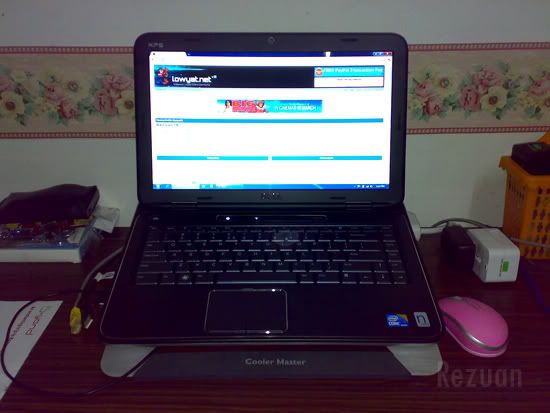
dell xps 14 i7 user reporting in  icon_idea.gif

» Click to show Spoiler - click again to hide... «

*
Nice. I'm using a Cooler Master too, but it's an old X-Mini I had from my previous laptop. My XPS 15 is like a table on a book on this, LOL.

What is that N sticker beside the Intel sticker?
TheWandererX
post Mar 17 2011, 06:37 PM

Regular
******
Senior Member
1,862 posts

Joined: Mar 2008
QUOTE(Snowguy2068 @ Mar 17 2011, 06:34 PM)
yawn.gif idk i lost the paper. lol
*
Either way it is still enough for those games. I have the 420 (weakest) one and it sails through COD4, COD6, Mafia II, BF:BC2.
TheWandererX
post Mar 19 2011, 05:53 PM

Regular
******
Senior Member
1,862 posts

Joined: Mar 2008
QUOTE(wonderboy88 @ Mar 18 2011, 04:27 PM)
My new XPS 15 will arrive next week and I'm looking for a cooler.
Is there any recommendations? I'm having the 9 cell batt so I hope that the cooler that I buy will never add more tilt to the lappy. And actually I don't use laptop much outdoor, I'm getting it as I'll be studying abroad soon and the usage of this lappy will most probably be in he hostel with a/c mode. So with the power cable plugged, can I just take off the batt so that I cam get the normal tilt with the cooler? Have no experience about this as this will be my first lappy. Some advice peeps!

From what I've read, CM's U2 seems like a good choice but I jus wanna know if the built and the components' position of the new XPS is the same as the old ones. If so I'll go with the U2.
*
Get the Cooler Master U2, and if you want, even the U3. More fans = more cooling.

Just a tip: the U2 has detachable fans so you can shift it to accustom. Put it under the RAM exhaust vent and processor vent, and the last one can go at the RAM intake vent. There are 2 vents for the RAM - the warmer one is the exhaust and the cooler one is the intake vent. smile.gif

5 Pages « < 2 3 4 5 >Top
 

Change to:
| Lo-Fi Version
0.0509sec    0.49    7 queries    GZIP Disabled
Time is now: 2nd December 2025 - 02:46 PM