

Btw, how to use CWM upgrade? I flash using ODIN cause don't know how to use cwm...

Samsung Galaxy S I9000 Official Thread V9, Please read FAQ at 1st page! Yummy froyo
|
|
 Dec 4 2010, 06:52 PM Dec 4 2010, 06:52 PM
Return to original view | Post
#1
|
 
Junior Member
437 posts Joined: Sep 2008 
|
How to disable lag fix before flash to K10F? I go into recovery i think, i select ULK xxxx, then lag fix option, then i select NO lagfix, is this consider done?
Btw, how to use CWM upgrade? I flash using ODIN cause don't know how to use cwm... |
|
|
|
|
|
Dec 7 2010, 03:06 PM
Return to original view | Post
#2
|
|
Junior Member
437 posts Joined: Sep 2008
|
Anyone here has fix the ringtone sound ascending? I mean default is from small to louder, after fix will become all time louder.
Anyone tried? I seen the thread on XDA, not sure if anyone has tried and if it is working.... Added on December 7, 2010, 3:09 pm QUOTE(GreenGoat @ Dec 7 2010, 03:03 PM) just changed to ultraslim + k10i.. never expect to have new bootanimation lol but its there with ultraslim Hi GreenGoat, if i'm using DXJPA stock rom with k10F kernal only, can i flash to DocRom as well? any issue? anyway its fast w/o lagfix.. but might wanna try with ext4 all anyway its fast w/o lagfix.. but might wanna try with ext4 all This post has been edited by ahhon83: Dec 7 2010, 03:09 PM |
|
|
Dec 7 2010, 03:18 PM
Return to original view | Post
#3
|
|
Junior Member
437 posts Joined: Sep 2008
|
QUOTE(GreenGoat @ Dec 7 2010, 03:14 PM) hi ahhon Thanks bro! But just not really understand 3button combo. I've speedmod kernal, the cwm should be there already, right? i see it when i reboot into recovery mode. no problem.. just make sure u have 3 button combo and CWM installed. do refer here on installation guides http://forum.xda-developers.com/showthread.php?t=817703 |
|
|
Dec 11 2010, 09:48 PM
Return to original view | Post
#4
|
|
Junior Member
437 posts Joined: Sep 2008
|
Hi all, i tried with the xxxxinfoxxx to check, and the gallery usage is more than android system. So, i assume this is not OK, right?
Attached thumbnail(s) 
|
|
|
Dec 12 2010, 07:06 AM
Return to original view | Post
#5
|
|
Junior Member
437 posts Joined: Sep 2008
|
QUOTE(ahhon83 @ Dec 11 2010, 09:48 PM) Hi all, i tried with the xxxxinfoxxx to check, and the gallery usage is more than android system. So, i assume this is not OK, right? anyone? is this the bug you guys saying?Added on December 12, 2010, 7:12 amSorry, no pic...i mean this as show in pic This post has been edited by ahhon83: Dec 12 2010, 07:14 AM Attached thumbnail(s) 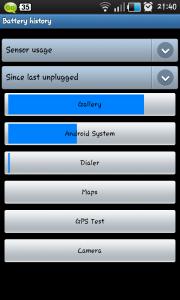
|
|
|
Dec 12 2010, 08:59 AM
Return to original view | Post
#6
|
|
Junior Member
437 posts Joined: Sep 2008
|
thanks Alvinz..i think i read that as well about removal, will check back.
I tried to install dark's rom, following his guidelines "EASY intsall" . But after i select apply:SD card: update.zip, go in CWM mode, when i click Install zip from SD card, nth happened so far. Then i click every also no more response. Anyone face this issue? Btw, i'm using speedmod kernal k10H with stock DXJPA. |
|
|
|
|
|
Dec 12 2010, 05:57 PM
Return to original view | Post
#7
|
|
Junior Member
437 posts Joined: Sep 2008
|
QUOTE(ahhon83 @ Dec 12 2010, 08:59 AM) I tried to install dark's rom, following his guidelines "EASY intsall" . But after i select apply:SD card: update.zip, go in CWM mode, when i click Install zip from SD card, nth happened so far. Then i click every also no more response. Anyone face this issue? Btw, i'm using speedmod kernal k10H with stock DXJPA. Anyone facing this issue? I wan to ask, suppose 1. if i have speedmod kernal installed, i should have already CWM right? Y there is a need to put update.zip into the internal SD card? 2. I enter into the clockworkmode recovery, after select Install zip from SD card, there is nth happen. Should i have to wait for few mins? Then everything just cannot select via home button anymore, i just can click "back button" to reboot my phone. Thanks again guys. |
|
|
Dec 13 2010, 02:57 AM
Return to original view | Post
#8
|
|
Junior Member
437 posts Joined: Sep 2008
|
Just flashed to Darky..finally....waiting...another few mins...just rebooted...
Excited...yeah~~~~~~~!!!! Added on December 13, 2010, 2:59 amY got a lady voice saying 3 mins.....2 mins....??? ok...i got into it.... This post has been edited by ahhon83: Dec 13 2010, 03:04 AM |
|
|
Dec 13 2010, 03:33 AM
Return to original view | Post
#9
|
|
Junior Member
437 posts Joined: Sep 2008
|
i do the easy install, not clean install...
got some prob here...the previous setting still here...how can i wipe all previous setting and fresh start with darky's rom setting? For example, my lock screen is android default lock screen, i got 5 dock icon for launcher pro instead of 3 like shown in darky's photo gallery... Hmm...3.32am in the morning...sigh..i need to work tomorrow morning..continue tomorrow.... DARKY's rom....rocks...!!~~!!! |
|
|
Dec 13 2010, 10:13 AM
Return to original view | Post
#10
|
|
Junior Member
437 posts Joined: Sep 2008
|
MORNING guys....
on Darky's rom...can i do factory reset to wipe previous setting on my sgs? I did EASY install, not a clean installation... |
|
|
Dec 13 2010, 10:33 AM
Return to original view | Post
#11
|
|
Junior Member
437 posts Joined: Sep 2008
|
Hi JUjx,
If like that...hmm...what should i do? |
|
|
Dec 13 2010, 10:50 AM
Return to original view | Post
#12
|
|
Junior Member
437 posts Joined: Sep 2008
|
QUOTE(| K e e | @ Dec 13 2010, 10:35 AM) use the clean method on darky thread to install darky roms .... all setting sure gone =x Hmmm, then i still need to flash to stock JPU and again flash back to Darky's? |
|
|
Dec 13 2010, 11:13 AM
Return to original view | Post
#13
|
|
Junior Member
437 posts Joined: Sep 2008
|
QUOTE(ken2291 @ Dec 13 2010, 10:57 AM) don't try it during idle. try when u're connecting and using all those. Idle for me is the same on Darky's JPU. But when using I noticed a bit more drain Thanks Ken. So, i do factory reset. then follow start from step 13 below?  Added on December 13, 2010, 10:58 am just factory reset then flash Darky's rom again.. PROCEDURE: 1. disable all lagfixes/tweaks. if you have voodoo then goto the "Voodoo" folder on your internal sdcard. If the folder isn't there then just make it. Inside that folder make another folder called "disable lagfix". 2. REBOOT your phone. Wait for Voodoo lagfix to disable. you will hear a robot girl voice while it is doing it. 3. download Darky's ROM and ClockWorkMod (CWM) Recovery to your computer. No need to rename the files. 4. connect your phone to your computer and copy Darky's ROM and the CWM 'update.zip' to your internal sdcard. DISCONNECT your phone from the computer 5. now download Stock XXJPU firmware to your computer. Password for extracting: samfirmware.com 6. if kies is open then close it. make sure your phone is disconnected from the computer. 7. now open Odin v1.3 Use 512 PIT file from the stock ROM that you downloaded. Use PDA file as PDA, MODEM file as PHONE, CSC file as CSC. 8. ENABLE "repartition" box in ODIN. 9. now boot your phone into download mode and then connect your phone to the computer. Once ODIN shows that your phone is connected press the START button in ODIN to flash. DO NOT DISCONNECT THE PHONE. DON'T DO ANYTHING. just let ODIN do everything automatically. Once stock XXJPU has been installed, your phone will reboot itself. when your phone has fully booted, disconnect it from the computer. 10. close ODIN and start it again. this time use CF-Root as PDA. leave everything else blank. make sure "re-partition" is DISABLED this time. 11. Boot your phone into download mode again and connect it to the computer. flash CF-root with ODIN. 12. once your phone has rebooted disconnect it from the computer and close ODIN. 13. install Root Explorer and go to your internal sdcard and delete the "Voodoo" folder. 14. now boot into recovery(2e) and apply update.zip to start CWM. You will need to do this twice for CWM to load. 15. in CWM do a factory reset, cache wipe and dalvik wipe. dalvik wipe can be found in advanced options. (again i'm doing all this to keep everything clean and safe) 16. install Darky's ROM with CWM. 17. reboot. |
|
|
|
|
|
Dec 13 2010, 11:45 AM
Return to original view | Post
#14
|
|
Junior Member
437 posts Joined: Sep 2008
|
QUOTE(ken2291 @ Dec 13 2010, 11:18 AM) @ahhon83: since u just factory reset, means u still have CWM rite, no nid to install it again. start from step 15. wipe those cache then flash Darky Thank you very much, Ken-san. Will do it during lunch hour...But, should i disable voodoo lagfix first? This post has been edited by ahhon83: Dec 13 2010, 11:47 AM |
|
|
Dec 13 2010, 11:52 AM
Return to original view | Post
#15
|
|
Junior Member
437 posts Joined: Sep 2008
|
Hahha...previously i only using ODIN...this is first time i use CWM actually...first time directly flash to darky's rom...
|
|
|
Dec 13 2010, 12:59 PM
Return to original view | Post
#16
|
|
Junior Member
437 posts Joined: Sep 2008
|
Clean way is good....now i do factory reset then reflash again...
|
|
|
Dec 13 2010, 02:44 PM
Return to original view | Post
#17
|
|
Junior Member
437 posts Joined: Sep 2008
|
In clean darky's rom i suppose. Now want to restore contact, but i can't connect with Kies. How to restore?
Headache... |
|
|
Dec 13 2010, 02:49 PM
Return to original view | Post
#18
|
|
Junior Member
437 posts Joined: Sep 2008
|
Kee-san, i actually did it ...last time when i was using Nokia 3310...hahaa...
Now cannot, too much contacts after working.... Hi Goth, i didn't sync with google acc i think. If i already used Titanium backup to backup all apps, does it include contact? |
|
|
Dec 13 2010, 02:52 PM
Return to original view | Post
#19
|
|
Junior Member
437 posts Joined: Sep 2008
|
oh my goodness...
hmm.....must connect via KIES then...stupid KIES.... |
|
Topic ClosedOptions
|
| Change to: |  0.0321sec 0.0321sec
 3.97 3.97
 7 queries 7 queries
 GZIP Disabled GZIP Disabled
Time is now: 8th December 2025 - 11:34 PM |
 Quote
Quote