i haven't install anything yet..i've just partitioned my phone yesterday...i'm quite bz atm.. sorry yea..what do you mean by "speed difference"?there's no difference in speed actually..unless you are talking about installing OSes(nitdroid/ubuntu/meego) in "memory card vs. internal memory", then yes..there are differences in speed if u install those in internal memory
I'm oso newbie.. welcome..huhu
Added on December 30, 2010, 1:49 pmoic...when i partition the microsd, the 27gb drive oso appear there..
nvm..i'll let u put the tutorial 1st..
since i'm still fail in mounting parts..huhu
actually, in linux machine (ubuntu for instance) mounting them is very easy, right click, then "unmount".. thats all..
I'm not quite sure on the unmounting part also...
I think it's about time I move to my ubuntu/fedora combo to my netbook on full time.Virtual mode isn't that usefull all the time.
After messing with Maemo -> Android -> iOS,now I'm messing with Symbian pulak

Cousin asked me to buy 5800 for him & install stuff.Have to say after using Maemo/Android for a long time & I really dislike this version of symbian.
My download folders full with deb,apk,ipa & sis files now
@one1002
pm me with the full repartitioning guide.I've plan to update some stuff on fp soon.
Hopefully I'll be free next week to do all this pending work.
you are right..virtual mode isn't convenient at all..i myself installed ubuntu alongside windows xp (yeah2 i still use xp cause i love its simplicity..hehe)..so i can dual boot them anytime i want...
i have yet to try installing OSes in those partition..but i'll let you guys try it..atm i'll be away as i have some errands to do..
Allright..here goes the tutorial..
- you need a linux machine with GParted installed (if you don't have it installed, type sudo apt-get install GParted)
- make sure MyDocs is not too full (for instance, if you want to resize MyDocs from 27GB to 10GB, make sure you have less than 10GB of data)
- and of course, your USB CABLE.. =P
*TURN ON YOUR LINUX MACHINE(eg. ubuntu)
ON THE N9001. Install "BACKUPMENU" from the repo.
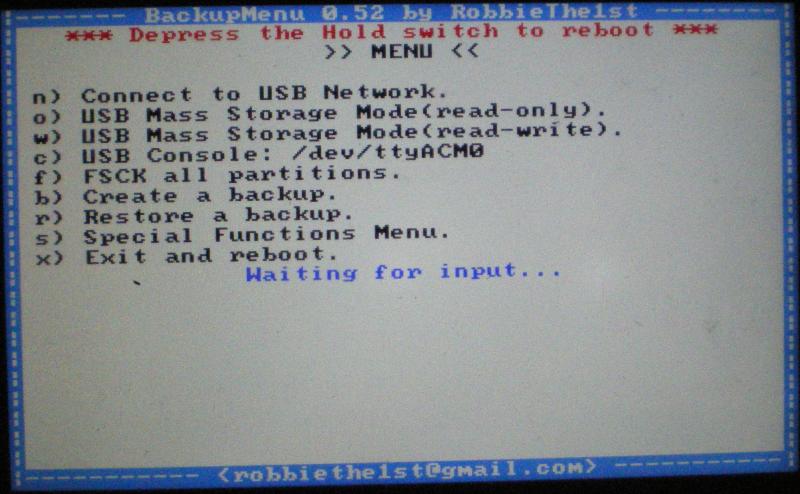
2. Once you have installed BACKUPMENU, reboot with the keyboard open (this is to launch BACKUPMENU)
» Click to show Spoiler - click again to hide... «
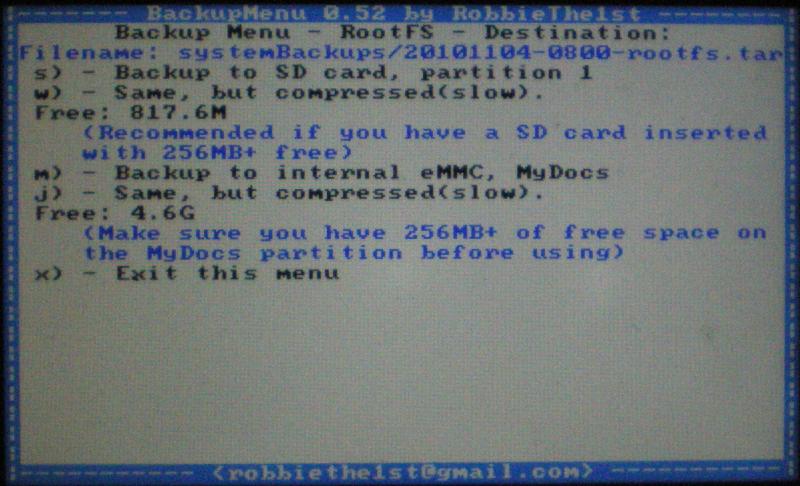
3. Press "b" to backup all your data (optFS and root)
*YOU WILL NEED AT LEAST 1GB OF FREE STORAGE (either MyDocs or microSD) DEPENDING ON YOUR PHONE
» Click to show Spoiler - click again to hide... «
4. Once you have finished backing up your files, connect your phone to your
LINUX MACHINE5. Once you have finished backing up your files, press "w" to go into usb mass storage mode (see first picture)
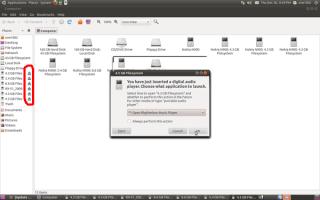
ON THE LINUX MACHINE1. Now your linux machine will detect your phone (it'll show eject button on the drive, meaning that it's mounted). If auto-play pops up, just cancel it. At this point, copy the backups u made earlier to the computer (just to make sure)
» Click to show Spoiler - click again to hide... «
2. Once you have copied the backups, right click any N900 drives and select "SAFELY REMOVE DRIVE", if an error occurs, just ignore it. Make sure the "eject button" is gone, meaning the drive has already unmounted.
» Click to show Spoiler - click again to hide... «
3. Start GParted on the linux machine. (administration --> system --> Gparted) or in terminal (sudo gparted)
4. Once Gparted has started, wait a while for it to scan all the drives. Then from the drop down menu, pick N900 (should be 30GB or something)
» Click to show Spoiler - click again to hide... «
5. Now, GParted will show 4 Partitions in order of size, from left to right - MyDocs, Home, Swap, and 1 unallocated drive(64mb - leave this alone!)
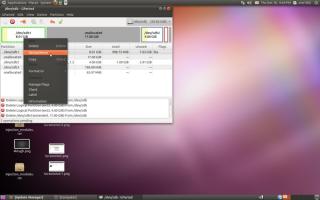
6. Click on the left partition with the most amount of GB (MyDocs) and right click, select "resize/move"
» Click to show Spoiler - click again to hide... «
7. 1GB should be 1024mb. So if you want MyDocs to be 10GB, 1024x10 = 10240MB
*8th step is optional. If you want to resize the 2GB home to 4GB (any GB u want), proceed. If not, skip the step
8. Select the second partition (home partition - originally 2GB), resize it to any GB u want with multipliers of 1024 (eg. if u want to make it 4GB, 1024x4 = 4096mb)
9. You should now have 10GB of MyDocs, and 4GB of home. You are now left with 15GB of free (unallocated) space
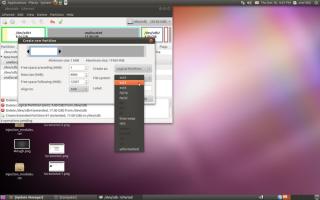
10. Right click the unallocated partition, and click "NEW". Select "EXTENDED DRIVE" on the right side drop down menu, then click "add" at the bottom right.
» Click to show Spoiler - click again to hide... «
11. Below the extended drive is another unallocated drive, right click it, click new, select "logical drive" and choose "ext3" as the format.
» Click to show Spoiler - click again to hide... «
12. At this point, you are free to add how many partitions you'd like. Just remember it has to be multipliers of 1024.
» Click to show Spoiler - click again to hide... «
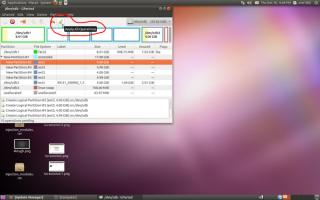
13. Once you have finish, click apply. Before that, pls make sure everything u did as after clicking apply, there is no turning back....The operation should take quite some time.
» Click to show Spoiler - click again to hide... «
14. Once done, close Gparted
ON THE N9001. Press "q" to exit from Backupmenu, and close the keyboard.
2. If you done everything correctly, you should now boot into maemo with all your files and data still intact....
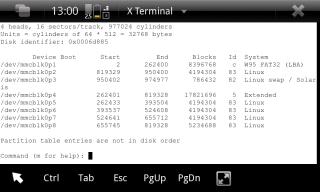
3. To check the list of partition, you should have sfdisk installed.
4. In terminal, type
CODE
/home/user/bin/fdisk /dev/mmcblk0
5. Press "p" to view the partition table
IF U DON'T HAVE SFDISK INSTALLED, TO INSTALL IT, OPEN XTERM AND TYPE THE FOLLOWING COMMAND
CODE
mkdir -p /home/user/util-linux /home/user/bin
cd /home/user/util-linux
wget http://ftp.de.debian.org/debian/pool/main/u/util-linux/util-linux_2.13.1.1-1_armel.deb
dpkg-deb -x util-linux_2.13.1.1-1_armel.deb root
cp root/sbin/fdisk /home/user/bin/
cd ..
rm -rf util-linux
DONE!!

 Dec 9 2010, 07:05 PM


 Quote
Quote








 what a good place to work. Plus i'm gonna off to Kelantan tomorrow for personal matters. Hope there's a good 3G coverage there so i can continue there + see if drunkdebugger sparks a suprise on new year countdown. LOL

 0.0519sec
 0.90
0.90
 7 queries
 GZIP Disabled