Welcome Guest ( Log In | Register )

Bump Topic Topic Closed RSS Feed

Outline · [ Standard ] · Linear+

 Samsung Galaxy 5 GT-I5503(V2 Froyo-ing Now), Froyo, pls come to papa

views
     
lcct
post Dec 1 2010, 07:06 AM

New Member
*
Junior Member
16 posts

Joined: Feb 2009
QUOTE(gocke55014 @ Nov 30 2010, 08:59 PM)
hmm. Interesting news. Maybe its true. More stable because the russian firmware is a few months newer than our original firmware. There might be a few tweaks here n there. I have one question for bro qunox. How about 3g connection. Is there an option to turn it on n off?
*
In I5500XWJJ6 firmware there isn't option to turn off data connection like in stock firmware (at power off screen or under setting > wireless & network > mobile network: enable always-on mobile). There is a solution for that however: use APNdroid (search at the market). It works by renaming APNs string in setting. In conjunction with 3G watchdog to monitor your data usage, you can effectively control your data usage automatically.

I like I5500XWJJ6. Rock solid and stable. But at the end of day, I flashed my phone back to I5503DXJG5 as soon as it's available at samfirmware.com smile.gif I need indonesian swype (though with your help I can make one for I5500XWJJ6), and DioPen Chinese IME keyboard (learning chinese right now). I restored my full backup from titanium backup without a hitch, all apps, settings, and data were preserved perfectly! For those who don't know how to do full backup using Titanium backup, press menu, batch, run backup all user apps + system data.
lcct
post Dec 2 2010, 04:42 PM

New Member
*
Junior Member
16 posts

Joined: Feb 2009
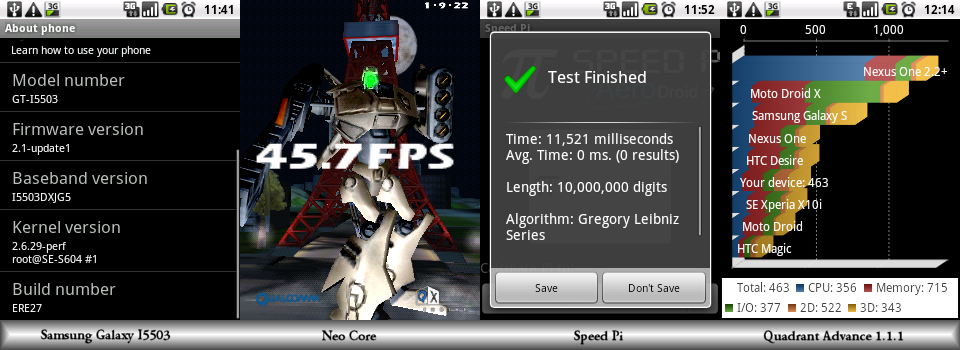
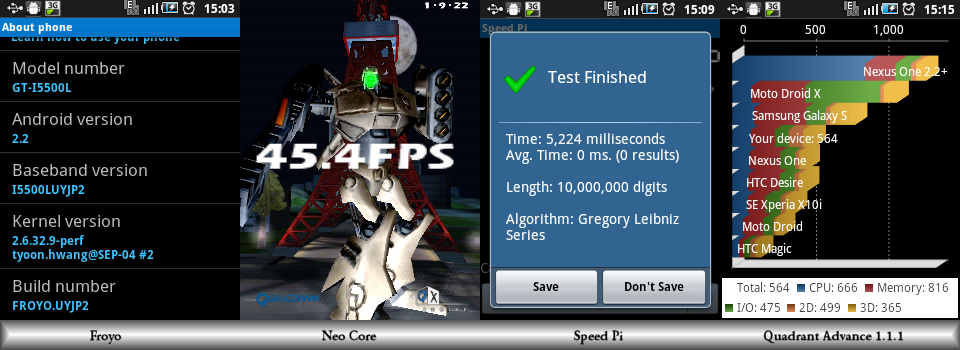
Benchmark results:

user posted image

user posted image

Neocore shows that eclair already handles gpu acceleration as good as it gets.

Speed Pi shows the benefit of JIT on cpu extensive task, more than twice as fast!

Quadrant mix bench cpu and gpu benchmark shows modest 22% overall speed improvement.


Flashing notes:

- Flashing this firmware does not erase your data, but apparently the new swype that comes with the this firmware conflicts with the old swype and causing the phone to periodically vibrating. It also eats cpu cycle thus makes the phone lagging as hell. Instead of getting Froyo (Frozen Yogurt) you get Fropho (Frozen Phone) sad.gif So first, you *should* force stop swype: settings > applications > manage applications > press 'All' tab > Swype > Force stop. Beyond this point I have no solution yet beside hard resetting the phone. But by hard reset, everything will be gone, and if you don't have backup.. So before reset, look around, do benchmark, etc. Most importantly, don't you think it's a good time to root the phone and install Titanium Backup?

- If you are prepare like me and have backup, good on you smile.gif But don't forget, before restoring everything, uncheck swype so it won't be restored.

lcct
post Dec 4 2010, 12:19 AM

New Member
*
Junior Member
16 posts

Joined: Feb 2009
QUOTE(StupidGuyPlayComp @ Dec 3 2010, 07:25 PM)
smile.gif Thanks for the info............some other forumer ask me for that
*
Thanks bro gocke for clarifying it to sgpc smile.gif 3g watchdog is a nice utility to have. Here in Indonesia using Telkomsel we have quite cheap data plan rate, RM 35 / month for unlimited, up to 384 Kbps (512 Kbps in practice) HSDPA connection. So I've been using my G5 as wifi tether, and 3g watchdog helps me keeping track how many data I've been using so far. Speaking about tethering, I could not get the new froyo build-in wifi tether to work. It works as a wifi router in infrastructure mode (i can access other computers in LAN), but there is no internet access. So I am still using barnacle for tethering, which still works perfectly (in froyo I need to turn on option 'skip wpa supplicant' in setting). What a pity, as the build-in tether can work in infrastructure mode and wpa2, and barnacle can only operate in ad-hoc mode and unsecure wep128. Do you guys have any luck with the build-in wifi tethering in froyo?
lcct
post Dec 4 2010, 03:16 PM

New Member
*
Junior Member
16 posts

Joined: Feb 2009
QUOTE(gocke55014 @ Dec 4 2010, 07:07 AM)
No problem bro lcct. Ive been using the built in wifi tether n so far so good. Working perfectly with wpa2. But i havent tested lan access though.
*
Thanks fyi bro. I knew there must be something wrong with my setup because skype and torrent work with froyo's build-in, but not browsing. And this happen to all five of my computers at home. Barnacle gives me zero problem, I can connect all five of my computers at the same time without problem whatsoever. I feel hard reset and starting fresh without restoring backup (especially apps) would work.. but.. Maybe if I have a lot of free time some day. Right now I pray that no neighbour of mine is skilled enough to crack the barnacle's wep encryption smile.gif

QUOTE(StupidGuyPlayComp @ Dec 4 2010, 08:25 AM)
laugh.gif Bro, you are a nice tester...........
In Malaysia the data plan is damn expensive and limited bandwidth, I not subcribe.
If we using the data connection without data plan, Habis lah............phone bill might few thousand Ringgit Malaysia.
1KB=1cent

Once I activate the 3G, not even execute any apps, the background data already consume me RM1.00 doh.gif

So I difficult to test the data connection thingy
That's ok ngpc, thanks anyway. I think 'n'(ice) word is more appropriate for you than the 's' word smile.gif Ouch... so expensive eh.. I've just check out the maxim, celcom, and digi's data plan, and you're right they are pricey. Here with my operator I can buy daily data plan if I want to, only RM 1.7 / day unlimited usage. There is quota of like 15 MB before the speed is supposedly dropped. But fortunately that is not enforced, so I can dowload more than 1GB per day with less than RM 2 biggrin.gif Btw, do you guys know that while dowloading I can still use G5 for voice call and sms without interruption? Galaxy 5 is without doubt the best handset I have ever own.

Have a nice weekend guys!
lcct
post Dec 5 2010, 05:00 PM

New Member
*
Junior Member
16 posts

Joined: Feb 2009
QUOTE(StupidGuyPlayComp @ Dec 4 2010, 09:51 PM)
smile.gif IMHO
Gaming performance - tight, this froyo did not seem faster in gaming, maybe a bit

Apps Compatibility - tight, the apps can use on eclair, can support by froyo too, the apps not support on eclair, cant use on this froyo

Battery - eclair win a bit, i felt that this froyo version consume battery faster

GPS - tight, this froyo not likely can locking faster. It cant access GPS Setting (USSD mode)
even the froyo has 90 degree problem but it dont effect much, Papago and GPS test still running without problem, no worry on this part

Sound - felt that the loudspeaker for froyo a bit better than eclair but i might wrong, its a subjective view

Video - tight, just tested the rockplayer, still lagging while playing high bitrate rmvb

Interface - froyo win, smoother in sliding, faster booting, faster media file scanning, colorful wording

Task Manager/RAM Management - froyo win, good apps with nice RAM management, better than ATK

Social Network (fb, twitter) - tight, did not found any changing

Flash - tight, both version still unable support flash

Apps2SD
- no doubt, froyo all the way

any others?
Nice summary sgpc. I agree and would like to add one more.

Connectivity - Froyo.

The the portable wifi hotspot feature elevates froyo to a new level. When I used Barnacle wifi tether for the first time, I was like "wow, now a phone can emulate wifi router?" Not perfect, you can't connect other phone to G5 in ad-hoc mode for example, but amazing still. Now the froyo's build in wifi tether that works in infrastructure mode as opposed to ad-hoc mode in barnacle, complete that illusion. It's a feature that is very handy and also will no doubt impress a lot of your friends. OK, perhaps unlimited data plan is still very expensive in most countries, and wifi tethering is a cool feature but has no practical use for those people. Now look at the wifi router feature and consider these scenarios:

1. Want to transfer large files between laptops but no one has flashdisk large enough? No problem. Transform your G5 into router and send those files away up to 20 meters or more, at about 1.25 MB/s transfer rate in my case.

2. While you are waiting for the transfer to finish, you and your friend(s) want to play a quick LAN games? Done!

3. Sharing a printer? Yes.

Etc, you get the idea, basically every benefit that a router has.

PS: Just an update to my situation. It turns out the source of my problem is that my operator (telkomsel) is blocking tethering when using froyo's build-in. I tried using other mobile operators (indosat and xl) and wifi tethering worked like charm. There is no problem in using barnacle. So next time if you guys are having problem wifi tethering with froyo's build-in router, you might want to point finger to your operator before blaming your setup.

Topic ClosedOptions
 

Change to:
| Lo-Fi Version
0.0329sec    0.31    7 queries    GZIP Disabled
Time is now: 7th December 2025 - 06:19 PM