Froyo to some extend fix the gps problem. Lock my position in 1-2 minute with any network assist, twice i tried. so consider fix. But.... the funny part is, the direction is now emm.. opposite the way we are going. You have to use the phone in landscape mode to get direction right. Funny...
cant say anything about this yet.. still dunno much about apps2sd.. and another thing is when restart the phone, the shortcuts to the apps on sd will be missing, in the app drawer also gone but its still installed and can be run
OMG, is true, apps that have moved to sd is missing.!!
After installing the GO Launcher apps, my interface looks very cool, no more that boring blue colour background, can flip to landscape view, customs settings for shortcuts and more, nice and recomended. Available in the Market!
Hmmm... just want to give you some advice on my experiance. Luncher are dangerous apps to use, weather it is lunch pro. Adw.lunch. Luncher will mess up with your system, or gife you way too much configuration. One time I have to reFlash my phone because launcher, and another time I almost have to reFlash it again. So in my experiance. Lucnher are bad and dangerous apps to have even thought it make your phone look very preety.
Just giving some of my thought, if you still want to use luncher, than i snuggest you backup your phone regularly
QUOTE(ja3kass @ Dec 2 2010, 09:55 PM)
who hv test the GPS in FROYO?
Me, my phone locked afert 2-3 minute, i consider the gps problem fix. But the funny thing is. the direction it pointing is oppsite the way we are going if you held the phone in potrait mode. But corrected in landscape mode. Can you check on this, maybe is just my software glitch
hi guys. i finally bought the handset can i ask the phone ring tone & sms ring tone posibble to customize? like we put our own music for the incoming call/sms ring tone... i still cant find tat setting...
Stock alarm clock worked fine this morning even with a task killer.
Try it for a few days, see does foroyo has fix the deep sleep bug
QUOTE(kimimaro_kun @ Dec 3 2010, 07:24 AM)
Froyo user reporting in!!! Morning guys..
i try to set alarm on froyo last night, but cant change the alarm tone. only silent available... WTH
who need alarm with silent tone...
hahahaha i just have to laugh on this
QUOTE(SAWEWA @ Dec 3 2010, 07:44 AM)
prob is, i cant even get my phone to start, after switch on, only appears the force close message, cant get to app drawer, the main screen or anything else
if it come to that, than you have to flash it. LIKE I SAY USING LAUNCHER ARE DANGEROUS, BACK UP ALLWAYSS
QUOTE(StupidGuyPlayComp @ Dec 3 2010, 09:32 AM)
Froyo flashing in progress.............
Added on December 3, 2010, 9:35 am Took around 5 minute, then done.......
Insya'Allah Ok guys, I received some PM regathering how to flash G5 to froyo. Instead of keep replying to all of the PM, I just thought it will be better if I posted here. So many people could read and try it. Thought I dont think is just about upgrading to froyo, but also to those having problem with G5 that can only resolve by DIY flashing. That can save you guys from being cheated to pay for flashing phone at shop like I had experianced.
Before starting to flash, I've to address some issue.
1) BACKUP BACKUP BACKUP , backup your contact, msg, file, anything thats is important. Can't stress out how important this is 2) I'm not an expert, I'm just a layman like you, so if some complicated things happen, I could not help you 3) This step by step guide is specific to I5500LUYJP2 firmware. Other firmware required a little twitch hear and there when using odin. 4) IS VERY HARD TO BRICK your phone, is very uncommon. But the possibility is there.
So here the step by step guide
Bismillah 1) Go to this webiste to download Odin v4.28 and Ops file, and this website to download I5500LUYJP2 2. Extract Odin v4.28 and Ops File.zip and I5500LUYJP2.rar, the password in the previous website 3. Open Odin v4.28, -Select OPS tab: EUROPA_I5508_v1.0.ops -Thick One Package, Auto Reboot and Protect OPS at the Option section -Select I5500LAROJP2.tar from where you have extracted the I5500LUYJP2 4. Turn off phone, remove battery for 5second, put it back 5. Hold "Volume Down, Center button & Power button" in the same time to enter Download Mode. Your are in download more when you see the yellow triangle with "!" sign in it and the word downloading on top of it. 5. Connect to PC with USB cable 6. When the data line and the phone connection is successful, com port shows yellow in Odin 7. Press Start on Odin 8. Waitin & Pray! and DONT PANIC. This section usually require 5-6 minutes. The phone will reboot it self and you just have to wait. 9. When odin said the flashing has PASS, you by now has FROYO!!. but wait is not done. 10. You have to do Hard reset after flashing by dialing *2767*3855# 11. And your done
WELCOME TO THE G5 froyo familly.
Added on December 3, 2010, 10:39 amOther people that have flash to froyo welcome to edit my froyo flashing guide
Added on December 3, 2010, 10:40 am
QUOTE(StupidGuyPlayComp @ Dec 3 2010, 10:20 AM)
I think it only work on others Samsung model
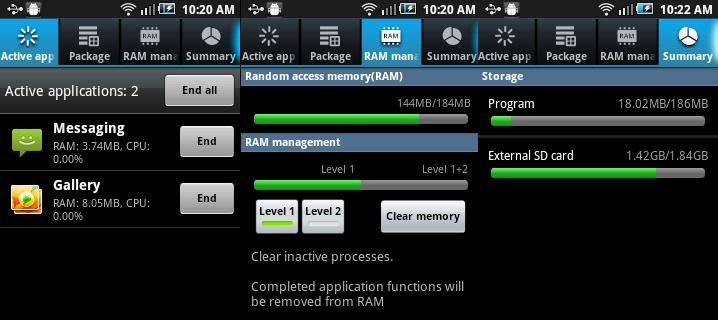
Added on December 3, 2010, 10:21 am Nice built in Task Manager, say bye bye to ATK
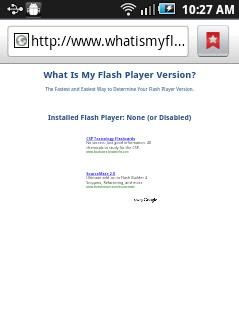
Added on December 3, 2010, 10:25 am Unfortunately the flash still unable function............without the ARMv7 instruction set it still non workable I will further test later
I still dont get it with level 1 level 2 thing. What is it for??
This post has been edited by qunox: Dec 3 2010, 10:40 AM
do you see the right side of google search bar, a voice search icon... how to use it? i try to download but not found。。。
Owww the google voice search. Is a cool apps to have, but pretty much useless. My old firmware has voice search preinstall, and every time i use it, it never give the correct stuff that I'm saying. Even simple word like Three, it will give search result that so far off from what we want.
Hey the you tube apps also have been upgraded. Now can watch video in potrait mode and the discussion thread also appear. Buffering time also has been shortened.
need your help...just flash my firmware to froyo....guess what happen phone not restarting....any sifu can help here..... odin shows result as follow: <1> VerifyPlatform:V0, P0,R0 <1> START!!! <1> set download environment. <1> big partition size!! <1> big partition size!! <1> big partition size!! <1> big partition size!! <1> amss download.. <1> 1/5 Finished. <1> boot.img download.. <1> 2/5 Finished. <1> recovery.img download.. <1> 3/5 Finished. <1> system.rfs download.. <1> 4/5 Finished. <1> csc.rfs download.. <1> 5/5 Finished. <1> reset pda.. <0> Started Timer <1> Close serial port and wait until rebooting. <1> PASS!!! <0> Destroy instant.. <0> Killed timer
Insya'Allah I check ok this, I'll try find out what happen
Hey guys, I can't get 3g connection, Already input celcom APN like the 1st phone. but nothing happen.... Thought I wanna use g5 to twitter as i got throught kl motor show.
at level 1 plaza berjaya...next to sony ericsson and nokia service center
Added on December 4, 2010, 10:30 amStupidGuyPlayComp.... is 3g service not available for the "new" firmware?? i notice that the mobile data is hidden and can't be configured....
Is available, just checked. But i didnt use the apn setting in the 1st post. Use another, more lengthy.
Hey froyo guys, just want to check if you guys punya "turn mobile network on/off" setting (the one when you long press the power off button) is working. Mine's working. but I usess different apn setting. I think read here somewhere that is not working
[quote=arepeace82,Dec 4 2010, 11:12 AM] what apn setting you used?? as for "turn mobile network on/off" cant event click on it....item hidden ....same thing in setting wireless & mobile network
Added on December 4, 2010, 11:14 am do we have to key in every thing(mms server,proxy prot...blablabla) or just the APN ....im Using U Mobile....
[/quote]
What firmware are you using?
[quote=arepeace82,Dec 4 2010, 11:36 AM] [quote=StupidGuyPlayComp,Dec 4 2010, 11:32 AM] I tried the setting in front page, the mobile network still unable activate...........wait for others rescue
[/quote
qunox let us know how do u that??
[/quote]
Here's the APN setting, is essentially same as in thw 1st post, though the APN setting for internet and mms has been seperated
Celcom 3g internet setting :
Name : Celcom 3G Internet APN : celcom3g MCC : 502 MNC : 19 APN type : default Celcom 3g MMS setting : Name : Celcom 3G MMS
APN : celcom3g MMSC : http://mms.celcom.net.my MMS proxy : 10.128.1.242 MMS port : 8080 MCC : 502 MNC : 19 APN type : mms Celcom 2g internet setting :
Name : Celcom 2G Internet APN : celcom.net.my MCC : 502 MNC : 19 APN type : default celcom 2g MMS setting :
Name : Celcom 2G MMS APN : mms.celcom.net.my MMSC : http://mms.celcom.net.my MMS proxy : 10.128.1.242 MMS port : 8080 MCC : 502 MNC : 19 APN type : mms
[quote=StupidGuyPlayComp,Dec 4 2010, 12:11 PM] Not many model come with more than 512MB ROM.............you need to pay higher for this
x10 has no multi touch, and froyo almost impossible for them xt720's RAM is pretty less, 256MB, no chance for froyo as well
the increase of ROM wont bring better performance to the phone, something like higher capacity of Hard Disk in PC.............higher capacity RAM will help a bit on giant apps
Added on December 4, 2010, 12:13 pm About the froyo release by UK, the UK Samsung said the froyo was released by the KIES is not ready...........so still unable update
I dont know the fact of this news, but can confirm nobody got the UK's froyo firmware now............the only froyo available now is our flashed one
[/quote]
So if I want to upgrade to android phone with 1000MHz with foryo capability, which phone i shoulde choose? I'm thinking just upgrading my self to nexus 2. But maybe the price of the phone is sky rocket
If UK is going a froyo firmware soon, than it is a very good news. European firmware tend to be more stable with lest bug. Hope they will fix the invisible apps icon bug, that is really a fatal bug.
[quote=SeNnDoh-7,Dec 4 2010, 01:02 PM] I forgot to write down the original firmware before upgrading.. What is the firmware originally installed in our i5503..
[/quote]
the firmware package is I5503DXJH1, i believe is already leaked and available for flashing
[quote=speedrider,Dec 4 2010, 02:03 PM] If i flash my g5 with Froyo, can it be reverted back to the original firmware?
[/quote]
I think is paussible, but never tried to downgread my phone. Use the firmware above
I leave you guy with cute dog dancing to salsa.
This post has been edited by qunox: Dec 4 2010, 02:15 PM
i already set the APN.. unfortunately, we cant set it off. dont know how much my bill this month. just realized the 3G/H icon
QUOTE(need7 @ Dec 4 2010, 11:30 PM)
go to wireless & network setting, turn off Mobile Network (Connect to the Internet). I just turn on to receive and send MMS. Internet better use WiFi. Froyo
The ability to switch 3g on/off depens on the firmware you using. for froyo I5500LUYJP2 can, long press the on/off button. But 2.1 really depens on the firmware, local one can.
Added on December 4, 2010, 11:39 pm
QUOTE(kimimaro_kun @ Dec 4 2010, 11:12 PM)
i already set the APN.. unfortunately, we cant set it off. dont know how much my bill this month. just realized the 3G/H icon
QUOTE(need7 @ Dec 4 2010, 11:30 PM)
go to wireless & network setting, turn off Mobile Network (Connect to the Internet). I just turn on to receive and send MMS. Internet better use WiFi. Froyo
The ability to switch 3g on/off depens on the firmware you using. for froyo I5500LUYJP2 can, long press the on/off button. But 2.1 really depens on the firmware, local one can.
Added on December 4, 2010, 11:42 pm
QUOTE(StupidGuyPlayComp @ Dec 4 2010, 08:49 PM)
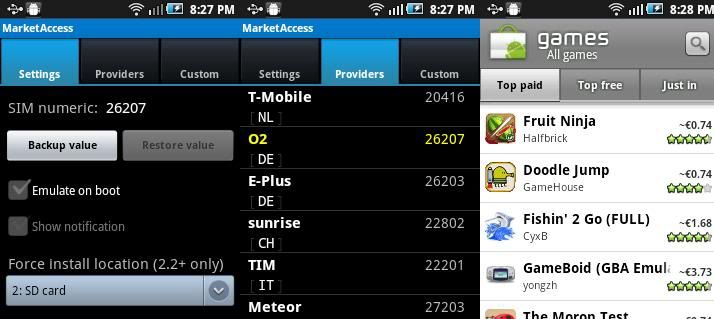
Market Access, emulate various region code to enable you access different region's market Example, I can download Google Voice Search via Android Market, and view the paid apps as well (but paid apps are un-downloadable) (Root needed) Market Access (Downloadable from Android Market) 39KB
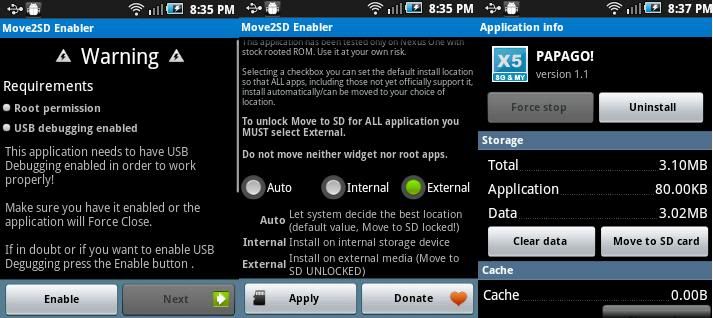
Added on December 4, 2010, 8:52 pm Have you found that some apps does not support apps2SD??? like Papago, facebook............. Here the apps which can force all the others apps move to SD - Root needed - USB Debugging mode must be activate Move2SD Enabler (Downloadable from market) 75KB
QUOTE(yweising @ Dec 4 2010, 08:54 PM)
sgpc, i hv dl the ninja fruit from applanet and playable. (never root my g5)
YESS!!! At last I can access all that filtered apps!! Thanks ultramen. Alhamdulilah
This post has been edited by qunox: Dec 4 2010, 11:42 PM
2days go to sheng heng ... big promotion for citibank horlder... galaxy 3 RCP price rm1099-citibank card horlder rm150- sheng heng discountrm150+65 instalment plan (must take) 1 year = rm864 .galaxy S big discount rm 2599- citibank card horlder rm450-sheng heng discount rm400 +rm65 1 year must take instalment plan o rm85 18 month o 36month rm85 = 1814
+addtion 3 year local waranty
Cant think any reason to use a handphone for 3 years. Now day people change phone like every 1-2 years
QUOTE(shadow111 @ Dec 5 2010, 09:10 PM)
chompsms and handcent.. which is better?
Handcent for me, got more customization
Hmmm... I can stand my bug and error, but what I cant stand is loss conection with my telco. Arghhhh Will revert back to local firmware if no connection error keeping showing up.


 Dec 2 2010, 04:32 PM


 Quote
Quote


 i just have to laugh on this
  Took around 5 minute, then done.......




 0.0479sec
 0.44
0.44
 7 queries
 GZIP Disabled