Welcome Guest ( Log In | Register )

Bump Topic Topic Closed RSS Feed

Outline · [ Standard ] · Linear+

 CLOSED

views
     
jeopardise
post Feb 8 2011, 03:46 PM

tidak memberi seketul tahi!
******
Senior Member
1,767 posts

Joined: Jan 2003
From: Bandar Seri Putra


QUOTE(yjeen @ Feb 8 2011, 12:29 PM)
Dear All,

Any ideas where to get this height adjustable stand for Dell Monitor (Model IN2020M)? Or any third party stands out there?

I called dell, and the customer care person mention that they do not sell it separately.

user posted image
*
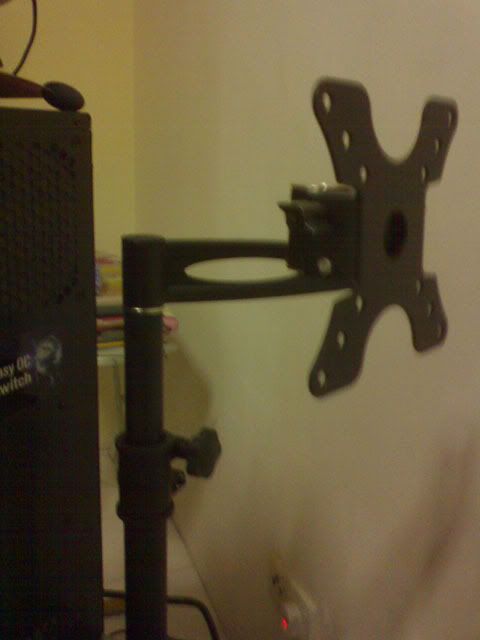
Look for 3rd party desk mount such as Cento DMP LCD502. Forumer rsangel did sell it. The only drawback is you can't pivot, perhaps need few modifications.

user posted image
jeopardise
post Feb 10 2011, 12:21 AM

tidak memberi seketul tahi!
******
Senior Member
1,767 posts

Joined: Jan 2003
From: Bandar Seri Putra


QUOTE(iguana_dude_619 @ Feb 9 2011, 12:43 PM)
newbie question here
are all DVI port for monitor is DVI-D?? or some DVI-I
I read that DVI-I is better bcoz it can use analog & digital
my monitor(acer s221hql) has DVI-D.. did I made a wrong mistake??
bcoz the monitor is xbox 360,I'm thinking of using hdmi to dvi cable
pls & tq guys
*
Yes, DVI-Integrated can transfer digital and analogue signals.
Yes, acer 221hql using DVI-D
and
Yes, you can connect you monitor using HDMI to DVI cable from console. Only lack of audio to be transferred at the same time.


QUOTE(Maxieos @ Feb 10 2011, 12:05 AM)
Anyone know which LCD brand model is using IPS which is 22 inch ? ?
*
What I usually found is Dell Ultrasharp U2211H, 2207WFP and 2209WFP.
jeopardise
post Feb 10 2011, 09:45 AM

tidak memberi seketul tahi!
******
Senior Member
1,767 posts

Joined: Jan 2003
From: Bandar Seri Putra


Better go for Dell U2311H

A little blurriness will occur on face paced games (if you game and really study the lag). U2311H also great for gaming since it has DisplayPort and easily you can. Because of it's good contrast ratio, Dell U2311H looks nicer in the dark scenes than Samsung.

Color is true on Dell while on Samsung looks brilliant but fake. I 've compared Dell U2311H side by side to Samsung B2430H and I confirm that Samsung TN monitor is not suitable for serious image editing. Simple gradient test showed serious color banding on TN monitor.


jeopardise
post Feb 10 2011, 02:34 PM

tidak memberi seketul tahi!
******
Senior Member
1,767 posts

Joined: Jan 2003
From: Bandar Seri Putra


QUOTE(Jet23sky @ Feb 10 2011, 02:24 PM)
Aiks.... the price between 23inches and 24inches IPS panel... is so much.... i can almost get 2 23inches lcd IPS panel O.o
*
Almost can get 2 x U2311H? I think add RM100++ can get three U2311H with one 24inch IPS price tongue.gif .


.......................................................................................

Yeay! This is my 1000th post mark as a milestone in Lowyat.net rclxm9.gif .... still 999000 for 1 million mark rolleyes.gif

This post has been edited by jeopardise: Feb 10 2011, 09:42 PM
jeopardise
post Feb 14 2011, 02:16 PM

tidak memberi seketul tahi!
******
Senior Member
1,767 posts

Joined: Jan 2003
From: Bandar Seri Putra


QUOTE(uzary @ Feb 12 2011, 10:42 PM)
guys, is there any disadvantage of using vga port insted or hdmi/dvi port to play games or watch hd content videos?
*
The image won't be sharp and often color distortion and flickering can be observed.

Blu-ray movies and HDCP content won't be able to be shown using VGA.


QUOTE(tat_lee @ Feb 13 2011, 02:16 PM)
Anybody know where can actual see Dell U2311H at Low Yat? Want to see it myself.
*
I've tried to find them in Lowyat and I can't find it. I hope you are luckier than me.

However I've bought one U2311H from other place and absolutely satisfied with my purchase. rclxms.gif
jeopardise
post Feb 15 2011, 12:22 AM

tidak memberi seketul tahi!
******
Senior Member
1,767 posts

Joined: Jan 2003
From: Bandar Seri Putra


QUOTE(tat_lee @ Feb 14 2011, 05:05 PM)
No luck also, up down up down for 3 times. sad.gif  Even monitor used at counter also  I check. doh.gif

BTW, since U already bought it, any problem with it?
For anybody who have bought Dell U2311H, any fault happen for this monitor?
*
No problem since I bought and install it. Backlight has good uniformity and no pixel defect.

Just a tiny scratch in the monitor surface, I think it is Dell's fault during preparing the monitor before distributing it. So because it's there I m only 90% satisfied or else I'll proudly say 100%.

I am very surprised that I immediately find out the difference between TN monitor quality with this monitor is very obvious. The color is superb and I should have bought this monitor than buying brand 'S' at RM715 vmad.gif

No need to go for the 24 inch because an adding inch cost almost RM1K. Thinking to buy another one for my command center. Photo editing, linear video editing and realtime previewing will be awesome.
jeopardise
post Feb 16 2011, 08:15 AM

tidak memberi seketul tahi!
******
Senior Member
1,767 posts

Joined: Jan 2003
From: Bandar Seri Putra


QUOTE(asepa @ Feb 16 2011, 04:50 AM)
anyone have any idea what's the cheapest 27" lcd?
*
I think Samsung P2770H is the cheapest in retail. There is also Viewsonic with 1ms with a little price topup.

or cheapest always come in the form of used monitor brows.gif
jeopardise
post Feb 17 2011, 09:02 AM

tidak memberi seketul tahi!
******
Senior Member
1,767 posts

Joined: Jan 2003
From: Bandar Seri Putra


QUOTE(Calvin Seak @ Feb 17 2011, 12:05 AM)
Hey bro I think you should call up Dell cs because from my experience Dell is very kind with their warranty! I even had hair line scratches on my laptop due to my own negligence and they still changed the whole casing! I'm looking in this forum because I'm looking for a monitor too lol!
*
thanks for the info.

I found out the color/backlight uniformity and color is quite even so I swallow the tiny scratch problem as for now because it is hardly noticeable and doesn't affect the pixel quality. I am afraid if I change it, I'll get a bad one if i m unlucky.

I expect to buy another one and hopefully it will perform similarly like the current.
jeopardise
post Feb 17 2011, 02:32 PM

tidak memberi seketul tahi!
******
Senior Member
1,767 posts

Joined: Jan 2003
From: Bandar Seri Putra


QUOTE(Mochan @ Feb 17 2011, 09:21 AM)
Hi, will I see difference upgrading from 22 to 24 inch? Looking to get B2430H.
*
2 inch increase will be like enormous change to me.

I've used B2430H. My experience is quite bad.

1. I got a terrible pain for the first 3 days and I got 2 times 1-1 replacement because of dead pixel (1st replacement) and subpixel problem (2nd replacement). Its like nightmare going up and down Lowyat Plaza and a bit mad.gif with All IT staffs to get replacement. In the warranty got "Zero Bright Defect (ZBD) only applies when it occurs within 7 working days from purchased date, regardless of dot quantity, the defective LCD panel/module shall be replace by SAMSUNG.". Info
2. Color is not accurate, Grey is a bit yellowish. Not for serious graphic works
3. Poor grads/banding. My office's cheap Philips 201E can produce images with amazing smooth gradient without much distortion and banding.
4. Text too sharp/antialias problem? Only with Full/Intelligent Image mode will fix it.
5. No DPMS. The computer already shutdown or sleep, the monitor still wake up with No Signal screen. Irritating in the night mode.
6. Goose neck stand, unstable on my desk. Fixed it with my L-2000 VESA mount.

Hmmmm ... that's what I think of this model.

The rest quite ok with me. BTW already replaced it with Dell IPS with 5 years warranty. Dell have amazing dead pixel warranty without much hassle.

I hope you are lucky buying one, or try LED lit models with cheaper price.


Added on February 17, 2011, 3:00 pm
QUOTE(everling @ Feb 16 2011, 02:55 PM)
Not quite true.

I can do 1920x1200 through VGA and it is sharp, without colour distortion or flickering. It is quite dependent on the quality of the cable. I have seen the problems you have described with different VGA cables.

And HD videos not limited by DRM will readily play over VGA.
*
I agree there's a dependency according to the quality of the cable, the length and the termination.

However VGA signal often described as RGB means 3 colors in analogue signal (prone to analog distortion) while DVI (digital signal) will correctly tell any pixel to show the desired color.

QUOTE
The DVI interface uses a digital protocol in which the desired illumination of pixels is transmitted as binary data. When the display is driven at its native resolution, it will read each number and apply that brightness to the appropriate pixel. In this way, each pixel in the output buffer of the source device corresponds directly to one pixel in the display device, whereas with an analog signal the appearance of each pixel may be affected by its adjacent pixels as well as by electrical noise and other forms of analog distortion.


Should u use 1080p resolution with analogue VGA, you can apply >60Hz with it. DVI single link can only show 60Hz.

This post has been edited by jeopardise: Feb 17 2011, 03:00 PM

jeopardise
post Feb 19 2011, 11:36 AM

tidak memberi seketul tahi!
******
Senior Member
1,767 posts

Joined: Jan 2003
From: Bandar Seri Putra


QUOTE(Hico @ Feb 18 2011, 09:59 PM)
ST2320L got hdmi port while U2311H got nicer colour.. but i found out another benefit which is it can swivel.. is the price rm609 a good buy for u2311H now? and wat is 3-Year Advanced Exchange Service and Premium Panel Guarantee? so mean anything damaged their exchange instead of repair?
*
Forget the HDMI, or u'll be ended just like me before; purchased a TN monitor with a higher price with HDMI but regretted to find out the color quality s**k.

I bought U2311H and using it with DVI with HDMI-DVI convertor without any problem.

RM609 is a good buy. 3 years warranty rclxms.gif


Added on February 19, 2011, 11:40 am
QUOTE(basSist @ Feb 18 2011, 04:17 PM)
i m also considering about the U2311H vs ST2320L

which i am going to connect it to my laptop for photoshop editing and designing works.

which is more suitable for my works?
*
For color critical works like photoshop and design = Go for U2311H IPS.

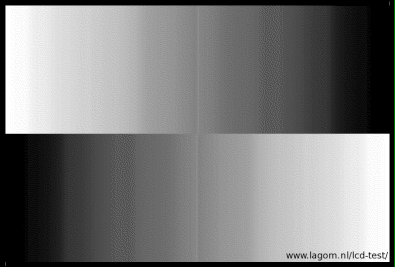
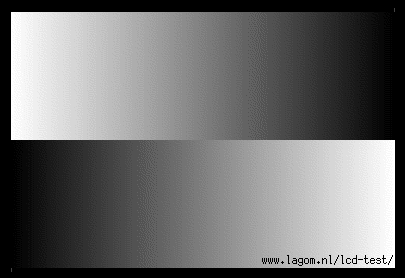
Simple test

With TN, usually encounter the below problem..
user posted image

IPS have better performance than this. Best for editing with gamut, transparency, shadow filter etc.

user posted image

More info: http://www.lagom.nl/lcd-test/gradient.php

This post has been edited by jeopardise: Feb 19 2011, 11:43 AM
jeopardise
post Feb 23 2011, 02:36 PM

tidak memberi seketul tahi!
******
Senior Member
1,767 posts

Joined: Jan 2003
From: Bandar Seri Putra


QUOTE(TheMakers @ Feb 23 2011, 11:27 AM)
I have a 24 inches LCD monitor at home..I plan to get another LCD to extend my desktop. But then 24inches IPS panel seems abit expensive. So I am wondering whether getting 23 inches LCD would be ok if extend it with my 24 inches since the resolution are the same....?
*
It would work but spanning would make spanning distorted because of different monitor size. As long at you don't care about it, then it would be ok.
jeopardise
post Feb 24 2011, 09:07 AM

tidak memberi seketul tahi!
******
Senior Member
1,767 posts

Joined: Jan 2003
From: Bandar Seri Putra


QUOTE(zerorating @ Feb 24 2011, 08:17 AM)
why u need led by the way? ccfl backlit produce better image for the same panel compared to edge lit led panel. The only good led were rgb led, which you can only find on dell laptop only. u will find out that great lcd monitor such as u2711h, u2410 didnt use edge lit led backlit
*
+1

If you think LED backlight saved power, latest CCFL backlight also become more power saving nowadays. Also one advantage of using LCD backlight is thin monitor and ligth weight. Because of manufacturer race for making the thinnest possible, sometimes they sacrifice VESA mounting capability.
jeopardise
post Feb 25 2011, 10:15 AM

tidak memberi seketul tahi!
******
Senior Member
1,767 posts

Joined: Jan 2003
From: Bandar Seri Putra


U3211H is far better than ST2320L in term of image quality, viewing angle because it is using eIPS panel.

The price is a bit expensive because of premium quality.

U2311H is also full HD. Best companion for graphic designer, movies (wide viewing) and also acceptable for gaming.
jeopardise
post Feb 25 2011, 11:38 AM

tidak memberi seketul tahi!
******
Senior Member
1,767 posts

Joined: Jan 2003
From: Bandar Seri Putra


2 usb ports via 1 uplink port from your motherboard. easy access for you flash/usb acrds.

No HDMI but have displayport. you can use DVI->HDMI convertor to connect from your graphic card HDMI output.
jeopardise
post Feb 26 2011, 01:09 AM

tidak memberi seketul tahi!
******
Senior Member
1,767 posts

Joined: Jan 2003
From: Bandar Seri Putra


QUOTE(ZzZzz... @ Feb 25 2011, 01:07 PM)
thanks all recommend dell u2311h......BTW wat is eIPS panel???
is it different from lcd or led?
*
IPS stands for In Plane Switching so e-IPS means enhanced IPS in term of color transmission, lower power, faster response time and better backlights. IPS panel has wide viewing angle and accurate color reproduction because of crystal molecules move parallel to the panel plane instead of perpendicular to it. It is much better than cheap TN (twisted nematic) panels.

LCD monitors means monitors that uses liquid crystal display; A liquid crystal display (LCD) is a thin, flat electronic visual display that uses the light modulating properties of liquid crystals (LCs). LCs do not emit light directly. so it will use lights to show color such as CCFL or LED.

LED monitors means the monitor uses LED as backlight. It is more power saving, better contrast.
jeopardise
post Mar 5 2011, 12:12 PM

tidak memberi seketul tahi!
******
Senior Member
1,767 posts

Joined: Jan 2003
From: Bandar Seri Putra


better have 3 x 2311H than 1 u 3011H. well, that's just me
jeopardise
post Mar 8 2011, 08:03 AM

tidak memberi seketul tahi!
******
Senior Member
1,767 posts

Joined: Jan 2003
From: Bandar Seri Putra


QUOTE(Gen-X- @ Mar 8 2011, 07:04 AM)
Guys, lets' say that a person so happen at lowyat and wanna buy monitor.
If there a way to identify what panel does a specific monitor used? or to say: whether it's using TN/VA panel? on the spot.
*
I think to identify on the spot is really difficult. VA models are offered by very few manufacturer such as NEC, Dell and HP and only a very few models too. Mostly they are made from TN panel.

For TN panel they can be identified by fast response times usually 5ms (despite some earlier models comes with 16ms) AND narrow viewing angles especially from below (read 160 degree to 170 degree). VA models usually slow in response time such as 8ms GtG or 16ms or sometimes 25ms. VA viewing angle also a bit narrower than TN (e.g 89 degree or such).
jeopardise
post Mar 9 2011, 08:00 AM

tidak memberi seketul tahi!
******
Senior Member
1,767 posts

Joined: Jan 2003
From: Bandar Seri Putra


QUOTE(Kit II @ Mar 9 2011, 12:01 AM)
hi lyn i bought a new lcd led monitor 20" phillips. im happy with it smile.gif
*
what model is it?

In my office I am using Philips 201E wide monitor. Its cheap but the color is very acceptable for image editing. Impressive tone and almost no banding problem for a TN monitor. Samsung and LG badly outperformed at the same price level rclxms.gif

Very satisfied with it
jeopardise
post Mar 10 2011, 11:24 AM

tidak memberi seketul tahi!
******
Senior Member
1,767 posts

Joined: Jan 2003
From: Bandar Seri Putra


Dear phyzoul, using DVI is sufficient for Full HD movies.
jeopardise
post Mar 12 2011, 11:35 AM

tidak memberi seketul tahi!
******
Senior Member
1,767 posts

Joined: Jan 2003
From: Bandar Seri Putra


QUOTE(phyzoul @ Mar 12 2011, 11:15 AM)
if i buy dell U2311H..izzit posible connect to Full HD media player?since the LCD dont have HDMI port...

sorry for noob question...
*
You can use a HDMI -> DVI convertor. It'll work

2 Pages  1 2 >Top
Topic ClosedOptions
 

Change to:
| Lo-Fi Version
0.0438sec    0.80    7 queries    GZIP Disabled
Time is now: 10th December 2025 - 04:19 PM