

hello..
can i ask sumething?
my friends date and time goes crazy..
it will reset by itself to an earlier time..
just use it for 5,6 months,.dont know why..
he using acer i3,,
any idea?
Asus A | U | N series combined thread V3
Asus A | U | N series combined thread V3
|
|
 Dec 12 2010, 07:25 PM Dec 12 2010, 07:25 PM
Return to original view | Post
#1
|
 
Junior Member
13 posts Joined: Aug 2010 
|
hello..
can i ask sumething? my friends date and time goes crazy.. it will reset by itself to an earlier time.. just use it for 5,6 months,.dont know why.. he using acer i3,, any idea? |
|
|
|
|
|
Dec 12 2010, 08:10 PM
Return to original view | Post
#2
|
|
Junior Member
13 posts Joined: Aug 2010
|
QUOTE(lee_what2004 @ Dec 12 2010, 07:49 PM) Seems like the CMOS battery is dead.. it is possible?..since the laptop still new.. This post has been edited by eki91: Dec 12 2010, 08:15 PM |
|
|
 Jan 2 2011, 01:41 PM Jan 2 2011, 01:41 PM
Return to original view | Post
#3
|
|
Junior Member
13 posts Joined: Aug 2010
|
QUOTE(Najmods @ Jan 2 2011, 12:47 AM) For me the Power4Gear is just another bloatware, you could configure Windows power options to do exactly the same thing. I already hate the ATK necessity to enable laptop hotkey. Way too much system process bloating the laptop unnecessarily Sorry 4 asking..My setting: Power saver: Everything set to maximum power saving, except the WiFi at maximum performance when plugged in. CPU min and max state is 0% so it will stay on lowest multiplier no matter what I do. Runs unbelievably quiet and very cool to touch or use on lap. Great battery runtime as well, up to 3 hours 30 minutes when browsing with minimum brightness. How to set an exception for WiFi to be at maximum performance? can you tell me how to build ur power saver .. tq in advance..  |
|
|
Jan 2 2011, 04:15 PM
Return to original view | Post
#4
|
|
Junior Member
13 posts Joined: Aug 2010
|
QUOTE(lee_what2004 @ Jan 2 2011, 01:46 PM) Click battery icon on system tray "More Power Option" "Change plan settings" "Change advanced power settings" "Wireless Adapter Settings" "Power Saving Mode" Change both to "Maximum Performance"... QUOTE(Najmods @ Jan 2 2011, 02:28 PM) Thanks lee. You could set everything in advanced power setting. Just open the menu one by one and test it yourself ooo..thx u 4 da help  |
|
|
Jan 23 2011, 01:23 PM
Return to original view | Post
#5
|
|
Junior Member
13 posts Joined: Aug 2010
|
May I ask sumting..
Im using a42jv.. I have problem viewing japanese font.. Can see the font in browser but when in window explorer i just see rectangles...(can see from file attached) I hav no orob b4.. any idea?? forgot to say.. I can write and read the font without prob in microsoft word.. After googleling.. i can only found prob in writing japanese / viewing the font in browser.. dont see one with mine prob... Help This post has been edited by eki91: Jan 23 2011, 01:40 PM Attached thumbnail(s) 

|
|
|
Mar 6 2011, 03:08 PM
Return to original view | Post
#6
|
|
Junior Member
13 posts Joined: Aug 2010
|
QUOTE(enix2000 @ Mar 6 2011, 02:36 PM) not there.. =( I have it here..see the image.. Attached thumbnail(s) 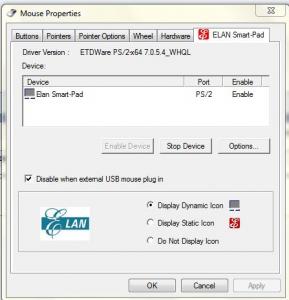
|
|
Topic ClosedOptions
|
| Change to: |  0.0422sec 0.0422sec
 0.46 0.46
 7 queries 7 queries
 GZIP Disabled GZIP Disabled
Time is now: 1st December 2025 - 09:09 AM |
 Quote
Quote