Welcome Guest ( Log In | Register )

47 Pages « < 27 28 29 30 31 > » Bottom

Outline · [ Standard ] · Linear+

 MSI User Discussion Corner, New G series Motherboard !!

views
     
MSI-MY
post Oct 13 2011, 12:04 PM

Top Player . Top Choice
****
Senior Member
569 posts

Joined: Aug 2010
Dear chaics85

If you enable the core unlocker alone, the system will unlock the cores only.

If you enable OCGenie, the system will unlock, and try to make the system stable. Most probably OCGenie increase the Vcore.That is why you can get a stable system with OCGenie.

My advice, if you plan to only unlock cores, enable core unlocker, and find yourself a stable vcore.

About the reset,
I also experience the reset problem. For me it occurred when i change too much settings at once or i over-overclock my PC (highly unstable)
i found that is not really a problem as i wont change settings in BIOS everyday.
But you can try a BIOS update and see if the problem fix

Regards.
KaLs
post Oct 15 2011, 05:40 PM

Getting Started
**
Junior Member
148 posts

Joined: Jan 2011
Hi, if i want to claim my msi mobo warranty where can i do it?
What should i bring?
TSSanko
post Oct 15 2011, 05:50 PM

Noob
******
Senior Member
1,436 posts

Joined: Mar 2005


KaLs, here you go.

1. You can send it back to the dealer/reseller you purchased from.
2. You can PM MSI-MY the serial number of the mainboard you want to claim warranty. He will advice you to send to which disti for you the send in for RMA.
3. If you are located far from the disti, you can post it to MSI Malaysia office, we will send your mainboard to ASP on your behalf.
athlonmax
post Oct 15 2011, 06:04 PM

On my way
****
Junior Member
558 posts

Joined: Jan 2003
From: Batu Caves/Gombak


Hi all,

I just purchased MSI GTX 570 Twin Frozr III Power Edition/OC, and i noticed in GPU-Z info the memory is only 1000Mhz,but i read in the MSI website it should be
4000Mhz. Do i read it wrongly or else?
Here's the screenshot of my GPU-Z.

Thanks.


Attached thumbnail(s)
Attached Image
kuntawakaw
post Oct 15 2011, 07:25 PM

imma tag fag!
*******
Senior Member
3,795 posts

Joined: Nov 2008
From: Varies....


QUOTE(athlonmax @ Oct 15 2011, 06:04 PM)
Hi all,

I just purchased MSI GTX 570 Twin Frozr III Power Edition/OC, and i noticed in GPU-Z info the memory is only 1000Mhz,but i read in the MSI website it should be
4000Mhz. Do i read it wrongly or else?
Here's the screenshot of my GPU-Z.

Thanks.
*
i donno is ths the correct way of calculating but the GPUZ showing the right figure

if gddr5.. ur 1000mhz must be X4 to get the effective clock
if gddr4 times 3.. gddr3 times 2.
MSI-MY
post Oct 18 2011, 12:22 PM

Top Player . Top Choice
****
Senior Member
569 posts

Joined: Aug 2010
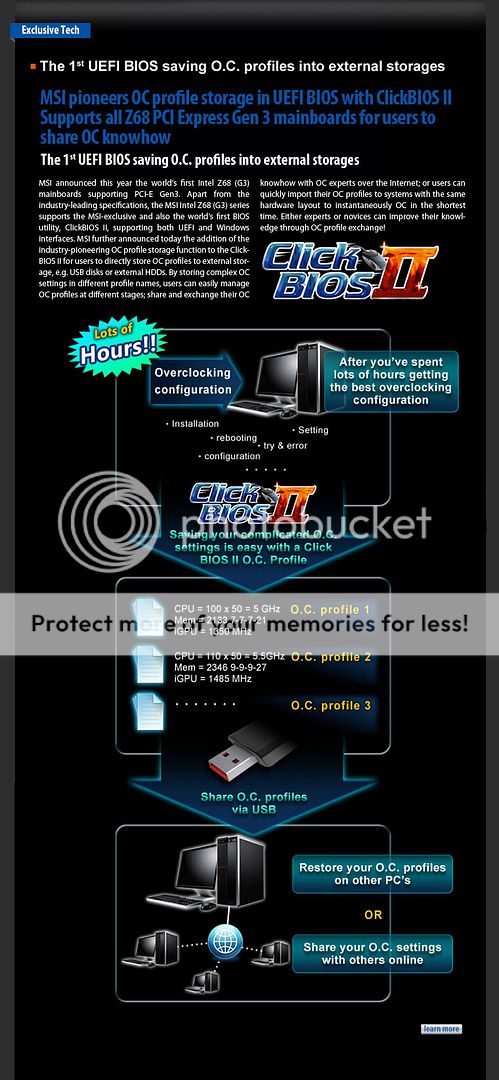
MSI - Save BIOS setting into external storage, and share with others

(Taipei-Taiwan) Global mainboard and graphic card manufacturer MSI announced this year the world's first Intel Z68 (G3) mainboards supporting PCI-E Gen3. Apart from the industry-leading specifications, the MSI Intel Z68 (G3) series supports the MSI-exclusive and also the world’s first BIOS utility, ClickBIOS II, supporting both UEFI and Windows interfaces. MSI further announced today the addition of the industry-pioneering OC profile storage function to the ClickBIOS II for users to directly store OC profiles to external storage, e.g. USB disks or external HDDs. By storing complex OC settings in different profile names, users can easily manage OC profiles at different stages; share and exchange their OC knowhow with OC experts over the Internet; or users can quickly import their OC profiles to systems with the same hardware layout to instantaneously OC in the shortest time. Either experts or novices can improve their knowledge through OC profile exchange!

The ClickBIOS II from MSI is the world's first BIOS utility supporting both UEFI and Windows interfaces for users to configure system BIOS with a mouse. When compared with ordinary BIOS configurations, ClickBIOS II fits the operation habits of general users with a graphical interface, thus making configuration more convenient and easier to all users. More importantly, the built-in features of ClickBIOS II also allow users to run online driver updates, BIOS updates and system backup, making it the best option for professional users.


user posted image


ascension
post Oct 23 2011, 11:39 AM

Getting Started
**
Junior Member
101 posts

Joined: Nov 2004
Recently i bought a P67A-GD65 and I noticed that in the UEFI the Intel Turbo Boost option is missing. Is it because I overclocked the base multiplier? I really wanna make sure turbo is off.
MSI-MY
post Oct 24 2011, 09:51 AM

Top Player . Top Choice
****
Senior Member
569 posts

Joined: Aug 2010
QUOTE(ascension @ Oct 23 2011, 11:39 AM)
Recently i bought a P67A-GD65 and I noticed that in the UEFI the Intel Turbo Boost option is missing. Is it because I overclocked the base multiplier? I really wanna make sure turbo is off.
*
Dear ascension
If you change anything in BIOS (eg EIST) and then you see the Turbo Boost option gone missing, this means that the Turbo Boost is disable.


This post has been edited by MSI-MY: Oct 24 2011, 10:38 AM
MSI-MY
post Oct 24 2011, 10:38 AM

Top Player . Top Choice
****
Senior Member
569 posts

Joined: Aug 2010
Dear All

This is to clear the confusions in this thread.

FYI, MSI motherboard has models that almost similar to one another. Eg : MSI KA760VM and MSI KA760VM-D
Some older motherboards might have different PCB revision and require different BIOS revision too.

Older motherboard with old BIOS dont have the M-Flash option where you have to manually flash the bios by DOS.
DOS flashing is quite risky as it will flash any BIOS file even the BIOS is not compatible, the result is motherboard failure.

To prevent the End-user updating the wrong BIOS, MSI created the Live Update.
Live Update will search the right BIOS file for you and flash it in Windows Mode.

However for newer motherboard, i recommend you to use the M-Flash option to update the BIOS.
Lacus
post Oct 24 2011, 10:57 AM

Lacus Sama No Tameni!
Group Icon
Staff
5,250 posts

Joined: Nov 2004
Thanks for clearing up/helping the user smile.gif. So technically Live-Update is recommended for the particular user?
MSI-MY
post Oct 24 2011, 11:31 AM

Top Player . Top Choice
****
Senior Member
569 posts

Joined: Aug 2010
QUOTE(Lacus @ Oct 24 2011, 10:57 AM)
Thanks for clearing up/helping the user smile.gif. So technically Live-Update is recommended for the particular user?
*
Personally, for those that know how to do it manually, i dont really recommend Live Update.
Live update is real helpful when you have no idea what to do.

For drivers, you can directly download the latest by developer instead from MSI. THis way is faster and you can get the latest driver available.
For BIOS, with MSI M-Flash, flashing will be much more easier. Except the old models that dont have M-Flash features, you have to update using Live Update

Btw, for old models that you cant download the BIOS, and you know how to flash by DOS, kindly PM me so i can send the file to you.

Regards.
JinXXX
post Oct 24 2011, 11:44 AM

Look at all my stars!!
*******
Senior Member
2,516 posts

Joined: Feb 2007
From: Uarla Umpur


QUOTE(Lacus @ Oct 24 2011, 10:57 AM)
Thanks for clearing up/helping the user smile.gif. So technically Live-Update is recommended for the particular user?
*
Thanks for directing me to the correct place, didnt know msi have this own topic sad.gif

QUOTE(MSI-MY @ Oct 24 2011, 11:31 AM)
Btw, for old models that you cant download the BIOS, and you know how to flash by DOS, kindly PM me so i can send the file to you.
*
hey pmed you already.. 10q.. hope to receive the file..

thanks for helping

This post has been edited by JinXXX: Oct 24 2011, 11:45 AM
mekboyz
post Oct 24 2011, 11:34 PM

Casual
***
Junior Member
438 posts

Joined: Apr 2007
From: Petaling Jaya


why no stock for R6950 Twin Frozr III Power Edition and why price increase for R6970 Lightning ohmy.gif ohmy.gif
MSI-MY
post Oct 25 2011, 01:53 PM

Top Player . Top Choice
****
Senior Member
569 posts

Joined: Aug 2010
Dear mekboyz,

Currently no stock on the R6950 TFIII Power Edition and also need your help on the PM which I sent for pricing enquiry.

Thank you.
nas06
post Oct 25 2011, 05:30 PM

♫..the sexy side of House..♪
****
Senior Member
549 posts

Joined: Sep 2008
Hi everyone. I'm using the P67A GD-65 B3. Audio is using Realtek chip right?
So, in the Realtek HD Audio Manager, there is no Sound Effects tab.
Why? I need this option to configure the equalizer as it is important to me.
Can anyone clarify this? Thanks smile.gif
chaics85
post Oct 26 2011, 10:12 AM

On my way
****
Senior Member
698 posts

Joined: Mar 2008
From: Oil town @ Miri
do i need to reset my bios to the default setting before updating the bios?? currently only turned on OC genie..
MSI-MY
post Oct 27 2011, 09:49 AM

Top Player . Top Choice
****
Senior Member
569 posts

Joined: Aug 2010
Dear nas00

may i know the version of realtek hd audio driver please.
Will get back to you later regarding this issue


Dear chaics85

its not compulsory but its best to do so.
the bios flash will be interrupted if your PC is no stable. Interrupted flash will result MB failure.
paradis3lost
post Oct 27 2011, 08:52 PM

Too leet for avatars
******
Senior Member
1,007 posts

Joined: Dec 2007


Hi MSI-MY, I have a MSI P67A-GD55 and when I took it out to clean my casing the other day, I notice that one of the screws on my motherboard has rusted (the one that holds the heatsink over the MOSFETs). Is there any way I can get a replacement screw for that?

Edit: Actually noticed that 4 screws are rusted... not just 1 sad.gif

This post has been edited by paradis3lost: Nov 2 2011, 11:21 PM
mekboyz
post Oct 27 2011, 09:26 PM

Casual
***
Junior Member
438 posts

Joined: Apr 2007
From: Petaling Jaya


@MSI

when is stock arriving for R69502gb Twin Frozr III Power Edition?

icon_question.gif
MSI-MY
post Oct 28 2011, 12:03 PM

Top Player . Top Choice
****
Senior Member
569 posts

Joined: Aug 2010
QUOTE(paradis3lost @ Oct 27 2011, 08:52 PM)
Hi MSI-MY, I have a MSI P67A-GD55 and when I took it out to clean my casing the other day, I notice that one of the screws on my motherboard has rusted (the one that holds the heatsink over the MOSFETs). Is there any way I can get a replacement screw for that?
*
Dear paradis3lost,
Noted on that. Maybe we could find few screws to spare. Please allow some time for us to do so.
Thank you.


QUOTE(mekboyz @ Oct 27 2011, 09:26 PM)
@MSI

when is stock arriving for R69502gb Twin Frozr III Power Edition?

icon_question.gif
*
Dear mekboyz,
Currently no stock available for R6950 2GB TFIII PE. Maybe can consider the R6970 Lightning.
Thank you.

This post has been edited by MSI-MY: Oct 28 2011, 12:06 PM

47 Pages « < 27 28 29 30 31 > » Top
 

Change to:
| Lo-Fi Version
0.0310sec    0.39    6 queries    GZIP Disabled
Time is now: 2nd December 2025 - 10:42 AM