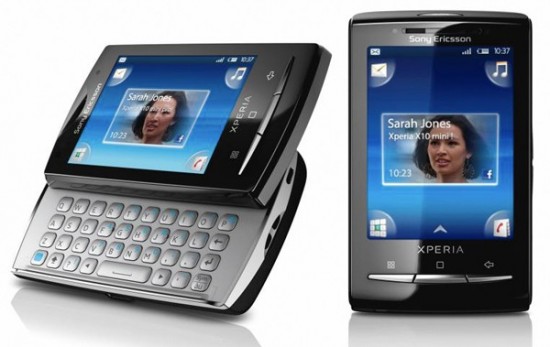
The Sony Ericsson XPERIA X10 Mini is a smartphone by Sony Ericsson in the Xperia series. It is the second Sony Ericsson smartphone to run the Android operating system[2] and also the smallest Android handset to date. The X10 Mini was first revealed on 14 February 2010.[1] Apart from the physical dimensions, the phone also differs feature-wise as compared to the X10. Text input is done via a virtual keypad and not a Qwerty keyboard like on the Xperia X10. It also comes with a T9 dictionary which makes it easy to use the keypad. Also, there are tabs for easily accessing symbols and numbers.
Specifications CPU -Qualcomm MSM7227 @600MHz OS -Android 2.1 Eclair (Previous, Android 1.6 Donut) Dimension -83 x 50 x 16 mm Weight -88 g Display -TFT capacitive touchscreen, 16M colors (65K effective) -240 x 320 pixels (QVGA) / 2.6" Memory -MicroSD™ support (up to 16 GB) -Phone memory 128MB Camera -5 Megapixel / LED Flash / Autofocus / Geo-tagging -Video record (VGA@30fps) / Video Light Connectivity -WLAN Wi-Fi 802.11b/g -3.5mm audio jack -Bluetooth 2.1 with A2DP -Micro USB connector -aGPS -Radio Stereo FM radio with RDS Network -GSM/GPRS/EDGE 850/900/1800/1900 -UMTS/HSPA 900/2100 -UMTS/HSPA 850/1900/2100 Battery Life (Standby time / Talk time) -2G network: 285 hours / 4 hours -3G network: 360 hours / 3 hours 30 min
Please pm me if u wan to add name for userlist
Guide:
MULTI TOUCH FOR X10 Mini
» Click to show Spoiler - click again to hide... «
It seems that X8 and X10mini use the same touchscreen controller, so this module may work with X10 mini, too!
I'm working with a kernel module to replace SE touchscreen driver to support dualtouch. However, as I found out, it will mostly not be supported by our hardware, because X8 has only 1 sensor and that sensor supports only 1 finger. I don't know whether we can have dual touch if we flash the screen firmware. I will have a look on that.
A temporary solution now is to make a one finger pinch zoom. The idea is that we make Android to think that the second finger is also pressed, by generating second finger events from the driver.
Because I need to modify hw_config.sh and each ROM has a different hw_config.sh, there will be a specific update.zip for each ROM.
Very Important : How to zoom Right now it supports only zoom-in, zoom-out, and rotate. I will improve it over time. For who says it's not working, please read this how-to very carefully: - To activate gesture : Put two fingers near each other, lift one finger up. - To zoom-in (make things bigger): Activate gesture near the center of the screen. Move your remaining finger away from the gesture position to zoom-in. - To zoom-out (make things smaller): Activate gesture at the corner or the side of the screen. Move your remaining finger toward the screen center to zoom-out. - To rotate : Activate gesture at the corner or the side of the screen. Move your remaining finger around the screen center to rotate.
Practice your 1 finger pinch zoom with MultiTouch Visualizer 2. Requirements - Rooted - xRecovery (for update.zip installation)
Instruction for manual installation: - Remount /system as rw - Copy the attached x8gesture.ko below to /system/lib/modules - Change hw_config.sh in your /system/etc, add this code at the beginning
- Push modified hw_config.sh back to your phone, reboot
Instruction for installation with update.zip: - Download update.zip according to your current ROM - Reboot and flash with xRecovery - Report bugsList of update.zip : I'm copying and pasting from multiupload. Sorry for the bad layout.
For other ROMs, please upload your /system/etc/hw_config.sh so I can customize your ROM's hw_config to load the kernel module
To whom says it doesn't work: please confirm that the driver was loaded with this command below in your adb shell, if there is some output, the driver is loaded. You should try to practice 1 finger pinch zoom first. Code: dmesg | grep X8Gesture
Notice: 1. This is NOT 2-finger pinch zoom, as big X10. 2. This is a Work In Progress. It may not behavior correctly. 3. Read the above "How to zoom" carefully before reporting that it is not working! 4. Who installed gesture module on 23-03-2011 manually : please remove the old synaptics_i2c_rmi4_dx.ko and replace with x8gesture.ko below. Update your hw_config.sh also. Sorry for the inconvenience.
Big thanks to andrej456 for the idea and code to remove SE touchscreen driver.
CREDIT TO:death213 at xda-developer.com
ROOT GUIDE FOR X10 MIni/Pro
» Click to show Spoiler - click again to hide... «
Atlast the root for x10 mini/mini pro is here ... now you dont have to use prerooted firmware ... just use this application and your device is rooted..
Tested On My X10 Mini Pro:
DOWNLOAD LINK:CLICK HERE..MUST LOGIN FIRST at xda-developer to download 1. Download modified "SuperOneClick". 2. Enable "USB Debug". 3. Connect phone to "PC" and select "Charge Phone". 4. Open "SuperOneClick" and select "Root". 5. Wait! 6. When it is done, reboot.
Now you have rooted Xperia X10 MINI/MINI PRO 2.1 without flashing.
Say thanks to: CLShortFuse - for making "SuperOneClick". sonty - for making exploit script
CREDIT TO:shivenjuneja at xda-developer.com.
CUSTOM RECOVERY FOR X10 Mini/Pro
» Click to show Spoiler - click again to hide... «
This is a custom recovery for Xperia X10 mini/pro based on Cyanogen's recovery source. Credits and special thanks to everyone involved in Cyanogenmod project!
Thanks to:
ruotal for framebuffer fix! zoz33 for his apk installer!
DaRk_dOg peetr_ Zocker Tko for alpha testing!
How? Press BACK button few times right after white SE logo appears.
Controls: Use VOLUME-UP and VOLUME-DOWN to browse, HOME to select, BACK to go back.
Features: ADB root shell Reboot Install update.zip from SD Card Factory reset (full wipe) Wipe cache partition Install custom zip Backup and Restore Partition tools Mount/unmount partitions Format partitions Mount as USB Storage Advanced options Wipe Dalvik cache Wipe battery stats Fix permissions for apps (FC fix)
Automatic Installation (recommended): To be announced
Manual Installation: - Download and unpack the recovery package - use Root Explorer to remount /system rw - copy the content of the package (3 files) into /system/bin folder
Notes: Please bear in mind that it's not the regular android recovery (we cannot replace recovery image without cracked bootloader). Instead, the boot hijacking is used to start recovery mode. You still need basic files on your /system partition to use this. NEVER use the "format /system" option (it's there only to check if anyone reads this long, boring note).
This recovery is NOT tested for compatibility with app2sd! Use at your own risk.
This recovery WILL be used to flash custom roms easily.
DO NOT reinstall busybox. Recovery depends on it's particular busybox version.
Requirements: 1. Phone must be rooted 2. Busybox from the market installed
» Click to show Spoiler - click again to hide... «
1.Teamloks =X10 Mini Pro 2.DoubleU =X10 Mini 3.kakit = X10 Mini Pro 4.skyer =X10 Mini 5.Velic =X10 Mini 6.AllItBatuPahat =X10 mini 7.kel_jink =X10 Mini 8.tenno = X10 mini Pro 9.shark7 =X10 Mini 10.glinter =X10 Mini Pro 11.xordMeztGeR =X10 Mini Pro 12.jounin =X10 Mini 13.ahsia80 =X10 Mini 14.mns =X10 Mini Pro 15.Art_535 =X10 Mini 16.Lingch =X10 Mini Pro 17.stephen_ksf =X10 Mini 18.nike89 =X10 Mini 19.jsc_tidus =X10 Mini Pro
I a owner of x10mini pro... in overall i think the device is neat and simple... only draw back was it doesnt behave like a phone... dialpad, call log, contact, sms all are too simple... worst the +6 problem on my phone...
i waiting eagerly on the new 2.1 update now... hope fully it can help fix some of the bug...
current app: adw launcher handcent sms superdial vingette unlocked beatiful widgets universal androot titanium backup pro(to kill default app) advance task killers ringdroid shootme(rooted) mp3 downloader album art grabber bluetooth file transfer appbrain +fast web installer
game(due to small screen, some game are not as good as big screen) air control numbuzz newsroom(rss reader) blogger droid forusquare idrop2 ninja kaka nes player+ mario 3 word mix lite traffic jam toss it talking app(cat and hippo)
This post has been edited by kakit: Nov 5 2010, 02:49 PM
Hi all, today just own a x10 mini. Need help, how to change input method and language to English with T9, i try many time as only got Chinese Pin Yin......
Double U , you update to 2.1 already? when can de ! i need to check online already ! wakakak! count me in [i using Xperia X10 mini]
Added on November 5, 2010, 5:48 pm
QUOTE(velic @ Nov 5 2010, 05:43 PM)
Hi all, today just own a x10 mini. Need help, how to change input method and language to English with T9, i try many time as only got Chinese Pin Yin......
HAHA! i face this problem too.. i solve it already! but now got 2.1 , after update might be solve.
Hi all, today just own a x10 mini. Need help, how to change input method and language to English with T9, i try many time as only got Chinese Pin Yin......
press and hold at the area to write your message a drop down box will appear, and then you can change your input method to english.
Yesterday tried update. PC Companion says got new update. But after update, still is 1.6. Anyone success?
yea, that was an update released awhile back (fixes the +60 problem, at least, mine was fixed) but that's not the 2.1 upgrade. The 2.1 upgrade hasn't arrived yet... (checked about 3-4 hours ago)
iirc, india is supposed to get theirs mid november. We might have to wait until then. If you dun want wait, you can root your x10mini to become nordic region to receive the update...
Just got my X10 mini pro yesterday. Went 2 buy Vivaz Pro, but ended up buying the X10 instead. Previously I used Omnia II, just got tired of WinMo I guess. So far I'm very impressed with the speed of this phone, even with 600 mhz proc, much faster compared to Omnia with its 1 Ghz proc. & it's much, much easier to use too !
imo, you dodge the symbian bullet there. I still don't like symbian that much.
Well, yeah, U can say tht. Although there r trade offs like a plain vanilla camera & media player, I found alternatives 2 the media players almost instantly.
BTW, I'm still running on 1.6, update to 2.1 still not available on SE's web. I suppose those running 2.1 here got it thru some other means ? Care 2 share ?


 Nov 5 2010, 02:23 PM, updated 15y ago




 Quote
Quote




 0.0178sec
 0.67
0.67
 6 queries
 GZIP Disabled