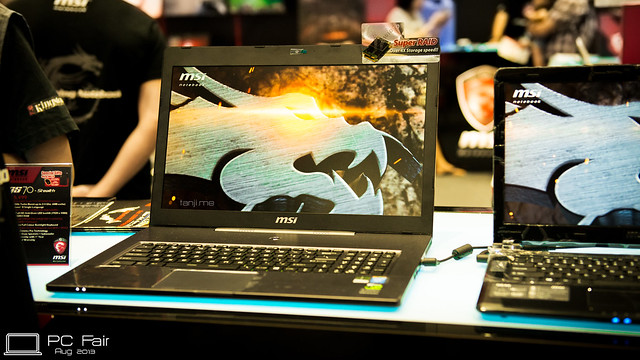
so, here's my own mini review of this mighty beast...
i WILL NOT be reviewing the performance of the hardware, u can find plenty of that in the Internet, so it's pointless for me to do one... i will be focusing on the features of the laptop instead...
also, i bought this laptop in Hong Kong, so some of the configuration may differ...
let's start off with the spec of the laptop:
MSI GT683DX
Intel Core i5-2450M (2.5GHz, 3MB L3 cache, 1C/2C Boost @ 3.1GHz/2.9GHz)
Intel HM67 chipset
Nvidia GeForce GTX 570M (336 unified stream processors, 192-bit GDDR5 1.5GB)
Nanya DDR3 1333MHz 4GB x2
Intel Centrino Wireless-N 130
Western Digital Scorpio Black 750GB
15.6" Full HD 1920x1080 monitor
USB 2.0 x2 + USB 3.0 x2
here's the unboxing pics if u missed them:
Part 1 Part 2and here's wat the geeks in us would want to see

[attachmentid=2625898] [attachmentid=2625902]
temps maybe a little on the low side since it's currently winter in Hong Kong and is exceptionally cold these few days... outside temp is approx. 9-11C...
so, let's get started...
Monitor - this is the first time i am using a 15.6" laptop with FHD resolution. i have been using 14" laptops all the while so it takes some time to get used to the extra estate space available. such resolution is great for multi-tasking, as u can split the windows into 2 halves and minimal scrolling... MSI opted for a non-glare monitor here, if a matte monitor on a business and the normal glaring monitor on a consumer laptop are the 2 extremes, this one is somewhere at the middle... this is a great design decision on MSI part, allowing the monitor to produce vibrant colour like other consumer monitor, but reducing the reflection at the same time

viewing angles are pretty good too
Video -monitor quality exceed my expectation as well, sure it's not as good compared to SAMOLED+ monitor on my phone (ok that's a bit too much

), running the "Samsung Ocean Life Demo" (x.264, 1080p, 40Mbps), i think the colour is pretty vibrant and seems to have pretty high contrast ratio as well... running the video is a piece of cake thanks to the CPU and CUDA, no stuttering at all while playing the 100+ sec video...
webcam pictures are clear as well, i am guessing that it is at least a 2MP sensor inside, significantly better than what I had been using in the past...
Audio - this is the area that literally blew me away

... i am no audiophile, but still have my own set of requirements when looking for earphones or speakers... for a long time i have never been a fan of laptop speakers, for obvious reasons... most laptop speakers produce hollow audio with virtually zero bass or treble... Lenovo Y510 (2.1 speaker setup) and harmon/kardon on Toshiba have proven otherwise, but was not sufficient to convince me... Dynaudio is truly splendid, sound is solid, for the first time i can actually hear bass on laptops and sends the vibration throughout the whole palm rest... granted the sound is still not top notch, but it's way above the average laptop speakers in the market...
this laptop is 7.1 channel ready as well, if u ve such a speaker system at ur disposal...
Keyboard and Touchpad - erm MSI, i hope u are actually reading this... the keyboard feels cheap to touch... the last time i ve such feeling on my fingers was on a Acer Aspire One netbook, but this is a flag ship laptop we re talking abt here

... feedback is alright with little to no keyboard flex, but the choice of the material is not good either, cheap plastic on alphabet keys on glossy plastic is gonna be troublesome to clean... the lack of Caps Lock, Num Lock and Scroll Lock LED makes me scratching my head as well

... they have released a "Lock Indicator" utility on the download page to compensate this, which pops out the indicator on the bottom right hand corner whenever one of the lock button is pressed... this is probably the only way to implement with the lack of LED...
touchpad has pretty good feedback, and the stiffness of the button is juz nice... not much comment here since i ve my own mouse to use...
the capacitative(?) buttons on top of the keyboard are sensitive to touch... everything works as they should be once u ve installed "System control" utility...
Chasis -Majority of the chasis is made with glossy plastic, so they are going to be fingerprint magnets (as usual), except for the outer rim of the monitor and the monitor hinge area... overall construction is pretty sturdy, which is expected from a flaghship model...
the orange LED... oh yeah, this is 1 of the special features of GT600 series and me gusta...
u can make it on, blink with the music, or on/off gradually... a nice touch to the all black/dark looking chasis... however, the 3 pt orange LED around the mouse pad do not blink together with the others, a logical decision or else u will ve them flashing right under ur nose... rather it's a mouspad on/off indicator, lighting up when the pad is deactivated, and vice versa... juz my own opinion but i find it a little strange this way

...
i was not able to open up the back panel thanks to the god damn warranty sticker on one of the screws.. afaik the Malaysian sets do not have this sticker, it's probably the local distributor who put it on... but i suppose the inside is the same as the previous iteration of the GT600 series... so u can refer to the dis-assembling pics by viruz019
here (click me)...
@viruz019
» Click to show Spoiler - click again to hide... «
those pointed thingys here

this is a common design for heatsinks... heat tends to gather at places with smaller surface area, so these thingy is to concentrate heat at them, and let the air flow inside the laptop to bring the heat away
u'll need compressed air to blow the dust away...
believe it or not, this laptop has 1 less USB port than my previous 14" Asus N81Vp... but 4 ports are sufficient anyway... compared to the old laptop, i am missing a 4-pin IEEE1394/Firewire port and a dial-up modem as well, but who use them anyway? a suggestion to MSI though, swap the right USB port with the optical drive bay, that would be the perfect position for us to plug in a mouse

... it's not really a problem to me since i am using a Logitech G700 wireless mouse... but for those using a wired mouse, they either plug into this port and have the mouse wire resting under the wrist, or go around the back and plug to the port on the left, but dangling with all the other wires and damage the mouse wire in the the process, so it will be an annoyance instead... or else, put 1 more USB port at the back, or turn the eSATA port into a eSATA/USB combo port... other than that, i think all the other ports are positioned nicely...
now to the biggest disappointment of the whole laptop, the wireless adapter... MSI, y u no use better one?

Intel Centrino Wireless-N 130 is a single band (1T1R) 802.11n adapter with no WiFi Display (WiDi) capability... the max throughput is 150Mbps only... honestly, i was expecting sth better than this... if u re looking at trimming the cost, Atheros and Broadcom have many WiFi adapters to offer as well at a cheaper price than Intel... even the older GT660 has a better adapter than me...
Power Supply - yeah, this is worth mentioning... if u did look at the PSU carefully in the unboxing pic, the power output measures a whopping 180W! that's double of what i ve been using in the past... but that's appropriate when GTX 570M has a rated TDP of approx. 100W...
so that's it peeps... here's all i can say abt the beast... now back to games... XD



 Mar 20 2011, 12:14 PM


 haha.
haha.


 0.0565sec
 0.46
0.46
 7 queries
 GZIP Disabled
 Quote
Quote