Welcome Guest ( Log In | Register )

Bump Topic Topic Closed RSS Feed
245 Pages « < 238 239 240 241 242 > » Bottom

Outline · [ Standard ] · Linear+

 Samsung LED TV Thread, owners pls share

views
     
hlchoo
post Jan 12 2018, 08:11 AM

New Member
*
Junior Member
33 posts

Joined: Oct 2017
QUOTE(jasonws @ Jan 11 2018, 11:29 AM)
Hi Sifus,
I am trying the hypptv everywhere on my Samsung 65MU6100 (2017 model) TV. I can login and navigate the channels. But, I can't watch the Channel after pressed "Watch". The blank screen is there, and after about 30 sec, it prompted "Unable to connect to hypptv everywhere".

I am using WIFI to connect.

Anyone here faced the same issue, and managed to solve?
*
Just found MU6100 TV has a new firmware 1160.4. After installing, update the hypptv app. Seems to be working for me now. Tried for a while so far playing OK. If the update not available from TV, download from Samsung website.
rx330
post Jan 12 2018, 02:54 PM

10k Club
********
All Stars
11,808 posts

Joined: Jun 2006
it seems the samsung smart view app crash everytime i turn off my TV
need to access to pc to start it again and link it to tv

not very convenient ler like tat
#Victor
post Jan 17 2018, 04:21 PM

Look at all my stars!!
*******
Senior Member
4,672 posts

Joined: Nov 2016
QUOTE(jasonws @ Jan 11 2018, 11:29 AM)
Hi Sifus,
I am trying the hypptv everywhere on my Samsung 65MU6100 (2017 model) TV. I can login and navigate the channels. But, I can't watch the Channel after pressed "Watch". The blank screen is there, and after about 30 sec, it prompted "Unable to connect to hypptv everywhere".

I am using WIFI to connect.

Anyone here faced the same issue, and managed to solve?
*
QUOTE(hlchoo @ Jan 11 2018, 04:22 PM)
Same issue here. Contacted TM they say currently not supported. It works on and off. I complaint already maybe you can do the same. Also complain to Samsung.
*
Tried the unifi playTV with Samsung TV, no problem watching the channel via WiFi after login with valid unifi account.
There is an issue where have to login every time the TV power off or idle after some time or use other input source and come back to the app.
» Click to show Spoiler - click again to hide... «


Moogle Stiltzkin
post Jan 24 2018, 06:43 PM

Look at all my stars!!
*******
Senior Member
4,456 posts

Joined: Jan 2003
Samsung MU6300 is this good? how come the one i saw is curved, but on review site is flat?
http://www.samsung.com/my/tvs/uhdtv-mu6300/UA49MU6300KXXM/


https://www.rtings.com/tv/reviews/samsung/mu6300

hmm.gif
Haruji Sora
post Jan 25 2018, 11:56 AM

春治のばか?
******
Senior Member
1,704 posts

Joined: Jan 2003
From: Kuala Lumpur


QUOTE(Moogle Stiltzkin @ Jan 24 2018, 06:43 PM)
Samsung MU6300 is this good? how come the one i saw is curved, but on review site is flat?
http://www.samsung.com/my/tvs/uhdtv-mu6300/UA49MU6300KXXM/
https://www.rtings.com/tv/reviews/samsung/mu6300

hmm.gif
*
Because US and Asia TV Model is different.

I believe UK/US/Korea is sharing similar code (except for the back part) while Asia, parts of Middle East, and I guess South America(?) is sharing the same tv model code.

Anyways MU6300 is a decent entry level TV.

Not bad for the price (if you can get discounts)

This post has been edited by Haruji Sora: Jan 25 2018, 11:58 AM
utusan@gmail
post Jan 25 2018, 04:41 PM

Getting Started
**
Junior Member
185 posts

Joined: Aug 2009
QUOTE(Moogle Stiltzkin @ Jan 24 2018, 06:43 PM)
Samsung MU6300 is this good? how come the one i saw is curved, but on review site is flat?
http://www.samsung.com/my/tvs/uhdtv-mu6300/UA49MU6300KXXM/

https://www.rtings.com/tv/reviews/samsung/mu6300

hmm.gif
*
Saw at Giant JB UA49MU6303 selling 2299...
and it curved...
IvanWong1989
post Feb 2 2018, 05:54 PM

!StringTheory!
*******
Senior Member
4,297 posts

Joined: Jul 2009


Hello everyone. Just got myself a mu6100.
Is it direct kit or edge lit?
I kept finding conflicting statements all over the net.

Also. Do you guys have backlight bleeding problems on this model ? And if so. How serious before it's worth to be claimed?
voncrane
post Feb 2 2018, 10:34 PM

Noir et fier!
*******
Senior Member
7,118 posts

Joined: Oct 2011
From: Wakanda


QUOTE(IvanWong1989 @ Feb 2 2018, 05:54 PM)
Hello everyone. Just got myself a mu6100.
Is it direct kit or edge lit?
I kept finding conflicting statements all over the net.

Also. Do you guys have backlight bleeding problems on this model ? And if so. How serious before it's worth to be claimed?
*
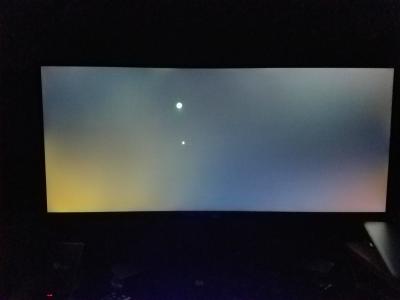
Most likely edge-lit.. Full-array/Direct backlighting is more expensive and are used in higher models. Backlight bleeding is a well-known LCD problem and is expected to some degree. Unless you post a pic of yours, we can't know how bad it is... If it looks like below then it's pretty bad and worth replacing.

Attached Image
Attached Image

This post has been edited by voncrane: Feb 2 2018, 10:35 PM
IvanWong1989
post Feb 2 2018, 10:47 PM

!StringTheory!
*******
Senior Member
4,297 posts

Joined: Jul 2009


QUOTE(voncrane @ Feb 2 2018, 10:34 PM)
Most likely edge-lit.. Full-array/Direct backlighting is more expensive and are used in higher models. Backlight bleeding is a well-known LCD problem and is expected to some degree. Unless you post a pic of yours, we can't know how bad it is... If it looks like below then it's pretty bad and worth replacing.

Attached Image
Attached Image
*
Oh. It's ntg that bad. It so minor it dissapointed unless I truly focus.

Hmm. Then relatively mine is ok. Lol


Ok. I thought it was direct lit. Lol.

Haruji Sora
post Feb 5 2018, 11:02 AM

春治のばか?
******
Senior Member
1,704 posts

Joined: Jan 2003
From: Kuala Lumpur


Even the High end Q7 Samsung (QLED) is Edge Lit tongue.gif


klesk85
post Feb 5 2018, 12:45 PM

New Member
*
Junior Member
19 posts

Joined: Dec 2008
From: Kuala Lumpur


Hi Sifu here, just wanna know if MU7000 at price rm4999 after discount at senheng is cheap? Is it a lot of difference from MU6300 in terms of gaming performance difference & movie? Looking for an upgrade for my ps4 pro, thanks

This post has been edited by klesk85: Feb 5 2018, 12:46 PM
Haruji Sora
post Feb 5 2018, 01:12 PM

春治のばか?
******
Senior Member
1,704 posts

Joined: Jan 2003
From: Kuala Lumpur


QUOTE(klesk85 @ Feb 5 2018, 12:45 PM)
Hi Sifu here, just wanna know if MU7000 at price rm4999 after discount at senheng is cheap? Is it a lot of difference from MU6300 in terms of gaming performance difference & movie? Looking for an upgrade for my ps4 pro, thanks
*
That's quite a fair price.

MU7000 is a step up of MU6300 (better HDR, better Wide Color Gamur, means more colors, better overall brightness)

In terms of 2017 TV sets from Samsung, I believe Q7F is better (though more expensive), MU7000/9000 slots roughly in the middle, while MU6xxx is Entry Level

You probably can find MU7000 55 inch for around RM4.5k from other smaller shops.

I'm not sure what's 55 inch Q7F price is nowadays after price cuts, perhaps you can look out for it as well.

And the good news is the 2017 sets firmware should have already solved the Game Mode HDR Profile switching.

Meanwhile 2016 set are still stuck in limbo in regards to firmware updates.
IvanWong1989
post Feb 5 2018, 01:24 PM

!StringTheory!
*******
Senior Member
4,297 posts

Joined: Jul 2009


QUOTE(voncrane @ Feb 2 2018, 10:34 PM)
Most likely edge-lit.. Full-array/Direct backlighting is more expensive and are used in higher models. Backlight bleeding is a well-known LCD problem and is expected to some degree. Unless you post a pic of yours, we can't know how bad it is... If it looks like below then it's pretty bad and worth replacing.

Attached Image
Attached Image
*
Hi..

I have a question. The tv supports frame dimming. Hence when I want to put a black screen to test for bleed, it turns down the backlight so much I can't notice any.

How to disable frame dimming to test ?


Also. Is it ok to directly call Samsung service center to arrange for service\panel swap if after I post the pic and your suggestion is to change? The TV has been used for 2 3 weeks
I have the shops receipt, unfilled warranty card. But online is activated I think(received SMS)
voncrane
post Feb 5 2018, 01:40 PM

Noir et fier!
*******
Senior Member
7,118 posts

Joined: Oct 2011
From: Wakanda


QUOTE(IvanWong1989 @ Feb 5 2018, 01:24 PM)
Hi..

I have a question. The tv supports frame dimming. Hence when I want to put a black screen to test for bleed, it turns down the backlight so much I can't notice any.

How to disable frame dimming to test ?
Also. Is it ok to directly call Samsung service center to arrange for service\panel swap if after I post the pic and your suggestion is to change? The TV has been used for 2 3 weeks
I have the shops receipt, unfilled warranty card. But online is activated I think(received SMS)
*
My advice is to not go looking for issues cuz if you are like me.. Once you find a defect, it'll forever be in your face and then you can't enjoy your purchase. smile.gif

However, if still want to go ahead.. Enter the settings and play around. Focus more on modifying the Movie mode to suit your tastes. For my setup, even during the day time, I have thick curtains drawn to prevent glare from the windows. So display is setup for a darker environment. You can do the same and then try to find a balance for daylight and nighttime viewing. Check your Eco Sensor and Energy Savings settings too. You can crank up the brightness levels to max.

Better take photos or a video and share here. FYI, Samsung won't simply swap panels unless there's a distinct issue that can't be classified as normal. But if they decide it's a defect, warranty claim is a breeze.
IvanWong1989
post Feb 5 2018, 01:57 PM

!StringTheory!
*******
Senior Member
4,297 posts

Joined: Jul 2009


QUOTE(voncrane @ Feb 5 2018, 01:40 PM)
My advice is to not go looking for issues cuz if you are like me.. Once you find a defect, it'll forever be in your face and then you can't enjoy your purchase. smile.gif

However, if still want to go ahead.. Enter the settings and play around. Focus more on modifying the Movie mode to suit your tastes. For my setup, even during the day time, I have thick curtains drawn to prevent glare from the windows. So display is setup for a darker environment. You can do the same and then try to find a balance for daylight and nighttime viewing. Check your Eco Sensor and Energy Savings settings too. You can crank up the brightness levels to max.

Better take photos or a video and share here. FYI, Samsung won't simply swap panels unless there's a distinct issue that can't be classified as normal. But if they decide it's a defect, warranty claim is a breeze.
*
What do you mean by brightness?
Backlight ?
Or brightness ?

I put my backlight to around 70% to hide the bottom edge bleeds. It's slight. Not noticible if you don't go looking for it.
But I know it's there lol.
Ambient light mode on, minimum screen brightness at 20% ish.

I'm now playing in standard mode. Movie mode is better ?

voncrane
post Feb 5 2018, 02:05 PM

Noir et fier!
*******
Senior Member
7,118 posts

Joined: Oct 2011
From: Wakanda


QUOTE(IvanWong1989 @ Feb 5 2018, 01:57 PM)
What do you mean by brightness?
Backlight ?
Or brightness ?

I put my backlight to around 70% to hide the bottom edge bleeds. It's slight. Not noticible if you don't go looking for it.
But I know it's there lol.
Ambient light mode on, minimum screen brightness at 20% ish.

I'm now playing in standard mode. Movie mode is better ?
*
Yes, Backlight.... Movie mode is recommended as a base to start from, cuz it offers a closer reproduction to what the content creator wanted you to see on the screen. But its all a matter of personal preference.. Which is why the different modes are available to choose from in the first place. Just like the auto-motion handling thingys, some like me absolutely hate it and switch it off others love it.. So enabled or disabled is really up to you. Summarily, tweak to the best you can enjoy depending on types of media you frequently watch. Then leave as is.. If still not satisfied, you either need a better TV or better content sources. laugh.gif
IvanWong1989
post Feb 5 2018, 03:11 PM

!StringTheory!
*******
Senior Member
4,297 posts

Joined: Jul 2009


QUOTE(voncrane @ Feb 5 2018, 02:05 PM)
Yes, Backlight.... Movie mode is recommended as a base to start from, cuz it offers a closer reproduction to what the content creator wanted you to see on the screen. But its all a matter of personal preference.. Which is why the different modes are available to choose from in the first place. Just like the auto-motion handling thingys, some like me absolutely hate it and switch it off others love it.. So enabled or disabled is really up to you. Summarily, tweak to the best you can enjoy depending on types of media you frequently watch. Then leave as is.. If still not satisfied, you either need a better TV or better content sources.  laugh.gif
*
Or an OLED... No more bleed problems. Lol.

But then there comes burn in.
tohff7
post Feb 5 2018, 03:28 PM

FF7 GOAT
******
Senior Member
1,581 posts

Joined: Mar 2008


QUOTE(Haruji Sora @ Feb 5 2018, 01:12 PM)
That's quite a fair price.

MU7000 is a step up of MU6300 (better HDR, better Wide Color Gamur, means more colors, better overall brightness)

In terms of 2017 TV sets from Samsung, I believe Q7F is better (though more expensive), MU7000/9000 slots roughly in the middle, while MU6xxx is Entry Level

You probably can find MU7000 55 inch for around RM4.5k from other smaller shops.

I'm not sure what's 55 inch Q7F price is nowadays after price cuts, perhaps you can look out for it as well.

And the good news is the 2017 sets firmware should have already solved the Game Mode HDR Profile switching.

Meanwhile 2016 set are still stuck in limbo in regards to firmware updates.
*
well, 2016 KS7000 PQ is much better and value-for-money wise.

Samsung really try to squeeze money with 2017 model
klesk85
post Feb 5 2018, 03:40 PM

New Member
*
Junior Member
19 posts

Joined: Dec 2008
From: Kuala Lumpur


QUOTE(Haruji Sora @ Feb 5 2018, 01:12 PM)
That's quite a fair price.

MU7000 is a step up of MU6300 (better HDR, better Wide Color Gamur, means more colors, better overall brightness)

In terms of 2017 TV sets from Samsung, I believe Q7F is better (though more expensive), MU7000/9000 slots roughly in the middle, while MU6xxx is Entry Level

You probably can find MU7000 55 inch for around RM4.5k from other smaller shops.

I'm not sure what's 55 inch Q7F price is nowadays after price cuts, perhaps you can look out for it as well.

And the good news is the 2017 sets firmware should have already solved the Game Mode HDR Profile switching.

Meanwhile 2016 set are still stuck in limbo in regards to firmware updates.
*
Thanks bro biggrin.gif

Cant afford the QLED tv, even 5k is my max budget liao...by the way, does any of u guys feel eye strained after watching on tv with high nits value like 1000 nits? I researched that MU7000 has got about 600 nits only whereas MU6300 only 300nits , wonder is it better or worst to have such high brightness tv?

This post has been edited by klesk85: Feb 5 2018, 05:10 PM
tohff7
post Feb 5 2018, 05:49 PM

FF7 GOAT
******
Senior Member
1,581 posts

Joined: Mar 2008


QUOTE(klesk85 @ Feb 5 2018, 03:40 PM)
Thanks bro biggrin.gif

Cant afford the QLED tv, even 5k is my max budget liao...by the way, does any of u guys feel eye strained after watching on tv with high nits value like 1000 nits? I researched that MU7000 has got about 600 nits only whereas MU6300 only 300nits , wonder is it better or worst to have such high brightness tv?
*
It's actually refers to peak brightness. Doesn't mean it output at that level constantly.

For LCD panel, you need high peak brightness (>1000nits) and wide color gamut to achieve True HDR

This post has been edited by tohff7: Feb 5 2018, 05:49 PM

245 Pages « < 238 239 240 241 242 > » Top
Topic ClosedOptions
 

Change to:
| Lo-Fi Version
0.1088sec    0.38    6 queries    GZIP Disabled
Time is now: 2nd December 2025 - 05:47 PM