Outline ·
[ Standard ] ·
Linear+
Samsung LED TV Thread, owners pls share
|
drunkonpiss
|
 Nov 16 2016, 10:26 PM Nov 16 2016, 10:26 PM
|
Getting Started


|
QUOTE(Xnet @ Nov 16 2016, 11:14 PM) Do you know where to get the wall mount screws? I already have the brackets for the wall mount Did it come free with the TV? Not really sure to be honest but regular concrete screws could work. |
|
|
|
|
|
drunkonpiss
|
Nov 24 2016, 09:18 PM
|
Getting Started
|
QUOTE(888kb24 @ Nov 24 2016, 09:07 PM) if my budget only allows for either SUHD flat or UHD curve, which one would you guys pick? SUHD flat. I believe these are the TVs with Quantum dot, HDR1000 support, 120hz refresh rate. The Curve feature is only for aesthetics. |
|
|
|
|
|
drunkonpiss
|
Nov 25 2016, 09:45 PM
|
Getting Started
|
QUOTE(retroRT @ Nov 25 2016, 10:34 PM) hi guys, bought the samsung ua40ku6300 to use with my pc as monitor..i have gtx 1060 and i believe should plug and play right? but im connecting using hdmi cables and the tv got no signal error..but i think my hdmi cable is a few years old.. do i need a newer better hdmi cable? the old 1.4 version wont support 4k 60hz tv right? It does support 4k 60hz bro even on my old HDMI cable. out of the box, resolution would say 3840 x 2160 @30hz. Connected my PC to HDMI 1(It only works on HDMI 1) and enabled HDMI UHD on the settings and it shows 60hz. Try it out, sometimes the cable is just loose. try to wiggle it a bit. It happened to me before. |
|
|
|
|
|
drunkonpiss
|
Nov 26 2016, 12:37 AM
|
Getting Started
|
QUOTE(retroRT @ Nov 25 2016, 10:53 PM) wiggled it many times until sked loose..  still not working..i tried using another hdmi cable, old one also (bought 2013) still not working and changed to hdmi 2 and 3 also the same.. Hmmm. Do you have any device that use HDMI? better try it out or did you even connect it to your cards HDMI? You might insert it in the on-board HDMI  |
|
|
|
|
|
drunkonpiss
|
Nov 29 2016, 07:32 PM
|
Getting Started
|
Samsung thread suddenly went active  Congrats to those who purchased their new TV |
|
|
|
|
|
drunkonpiss
|
Nov 30 2016, 11:37 PM
|
Getting Started
|
Curve is just plain aesthetics. Most reviews say that better opt for a flat one as it doesn't really improve your viewing experience.
|
|
|
|
|
|
drunkonpiss
|
Dec 1 2016, 11:14 PM
|
Getting Started
|
QUOTE(OPT @ Dec 1 2016, 11:20 PM) Just had a thought... Go hotels and mamaks and whatnot...all TV flat screen. Big size/small size...A curved would be something different, no? hahaha! well you could be the first if you plan to put curve TV in your mamak shop |
|
|
|
|
|
drunkonpiss
|
Feb 14 2017, 04:18 PM
|
Getting Started
|
QUOTE(rx330 @ Feb 14 2017, 03:19 PM) no offense taken im trying those video where netflix shows its 4k im using this on the KU6000 no UHD to try on though Maybe your internet's bandwith can't run 4k? 4k is the real deal. If you're coming from a 1080p TV, you will clearly see the upgrade to 4k. Check 4k videos on youtube and if you have a 1080p TV run the same content and see the difference. |
|
|
|
|
|
drunkonpiss
|
Apr 10 2017, 06:28 PM
|
Getting Started
|
Online shops are way cheaper cause of the fact that they don't pay for overhead for staff and space in the mall. I usually buy my stuff either from Lazada or 11street. Never been scammed yet. These are reputable online shops that you shouldn't worry about.
|
|
|
|
|
|
drunkonpiss
|
May 31 2017, 06:02 PM
|
Getting Started
|
anyone have tried to claim Samsung Warranty? How should I proceed?
|
|
|
|
|
|
drunkonpiss
|
May 31 2017, 06:42 PM
|
Getting Started
|
QUOTE(Haruji Sora @ May 31 2017, 07:04 PM) 1 800 88 9999 Call. iinm 32 inch and above TV is on site support. Unless you're on extended support by another company (Harvey, Sengheng, whatever). Those you need to call the respective shop. Great info! thanks man! I actually called the shop but would like to get in touch with Samsung directly just so I know that they are aware of my concern. |
|
|
|
|
|
drunkonpiss
|
Jun 6 2017, 10:37 PM
|
Getting Started
|
Hey guys,
Just wanted to share with your my experience with Samsung Customer Service for the issue I had with my KU6000. I had this flickering issue with my TV. Thought i'm gonna have a hard time to claim the warranty but it was a breeze. I kinda neglected the issue as it was not a deal breaker for me. Called TB where I bought my TV on Wednesday and I was informed someone from Samsung will call me soon. Expected to be contacted about a week but I got a call on Friday saying a technician will check my issue. Technician came by and looked at my issue. It's a legit issue and most 4k TV would encounter it as per him. He wasn't surprised and immediately he concluded to replace my panel. Thought the Panel replacement would take a week or so but the part came on Monday! So the Technician removed the old panel and replaced it with the new one just like that. I was told that parts were made in Vietnam and it's a brand new one. Noticed a difference in terms of overall picture quality. So far, I'm happy with their service albeit the issue I encountered.
|
|
|
|
|
|
drunkonpiss
|
Jun 7 2017, 06:03 PM
|
Getting Started
|
QUOTE(add_darkswd @ Jun 7 2017, 12:31 AM) Thanks for the info @drunkonpiss. Looked like you got a great experience with Samsung aftersale service. My KS7000 currently have two point of lightbleeding issue on the bottom panel of the tv but nothing that is too disturbing when watching the tv at a normal viewing position. If it get much worse in the future I'll be sure to give Samsung a call for a checkup. I really lowered my expectations and presumed a subpar service but I was impressed even when I sent my issue via their website, I received an email and a call about my issue the next day.  If you think that it is tolerable, just leave it as it is but if you're just curious if they would replace your panel since it is still under warranty, you may do so too at your convenience. Try it out just for the sake of experiencing their service hehe |
|
|
|
|
|
drunkonpiss
|
Jun 7 2017, 06:08 PM
|
Getting Started
|
QUOTE(ZzZzz... @ Jun 7 2017, 12:24 AM) legit issue of most 4k? serious? I asked the technician if the issue is common for KU models but he told me that it happens to all 4k TVs regardless of the model. He told me that he was working with Samsung since he was 17 until today. he's in his mid 40s  Can't doubt about that haha btw, my issue is a black bar intermittently flickering regardless of what i'm doing(PS4, Netflix, Youtube, Kodi, etc..) This post has been edited by drunkonpiss: Jun 7 2017, 06:09 PM Attached thumbnail(s)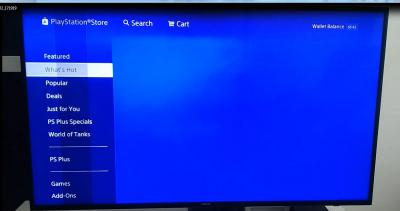
|
|
|
|
|
|
drunkonpiss
|
Jun 7 2017, 11:52 PM
|
Getting Started
|
The black bar that I have flickers for about half a second. Sometimes it does, sometimes it's normal. It really took me a while to observe and gave my old panel a few more months but the issue became frequent so had to call Samsung for replacement. Thought I have to fill up the warranty card and fill up a lot of stuff but the process was fast and quick when the one who raised the concern is the store itself. Better call the shop where you bought the TV from and let them talk to Samsung.
|
|
|
|
|
|
drunkonpiss
|
Jun 9 2017, 05:38 PM
|
Getting Started
|
QUOTE(cyberkoh88 @ Jun 9 2017, 12:09 PM) KU6000 motion movement not so smooth (not so suitable to watch live sports or fast action movie), tested on my sister's house, after checking the spec, only 60Hz. Check KS7000, 120Hz, so anyone using KS7000 can comment on this matter? watching live sport of fast action movie smooth on KS7000? if yes, i think i rather buy KS7000 rather than KU6000 even though the pricing double. If you have the money, by all means, get the KS7000. You can see obvious judders especially on fast moving scenes on KU6000. There is an option to manually reduce the judder but it is still existent. |
|
|
|
|
|
drunkonpiss
|
Jun 14 2017, 05:59 PM
|
Getting Started
|
QUOTE(tankiasu @ Jun 14 2017, 06:00 AM) I regularly watch live football on Astro with my KS7500. Have to say I am very satisfied with the PQ even though there is still minimal judder and ghosting appearing Congrats on your purchase! KS is far better than KU series.  It has Quantum dot panel, wide color gamut, better HDR, etc. so you'll be a couch potato for a while |
|
|
|
|
|
drunkonpiss
|
Jun 17 2017, 06:29 AM
|
Getting Started
|
DAMN! upgraded my software to 1180. Tried to play PS4 Pro and now it won't trigger the HDR notification. Tried to downgrade but the OS is only able to search for software that are higher or latest via usb. CRAP!
|
|
|
|
|
|
drunkonpiss
|
Jun 17 2017, 08:47 AM
|
Getting Started
|
Using a KU6000. Normally, I would get that notification that says HDR video is playing. After the update, it doesn't kick in anymore  only way I can think of is downgrade but it couldn't install lower firmwares. It only searches for the latest one |
|
|
|
|



 Quote
Quote
 0.0927sec
 0.27
0.27
 7 queries
 GZIP Disabled