

Hi guys, I want to record footage from tv to be played back (edited) later on my desktop. What particular equipment will I need? How much would it cost? Where can I find such equipment?
TV recording solutions, What do I need?
TV recording solutions, What do I need?
|
|
 Oct 27 2010, 11:42 AM, updated 16y ago Oct 27 2010, 11:42 AM, updated 16y ago
Show posts by this member only | Post
#1
|
 
Junior Member
189 posts Joined: Nov 2009 From: Bandar Sunway  
|
Hi guys, I want to record footage from tv to be played back (edited) later on my desktop. What particular equipment will I need? How much would it cost? Where can I find such equipment?
|
|
|
|
|
|
Oct 27 2010, 01:29 PM
Show posts by this member only | Post
#2
|

Senior Member
4,403 posts Joined: Jan 2007 From: Johor Bahru
|
Maybe AC Ryan Playon! DVR HD can help..
Do a google search " AC Ryan Playon! DVR HD lowyat " Ask the seller the features to record TV programs. |
|
|
Oct 27 2010, 06:08 PM
Show posts by this member only | Post
#3
|
|
Junior Member
189 posts Joined: Nov 2009 From: Bandar Sunway
|
Woah! Canggihnye... Worth looking into, but got any cheaper alternatives?
|
|
|
Oct 27 2010, 06:12 PM
Show posts by this member only | Post
#4
|

Senior Member
1,543 posts Joined: Jan 2009 From: Somewhere in Damansara
|
QUOTE(azbro @ Oct 27 2010, 01:29 PM) Maybe AC Ryan Playon! DVR HD can help.. Can it record HD program from astro byond?Do a google search " AC Ryan Playon! DVR HD lowyat " Ask the seller the features to record TV programs.  |
|
|
Oct 27 2010, 06:24 PM
Show posts by this member only | Post
#5
|

Senior Member
2,234 posts Joined: Feb 2007
|
this one will cost you RM380, record SD resolution only
http://forum.lowyat.net/index.php?showtopic=1461223&hl=  |
|
|
Oct 27 2010, 06:38 PM
Show posts by this member only | Post
#6
|
|
Senior Member
4,403 posts Joined: Jan 2007 From: Johor Bahru
|
QUOTE(minimize @ Oct 27 2010, 06:12 PM) Can it record HD program from astro byond? Not sure bro,not using one...I think only SD cause the rear have only Yellow RCA video in. This post has been edited by azbro: Oct 27 2010, 06:41 PM |
|
|
|
|
|
Oct 27 2010, 06:47 PM
Show posts by this member only | Post
#7
|
|
Senior Member
1,543 posts Joined: Jan 2009 From: Somewhere in Damansara
|
QUOTE(azbro @ Oct 27 2010, 06:38 PM) Not sure bro,not using one...I think only SD cause the rear have only Yellow RCA video in. Yeah.. for sure it only support SD.Tivo is great HD DVR and all recording file can be transfer to PC. But it only compatible at US.  |
|
|
Oct 28 2010, 02:41 AM
Show posts by this member only | Post
#8
|

Junior Member
50 posts Joined: Aug 2010
|
got any recording software for htpc?
that is user frendly..thx  |
|
|
Oct 28 2010, 06:45 AM
Show posts by this member only | Post
#9
|
Senior Member
608 posts Joined: Aug 2008
|
Pinnacle - a USB video capture device come with a video editing software.
According to Pinnacle website, this one can capture HD video. 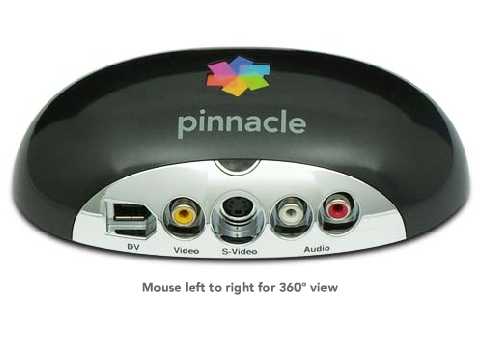 Pinnacle home page link. This post has been edited by tanhks: Oct 28 2010, 06:48 AM |
|
|
Oct 28 2010, 09:07 AM
|
|
Senior Member
4,403 posts Joined: Jan 2007 From: Johor Bahru
|
QUOTE(tanhks @ Oct 28 2010, 06:45 AM) Pinnacle - a USB video capture device come with a video editing software. Pinnacle is a good brand. Good for SDAccording to Pinnacle website, this one can capture HD video. Pinnacle home page link. I think the HD recording features are limited to the DV connection..meaning Digital Video cameras. If from Astro beyond, need to get a HDMI converter box to DV...I dun think can get that cheap and not available locally. Closes can get is the Hauppauge HD-PVR, but that also accepts only component video (YCrCb or YPrPb) I heard HDMI features also include an anti copy protection feature while being decoded by the processors. For HDMI recording probably can try something like Blackmagic Design Intensity Pro PCI-E based card. This post has been edited by azbro: Oct 28 2010, 09:08 AM |
|
|
Oct 28 2010, 12:18 PM
|
|
Junior Member
189 posts Joined: Nov 2009 From: Bandar Sunway
|
QUOTE(neb @ Oct 27 2010, 06:24 PM) this one will cost you RM380, record SD resolution only Looks good, and I don't need HD recording capability, SD will do just fine.http://forum.lowyat.net/index.php?showtopic=1461223&hl= |
|
|
Oct 28 2010, 01:52 PM
|

Senior Member
623 posts Joined: Jan 2003 From: Kuala Lumpur 
|
QUOTE(otacon84 @ Oct 28 2010, 02:41 AM) got any recording software for htpc? Windows Media Center have a scheduler and recording functions... you will need a Video input card like Hauppauge or similar ..that is user frendly..thx If you get the Media Center edition, it comes with an IR Blaster to change the channel automatically... I've written some articles on my blog below.. |
|
|
Oct 29 2010, 03:21 AM
|
|
Senior Member
608 posts Joined: Aug 2008
|
QUOTE(azbro @ Oct 28 2010, 09:07 AM) Pinnacle is a good brand. Good for SD Blu-ray player also has RCA-video connector, so i guess the RCA-connector(yellow color) can handle HD also.I think the HD recording features are limited to the DV connection..meaning Digital Video cameras. If from Astro beyond, need to get a HDMI converter box to DV...I dun think can get that cheap and not available locally. Closes can get is the Hauppauge HD-PVR, but that also accepts only component video (YCrCb or YPrPb) I heard HDMI features also include an anti copy protection feature while being decoded by the processors. For HDMI recording probably can try something like Blackmagic Design Intensity Pro PCI-E based card. |
|
|
Oct 29 2010, 03:16 PM
|
|
Senior Member
1,543 posts Joined: Jan 2009 From: Somewhere in Damansara
|
QUOTE(~X.T.~ @ Oct 28 2010, 12:18 PM) Looks good, and I don't need HD recording capability, SD will do just fine. If your requirement just for SD recording then a lot of product already in the market right now. |
|
|
Oct 30 2010, 03:08 PM
|
|
Junior Member
50 posts Joined: Aug 2010
|
QUOTE(stan001 @ Oct 28 2010, 01:52 PM) Windows Media Center have a scheduler and recording functions... you will need a Video input card like Hauppauge or similar .. very usefull and easy to use...thx a lot If you get the Media Center edition, it comes with an IR Blaster to change the channel automatically... I've written some articles on my blog below..  |
| Change to: |  0.0212sec 0.0212sec
 0.28 0.28
 5 queries 5 queries
 GZIP Disabled GZIP Disabled
Time is now: 22nd December 2025 - 05:40 AM |
 Quote
Quote