

QUOTE(raynmay @ Dec 11 2010, 08:07 AM)
hi please add me as well
got BW Ultimate frm Digital Expo yesterday

added got BW Ultimate frm Digital Expo yesterday

Mechanical Keyboard Club, For gamers, and typist enthusiasts
|
|
 Dec 11 2010, 08:21 AM Dec 11 2010, 08:21 AM
Return to original view | Post
#141
|
 
Senior Member
4,456 posts Joined: Jan 2003 
|
QUOTE(raynmay @ Dec 11 2010, 08:07 AM) hi please add me as well added got BW Ultimate frm Digital Expo yesterday |
|
|
|
|
|
Dec 11 2010, 03:11 PM
Return to original view | Post
#142
|
|
Senior Member
4,456 posts Joined: Jan 2003
|
Added you ssjben
Added on December 11, 2010, 3:17 pmThis is probably one of the best options for a gaming mechanical keyboard that has 1. choices of Cherry mx brown, blue, black switches 2. NKRO via usb to PS2 adapter 3. the pad printed keycaps can easily be replaced with the geekhack custom doubleshots. Looks nice and solves the weakness of the default keys that came with the filco  The one i got is the Ducky dk-9008; but installing the doubleshots won't look as nice as if it were on the Filco because of the led lights integrated into the keycaps. It will look like this 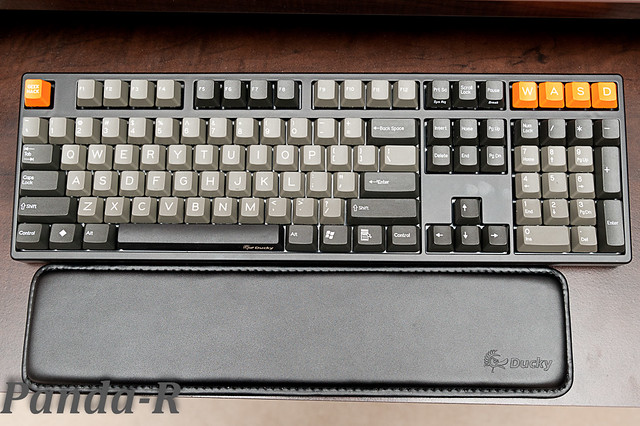 Anyway what that filco + custom doubleshot keycaps lacks are 1. led backlighting bling like the razer black widow 2. macros 3. a windows key disabling feature like the Ducky's Fn+F9. But still those seem to be acceptable concessions  when considering the main traits of what makes a good mechanical keyboard for typing and gaming for this filco option is very good :] when considering the main traits of what makes a good mechanical keyboard for typing and gaming for this filco option is very good :]The price for that filco majestouch + geekhack doubleshot keycap set should be around Rm5xx in total roughly. Also those doubleshots are already sold out so it may no longer be obtainable unless someone is willing to do another MO with Signature plastics. Considering that; the Ducky and Leopold which come with pbt laser etched keys by default seem to be a better choice unless you can get your hands on a custom set of doubleshots or other keycap set of your choice  This post has been edited by Moogle Stiltzkin: Dec 11 2010, 04:17 PM |
|
|
Dec 11 2010, 09:04 PM
Return to original view | Post
#143
|
|
Senior Member
4,456 posts Joined: Jan 2003
|
QUOTE(raynmay @ Dec 11 2010, 08:55 PM) the price is 379 for the keyboard+free Razer cap and entitled bundle price mousepad, so i bought a Goliathus as well. Some pictures would be nice i have shared this in Razer thread as well  |
|
|
Dec 11 2010, 11:55 PM
Return to original view | Post
#144
|
|
Senior Member
4,456 posts Joined: Jan 2003
|
Picture of your keyboard and computer rig :}
|
|
|
Dec 12 2010, 01:37 AM
Return to original view | Post
#145
|
|
Senior Member
4,456 posts Joined: Jan 2003
|
aluminium is cold when touching especially in an air conditioned room
that is why i am not particularly found of metalic keycaps.Plastic should be sufficient. Not to mention metalic keycaps are costly |
|
|
Dec 12 2010, 04:48 PM
Return to original view | Post
#146
|
|
Senior Member
4,456 posts Joined: Jan 2003
|
QUOTE(Kit II @ Dec 12 2010, 04:24 PM) is Alienware TacX a mecha keyboard too? Here is the reviewhttp://www.hardwareheaven.com/reviews/838/...troduction.html I don't think it is. Funny how the reviews for keyboards tend to neglect to mention the difference between rubberdome and mechanical keyboards; as if they were on equal footing which they are not. Maybe it's because they get free gear so they omit certain facts to make the keyboard a better buy heh. |
|
|
|
|
|
Dec 12 2010, 05:52 PM
Return to original view | Post
#147
|
|
Senior Member
4,456 posts Joined: Jan 2003
|
I've done many overseas purchases so i know how crappy Malaysian customs are.
Delays getting through customs. In worse case scenario; if your item does gets taxed; you need to head down to the airport yourself and pay the tax before they release it. These days my packages arrive at my doorstep and no tax or any other further incident. The only bad thing likely to happen is if i receive a package via the local Poslaju and i am not in; they may keep my packgage at their distribution center and i'd have to go collect it myself. From experience; DHL, EMS, Fedex will deliver to my doorstep, so i've come to like those better than Poslaju. Anyway some random facts QUOTE They both actuate at the same point, but for the blue switches to actuate a second time, you have to bring the key all the way up. With browns, you just need to bring the key above the actuation point. Since that "feature" of the blues causes problems if you don't lift the key all the way up in games, browns are generally considered better. Some people don't have issues with the blue switches since they naturally release the key fully no matter what. It's generally more noticeable the faster you have to repeat the key press, as you're less likely to bring the key up fully then. This post has been edited by Moogle Stiltzkin: Dec 12 2010, 05:53 PM |
|
|
Dec 13 2010, 11:17 PM
Return to original view | Post
#148
|
|
Senior Member
4,456 posts Joined: Jan 2003
|
Jasmine i don't keep track of the prices but the pbt variant will be around 400-500 MYR.
Anyway this is what the G80-3494 looks with doubleshots. 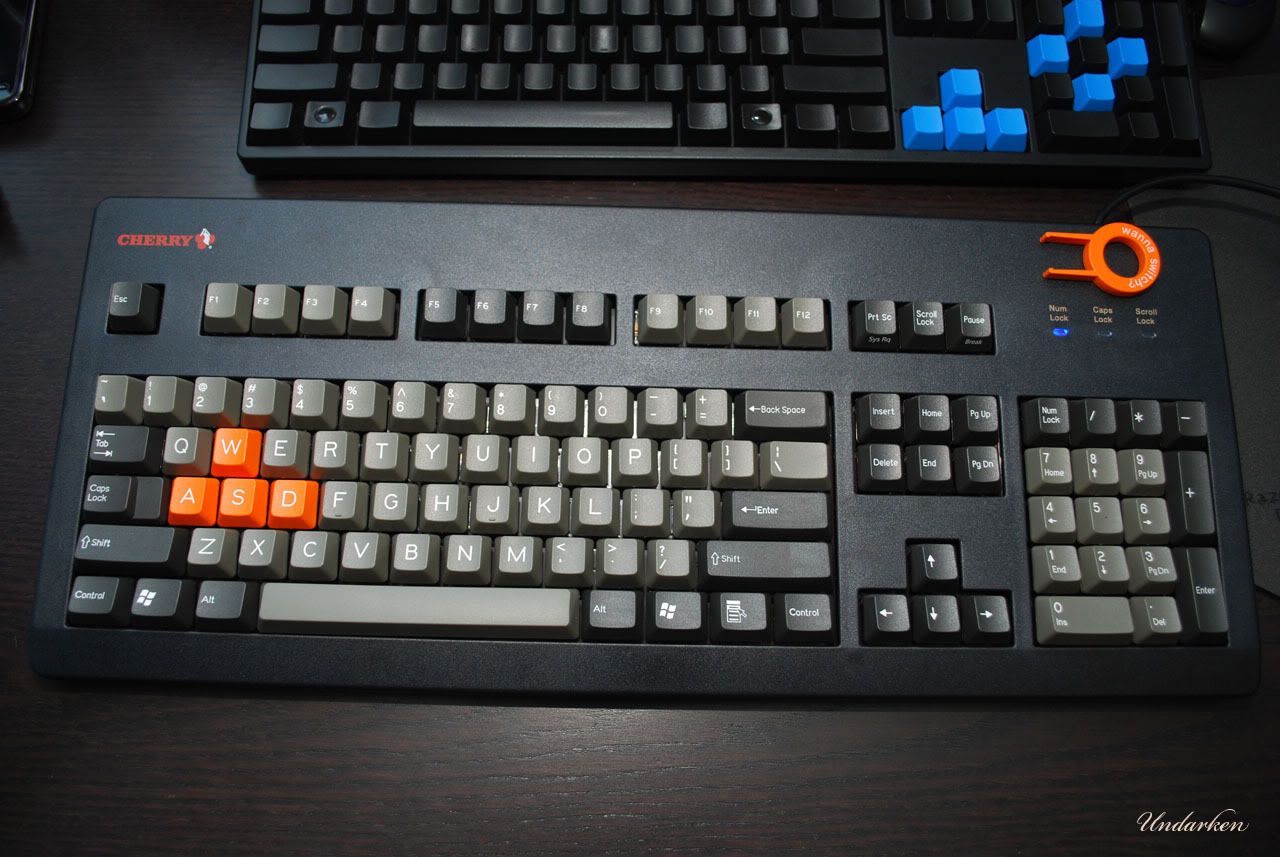 |
|
|
Dec 14 2010, 12:17 AM
Return to original view | Post
#149
|
|
Senior Member
4,456 posts Joined: Jan 2003
|
QUOTE Review: - The keyboard feels extremely cheap like those $5-10 rubberdome keyboards - Not plate mounted (show alot of flexing when replacing keycaps) - NKRO can be literally be seen. (Diodes can be seen) - Very big compared to a Filco - Cherry Red are extremely light and fun to type on - The keyboard angle is perfect even without using the height raising legs http://forums.vr-zone.com/hardware-arena/8...tml#post8938021 |
|
|
Dec 14 2010, 03:52 PM
Return to original view | Post
#150
|
|
Senior Member
4,456 posts Joined: Jan 2003
|
QUOTE(PeaceCraft1989 @ Dec 14 2010, 01:54 PM) After much of reading and studying from this thread and geekhack,I plan to order a hhkb from Elitekeyboards.com. Does anyone know how many % of tax will be charged for a computer keyboard if I kena the custom tax thinggy during the shipping process But why hhkb ? If your gonna pay that much the realforce might be better; i read from others who tried them saying the realforce felt better typing on. ?Anyone has experience on this?Your opinions will be appreciated ?Anyone has experience on this?Your opinions will be appreciated However the HHKB has its small form factor but i don't think its worth more than a better typing experience.Anyway try check on it a bit more comparing the realforce and HHKB before you decide |
|
|
Dec 14 2010, 05:26 PM
Return to original view | Post
#151
|
|
Senior Member
4,456 posts Joined: Jan 2003
|
 QUOTE SteelSeries 6Gv2 Mechanical Gaming Keyboard Benchmark Reviews has tested all sorts of gaming peripherals in the past, today we are taking an in depth look at the SteelSeries 6Gv2 mechanical Gaming Keyboard. The 6Gv2 is the little brother of the 7G and does away with some of the unnecessary features of an already basic gaming keyboard and for a good reason too, the 7G is a little on the expensive side. The 6Gv2 does away with the USB hub, the audio ports and the wrist rest. The price is still a little high at $99.99 but it is certainly better than the price of the 7G, essentially the 6Gv2 is a stripped down version so lets see if it's worth your hard earned cash. Just like the SteelSeries 7G, the 6Gv2 sports a rigid metal inner chassis for extreme strength and each key is an individual 18 karat gold plated and spring loaded mechanical switch which are guaranteed for 50 million presses and provide excellent tactile and audible feedback. The anti-ghosting system allows for as many simultaneous key presses as there are keys on the keyboard when you use the supplied PS/2 adapter, if you connect the 6Gv2 to your PC via USB the anti-ghosting only works for up to eight keys at a time. QUOTE SteelSeries 6Gv2 Final Thoughts I would like to use this section to express a view about a trend that has been steadily evolving, I hope a lot of others may share my views about the subject, and that is products that are designed for gamers. To kick start this viewpoint we need to rewind time a little, back to the days before the likes of SteelSeries, Razer, Choixx and Roccat etc ever made gaming peripherals. What were people using to play games before these companies created their revolutionary 'must have' devices?? A short answer is anything that they could get their hands on. Before the days of optical or laser sensors we had to bear the trackball mice and although the IBM model M and other similar mechanical keyboards were around, I'm pretty sure they weren't touted as 'gaming' keyboards. No, we used regular keyboards but people still had significant advantage over others, it wasn't until cyber sports had become popular that these gaming peripheral companies were founded. It's hard to look at a motherboards and memory and CPU's and read the words 'created for gamers' in the features list, the only piece of hardware that is truly designed for gamers are graphics cards surely. We have reached a stage now where the words 'created for gamers' are becoming a little over used, or used purely as marketing to sell a product to a wider market. Gaming mice are making large strides to becoming a whole lot more responsive and feature rich but I can't really see any new innovations that can make any new product individual any more. Most gaming keyboards are a joke with their backlit keys for improved visibility and LCD panels for additional info, sure macro keys are great but when using them in games doesn't it kind of feel like cheating a little? I remember playing Need for Speed: Porsche Challenge on the PS1 and found a little glitch when playing a wager mode between two players, it was possible to load the same car for both players by cloning the memory card. The end result was that I won my own car several times and was able to sell it over and over again and earn a large amount of cash and was able to buy the best car available, which was good for all of one hour and kind of killed the game as I now had nothing to aim towards. Sure today's games have evolved a lot and we now have the multiplayer aspect to contend with, so now we are pitching ourselves against each other and we need to find that competitive edge. Sure that 5600dpi mouse and that LED backlit keyboard may give you a slight advantage but when it comes down to it nothing comes close to raw skill. My first taste of multiplayer action was in the form of Americas Army, when I started I was rubbish, first I thought it was my RAM holding me back so I upgraded that but no difference was seen. Next I decided to upgrade my CPU but it was the same story. It was then that I upgraded my flailing MX440 Video Card to a more suitable ATI Radeon X800 XT and the difference was immediately apparent. It wasn't until I destroyed my mouse in a fit of rage that I bought into the whole gaming peripheral market ideal in the form of a Razer Krait 1600dpi gaming mouse, which made little difference to my gameplay when compared to the improvement gained from buying that X800 XT Video Card. It wasn't until I learned to watch shadows and listen for footsteps and learn different aspects and routes of maps that I could call myself good. Also being part of a gaming clan and communicating via teamspeak improved my gameplay a lot more than any peripheral ever has. I don't intend to start a mission to debunk the entire gaming peripheral market segment as there are products out there that really do make a difference, but at the end of the day you need to understand that a particular input device won't transform you into a pro-gamer overnight and you can also become 'pro' without the use of one of these devices so long as you have good hardware that is related directly to games. I'm talking now about Video and Sound cards that are able to recreate your game of choice with high details because at the end of the day your main weapons are ultimately your senses and your reaction time, skills that are developed over time. This brings me back now to my opening statement, what are you looking for in a gaming keyboard? Hopefully I have been able to put some things into perspective. The review: http://benchmarkreviews.com/index.php?opti...d=648&Itemid=65 This post has been edited by Moogle Stiltzkin: Dec 14 2010, 05:34 PM |
|
|
Dec 14 2010, 05:35 PM
Return to original view | Post
#152
|
|
Senior Member
4,456 posts Joined: Jan 2003
|
I'm not too particularly fond of the Noppo's coloring scheme :/
|
|
|
Dec 14 2010, 05:53 PM
Return to original view | Post
#153
|
|
Senior Member
4,456 posts Joined: Jan 2003
|
@jamines
I saw this eshop selling the dk-9008 pbt lasered version in english. This one in particular comes with the palm rest as well if i'm not mistaken. Ducky N-KEY 108KEY PBT Cap | tea hand cushion to send English-axis Product Model: DK9008-BEPLB QUOTE Introduction: DUCKY 薄邊框精心巧思的玩家之鍵,使用者可同時按下所有按鍵同時顯現, 此功能讓Ducky鍵盤成為多功能機械鍵盤, 符合打字速度快的使用者和電玩玩家的需求。 DUCKY thin border of the key players well ingenuity, the user can simultaneously press all the buttons appear at the same time, this feature allows the keyboard to become multi-functional mechanical keyboard Ducky, in line with typing speed of users and the demand for video game players. 茶軸的觸發鍵程為2.0mm,壓力克數60g,壽命5000萬次,MX軸中做工最為複雜的一種,壓力克數和青軸相當,避免了黑軸長期使用手部疲勞的問題,採用跟青軸一樣有二段式行程,唯獨缺少CLICK的聲音,按鍵聲音適中,單軸壽命為5000萬次,兼顧辦公與遊戲。 The trigger shaft key way of tea is 2.0mm, the pressure grams 60g, life 50 million times, MX-axis in the most complex kind of work, pressure, and the green shaft quite a few grams, to avoid the long axis of the black hand fatigue problems, the use of as a two-step with the green axis travel, except the voice of the lack of CLICK, key sound moderate, Single life 50 million times, both office and gaming. 宜辦公使用或遊戲使用。 Office use, or the game should use. 還有更接近特定玩家需要的快速鍵,F9是代表視窗鍵失效,可鎖Window Key(讓愛好遊戲的您,不用擔心)。 There are more close to the specific needs of the fast key players, F9 key failure on behalf of the window, you can lock Window Key (so that you are loving the game, do not worry.) F10代表Caps Lock與Ctrl切換,(讓Linux使用特殊系統更加方便)。 Caps Lock and Ctrl F10 on behalf of switch (to Linux easier to use a special system.) F11則是視窗鍵與Alt鍵切換,(讓蘋果使用者使用更加方便)。 F11 is the Windows key and Alt key to change, (so that Apple users are more convenient). 整把鍵盤在鍵帽上採用高規格的PBT鍵帽,PBT鍵帽的特色在於抗磨損手感極佳,在印字上使用香檳色字體,更加有質感。 On the whole the keyboard in Cap Cap with high specification PBT, PBT is the anti-wear characteristics of keycap feel good, the use of champagne in the printing fonts, more texture. Ducky keyboard 全系列皆採用德國工藝Cherry 機械式軸承,擁有獨特的手感及超長的壽命。 Ducky keyboard using German technology the whole series are Cherry mechanical bearings, has a unique feel and long life. 對打字講求舒適及效率的使用者來說,Ducky鍵盤不卡鍵, 使用者可同時按下所有按鍵同時顯現, 此功能讓Ducky機械鍵盤成為多功能鍵盤, 符合打字速度快的使用者和電玩玩家的需求,Ducky鍵盤使用一流的機械軸,憑藉輕微的喀答聲和優良的觸覺反饋,以及五千萬次超長使用壽命,旨在產生出更快的打字速度和準確性。 Emphasis on comfort and efficiency of typing for the user, Ducky keyboard keys do not card, the user can press the buttons at the same time show all, this feature allows a multi-function keyboard Ducky mechanical keyboard, in line with typing speed of users and game players demand, Ducky keyboard class mechanical axis, with a slight sound and excellent Cameroon A tactile feedback, and five million times long life, designed to produce faster typing speed and accuracy. 商品特色: Product Features: 1、PS/2 Full N-KEY 對應不衝突,USB 6 KEY 不衝突 1, PS / 2 Full N-KEY corresponding to no conflict, USB 6 KEY do not conflict 2、FN 多媒體功能快速鍵 2, FN multimedia shortcut keys 3、FN特殊功能鍵切換 3, FN special function key to switch 4、四鍵貼心快捷鍵(Only 108 Key Type) 4, four shortcut keys close (Only 108 Key Type) 5、接線分離,讓您攜帶方便 5, wiring separation, allowing you easy to carry 6、三向出口,給您更多選擇 6, three to the exit, giving you more options 7、薄型邊框設計,簡潔有形 7, thin frame design, simple physical 8、採Cherry原廠茶軸獨立軸設計,壽命更長 8, an independent mining shaft axis Cherry tea factory design and longer life 9、Function Key採用衛星輔軸設計,讓您打字更加穩固 9, Function Key with satellite auxiliary shaft design makes your typing more stable 10、 特殊雷雕料香檳雷刻印字。 10, special materials champagne Ray Ray carving engraving words. 11、附拔鍵器與ESC、A、S、D、W遊戲鍵 11, with a pull key device and ESC, A, S, D, W game keys 12、有多4個特殊鍵、小算盤、我的電腦、信箱、首頁 12, a number of four special keys, calculator, my computer, mailbox, home page 13、 使用PBT塑膠鍵帽手感更佳 13, the use of PBT plastic keycap feel better 商品規格: Specification: 型號: Type: DK9008-BEPLB DK9008-BEPLB 介面: Interface: USB/PS2 USB/PS2 印刷技術: Printing Technology: 雷射印刷 Laser Printing 軸: Axis: Cherry MX 茶軸 Cherry MX tea axis 鍵數: Key number: 108 KEY 108 KEY 排列: Order: US ASCII US ASCII 鍵帽材質: Cap Material: PBT PBT 印刷: Printing: 英文 English 尺寸: Size: 442 x 140 x 41.5 mm(W,D,H) 442 x 140 x 41.5 mm (W, D, H) 重量: Weight: 1.2Kg 1.2Kg 產地: Origin: 台灣 Taiwan 配件: Accessories: ESC、WASD遊戲鍵x 1、拔鍵器x 1、黑色手靠墊x 1 ESC, WASD gaming keys x 1, pull out key control x 1, the black hand cushion x 1 http://translate.google.com.my/translate?h...atId%3D18&twu=1 So thats like 407.422 MYR for the keyboard. I paid like 610 MYR for mine so i overpaid by from the Vrzone MO For Singaporeans it costs 540.946 MYR (shipping price already included) But i don't think this eseller has international shipping right fsbzzz :{ ? PChome only has in Chinese :{ ?? http://translate.google.com.my/translate?h...%26tm%3Du&twu=1 This is the shipping price for pchome. Weight is for somewhere between 5-10 keyboards QUOTE 大陸 China RMB ¥ 50 亞洲/ 大洋洲 Asia / Oceania US $ 10 (含港澳) (including Hong Kong and Macau) 歐美及其他 Europe, America and other US $ 20 Shame, but at least people have a grasp how much the keyboard is worth :/ just hope pchome has stock. This post has been edited by Moogle Stiltzkin: Dec 14 2010, 06:21 PM |
|
|
|
|
|
Dec 14 2010, 06:23 PM
Return to original view | Post
#154
|
|
Senior Member
4,456 posts Joined: Jan 2003
|
Does pchome have this model
DK9008-BEPLB Even without the palm rest; do they have just that dk-9008 pbt in English with cherry brown switches ??I saw their site the pull down only said Chinese characters :{ The cherry g80-3494 also seems to be only available in Chinese http://global.pchome.com.tw/?mod=item&func...21&ROWNO=9&tm=u 522.771 MYR + 31.2950 MYR for shipping to malaysia = 554.066 MYR fsbzz when you bought from them did you have to pay paypal transaction fee or they ?? I use a credit card attached to my paypal rather than keep credits in my paypal account This post has been edited by Moogle Stiltzkin: Dec 14 2010, 06:28 PM |
|
|
Dec 14 2010, 06:41 PM
Return to original view | Post
#155
|
|
Senior Member
4,456 posts Joined: Jan 2003
|
But why for this model they don't have English but Walrus does :/
And Inpad who does; probably doesn't ship internationally :{ grrr. |
|
|
Dec 15 2010, 01:32 AM
Return to original view | Post
#156
|
|
Senior Member
4,456 posts Joined: Jan 2003
|
QUOTE(OCN_fssbzz @ Dec 14 2010, 08:39 PM) ask diamond player, most of the diamond player just prefer NKRO in SCII. Is the promo over already ? and FYI,Diamond player cant even play well on Cherry MX Blue. |
|
|
Dec 15 2010, 05:47 PM
Return to original view | Post
#157
|
|
Senior Member
4,456 posts Joined: Jan 2003
|
micdy you another Malaysian ?
naice Anyway square which keyboards you have so i can enter you into the list. Filco Majestouch "Otaku" (Cherry mx Brown) Steelseries 6Gv2 (Cherry mx black) Cherry G80-3494 (Cherry mx red. Also installed into it is White Rice's Geekhack custom doubleshot abs 104 key cap set) Ducky 9008 ABS black on black (cherry mx blue) @micd May i ask when did you purchase from pchome and does the 10 USD shipping promotion still valid when you bought it ? This post has been edited by Moogle Stiltzkin: Dec 15 2010, 06:02 PM |
|
|
Dec 15 2010, 06:05 PM
Return to original view | Post
#158
|
|
Senior Member
4,456 posts Joined: Jan 2003
|
added
Added on December 15, 2010, 6:17 pmThis G80-1863HUMUS-2 wNv released in 2009 looks almost the perfect Cherry keyboard. QUOTE After a long search I was finally able to track down the source of Cherry Corp RED double shot ESC keys. They were taken from a special edition of the G80-1863 (a.k.a. the Raptor Gaming K2). The board is called the Cherry G80-1863HUMUS-2 wNv. It seems to be marketed under the name of "HUMUS", which is simply taken from the boards product number. wNv appears to be the top Chinese Counterstrike pro-gaming team and this is their own keyboard. The keyboard was released in late October 2009 in limited quantities. I don't know many they made exactly but all of the Chinese auction sites are flooded with them, so there should be plenty available for now. The keyboard currently goes for about 1200 Yuan (~180,00 USD). * Limited Edition Keyboard * Full N-Key Rollover * All keycaps are double shot * Blue LEDs * Available with black or brown Cherry MX * ESC, W, N, V key are in bright red * 2 USB ports on the back for headset and mouse * W keycap is raised about 2mm higher than all other keys. According to studies by Cherry with Chinese progamers it appears to be the most frequently used key that gets the most pressure in average gaming. Raising it above the other keys guarantees that you will be able to instantly find the forward movement key without looking at the keyboard. See that plastic thing bottom right. You remove the keycap and fit that under the windows key to lock it in place. Low tech method compared to the Ducky's FN+F9 method to disable the windows key but at least theres an option to lock it although the method is crude.      This post has been edited by Moogle Stiltzkin: Dec 15 2010, 06:22 PM |
|
|
Dec 15 2010, 08:03 PM
Return to original view | Post
#159
|
|
Senior Member
4,456 posts Joined: Jan 2003
|
QUOTE(Squarebox @ Dec 15 2010, 06:40 PM) @Moogle What does the normal version lack compared to the special edition ?1200 yuan = 565 MYR for that version Normal versions go for about 900 yuan = 425 MYR I'm not really interested in the usb features; but i rather like the fact it has 1. doubleshots 2. nkro 3. keycap lock even if it isn't as neat as the Ducky FN+F9. 4. judging from your screenshot; the geekhack keycaps might look better on the cherry keyboard And before you ask me why i need doubleshot keyboard when i already have geekhack's; well Cherry doubleshot is considered very good considering the font, and thickness of the key. So i wouldn't mind having both that and the GH set This post has been edited by Moogle Stiltzkin: Dec 15 2010, 08:09 PM |
|
|
Dec 15 2010, 08:11 PM
Return to original view | Post
#160
|
|
Senior Member
4,456 posts Joined: Jan 2003
|
QUOTE(skincladalien @ Dec 15 2010, 08:07 PM) i understands the W key, but why the V and N key? I also don't get it either. But thankfully those keys came with the original color scheme as well. The colored you can use optionally.Another oddity is the W is slightly elevated more. They claim they did that to make it easier for gamers to distinguish the W key for movement for touch typing. Anywayz, my ducky keyboard will have pbt laser etched like this screenshot  http://www.inpad.com.tw/goods.php?act=view&no=2718 QUOTE Product Features: 1、可將鍵盤更換成英文印刷介面 1, the keyboard can be replaced with English printing interface 2、雷射印刷更耐久 2, laser printing is more durable 3、PBT材質鍵帽手感佳,不易變光頭胎 3, PBT material keycap feel good, not easy to change slicks Specification: Material: PBT PBT Cap number: 104 104 Font color: 香檳金 Champagne Gold Order: US ASCII US ASCII Printing Technology: 雷射印刷 Laser Printing Printing: 英文 English Notes: 可適用於Ducky、Filco、IONE、Steelseries 7G與6GV2之鍵盤 Applicable to Ducky, Filco, IONE, Steelseries 7G keyboard with 6GV2 of 7G與6Gv2的Backspace和Enter兩鍵不合用 7G and 6Gv2 the Backspace and Enter keys not used for two This post has been edited by Moogle Stiltzkin: Dec 15 2010, 08:12 PM |
|
Topic ClosedOptions
|
| Change to: |  0.0495sec 0.0495sec
 0.27 0.27
 7 queries 7 queries
 GZIP Disabled GZIP Disabled
Time is now: 3rd December 2025 - 10:23 AM |
 Quote
Quote