

You guys can just navigate into the game folder to know the the game file name.
Nokia N900 V7 (More than 150 owners), Made by Nokia,Powered by Community
Nokia N900 V7 (More than 150 owners), Made by Nokia,Powered by Community
|
|
 Oct 29 2010, 10:59 PM Oct 29 2010, 10:59 PM
Return to original view | Post
#241
|
 
Senior Member
5,105 posts Joined: Mar 2007 From: In front of my desktop/laptop/phone   
|
You guys can just navigate into the game folder to know the the game file name.
|
|
|
|
|
|
Oct 29 2010, 11:15 PM
Return to original view | Post
#242
|
|
Senior Member
5,105 posts Joined: Mar 2007 From: In front of my desktop/laptop/phone
|
QUOTE(porselinaheart @ Oct 29 2010, 11:10 PM) +1 +2(Even though I barely use the app) |
|
|
Oct 30 2010, 12:30 AM
Return to original view | Post
#243
|
|
Senior Member
5,105 posts Joined: Mar 2007 From: In front of my desktop/laptop/phone
|
QUOTE(porselinaheart @ Oct 30 2010, 12:21 AM) hmmm, same version as mine. try to retransfer files meLi. Are you using SSh to transfer the files? I'm wondering wether i should instruct everyone to use midnight commander to transfer webos game files. It seems to be the only method that doesn't seem result in having to retransfer the game files. +1Retransfering the files worked for some cases. QUOTE(N900rocks @ Oct 30 2010, 12:26 AM) GG lo this time..after dl the ussd-widget, my phone keep rebooting..macam mana la== No point using USSD widget after PR 1.2Just uninstall it. P/S:As experienced kopitiamer,I suggest those who want to flame others to open thread in kopitiam.But prepare backlash from the "oldfags" |
|
|
Oct 30 2010, 12:55 AM
Return to original view | Post
#244
|
|
Senior Member
5,105 posts Joined: Mar 2007 From: In front of my desktop/laptop/phone
|
QUOTE(one1002 @ Oct 30 2010, 12:54 AM) now..how do i automount the partition? Check RVin's maemo wiki link few pages ago.It's works for automount.everytime i reboot, i have to mount it manually by mount -t ext3 /dev/mmcblk1p2 /.neopwn -o noatime how do i get this to automount? |
|
|
Oct 30 2010, 01:04 AM
Return to original view | Post
#245
|
|
Senior Member
5,105 posts Joined: Mar 2007 From: In front of my desktop/laptop/phone
|
QUOTE(one1002 @ Oct 30 2010, 12:57 AM) i have no idea sir.. I did have thought of installing the beta neopwn but I was afraid of running into another Navit like fiasco.should be released soon.. i'm kicking myself for it too, and that is why i installed it straight away..to stop from kicking myself!!  Full version should be near now.I read it somewhere that full version of neopwn will be released before end of this year. Anyway on other hand,is it even legal talking about neopwn here?  PS/WARNING : No more flaming here!If there is someone who started it again & somehow as TS I get any verbal/suspension warning,I'll be very unhappy.Trust me,you don't want me to be unhappy.  |
|
|
Oct 30 2010, 01:23 AM
Return to original view | Post
#246
|
|
Senior Member
5,105 posts Joined: Mar 2007 From: In front of my desktop/laptop/phone
|
QUOTE(one1002 @ Oct 30 2010, 01:17 AM) it's legal to talk about neopwn as there's nothing illegal about it..neopwn is a wireless-security tools..it depends on the color of your hat.. =) The program itself is legal but what we use it for is illegal? if u have the files..i can write a tutorial for u if u want... =)  I'll wait for the full edition.If it's not released by end of this year then I'll be using the beta.I have the files. |
|
|
|
|
|
Oct 30 2010, 10:28 AM
Return to original view | Post
#247
|
|
Senior Member
5,105 posts Joined: Mar 2007 From: In front of my desktop/laptop/phone
|
QUOTE(Andy214 @ Oct 30 2010, 03:15 AM) You're GREEN but you're not HULK wor. People who messed up my thread deserved my light sabers end.QUOTE(jananan @ Oct 30 2010, 03:37 AM) you guys really like to play games huh... Few nice games is good for us to pass time.Before this we don't have much choice i'm not much of a gamer... neopwn is a good proof-of-concept work... but its a bit too late now... everybody using wpa2 and all sort of new wizardry with their new wireless AP. firesheep... now that sounds like fun... just need to install that capture driver from neopwn and get a fennec copy of the addon if someone makes one from the source... hmmm... You'll be surprised on how many people on my campus still using WEP  QUOTE(N900rocks @ Oct 30 2010, 10:06 AM) asd...my n900 still havent awake yet..dling the flash file...sad.. The manual flashing tool is primary recovery tool of recovery/update for all Nokia Internet Tablets.It's perfectly fine to use it.You won't void the warranty.Added on October 30, 2010, 10:08 amand after flash it will void my warranty???? i zitron warranty.... |
|
|
Oct 30 2010, 12:05 PM
Return to original view | Post
#248
|
|
Senior Member
5,105 posts Joined: Mar 2007 From: In front of my desktop/laptop/phone
|
QUOTE(Daniel89 @ Oct 30 2010, 10:03 AM) Having such hard time with my application manager not only respond slow but sometime when trying to install apps from Ovi Store keep Operation Failed lol very frustrating Try disabling the repos one by one.I suspect one of the repo down hence the operation failed warning. Edit: sometime i notice that when I open my application manager it will show Operation Failed I wondering what failed eh ?  QUOTE(porselinaheart @ Oct 30 2010, 10:49 AM) @super, bro, can add the link RViN posted at the bottom of page 92 to the frontpage ka, very useful for linux newbies to have a cmd list for xterm. Done.But I think only the advanced users will refer to it Added on October 30, 2010, 12:09 pmIf anyone have anymore appearance modification in Maemo 5,feel free to pm me. I'll include it on upcoming mod guide. This post has been edited by super_evil_alien: Oct 30 2010, 12:09 PM |
|
|
Oct 30 2010, 05:47 PM
Return to original view | Post
#249
|
|
Senior Member
5,105 posts Joined: Mar 2007 From: In front of my desktop/laptop/phone
|
QUOTE(RViN @ Oct 30 2010, 12:32 PM) I know icons and some files are placed in root but should take up a few MB lol Been happening to me too.No idea how that happens. Planning to take a tour at my root tonight. QUOTE(N900rocks @ Oct 30 2010, 01:51 PM) anyone can help me out..??? meet up and teach me how to flash..i feel damnnnnn sad already... Frontpage bro.I've said this before,it's actually very simple that even my 12 years old cousin can do it. QUOTE(Amedion @ Oct 30 2010, 05:03 PM) Got myself Nokia N900 ... Wanna find hell lot of games for my gf to play.. Refers to frontpage.Just wondering where do i start?  OVI games download from OVI Store. Maemo native games download from App Manager. Android games,install NITDroid & download from Android Market. webOS games,download the IPK files & follow the frontpage guide.A much proper guide will be posted when porseline complete it. Since aspire said it & I've meaning to do it for a long time,we'll start the no spoonfeeding policy. |
|
|
Oct 30 2010, 05:50 PM
Return to original view | Post
#250
|
|
Senior Member
5,105 posts Joined: Mar 2007 From: In front of my desktop/laptop/phone
|
QUOTE(aspire2oo6 @ Oct 30 2010, 05:47 PM) just curious how do u guys transfer photos,files and etc between your nokia n900 and computer? Eerr..Connect with the usb cable & transfer? |
|
|
Oct 30 2010, 06:29 PM
Return to original view | Post
#251
|
|
Senior Member
5,105 posts Joined: Mar 2007 From: In front of my desktop/laptop/phone
|
QUOTE(Asus W3V @ Oct 30 2010, 05:49 PM) how is meego performance on n900? I've tried it.Not many functions included but the whole OS runs fairly well.anyone tried? QUOTE(aspire2oo6 @ Oct 30 2010, 05:50 PM) grandmaster waiting your meego installation guide Ok.Here it is.But I think you need at least class 6 microSD to make the OS runs smoothly.Use windows pc/laptop to do it.MeeGo installation Things that you must have:- 1)Flasher tool 2)Winrar 3) Win32DiskImager - https://launchpad.net/win32-image-writer/+download Install MeeGo 1)Download the latest image from here : http://repo.meego.com/MeeGo/releases/1.1/h...et-armv7l-n900/ Download all the files & dump it to C:Program Files/maemo/flasher 3.5/ 2)Extract the meego-handset-armv7l-n900-1.1-mmcblk0p.raw.bz2 with WinRAR to the same folder. 3)Run Win32DiskImager 4)Click open icon(you’ll know which one when you run the program) & type *.* at the filename space(This to enable the find program file with all file extension) 5)Choose the meego-handset-armv7l-n900-1.1-mmcblk0p.raw as your file 6)Make sure you have inserted your microSD card into the phone & connect the phone to your computer. 7)On the Win32DiskImager application right side you should see the device letter.Set it to the microSD device letter. 8)Now click “write”.Press “yes” to any mumbo jumbo which pop up next. 9)Disconnect your phone from computer & turn it off(THIS IS VERY IMPORTANT) 10)Open flasher tool & copy paste this exact command - flasher-3.5.exe -l -k meego-handset-armv7l-n900-1.1-vmlinuz-2.6.35.3-10.3-n900 n900 –b 11)Now the flasher will look for the device.Connect your phone & after 1 minute or so you should see MeeGo booting. This is the safest step to install MeeGo yet.The dual boot method is bit too complex to figure out & I've only done it with linux OS.If you have any problem pm me. For other "average" users take note,I will nor recommend you to install MeeGo yet. Added on October 30, 2010, 6:32 pm@meLi NFSU v1.48 working with your phone? Don't forget the send the "item" to me ok?  This post has been edited by super_evil_alien: Oct 30 2010, 06:32 PM |
|
|
Oct 30 2010, 06:37 PM
Return to original view | Post
#252
|
|
Senior Member
5,105 posts Joined: Mar 2007 From: In front of my desktop/laptop/phone
|
QUOTE(nicholas_oh @ Oct 30 2010, 06:32 PM) anybody use win 7 to flash n900 ? ??? I am.thanks QUOTE(DET_D5t @ Oct 30 2010, 06:33 PM) » Click to show Spoiler - click again to hide... « Sifu..this mean...we only running meego.. No maemo?? Once you shut down & restart your Maemo will load as usual. I still don't know how to properly configure u-boot (aka dual boot) in windows environment.I know the linux method only. Added on October 30, 2010, 6:39 pm QUOTE(meLi @ Oct 30 2010, 06:34 PM) yes working fine - NFSU v20.0.48 EU. Do u still need female to female USB adapter ?  Weird.Not working with my phone.I'll try again soon. Weird.Not working with my phone.I'll try again soon.Yes,I'm looking for replacement for my adapter. QUOTE(Cornwell @ Oct 30 2010, 06:35 PM) no you cant. go to front page for tutorial Yes,you can.Flasher tool will only not working with 64 bit OS.This post has been edited by super_evil_alien: Oct 30 2010, 06:39 PM |
|
|
Oct 30 2010, 06:43 PM
Return to original view | Post
#253
|
|
Senior Member
5,105 posts Joined: Mar 2007 From: In front of my desktop/laptop/phone
|
Class 2 & 4 will work but the OS respond will be slower.
Main reason why I'm looking for class 6/10 microSD now. Actually Andy already put my name for the next "event" during the N8 event. This post has been edited by super_evil_alien: Oct 30 2010, 06:47 PM |
|
|
|
|
|
Oct 30 2010, 06:51 PM
Return to original view | Post
#254
|
|
Senior Member
5,105 posts Joined: Mar 2007 From: In front of my desktop/laptop/phone
|
QUOTE(aspire2oo6 @ Oct 30 2010, 06:48 PM) lol thats not how it select I know but lets just wait and see.I'm not that despo like the guys in N8 thread. Whether i get selected or not I'll still buy the upcoming MeeGo phone.Buying with my own money will give me more freedom to take a shot at Nokia if they mess up anything with the phone. |
|
|
Oct 30 2010, 06:53 PM
Return to original view | Post
#255
|
|
Senior Member
5,105 posts Joined: Mar 2007 From: In front of my desktop/laptop/phone
|
To the DiGi/Maxis/Celcom MMS users
Do the setting at frontpage still work? Added on October 30, 2010, 6:54 pmOh meLi....You just made some wet their pants with your drift This post has been edited by super_evil_alien: Oct 30 2010, 06:54 PM |
|
|
Oct 30 2010, 07:00 PM
Return to original view | Post
#256
|
|
Senior Member
5,105 posts Joined: Mar 2007 From: In front of my desktop/laptop/phone
|
You'll notice the OS working more smoothly once you OC it to 800MHz
However only when playing heavy games & videos you'll really notice the difference between stock clock & OC-ed clock |
|
|
Oct 30 2010, 07:40 PM
Return to original view | Post
#257
|
|
Senior Member
5,105 posts Joined: Mar 2007 From: In front of my desktop/laptop/phone
|
QUOTE(mashimarow @ Oct 30 2010, 07:11 PM) sure it is, but it generate more heat and lessen the life of the phone Generate heat yes.On the lessen the life of phone,if you configure the profile well I think you should be able to stretch the lifetime of your phone. I still have a overclocked 4GHz processor running fine even after 3 years plus.It's not mobile processor but the theory nevertheless remains the same.With decent voltage & running acceptable clock speed everything should run well for long time. QUOTE(DET_D5t @ Oct 30 2010, 07:31 PM) I'm using fmms (newer version) for maxis user.. my mms still working.. can receive mms as usual QUOTE(aspire2oo6 @ Oct 30 2010, 07:33 PM) Maxis one still working i am still using it now. Same MMS setting as in frontpage?Because I received some PM saying frontpage MMS setting don't work. |
|
|
Oct 30 2010, 09:49 PM
Return to original view | Post
#258
|
|
Senior Member
5,105 posts Joined: Mar 2007 From: In front of my desktop/laptop/phone
|
Welcome to comrade HeiShou & gyianz.
@meLi fMMS 1.2.6 works just fine for me. |
|
|
Oct 30 2010, 11:12 PM
Return to original view | Post
#259
|
|
Senior Member
5,105 posts Joined: Mar 2007 From: In front of my desktop/laptop/phone
|
QUOTE(jananan @ Oct 30 2010, 10:49 PM) end of my hdd.... boot sector damaged... cannot create a new mbr... cannot load grub... Forget about NTFS support.It'll never happen.have to boot from usb and load the hdd partition... damn... Added on October 30, 2010, 10:55 pmmeego 1.2 netbook also not bad... kinda fast on a core2duo processor... i mean really fast...almost complete i would say... but it does not ship ready to use... a pity, no support for ntfs or any other filesystem.  also does not ship with any codecs whatsoever... they're trying to maintain 100% open source i guess... better not to be tied down by some distribution license shit... and cannot ship to certain countries and stuff like that... Codec might me available with the April 2011 release. QUOTE(k-bkeat @ Oct 30 2010, 11:05 PM) hey. i cant find infor bout pr1.3 in frontpage @@ mind sharing? Seriously,are you joking? Read the post #5 again. |
|
|
Oct 31 2010, 11:57 AM
Return to original view | Post
#260
|
|
Senior Member
5,105 posts Joined: Mar 2007 From: In front of my desktop/laptop/phone
|
QUOTE(k-bkeat @ Oct 31 2010, 08:17 AM) Step 11 After reflashing before it boot up IMMEDIATELY TURN OFF YOUR PHONE BY UNPLUGGING THE BATTERY AND CABLE Turning off the phone before flashing with vanilla is sufficientmeans after the CMT flashed successfully then take out the battery? wont corrupt data?  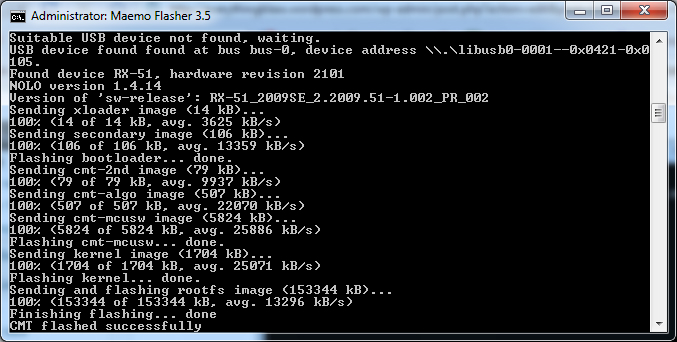 QUOTE(LyeNa @ Oct 31 2010, 09:15 AM) Anyone can help me? I forgot password for X-Terminal. How to retrieve? Can i reset? Open terminalType root Type passwd Choose new password |
|
Topic ClosedOptions
|
| Change to: |  0.0445sec 0.0445sec
 0.22 0.22
 7 queries 7 queries
 GZIP Disabled GZIP Disabled
Time is now: 3rd December 2025 - 04:02 AM |
 Quote
Quote