


Nokia N900 V7 (More than 150 owners), Made by Nokia,Powered by Community
Nokia N900 V7 (More than 150 owners), Made by Nokia,Powered by Community
|
|
 Oct 25 2010, 06:21 PM Oct 25 2010, 06:21 PM
Return to original view | Post
#21
|
 
Senior Member
4,475 posts Joined: Nov 2009 From: KL   
|
pm me link to nfsu leh
|
|
|
|
|
|
Oct 25 2010, 06:30 PM
Return to original view | Post
#22
|
|
Senior Member
4,475 posts Joined: Nov 2009 From: KL
|
QUOTE(porselinaheart @ Oct 25 2010, 06:22 PM) i'm assuming you mean the NFSU files right? check ur pm thx mate as for ur psp, my memory card has this problem from time to time, just reformat. Which CFW version u using?  |
|
|
Oct 25 2010, 08:11 PM
Return to original view | Post
#23
|
|
Senior Member
4,475 posts Joined: Nov 2009 From: KL
|
 |
|
|
Oct 25 2010, 08:26 PM
Return to original view | Post
#24
|
|
Senior Member
4,475 posts Joined: Nov 2009 From: KL
|
I hope they have video call and mms lar ==lll
|
|
|
Oct 25 2010, 09:05 PM
Return to original view | Post
#25
|
|
Senior Member
4,475 posts Joined: Nov 2009 From: KL
|
QUOTE(Augus7 @ Oct 25 2010, 08:34 PM) urgh...i hope the media player can shift to select songs instead of selecting one straight away it will play, very annoying... checking in via psp  any emulator to play iPhone? or at least Android games in Maemo? btw, why can't the media player be slightly better...now super hard to search for songs...and cannot choose folder to filter... |
|
|
Oct 25 2010, 09:13 PM
Return to original view | Post
#26
|
|
Senior Member
4,475 posts Joined: Nov 2009 From: KL
|
OMG...where's VLC for Maemo? ==lll
|
|
|
|
|
|
Oct 25 2010, 09:22 PM
Return to original view | Post
#27
|
|
Senior Member
4,475 posts Joined: Nov 2009 From: KL
|
QUOTE(porselinaheart @ Oct 25 2010, 09:43 AM) for those of you who were asking about installing palm SDL games ( NFSU, SIMS, LETS GOLF ), here's a quick tuto I can't cd for some reason?open up Xyerm and type : sudo gainroot apt-get install preenv transfer the relevant game folder within 'applications' folder from ur palm pre to '/home/user/applications' in your n900 ( create the '/home/user/applications' folder and transfer the game folders in there ) if you only have the ipk file ( similiar to the apk files for android ), unzip with 7-zip and you should have the relevant game folders you need to transfer to your n900. next open up xterm again and type: sudo gainroot preenv ( or if its still open ) cd /home/user/applications/'name of game folder'. chmod +rwx 'name of the game' (for example, need for speed would be nfsuc) To create a desktop icon type the added line: desktopgen appinfo.json then just select the icon from your normal menu like a native game/app Note 1 : For NSFU when in car purchase/car select screen, to exit have to tap the return button multiple times like a woodpecker, must be a bug due to multi-touch reqsNote 2 : Games I've tested - NFSU ( works perfectly) - SIMS ( No camera rotation due to lack of multitouch) - LETS GOLF ( Currently testing, seems fine so far ) @mashimarow thanks for the list bro, take note though for item 47 ( installation of rootsh ) latest version requires you to type sudo gainroot EDIT: Clarified instructions for transferring game folders/into relevant directory in n900. Added on October 25, 2010, 9:25 pm QUOTE(super_evil_alien @ Oct 25 2010, 09:16 PM) AP set 1,Zitron set 0 yup...a total betrayal to open source community  Added on October 25, 2010, 9:17 pmI take VLC's release to iOS 1st as betrayal for the open source community   This post has been edited by hengguowei: Oct 25 2010, 09:25 PM |
|
|
Oct 25 2010, 09:28 PM
Return to original view | Post
#28
|
|
Senior Member
4,475 posts Joined: Nov 2009 From: KL
|
QUOTE(super_evil_alien @ Oct 25 2010, 09:16 PM) AP set 1,Zitron set 0 yup...a total betrayal to open source community Added on October 25, 2010, 9:17 pmI take VLC's release to iOS 1st as betrayal for the open source community |
|
|
Oct 25 2010, 09:29 PM
Return to original view | Post
#29
|
|
Senior Member
4,475 posts Joined: Nov 2009 From: KL
|
directory doesnot exist? ==lll
how arh? btw, I have rootsh installed and I have type sudo gainroot I know that...but why cannot cd?? |
|
|
Oct 25 2010, 09:38 PM
Return to original view | Post
#30
|
|
Senior Member
4,475 posts Joined: Nov 2009 From: KL
|
I can't even cd the file ==lll
|
|
|
Oct 25 2010, 09:43 PM
Return to original view | Post
#31
|
|
Senior Member
4,475 posts Joined: Nov 2009 From: KL
|
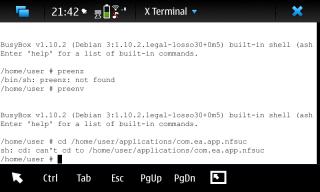
this is what I get ==lll what did I do wrong?... so annoying...I'm always stuck at the cd part ==lll the nitdroid accelerometer patch also stuck at the cd part ==lll Added on October 25, 2010, 9:44 pm QUOTE(N900rocks @ Oct 25 2010, 09:43 PM) wah...you guys seem enjoying nitdroid=D I think those people are enjoying installing webos games to maemo Nitdroid is nice too This post has been edited by hengguowei: Oct 25 2010, 09:44 PM |
|
|
Oct 26 2010, 06:43 AM
Return to original view | Post
#32
|
|
Senior Member
4,475 posts Joined: Nov 2009 From: KL
|
QUOTE(super_evil_alien @ Oct 25 2010, 09:46 PM) I need screenshots.Take screenshot at the direction I specify below. tonight...now gotta go to school...1)Assuming you already typed sudo gainroot,type cd /home/ 2)Type "ls"(Take screenshot here) 3)Type cd user 4)Type "ls"(Take screenshot here) 5)Type cd applications Type "ls"(Take screenshot here) |
|
|
Oct 26 2010, 09:34 PM
Return to original view | Post
#33
|
|
Senior Member
4,475 posts Joined: Nov 2009 From: KL
|
QUOTE(N900rocks @ Oct 26 2010, 09:18 PM) Try this: I'm having the exact same problem...what did I do wrong?Open new terminal Type "root" Type "preenv" Type "cd /home/user/applications/nfsuc/ sifu...still couldn't solve the problem..stuck here..sh: cd: can't cd to /home/user/applications/nfsuc/ might if i ask, i use the filebox to create a new folder, is correct right? then how do you transfer the nfsuc into the appliactions folder?? i straight away throw into the applications from my laptop's dekstop to the n900 appliactions folder by using cable. am i correct? edit:: and i did rename it from *com.ea.app.nfsuc* to nfsuc. home is home? user is user? or it depends on my phone? Added on October 26, 2010, 9:40 pmsuperevilalien? any sifu can help me? This post has been edited by hengguowei: Oct 26 2010, 09:40 PM |
|
|
|
|
|
Oct 26 2010, 10:08 PM
Return to original view | Post
#34
|
|
Senior Member
4,475 posts Joined: Nov 2009 From: KL
|
RM1100 ori no scratches (but now got scrathes on bezel already
)Added on October 26, 2010, 10:10 pm QUOTE(super_evil_alien @ Oct 26 2010, 09:45 PM) "Customer service on break now.Please pm porselinaheart about the webOS games & refer to frontpage if you have any question about PR 1.3" kthbye  why why why why I can cd but desktop thingy showed me not executable?? This post has been edited by hengguowei: Oct 26 2010, 10:10 PM |
|
|
Oct 26 2010, 10:21 PM
Return to original view | Post
#35
|
|
Senior Member
4,475 posts Joined: Nov 2009 From: KL
|
I cd the folder already but the desktop thingy states not executable ==lll

please help me sifu Added on October 26, 2010, 10:24 pmnobody's bothering about me ==lll sad sad ==lll This post has been edited by hengguowei: Oct 26 2010, 10:24 PM |
|
|
Oct 27 2010, 11:07 AM
Return to original view | Post
#36
|
|
Senior Member
4,475 posts Joined: Nov 2009 From: KL
|
I manage to cd the folder step by stepchecking what folder within folder
it goes : cd /home/user/MyDocs/applications/com.ea.app.nfsuc but when I key in: desktopgen appinfo.json reply is '/home/user/MyDocs/applications/com.ea.app.nfsuc/nfsuc' is not executable what did I do wrong? ==lll meili,porselinaheart,superevilalien...please reply... |
|
|
Oct 27 2010, 11:30 AM
Return to original view | Post
#37
|
|
Senior Member
4,475 posts Joined: Nov 2009 From: KL
|
QUOTE(dh3x @ Oct 27 2010, 11:18 AM) easy. move the entire applications directory out of MyDocs into /home/user/ so how do I move it out of MyDocs into /home/user/? u can't chmod stuffs in MyDocs coz it's a VFAT partition (FAT32) sorry if I sounded so dumb  |
|
|
Oct 27 2010, 11:41 AM
Return to original view | Post
#38
|
|
Senior Member
4,475 posts Joined: Nov 2009 From: KL
|
QUOTE(dh3x @ Oct 27 2010, 11:37 AM) uhmm.. here goes.. What does ..after applications mean? in xterm cd to MyDocs then type "mv applications ../" then hit ENTER Added on October 27, 2010, 11:46 amdh3x, are you there? This post has been edited by hengguowei: Oct 27 2010, 11:46 AM |
|
|
Oct 27 2010, 11:51 AM
Return to original view | Post
#39
|
|
Senior Member
4,475 posts Joined: Nov 2009 From: KL
|
I don't get it se3riously...what previous folder please
|
|
|
Oct 27 2010, 08:56 PM
Return to original view | Post
#40
|
|
Senior Member
4,475 posts Joined: Nov 2009 From: KL
|
QUOTE(porselinaheart @ Oct 27 2010, 08:45 PM) hopefully I can live up to the expectations, haha. wanna go but can't...parents won't allow obviously coz spm in less than a month T.TAs n900rocks said I'll be meeting him tomorrow night around 7:30ish at Sunway Pyramid. For those users still having problem with installing webOS games and getting them to run, or wanna learn some basic n900 skills (transferring files, navigating filesystem, etc ) you're welcome to join us for a mini TT. Added on October 27, 2010, 8:58 pm QUOTE(DET_D5t @ Oct 27 2010, 08:52 PM) I wish i can join.. or a third after 17th december...I shun bin go ice-skating but must be b4 20th because 20+ going holiday ady In the midst of month end closing rite now.. I all can do is copy paste all the post relating to the webOS games.. Hopefully i have a time this weekend to trying install on it.. If cannot... Sifu Porselinaheart will need to attend 2nd TT with me...lol This post has been edited by hengguowei: Oct 27 2010, 08:58 PM |
|
Topic ClosedOptions
|
| Change to: |  0.0207sec 0.0207sec
 0.21 0.21
 7 queries 7 queries
 GZIP Disabled GZIP Disabled
Time is now: 6th December 2025 - 09:33 AM |
 Quote
Quote