Outline ·
[ Standard ] ·
Linear+
::: Art Attack :::, Post your drawings here
|
Syfq
|
 Feb 26 2006, 08:16 AM Feb 26 2006, 08:16 AM
|

|
QUOTE(radiounit @ Feb 26 2006, 12:28 AM) hey Navigator®... since ur PAINT is so GREAT, y dun u post ur magnificent PAINT artwork to http://forum.doxob.com/ especially in the Design Battle section. i'm sure the ppl will "adore" ur artwork. just to let u know, doxob is a forum well known among designers in m'sia and other countries... and most ppl like u who is really great in PAINT, discuss bout their artwork in the forum. ........ |
|
|
|
|
|
andriel
|
Feb 26 2006, 12:35 PM
|
|
|
thanks for the links too, i saw their vectors. All super hebat!!
|
|
|
|
|
|
Hackezkk
|
Feb 26 2006, 01:15 PM
|
|
|
Pixel art In Microsoft PAINT http://forum.doxob.com/viewtopic.php?t=3077tiz da HEBAT'est as confirmed by its tuan * thread edited * looks like an insult * This post has been edited by Cyphereza: Feb 26 2006, 09:08 PM |
|
|
|
|
|
Syfq
|
Feb 26 2006, 01:34 PM
|
|
|
*** thread edited ***
This post has been edited by Cyphereza: Feb 26 2006, 09:11 PM
|
|
|
|
|
|
bem69
|
Feb 26 2006, 01:41 PM
|
|
|
Aduh lawak la korang ni, dah la dah la.. salam-salaman sambil mengucap selamat hari raya, maaf zahir batin. Apa apa post korang nak gaduh kat pm tu, takyah la nak post here.
Keep it cool.
This post has been edited by bem69: Feb 26 2006, 01:42 PM
|
|
|
|
|
|
Syfq
|
Feb 26 2006, 01:47 PM
|
|
|
is not Private Massege.
it's from other Forum.
|
|
|
|
|
|
bem69
|
Feb 26 2006, 02:09 PM
|
|
|
Yeah, a bit confused... Pixel Art is a different artform altogether. But I was like that last time, and because of that I failed an interview with pixel art.
|
|
|
|
|
|
Syfq
|
Feb 26 2006, 04:15 PM
|
|
|
owhh Really.  now.. rajin2 la Buka PAINT |
|
|
|
|
|
Hackezkk
|
Feb 26 2006, 04:22 PM
|
|
|
WOW Paint can do that huh??? IMPRESSIVE  This post has been edited by Hackezkk: Feb 26 2006, 04:23 PM This post has been edited by Hackezkk: Feb 26 2006, 04:23 PM |
|
|
|
|
|
Shooterz
|
Feb 26 2006, 05:38 PM
|
|
|
walau both of u spamming like there's no tmr only  nice drawing there navigator |
|
|
|
|
|
Hackezkk
|
Feb 27 2006, 09:20 AM
|
|
|
 hellop evryone how to remove stroke huh? |
|
|
|
|
|
bem69
|
Feb 27 2006, 09:25 AM
|
|
|
To remove stroke in illustrator, u click the stroke on the toolbar, then press the "no stroke" button just below. looks like no entry sign.
|
|
|
|
|
|
Hackezkk
|
Feb 27 2006, 03:06 PM
|
|
|
ok
will try that
|
|
|
|
|
|
Hackezkk
|
Feb 27 2006, 08:53 PM
|
|
|
 hokhok how to trace n without fill it first? i mean trace until end point and it automatically fill |
|
|
|
|
|
bem69
|
Feb 27 2006, 09:30 PM
|
|
|
QUOTE(Hackezkk @ Feb 27 2006, 08:53 PM) hokhok how to trace n without fill it first? i mean trace until end point and it automatically fill You can do that by pressing the 'no entry' button, but choosing the fill box instead of stroke box. If you want to trace with minimal stroke, set the stroke to 0.1. Just finished this today  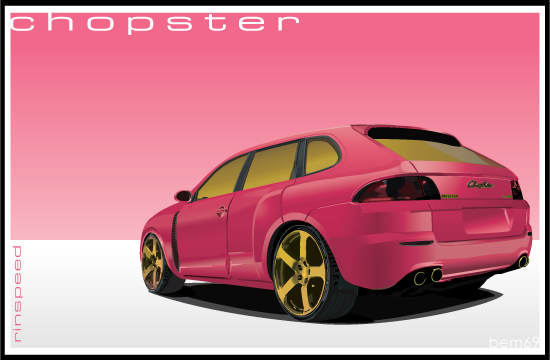 This post has been edited by bem69: Feb 27 2006, 09:31 PM This post has been edited by bem69: Feb 27 2006, 09:31 PM |
|
|
|
|
|
Hackezkk
|
Feb 27 2006, 10:48 PM
|
|
|
hahah
prob solve
juz untick at preview
n can see outline onli
gud gud
|
|
|
|
|
|
Syfq
|
Feb 28 2006, 12:19 AM
|
|
|
bem69 nice vectoring here mine .in. PAINT. wanna vector soon....   |
|
|
|
|
|
bem69
|
Feb 28 2006, 12:24 AM
|
|
|
Nav, I like that chick in the tudung. Good stuff.
|
|
|
|
|
|
hariz_otaku87
|
Mar 1 2006, 01:49 PM
|
New Member

|
WIP  |
|
|
|
|
|
Syfq
|
Mar 1 2006, 02:50 PM
|
|
|
|
|
|
|
|



 Quote
Quote


 0.0279sec
 0.96
0.96
 6 queries
 GZIP Disabled