Outline ·
[ Standard ] ·
Linear+
Nokia X6 V3 ~ happy phone with happy price, New Firmware v30.0.003 Released
|
ckuanglim
|
 Nov 15 2010, 03:28 PM Nov 15 2010, 03:28 PM
|

|
QUOTE(ping0613 @ Nov 15 2010, 03:17 PM) why ur case so weird..  i a not sure with the Y-browser. Anyway, do u have X-plore? use X-plore to check the resource folder. If still dont have, then create a new foler named" resource" in mass memory Does the 'Resource' folder in your phone contain any files? |
|
|
|
|
|
ne0cz
|
Nov 15 2010, 03:31 PM
|
|
|
QUOTE(ckuanglim @ Nov 15 2010, 03:28 PM) Does the 'Resource' folder in your phone contain any files? many... try open with PC can? Use Mass Storage mode. Then Explore the drive. At the top of the window, select Tools>Folder Options>select the View tab>Hidden files and folders>select Show hidden files and folders |
|
|
|
|
|
TSping0613
|
Nov 15 2010, 03:33 PM
|
|
|
QUOTE(ckuanglim @ Nov 15 2010, 03:28 PM) Does the 'Resource' folder in your phone contain any files? yes. contain of those apps i installed before. If u never installed any 3rd party software, then it is possible for u to din have "resource" folder. |
|
|
|
|
|
TSping0613
|
Nov 15 2010, 03:34 PM
|
|
|
QUOTE(ne0cz @ Nov 15 2010, 03:31 PM) many... try open with PC can? Use Mass Storage mode. Then Explore the drive. At the top of the window, select Tools>Folder Options>select the View tab>Hidden files and folders>select Show hidden files and folders he tested, but still cant. |
|
|
|
|
|
ckuanglim
|
Nov 15 2010, 03:35 PM
|
|
|
QUOTE(ne0cz @ Nov 15 2010, 03:31 PM) many... try open with PC can? Use Mass Storage mode. Then Explore the drive. At the top of the window, select Tools>Folder Options>select the View tab>Hidden files and folders>select Show hidden files and folders Yes, I open it in PC (connect with Mass Storage mode). And I select Show hidden files and folders also. But I don't see the 'Resource' folder. |
|
|
|
|
|
sirlordwanz
|
Nov 15 2010, 03:36 PM
|
|
|
QUOTE(ne0cz @ Nov 15 2010, 03:26 PM) Hope you have fun configuring everything  When done and happy, post some screenshots for all to see ya  but i think one more problem, (keep posting problem ) hope you dont mind. the problem is, i create shortcut, but dunno how to remove. take a look at my screenshot, i want to remove set connection. but cannot  Attached thumbnail(s) Attached thumbnail(s)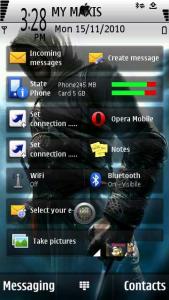
|
|
|
|
|
|
ne0cz
|
Nov 15 2010, 03:36 PM
|
|
|
QUOTE(ping0613 @ Nov 15 2010, 03:34 PM) he tested, but still cant. This is a mystery for Mr. ne0cz to solve together with his boss, Tun ping0613! 
Added on November 15, 2010, 3:37 pmQUOTE(sirlordwanz @ Nov 15 2010, 03:36 PM) but i think one more problem, (keep posting problem ) hope you dont mind. the problem is, i create shortcut, but dunno how to remove. take a look at my screenshot, i want to remove set connection. but cannot Press the screen long long, until the screen darkens and got X in circles..press the X to delete those you don't want... I like your problems...allow me add post count...  This post has been edited by ne0cz: Nov 15 2010, 03:37 PM This post has been edited by ne0cz: Nov 15 2010, 03:37 PM |
|
|
|
|
|
TSping0613
|
Nov 15 2010, 03:39 PM
|
|
|
QUOTE(ckuanglim @ Nov 15 2010, 03:35 PM) Yes, I open it in PC (connect with Mass Storage mode). And I select Show hidden files and folders also. But I don't see the 'Resource' folder. can u list out what apps had u installed in your X6? |
|
|
|
|
|
ckuanglim
|
Nov 15 2010, 03:41 PM
|
|
|
QUOTE(ne0cz @ Nov 15 2010, 03:36 PM) This is a mystery for Mr. ne0cz to solve together with his boss, Tun ping0613! I put a new 'Resource' folder containing 'Fonts' folder into my I:\ (the phone directory). Then restart the phone. But I still can't see the Chinese character in sms in my phone. May I know what folder you have in your mass storage directory? |
|
|
|
|
|
ne0cz
|
Nov 15 2010, 03:41 PM
|
|
|
QUOTE(ping0613 @ Nov 15 2010, 03:39 PM) can u list out what apps had u installed in your X6? I am loading my phone full of games! Saw a Satio/Vivaz user having so much fun at a "hoi mun chi" playing with his phone I got jealous! Now I shall load my X6 with games!  
Added on November 15, 2010, 3:44 pmQUOTE(ckuanglim @ Nov 15 2010, 03:41 PM) I put a new 'Resource' folder containing 'Fonts' folder into my I:\ (the phone directory). Then restart the phone. But I still can't see the Chinese character in sms in my phone. May I know what folder you have in your mass storage directory? Do you mean E? This post has been edited by ne0cz: Nov 15 2010, 03:44 PM |
|
|
|
|
|
ckuanglim
|
Nov 15 2010, 03:46 PM
|
|
|
QUOTE(ping0613 @ Nov 15 2010, 03:39 PM) can u list out what apps had u installed in your X6? I only install the Ovi map and the voice navigation. I actually has another problem. In my phone, I set the messaging to use Mass Storage. I move some sms to other folder (from 'Inbox' to 'My folders'). And I connect my phone with PC. But I didn't saw any folder containing sms. |
|
|
|
|
|
TSping0613
|
Nov 15 2010, 03:47 PM
|
|
|
QUOTE(ckuanglim @ Nov 15 2010, 03:41 PM) I put a new 'Resource' folder containing 'Fonts' folder into my I:\ (the phone directory). Then restart the phone. But I still can't see the Chinese character in sms in my phone. May I know what folder you have in your mass storage directory?there are alot.. |
|
|
|
|
|
ckuanglim
|
Nov 15 2010, 03:48 PM
|
|
|
QUOTE(ne0cz @ Nov 15 2010, 03:41 PM) Not E, is I in my PC. But I don't think this is important. The letter can change by Windows. What I mean is the 'Mass Storage' drive. |
|
|
|
|
|
TSping0613
|
Nov 15 2010, 03:50 PM
|
|
|
QUOTE(ckuanglim @ Nov 15 2010, 03:46 PM) I only install the Ovi map and the voice navigation. I actually has another problem. In my phone, I set the messaging to use Mass Storage. I move some sms to other folder (from 'Inbox' to 'My folders'). And I connect my phone with PC. But I didn't saw any folder containing sms. oic...no wonder u din have resource folder la... bro, download Opera Mobile ad install it on mass memory, i am sure got resource folder come out. for the message, u cant view it at normal directory. it located inside "private" folder.. now i no time to show the way, later i tell. now gtg. bb |
|
|
|
|
|
ckuanglim
|
Nov 15 2010, 03:52 PM
|
|
|
QUOTE(ping0613 @ Nov 15 2010, 03:47 PM) there are alot.. This is the folder I have in my 'Mass Storage' when I view it in PC: cities data Games Images Installs Music My Videos Nokia Others Private Sounds sys system Videos Are there any different with your phone?
Added on November 15, 2010, 3:54 pmQUOTE(ping0613 @ Nov 15 2010, 03:50 PM) oic...no wonder u din have resource folder la... bro, download Opera Mobile ad install it on mass memory, i am sure got resource folder come out. for the message, u cant view it at normal directory. it located inside "private" folder.. now i no time to show the way, later i tell. now gtg. bb OK, I will download Opera Mobile. Sorry to troubling you. Thank you very very much. This post has been edited by ckuanglim: Nov 15 2010, 03:54 PM |
|
|
|
|
|
ne0cz
|
Nov 15 2010, 03:56 PM
|
|
|
QUOTE(ckuanglim @ Nov 15 2010, 03:52 PM) OK, I will download Opera Mobile. Sorry to troubling you. Thank you very very much. I will be here to assist you after you have a resource folder |
|
|
|
|
|
ckuanglim
|
Nov 15 2010, 03:57 PM
|
|
|
QUOTE(ne0cz @ Nov 15 2010, 03:56 PM) I will be here to assist you after you have a resource folder OK, thank you very very much. |
|
|
|
|
|
sirlordwanz
|
Nov 15 2010, 04:02 PM
|
|
|
@ne0. mission succeed. can move2 the icon summore. thanks!!
|
|
|
|
|
|
ne0cz
|
Nov 15 2010, 04:06 PM
|
|
|
QUOTE(sirlordwanz @ Nov 15 2010, 04:02 PM) @ne0. mission succeed. can move2 the icon summore. thanks!! Yea...thanks for trying out my recommendations  |
|
|
|
|
|
ckuanglim
|
Nov 15 2010, 04:33 PM
|
|
|
I already install Opera Mobile 10. Now, I saw the 'Resource' folder (which contain 'apps' folder and 'OperaMobile' folder) in my 'Mass Storage'.
I put the 'font' folder into 'Resource' folder. Then restart. But, I still can't see the Chinese character in the sms in my phone.
|
|
|
|
|



 Quote
Quote


 0.0198sec
 0.69
0.69
 6 queries
 GZIP Disabled