Outline ·
[ Standard ] ·
Linear+
[Help!] Ubuntu Problems, everything related to ubuntu goes here
|
ayob99
|
 Jul 28 2008, 03:57 PM Jul 28 2008, 03:57 PM
|

|
QUOTE(bluswhitehat @ Jul 28 2008, 02:01 PM) lol... on windows i know how to make partitions la... but on linux lol im lost... i just have one partition 320gigs lol You can use gparted (Gnome Partition Editor). |
|
|
|
|
|
ayob99
|
Aug 4 2008, 10:12 AM
|
|
|
QUOTE(bluswhitehat @ Aug 2 2008, 03:35 PM) ohh... anyways i think its safest for me to just run without any drivers installed la.. pc is fine without any graphics drivers.. p.s. mint rox.. p.s.s. wanna start a MINT thread? Yeah, good idea. Count me in..
Added on August 4, 2008, 10:18 amQUOTE(bluswhitehat @ Aug 2 2008, 01:27 PM) hey guys. im sure some of you are aware of my driver problems last time..... anyways i just installed mint this morning and used envy to install the driver for my NVidia 8600GT .. but.. still same problem la.. with the pixelated screen and little colourful boxes here and there lol.. dunno whats the problem la.. i took my graphics card to the shop they guy said the card is working fine... My rig used the same gc card. I had many hair tearing moments trying to get it working. Use Envy to uninstall whatever previous drivers and then reinstall. It worked for me. Now I could set the display to the Syncmaster 2232BW to its native resolution: a glorious 1680 x 1050! This post has been edited by ayob99: Aug 4 2008, 10:18 AM |
|
|
|
|
|
ayob99
|
Sep 25 2008, 08:30 PM
|
|
|
2 very helpful websites for Linux newbies (including me):
linuxcommand.org <for learning CLI (command line input)
linuxquestions.org <forum, tutorials, articles about Linux
|
|
|
|
|
|
ayob99
|
Oct 7 2008, 09:36 PM
|
|
|
You can try it first but if it still crashed like that you might want to reconsider replacing your RAM. If you can borrow a similar type RAM and swap it with yours you might be able to conclude the RAM is giving you that problem.
|
|
|
|
|
|
ayob99
|
Dec 31 2008, 12:09 PM
|
|
|
QUOTE(tan_pang @ Dec 26 2008, 10:25 PM) Hi, I have a problem on my Kubuntu... I don't know why my Desktop didn't have icon and I can't seen to add icon/files on Desktop... Have tried explore the System Settings, can't find any settings that seen like related to this... But I still can add widget on it... Is there anyway to make the Desktop show the icon? Right click your desktop and click 'Create Launcher' or click your menu and right click the item you want to be on your desktop and choose 'Add This Launcher To Desktop' |
|
|
|
|
|
ayob99
|
Jan 3 2009, 01:21 PM
|
|
|
QUOTE(tan_pang @ Jan 3 2009, 02:25 AM) Quite some time didn't come here, and forgot to check this post... By the way, is the screenshot showing KDE?? Why it looks like gnome?? And how you do that?? It looked like Gnome because it is Gnome. I used the Mac4Lin Emerald Theme and Mac4Lin Icon Theme to make it look like that. |
|
|
|
|
|
ayob99
|
Jan 4 2009, 01:07 AM
|
|
|
I find KDE a little 'buggy' and a resource hog. Gnome looks plain but it's very stable and I find customizing it easier than KDE.
|
|
|
|
|
|
ayob99
|
May 7 2009, 11:03 PM
|
|
|
QUOTE(DunkyKung @ May 7 2009, 07:20 PM) how to change font in lyn?i found it hard to read..solve my prob which is installing ati driver using this guide http://wiki.cchtml.com/index.php/Ubuntu_Ja...rivers_manuallyone more thing,why when i reboot my pc,why the wallpaper change to default? Install 'Installer for Microsoft TrueType core fonts', launch Synaptic and type 'ttf-mscorefonts-installer' in your search box It could be that you stored the wallpaper file inside a drive that is not mounted upon booting. If that's the case move it to your 'Home' folder. This post has been edited by ayob99: May 7 2009, 11:10 PM |
|
|
|
|
|
ayob99
|
May 8 2009, 03:50 AM
|
|
|
QUOTE(DunkyKung @ May 8 2009, 01:15 AM) thx! now i face other prob,which is play full screen video while compiz is enabled..wanna ask, what is the best video player for ubuntu? i ike tis os, but many driver issue la... Best video player? My choice is Totem but I like SMPlayer too because it's capable of playing .iso video files on-the-fly (no extraction needed). Many drivers issues? All my hardware devices worked on my Ubuntu desktop. Which hardware doesn't work for you? |
|
|
|
|
|
ayob99
|
May 9 2009, 11:39 AM
|
|
|
QUOTE(UbuntuClient @ May 8 2009, 03:46 PM) I have problem with my jaunty. When i plug in my ext hdd (1TB) it cannot detect. My jaunty is 64bit version. So, keep wondering, if true linux can read/write large capacity hdd. Anyone knows? Launch your terminal and type this command: sudo modprobe -i usb_storage |
|
|
|
|
|
ayob99
|
May 10 2009, 10:29 AM
|
|
|
QUOTE(zx7177 @ May 9 2009, 11:30 AM) just installed jaunty on my acer laptop with the realtek hd audio chipset. somehow or rather, whenever i play video's, it isnt very clear. theres like a very obvious distortion in the audio stream. anyone knows whats the problem ? pardon my nuubness, just got it installed yesterday  What application are you using for playing the video? Try to change the audio device in the application's 'Preferences' to default or ALSA. The screenshot below is an MPlayer Preferences: Attached thumbnail(s)
|
|
|
|
|
|
ayob99
|
May 10 2009, 10:53 AM
|
|
|
QUOTE(slier81 @ May 10 2009, 05:24 AM) i want to ask...y everytime when i logon to my ubuntu machine i have to perform sudo pppoeconf before i can sudo pon dsl-provider? if i just sudo pon dsl-provider without sudo pppoeconf first i will not have an internet connection..this quite anoyying Are you using a wired connection? Use Auto eth0: Attached thumbnail(s)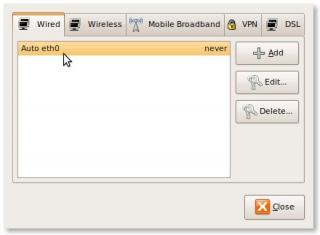
|
|
|
|
|
|
ayob99
|
May 10 2009, 05:14 PM
|
|
|
QUOTE(LEVIATHAN @ May 10 2009, 04:38 PM) How to login pptp VPN from Ubuntu? Use pptp-linux Client for the proprietary Microsoft Point-to-Point Tunneling Protocol, PPTP. Allows connection to a PPTP based VPN as used by employers and some cable and ADSL service providers. |
|
|
|
|
|
ayob99
|
May 10 2009, 07:25 PM
|
|
|
QUOTE(LEVIATHAN @ May 10 2009, 06:36 PM) I am a MoreVPN user, forum.lowyat.net/topic/1020960 Jaunty failed to connect to the server. I have installed network-manager-pptp, and pptp-linux. The network icon showed some spinning yellow comet and a tiny lock, however it failed to connect and showed no error dialog. Any idea where I did wrong? Visit this diagnostic page and see whether your problem is one among the list: http://pptpclient.sourceforge.net/howto-diagnosis.phtml |
|
|
|
|





 Quote
Quote
 0.0387sec
 0.95
0.95
 7 queries
 GZIP Disabled